
Beschrijving
WXP Opening Times shows your opening times on any page with a shortcode, together with an Open/Closed badge that stays correct while the visitor is on the page.
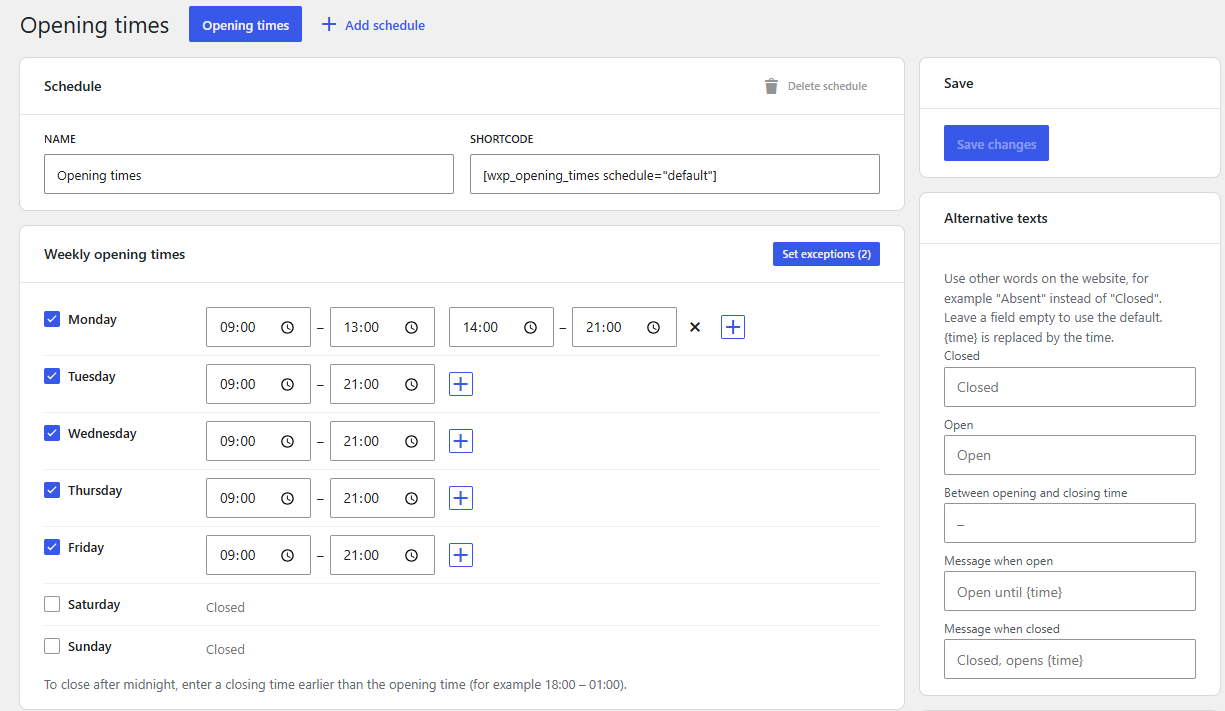
- Set the weekly opening times by ticking the days. Add a second (or third) set of times for a lunch break: 8:00–12:00 and 14:00–18:00. A closing time earlier than the opening time means “after midnight”.
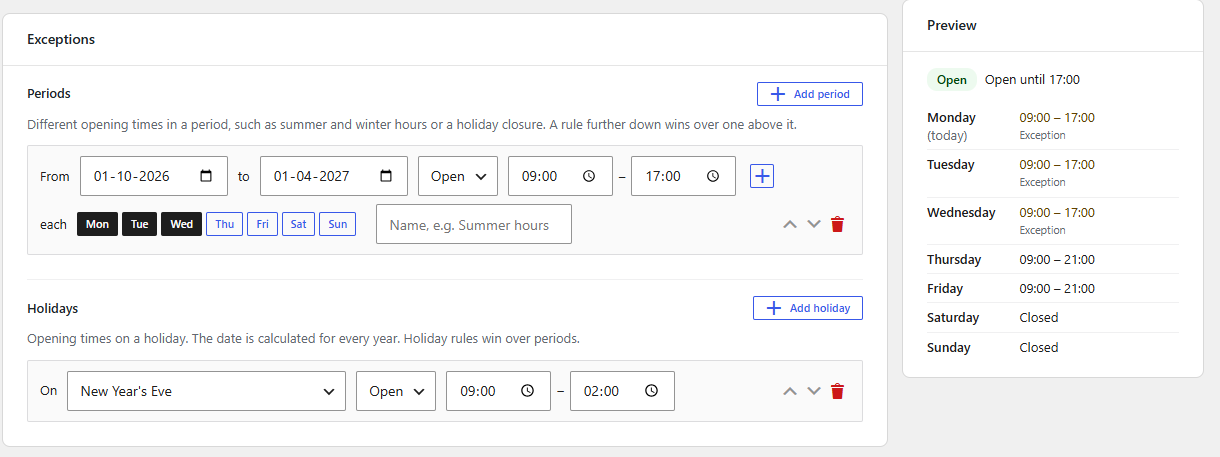
- Exceptions: different times in a period (summer and winter hours, a holiday closure, only on certain weekdays), and rules for holidays. Holiday dates are calculated for every year (Easter and everything that depends on it included).
- Several named schedules, for example “Restaurant” and “Kitchen”. Each can use its own words, such as “Absent” instead of “Closed” for a doctor, or “to” instead of a dash.
- Visitors can browse to the next weeks.
- Templates are written in Twig and can be overridden in your theme.
- Works on its own. It can be used next to WXP Restaurant Menu, but does not need it.
- Ready for translation: help translate it on translate.wordpress.org.
Shortcode
[wxp_opening_times]
Attributes:
schedule– id of the schedule, shown in the admin (default: the first schedule).template–default(week table) orcompact(one line), or a template from your theme.show_status–yesorno: the Open/Closed badge (default yes).show_title–yesorno: the schedule name as a heading (default no);heading_levelsets the level (2-6, default 3).show_dates–yesorno: the date next to each weekday (default no).-
week_nav–yesorno: previous/next week buttons (default no);weeks_aheadsets how far visitors can look ahead (0-26, default 4). -
text_closed,text_open,text_separator,text_open_until,text_closed_opens– other words for this block only, for exampletext_closed="Absent". They win over the texts set for the schedule in the admin. Use{time}in the last two for the time.
Elementor
With Elementor active, the “Opening times” widget (panel “WXP Plugins”) shows the same output as the shortcode. It has the same options, optional alternative texts for that widget, and style controls for the badge colours, the typography, the lines, the highlight of today and the week buttons.
Block editor
The “Opening times” block (category “WXP Plugins”) has the same options as the shortcode in the sidebar, including the alternative texts, and shows a live preview in the editor. Like the shortcode and the Elementor widget it is rendered on the server, so the status is always current.
Structured data (JSON-LD)
Voeg schema="yes" toe aan de shortcode (of schakel ‘Gestructureerde gegevens voor zoekmachines’ in het blok of de Elementor-widget in). De pagina bevat dan ook de openingstijden als schema.org JSON-LD (openingHoursSpecification), zodat zoekmachines deze kunnen weergeven. Zowel de wekelijkse openingstijden als de uitzonderingen voor de komende 365 dagen worden opgenomen. Voor een gesloten dag krijgen opens en closes beide de waarde “00:00”. De gegevens worden per openingstijdenschema slechts één keer per pagina toegevoegd en niet in de voorbeelden in de editor. Het bedrijf wordt aangeduid als LocalBusiness, met de sitenaam en het adres van de homepage. Met de filter wxp_opening_times_schema kun je het type wijzigen of gegevens toevoegen (zoals adres en telefoonnummer), bijvoorbeeld om het bedrijf als Restaurant aan te duiden.
If an SEO plugin already prints the data of your business, use wxp_opening_times_get_schema() to get the same array, and add it there.
For developers
Template override: copy a file from the plugin’s templates folder to wxp-opening-times/ in your (child) theme. The markup contract is described at the top of _base.html.twig.
Helper functions (call them after the init action):
wxp_opening_times_is_open( $schedule = '', $at = null )returns true when open.$atis an optional DateTimeImmutable.wxp_opening_times_get_holidays( $date )returns the holidays on a date (Y-m-d) as a list ofkey,labelandcalendar.wxp_opening_times_get_schedules()returnsconfigured(whether anything was saved yet) and theschedules(idandname).wxp_opening_times_get_status( $schedule = '', $at = null )retourneertopen,closes_at,opens_at,next_change(Unix-tijdstempels) enschedule, of null als het openingstijden schema onbekend is.
Filters: wxp_opening_times_status, wxp_opening_times_template_context, wxp_opening_times_template_paths, wxp_opening_times_twig_cache, wxp_opening_times_schema, wxp_opening_times_schema_days, wxp_opening_times_load_css (return false to load your own CSS) and wxp_opening_times_holidays (add holiday providers, for example for other calendars).
CSS custom properties on .wxp-opening-times (--wxp-ot-open-bg, --wxp-ot-closed-bg and more) change the colours.
Source code and third-party libraries
The admin app and the block are built with @wordpress/scripts. The readable sources are in the plugin, in assets/admin/src and assets/block/src; the build commands are in package.json (npm install, then npm run build).
The plugin bundles Twig (BSD 3-Clause) and a few Symfony polyfills (MIT) in vendor-prefixed, with their namespaces prefixed so they cannot clash with other plugins. They are installed with Composer (composer install).
Schermafbeeldingen
Blokken
Deze plugin heeft 1 blok.
- Openingstijden Toont de openingstijden van een rooster en of het nu open is.
Installatie
- Upload the plugin to
/wp-content/plugins/and activate it. - Open “Opening times” in the admin menu and set your times.
- Add
[wxp_opening_times]to a page.
The time zone, the week start day and the time format are taken from Settings, General.
FAQ
-
Waarom gebruikt ‘Nu geopend’ de tijdzone van de site?
-
Openingstijden zijn gekoppeld aan een locatie, niet aan de bezoeker. Stel de juiste tijdzone in via Instellingen, Algemeen.
-
Werkt het met paginacaching?
-
Ja. De status wordt in de browser bijgewerkt als de pagina langer dan vijf minuten in de cache heeft gestaan en op het moment dat de status verandert.
-
Welke feestdagen zijn inbegrepen?
-
Secular and Christian holidays, with the Christian ones calculated from Easter. Islamic and Jewish holidays come with the add-on WXP Opening Times: Jewish and Islamic holidays.
Beoordelingen
Er zijn geen beoordelingen voor deze plugin.
Bijdragers & ontwikkelaars
“WXP Opening Times” is open source software. De volgende personen hebben bijgedragen aan deze plugin.
Bijdragers
“WXP Opening Times” is vertaald in 1 locale. Dank voor de vertalers voor hun bijdragen.
Vertaal “WXP Opening Times” in je eigen taal.
Interesse in ontwikkeling?
Bekijk de code, haal de SVN repository op, of abonneer je op het ontwikkellog via RSS.
Changelog
1.0.0
- First stable release. No functional changes since 0.12.0.
- The source of the built JavaScript is now included in the plugin.
0.12.0
- New helper functions
wxp_opening_times_get_holidays( $date )(the holidays on a date) andwxp_opening_times_get_schedules(), used by WXP Local Events to warn about events on holidays and closed days.
0.11.0
- A holiday can now have more than one date in a year (needed for the Islamic calendar), for add-ons.
- A holiday rule for a holiday that is not available (for example when an add-on is deactivated) is kept, shown as “not available” in the admin, and does nothing until the add-on is back.
0.10.0
- Opening times as schema.org JSON-LD (
schema="yes", block toggle, Elementor switch), with the filterswxp_opening_times_schemaandwxp_opening_times_schema_daysand the functionwxp_opening_times_get_schema().
0.9.0
- Block for the block editor, with a live preview and the same options as the shortcode.
- Elementor widgets of all WXP plugins now share one panel, “WXP Plugins”.
- The compact template no longer repeats the status in a second line.
0.8.0
- Elementor widget with content, text and style controls.
- Alternative texts per block through the
text_*shortcode attributes. - The plugin shows an admin notice instead of a fatal error when it cannot start; the bundled Twig no longer conflicts with other plugins that bundle it.
0.7.0
- Alternative texts per schedule: the words Open and Closed, the separator between opening and closing time, and the two status sentences.
- A rule that is switched from Closed to Open gets a first set of opening times.
0.6.0
- Dutch, German and French translations, helper functions for themes, readme.
0.5.0
- Week navigation for visitors and a status that updates by itself.
0.4.0
- The
[wxp_opening_times]shortcode with Twig templates.
0.3.0
- The admin screen.
0.2.0
- Storage and REST routes.
0.1.0
- Opening times logic and holiday calculation.