

Beschrijving
Deze plugin integreert met de WPVulnerability API en biedt realtime kwetsbaarheden analyses voor je WordPress core, plugins, thema’s, PHP version, Apache HTTPD, nginx, MariaDB, MySQL, ImageMagick, curl, memcached, Redis en SQLite.
Het levert gedetailleerde rapporten rechtstreeks in je WordPress dashboard, zodat je op de hoogte blijft van potentiële beveiligingsrisico’s. Configureer de plugin om periodiek meldingen te sturen over de beveiligingsstatus van je site, zodat je op de hoogte blijft zonder overweldigd te worden. De plugin is ontworpen met het oog op gebruiksgemak en ondersteunt proactieve beveiligingsmaatregelen zonder persoonsgegevens op te slaan of op te halen van je site.
Betrouwbaarheid gegevens
De informatie in de informatiedatabase is afkomstig van verschillende bronnen die door derden zijn beoordeeld. Er is geen enkele aansprakelijkheid voor de informatie. Handel op eigen risico.
De plugin gebruiken
WP-CLI
Je kunt de volgende WP-CLI commando’s gebruiken om kwetsbaarheden te beheren en te controleren:
- Core:
wp wpvulnerability core - Plugin’s:
wp wpvulnerability plugins - Thema’s:
WP wpkwetsbaarheidsthema's - PHP:
wp wpvulnerability php - Apache HTTPD:
wp wpvulnerability apache - nginx:
wp wpvulnerability nginx - MariaDB:
wp wpvulnerability mariadb - MySQL:
wp wpvulnerability mysql - ImageMagick:
wp wpvulnerability imagemagick - curl:
wp wpvulnerability curl - memcached:
wp wpvulnerability memcached - Redis:
wp wpvulnerability redis - SQLite:
wp wpvulnerability sqlite
To configure the plugin you can use:
- Hide component:
wp wpvulnerability config hide <component> [on|off] - Notification email:
wp wpvulnerability config email <emails>(comma separatted) - Notification period:
wp wpvulnerability config period <never|daily|weekly> - Log retention:
wp wpvulnerability config log-retention <0|1|7|14|28>(in days) - Cache duration:
wp wpvulnerability config cache <1|6|12|24>(in hours)
Alle commando’s ondersteunen de optie - format om het output format op te geven:
- format=table: toont de resultaten in een tabel format (standaard).- format=json: toont de resultaten in JSON format.
Hulp nodig?
wp wpvulnerability --help: toont helpinformatie voor de WPVulnerability opdrachten.wp wpvulnerability [command] --help: toont helpinformatie voor een WPVulnerability opdracht.
REST API
De WPVulnerability plugin biedt verschillende REST API endpoints om informatie over kwetsbaarheden op te halen voor verschillende onderdelen van je WordPress site.
- Core:
/wpvulnerability/v1/core - Plugin’s:
/wpvulnerability/v1/plugins - Thema’s:
/wpvulnerability/v1/themes - PHP:
/wpvulnerability/v1/php - Apache HTTPD:
/wpvulnerability/v1/apache - nginx:
/wpvulnerability/v1/nginx - MariaDB:
/wpvulnerability/v1/mariadb - MySQL:
/wpvulnerability/v1/mysql - ImageMagick:
/wpvulnerability/v1/imagemagick - curl:
/wpvulnerability/v1/curl - memcached:
/wpvulnerability/v1/memcached - Redis:
/wpvulnerability/v1/redis - SQLite:
/wpvulnerability/v1/sqlite
De WPVulnerability REST API gebruikt Applicatiewachtwoorden voor authenticatie. Je moet een geldig Applicatie Wachtwoord opnemen in de Authorisatie header van je aanvragen.
Voorbeeldaanvraag met verificatie
curl -X GET https://example.com/wp-json/wpvulnerability/v1/plugins -u username:application_password
Vervang gebruikersnaam door je WordPress username en application_password door je Applicatie wachtwoord.
Extra configuraties
“Van:” mail (sinds: 3.2.2)
Als je, om wat voor reden dan ook, wil dat de e-mails die door de plugin worden verzonden een andere Van hebben dan die van de sitebeheerder, dan kun je dit veranderen in WP-config.php door een constante toe te voegen:
define( 'WPVULNERABILITY_MAIL', 'sender@example.com' );
Als de constante actief is, is deze zichtbaar in het configuratiescherm.
Force hiding checks (since: 4.1.0)
If you want to always hide a specific component, you can define a constant in wp-config.php. When set to true, the option will be checked automatically in the settings screen and the related analysis will be skipped.
Example:
define( 'WPVULNERABILITY_HIDE_APACHE', true );
Available constants: WPVULNERABILITY_HIDE_CORE, WPVULNERABILITY_HIDE_PLUGINS, WPVULNERABILITY_HIDE_THEMES, WPVULNERABILITY_HIDE_PHP, WPVULNERABILITY_HIDE_APACHE, WPVULNERABILITY_HIDE_NGINX, WPVULNERABILITY_HIDE_MARIADB, WPVULNERABILITY_HIDE_MYSQL, WPVULNERABILITY_HIDE_IMAGEMAGICK, WPVULNERABILITY_HIDE_CURL, WPVULNERABILITY_HIDE_MEMCACHED, WPVULNERABILITY_HIDE_REDIS, WPVULNERABILITY_HIDE_SQLITE.
Cache duration (since: 4.1.0)
By default, data from the API is cached for 12 hours. To change this, define WPVULNERABILITY_CACHE_HOURS in wp-config.php with one of 1, 6, 12 or 24. This value overrides the setting screen and WP-CLI command.
define( 'WPVULNERABILITY_CACHE_HOURS', 24 );
Log rotation (since: 4.2.0)
WPVulnerability stores the most recent API responses so you can review recent calls from the new log tab. Define WPVULNERABILITY_LOG_RETENTION_DAYS in wp-config.php to control how many days of entries are preserved. Supported values are 0, 1, 7, 14 or 28; using 0 disables logging entirely.
define( 'WPVULNERABILITY_LOG_RETENTION_DAYS', 14 );
When the constant is present its value is enforced in the settings UI and through WP-CLI, ensuring consistent log rotation across environments.
Security configuration (since: 4.3.0)
WPVulnerability uses a hybrid detection approach for server software (ImageMagick, Redis, Memcached, SQLite): PHP extensions first (most secure), then shell commands as fallback (most accurate). You can control this behavior using security configuration constants in wp-config.php.
Global disable of shell commands:
define( 'WPVULNERABILITY_DISABLE_SHELL_EXEC', true );
Completely disables shell command usage. Falls back to PHP extensions only. Use for maximum security when accuracy loss is acceptable.
Security mode (standard/strict/disabled):
define( 'WPVULNERABILITY_SECURITY_MODE', 'strict' );
standard– Hybrid detection: PHP extensions first, shell commands fallback (default, best accuracy)strict– PHP extensions only, no shell commands (high security, lower accuracy)disabled– No software detection at all (maximum security)
Component whitelist:
define( 'WPVULNERABILITY_SHELL_EXEC_WHITELIST', 'imagemagick,redis' );
Allows shell commands only for specified components. Available components: imagemagick, redis, memcached, sqlite. Use for granular control.
Examples:
Maximum security (no shell commands):
define( 'WPVULNERABILITY_SECURITY_MODE', 'strict' );
Only allow ImageMagick shell detection:
define( 'WPVULNERABILITY_SHELL_EXEC_WHITELIST', 'imagemagick' );
Complete disable:
define( 'WPVULNERABILITY_DISABLE_SHELL_EXEC', true );
All shell commands are hardcoded and validated – no user input is involved. Commands are logged for security auditing.
Compabiliteit
- WordPress: 4.7 – 7.1
- PHP: 7.0 – 8.5
- WP-CLI: 2.3.0 – 2.12.0
Beveiliging
Deze plugin houdt zich aan de volgende veiligheidsmaatregelen en beoordelingsprotocollen voor elke versie:
- WordPress plugin handboek
- WordPress plugin beveiliging
- WordPress API’s beveiliging
- WordPress coderingsstandaarden
- plugin controleren (PCP)
Privacy
- Deze plugin of de WordPress Vulnerability Database API verzamelt geen informatie over je site, je identiteit, de plugins, thema’s of inhoud die de site heeft.
Kwetsbaarheden
- A security vulnerability was found and fixed in version 4.2.2.1. All previous versions (3.3.0 – 4.2.1) are affected. Please update to version 4.2.2.1 or later.
Found a security vulnerability? Please report it to us privately at ROBOTSTXT.
Bijdragers
Je kunt bijdragen aan deze plugin in de WPVulnerability repository.
Schermafbeeldingen

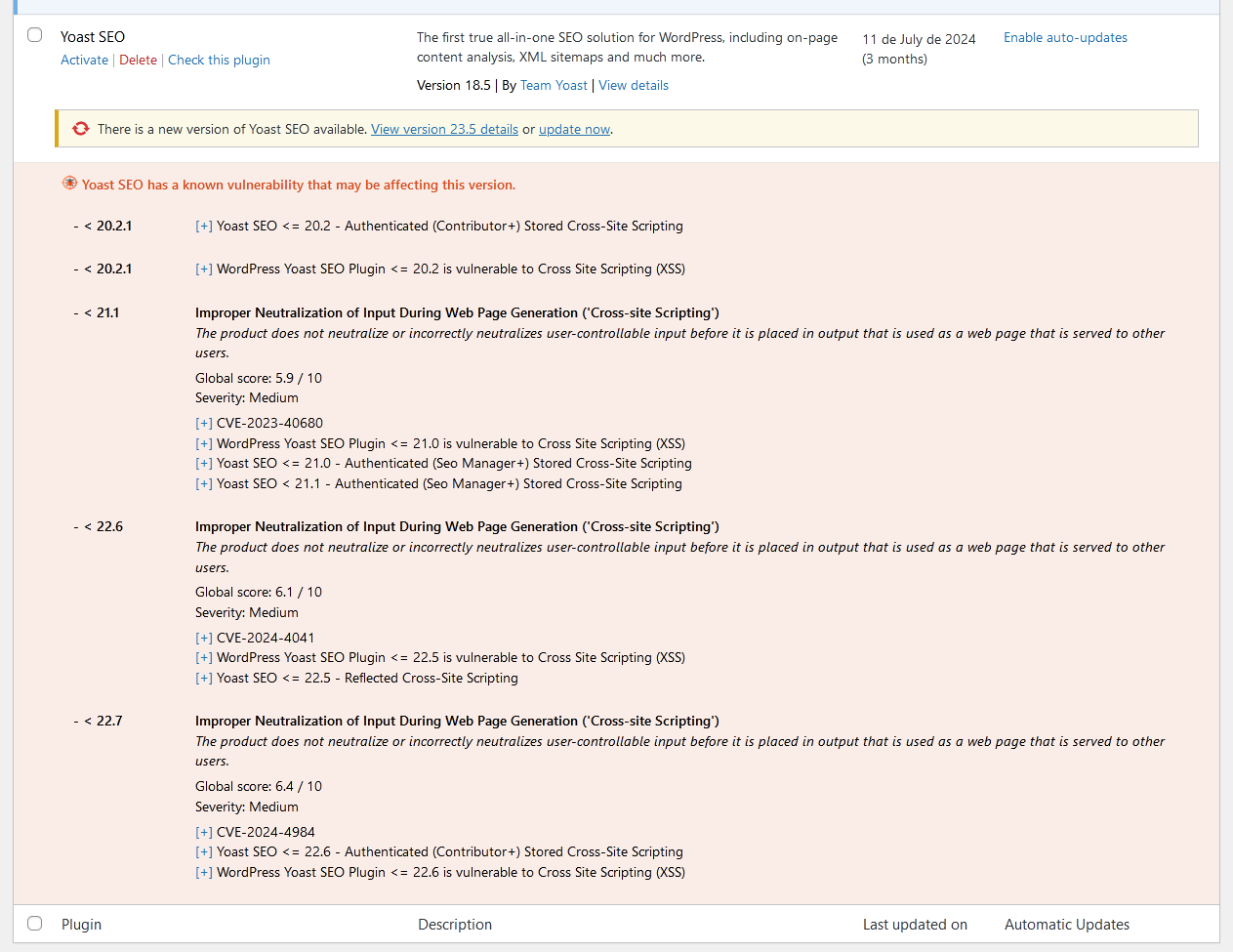

Installatie
Automatische download
Ga naar de sectie met plugins in je WordPress, zoek naar [wpvulnerability]; download en installeer de plugin.
Handmatige download
Pak de inhoud van de Zip uit en upload de inhoud naar de folder /WP-content/plugins/wpvulnerability/. Eenmaal geüpload zal het verschijnen in je plugin lijst.
FAQ
-
Waar komt de informatie over de kwetsbaarheid vandaan?
-
De oorsprong ligt in de WPVulnerability.com API. De kwetsbaarheden die in deze API worden weergegeven zijn afkomstig van verschillende bronnen, zoals CVE’s.
-
Worden gegevens van mijn site ergens naartoe gestuurd?
-
Nee, nooit. Je privacy is erg belangrijk voor ons. We commercialiseren niet met je gegevens.
-
Welke kwetsbaarheden zal ik vinden?
-
Kwetsbaarheden in WordPress core, plugin’s, thema’s, PHP, Apache HTTPD, nginx, MariaDB, MySQL, ImageMagick, curl, memcached, Redis en SQLite zijn gedocumenteerd.
-
Wat moet ik doen als mijn site een kwetsbaarheid heeft?
-
Allereerst gemoedsrust. Onderzoek wat de kwetsbaarheid is en controleer vooral of je de laatste versie van het aangetaste element hebt. We raden je actief aan om al je WordPress en de bijbehorende plugins up-to-date te houden. Neem contact op met je hostingprovider om niet-WordPress kwetsbaarheden te patchen (zoals webserver, databases en andere software).
Beoordelingen


Bijdragers & ontwikkelaars
“WPVulnerability” is open source software. De volgende personen hebben bijgedragen aan deze plugin.
Bijdragers


“WPVulnerability” is vertaald in 14 localen. Dank voor de vertalers voor hun bijdragen.
Vertaal “WPVulnerability” in je eigen taal.
Interesse in ontwikkeling?
Bekijk de code, haal de SVN repository op, of abonneer je op het ontwikkellog via RSS.
Changelog
[5.1.6] – 2026-08-22
Opgelost
- Saving the “Delete all plugin data on uninstall” preference no longer triggers a fatal error (
add_settings_error()was called before the WordPress admin API was loaded). - Notification channels can now be disabled entirely: unchecking every channel and saving previously kept the old channels active, because unchecked checkboxes are never submitted.
- “Reset Plugin” and “Delete all logs” now purge both log stores (API request logs and shell execution audit logs). Previously the shell audit store was never cleaned, and both deletions silently did nothing because the log post types were not registered yet when the actions ran.
- The Debug tab API connectivity tests now use the real API routes: WordPress core collapses pre-release versions (e.g. 7.1-alpha) to their stable milestone, and plugins/themes are tested against their actual slug routes instead of nonexistent plural ones (HTTP 404).
- Component icons now carry explicit width/height attributes and a meaningful alt text. The same icons are embedded in notification emails and Site Health, where the plugin CSS is not loaded and unsized SVGs rendered at their intrinsic 800×800 size.
Gewijzigd
languages/wpvulnerability.potregenerated with the new strings.
Compatibiliteit
- WordPress: 4.7 – 7.1
- PHP: 7.0 – 8.5
- WP-CLI: 2.3.0 – 2.12.0
Tests
- PHP Coding Standards: 3.13.6 (0 errors)
- WordPress Coding Standards: 3.4.1
- PHPStan: 2.2.9 (level 9, 0 errors)
- PHPUnit: 9.6.36 (54 tests)
[5.1.5] – 2026-08-22
Gewijzigd
- The contributor list now leads with the ROBOTSTXT organization account, followed by Javier Casares; the remaining contributors are unchanged.
- Regenerated
languages/wpvulnerability.potso its source references match the current code. The string set is unchanged (450 strings); all shipped translations were verified against it and remain fully up to date.
Compatibiliteit
- WordPress: 4.7 – 7.1
- PHP: 7.0 – 8.5
- WP-CLI: 2.3.0 – 2.12.0
Tests
- PHP Coding Standards: 3.13.6
- WordPress Coding Standards: 3.4.1
- PHPStan: 2.2.9 (level 9, 0 errors)
- PHPUnit: 9.6.36 (45 tests)
[5.1.4] – 2026-08-22
Highlights
- The Site Health vulnerability tests work again on every WordPress version: they were silently disabled everywhere by an availability gate that could never pass. Secrets are now masked in the admin forms, and compatibility was verified against real PHP interpreters from 5.6 to 8.5.
Opgelost
- The Site Health integration registered its tests behind
class_exists( 'WP_Site_Health' ), but core loads that class lazily, afterinit, where the plugin loads its modules — so the guard always evaluated to false and none of the 13 vulnerability tests ever appeared in Site Health. The filter is now registered unconditionally; below WordPress 5.2 it simply never fires. - “Clear all caches” in the debug tools now also deletes the
wpvulnerability-plugins-cache-datatimestamp option, so the plugins dataset is fully refreshed afterwards. - The notification email “From:” address is now sanitized with
sanitize_email()on all code paths. - The plugins list table “Last updated” column decoded the whole plugins dataset for every table row; it is now decoded once per request.
- Removed a duplicated
json_decode()call when reading the vulnerable-themes count. - The
wp_date()compatibility polyfill no longer fatals on WordPress 4.7–5.3: core callswp_maybe_decline_date()unconditionally, but that function only exists since 5.4; the call is now availability-guarded. - The core and software JSON getters return
'[]'instead of an empty string when encoding fails, matching the plugins and themes getters.
Beveiliging
- Webhook URLs (Slack, Teams, Discord) and the Telegram bot token are masked in the admin settings forms (single-site and network), showing only their last 4 characters — previously they were rendered in full into the page HTML. The inputs are plain text fields, so masked values never trigger browser URL validation. Saving a form with unchanged masked values keeps the stored secret; clearing a field still removes it.
- Removed the dead
register_uninstall_hook()registration:uninstall.phpsupersedes it and the registration added a stray autoloaded option row. - Single-site settings registrations now explicitly set
show_in_rest => false, matching the multisite configuration.
Gewijzigd
- Admin CSS/JS assets load only on the WPVulnerability settings pages, the dashboard and the plugins/themes list tables instead of on every wp-admin screen.
- The shell availability probe (
wpvulnerability_can_shell_exec()) result is cached per request instead of spawning a process on every call.
Compatibiliteit
- WordPress: 4.7 – 7.1
- PHP: 7.0 – 8.5
- WP-CLI: 2.3.0 – 2.12.0
- Verified against real PHP interpreters 5.6.40, 7.0.33, 7.1.33, 7.2.34, 7.3.33, 7.4.33, 8.0.30, 8.1.34, 8.2.33, 8.3.33, 8.4.24 and 8.5.9: every plugin file lints clean from 7.0 up and fails on 5.6, confirming the declared floor. PHPCompatibility gate 7.0-8.5 clean; wp-compat WordPress floor 4.7 clean.
Tests
- PHP Coding Standards: 3.13.6
- WordPress Coding Standards: 3.4.1
- PHPStan: 2.2.9 (level 9, 0 errors)
- PHPUnit: 9.6.36 (45 tests)
Previous versions
Als je de volledige changelog wil zien, ga dan naar het bestand changelog.txt.