Beschrijving
Een gratis chatbot-plugin voor WordPress die je eigen content omzet in een AI-ondersteuningsassistent die 24/7 klaarstaat. WebChatAgent beantwoordt vragen op basis van je website en documenten, verzamelt leads, plant afspraken en laat je team gesprekken overnemen via livechat.
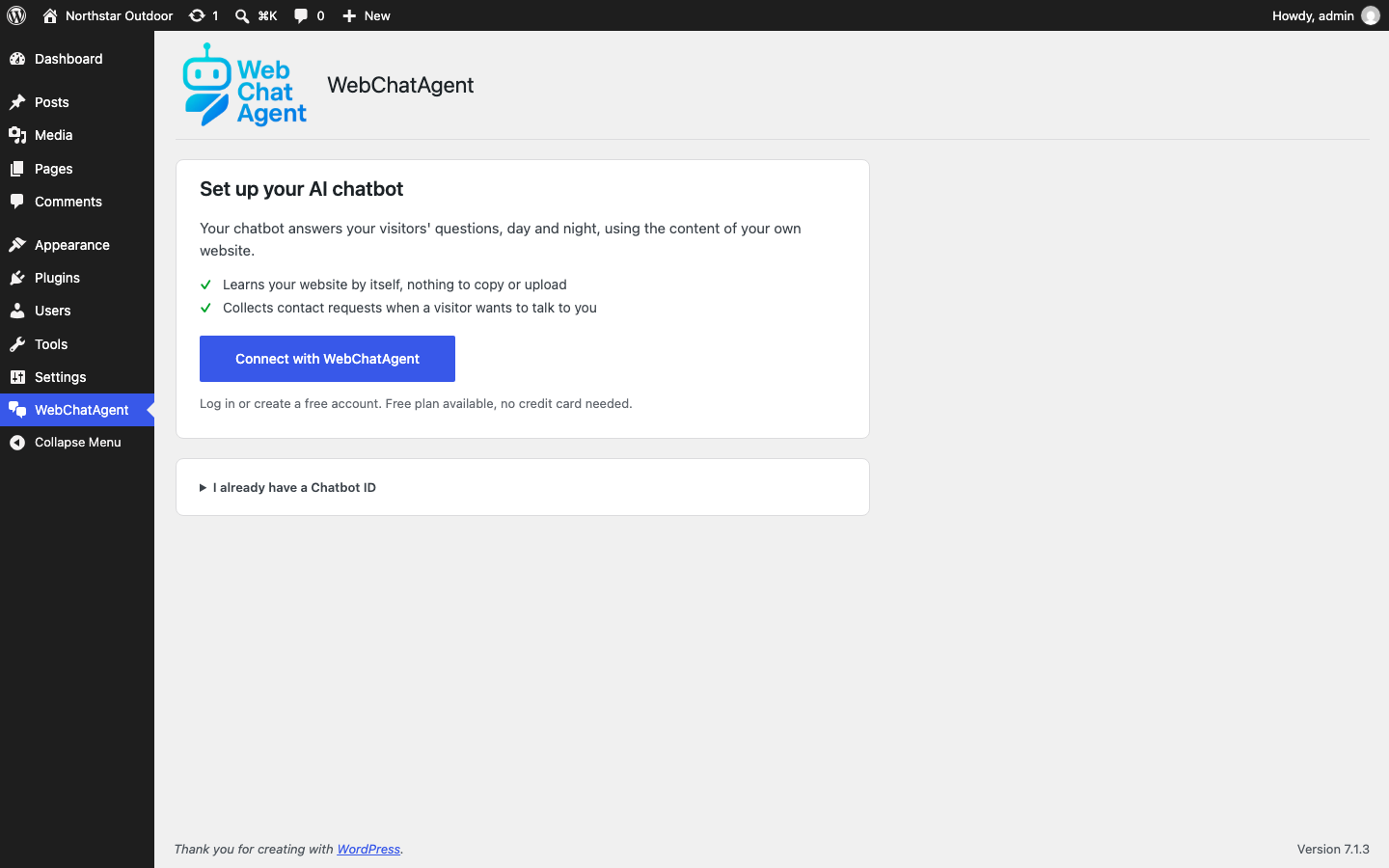
Installeer de plugin, klik op Koppelen met WebChatAgent, log in of maak een gratis account aan, en de chat staat live. De chatbot leest je website vanzelf, dus je hoeft niets te kopiëren en hebt geen code en geen API-sleutel voor een model nodig.
Meer dan een standaard chatballon: WebChatAgent combineert onderbouwde AI-antwoorden, overname door een mens en conversietools in één workflow die klaar is voor WordPress.
- Free to install and run – The plugin and the free plan cost nothing; paid plans add higher limits and advanced integrations
- Answers from your content – Train the AI on website pages, PDFs, Word files, spreadsheets, Notion or Confluence
- AI-chatbot + livechat met echte mensen – Automatiseer routinevragen en neem elk gesprek over als er een mens nodig is
- Lead capture and bookings – Collect contact details, qualify enquiries and book appointments inside the chat
- Gemaakt voor WordPress – Gebruik de zwevende widget, de shortcode of het ingebouwde Gutenberg blok
- Privacy-focused controls – Anonymized IP storage, configurable retention settings, a DPA and documented provider choices help support GDPR requirements
Een gratis WebChatAgent account is vereist. De AI, gesprekken en widgetinstellingen beheer je in het WebChatAgent dashboard; deze WordPress plugin koppelt je site, zet de chat aan of uit en biedt de mogelijkheden om de chat in te sluiten.
In drie stappen ingesteld
- Activeer de plugin. WordPress opent het WebChatAgent scherm.
- Klik op Koppelen met WebChatAgent en log in of maak een gratis account aan. Er wordt een nieuwe chatbot voor je site aangemaakt, die je pagina’s begint te lezen.
- Je komt terug in WordPress en de chat staat live. Pas antwoorden en ontwerp aan in het WebChatAgent-dashboard wanneer je maar wilt.
Speciaal gemaakt voor WordPress
- Zwevende widget zonder code – Voeg de chatbot aan je hele site toe zonder themabestanden te bewerken
- Ingebouwd Gutenberg blok – Plaats een inline chat direct in een pagina of bericht
- Shortcode-ondersteuning – Gebruik
[webchatagent_inline]in de Klassieke editor, paginabouwers en tekstwidgets - Chatbot-ID per insluiting – Vervang de standaardbot voor afzonderlijke pagina’s of campagnes
- Verbindingscontrole – Het WordPress scherm laat zien of de chat live staat en wat je moet oplossen als dat niet zo is
- Efficiënt laden – De bestanden van de inline widget laden alleen op pagina’s met het blok of de shortcode
AI support, sales and automation
- Contextbewuste antwoorden (RAG) op basis van je pagina’s en geüploade documenten
- Ondersteuning voor modellen van OpenAI ChatGPT, Google Gemini, xAI Grok en Mistral AI
- Livechat en overname door een mens met één gedeelde inbox voor gesprekken
- Actiebalk en formulierbouwer voor links, WhatsApp, Calendly en eigen leadformulieren
- Proactieve triggers op basis van tijd, scrolldiepte, exit intent, inactiviteit en ander bezoekersgedrag
- WooCommerce- en API-connectors voor bestelstatus, productinformatie en bedrijfsgegevens
- Meertalige gesprekken, spraakinvoer, bestandsupload en berichtstreaming
- Statistieken, leadbeheer, tickets, feedback en kennistests in het WebChatAgent-dashboard
Feature availability and usage limits depend on the selected WebChatAgent plan. See https://webchatagent.com/pricing for current details.
Voor bureaus en resellers
Managing chatbots for clients? WebChatAgent also offers a separate white-label platform with your own branding, domain, client management and reseller pricing. Learn more at https://webchatagent.com/enterprise-white-label.
Privacybeleid
WebChatAgent is an external service used to provide the chatbot, AI responses and live chat.
When the floating widget is enabled, the visitor’s browser requests widget files from https://webchatagent.com. This connection can transmit standard request information such as the IP address and user agent. The IP address is stored in anonymized form for abuse prevention and geographic customization.
Chat messages, session information and any details a visitor submits are sent to WebChatAgent when the visitor uses the chat. Retention periods and automatic cleanup can be configured in the WebChatAgent dashboard.
If a custom Google Font is selected, the widget may request font files through https://fonts.googleapis.com. Configure a system or locally hosted font if you do not want the widget to request Google Fonts.
Site owners should describe the service in their privacy notice and configure consent behaviour according to their requirements.
Neem bij vragen over privacy contact op via privacy@webchatagent.com.
Externe diensten
De plugin maakt verbinding met de volgende externe diensten:
https://webchatagent.com/connect/wordpress– Wordt in de browser geopend als een beheerder op Koppelen met WebChatAgent klikt. Deze pagina ontvangt de URL van de homepage van deze site, de beheer-URL om naar terug te keren, de titel en taal van de site, en een eenmalige code die WordPress controleert wanneer de browser met de chatbot-ID terugkomthttps://webchatagent.com/api/chatbots/{id}/public– Controleert op het pluginscherm of de gekoppelde chatbot bereikbaar is en is toegestaan voor deze sitehttps://webchatagent.com/widget/web-chat-agent.js– Toont de zwevende widget als die is ingeschakeldhttps://webchatagent.com/widget/chat-widget-inline.js– Toont chats die via de shortcode of het Gutenberg-blok zijn ingesloten, op de pagina’s waar ze worden gebruikthttps://fonts.googleapis.com– May load a selected custom Google Font
Algemene voorwaarden: https://webchatagent.com/terms
Privacybeleid: https://webchatagent.com/privacy-policy
Schermafbeeldingen


Blokken
Deze plugin heeft 1 blok.
- WebChatAgent Inline Chat Sluit de inline chat widget van WebChatAgent rechtstreeks in je content in.
Installatie
- Install WebChatAgent from the WordPress plugin directory and activate it.
- Klik in het scherm dat opent op Koppelen met WebChatAgent.
- Log in or create a free account, then confirm the website. You are sent back to WordPress and the chat is live.
Heb je al een chatbot? Kies die op de koppelpagina in plaats van een nieuwe aan te maken. Je kunt ook een chatbot-ID plakken onder Ik heb al een chatbot-ID.
To embed the chat inside a page, add the WebChatAgent Inline Chat block or use [webchatagent_inline]. You can override the global ID with [webchatagent_inline chatbot-id="..."].
FAQ
-
Heb ik een account of een eigen API-sleutel van OpenAI nodig?
-
You need a WebChatAgent account to create and manage the chatbot. You do not paste an OpenAI, Gemini or other model API key into WordPress. The connect button links your site to your account.
-
Is de plugin gratis?
-
The WordPress plugin is free and WebChatAgent offers a free plan. Paid plans provide higher usage limits, more team features and advanced integrations. Current plan details are available at https://webchatagent.com/pricing.
-
Hoe leert de chatbot van mijn WordPress-site?
-
When you connect a new chatbot, it starts reading your website right away. The first answers work after a few seconds, larger sites finish in the background. The crawler can also process JavaScript-rendered content. You can add PDFs, Word files, spreadsheets and other sources from the dashboard.
-
Kan een mens een AI-gesprek overnemen?
-
Ja. Je team kan de inbox met gesprekken openen, een chat in realtime overnemen en daarna de controle teruggeven aan de AI.
-
Yes. Use the native WebChatAgent Inline Chat Gutenberg block or the
[webchatagent_inline]shortcode. Inline embeds work independently of the switch that controls the floating widget. -
Werkt het met WooCommerce?
-
Yes. The API Connector can retrieve WooCommerce data such as product details and order status. Customers can be asked to verify their identity before personal order information is returned. Connector availability depends on the selected plan.
-
Kan ik de widget aanpassen?
-
Ja. Kleuren, lettertypen, avatar, welkomstbericht, promptknoppen, gedrag en positie stel je in het WebChatAgent dashboard in. Wijzigingen zie je meteen op je site.
-
Hoe helpt WebChatAgent bij de eisen van de AVG/GDPR?
-
WebChatAgent provides privacy-focused controls including anonymized IP storage, configurable retention settings, a DPA and documented provider choices. Whether a website is GDPR compliant depends on its complete configuration, consent flow, privacy notice and legal requirements. Verify the current retention and erasure process before making commitments to data subjects. See https://webchatagent.com/privacy-policy for details.
Beoordelingen


Bijdragers & ontwikkelaars
“AI-chatbot & livechat – WebChatAgent” is open source software. De volgende personen hebben bijgedragen aan deze plugin.
Bijdragers
“AI-chatbot & livechat – WebChatAgent” is vertaald in 3 localen. Dank voor de vertalers voor hun bijdragen.
Vertaal “AI-chatbot & livechat – WebChatAgent” in je eigen taal.
Interesse in ontwikkeling?
Bekijk de code, haal de SVN repository op, of abonneer je op het ontwikkellog via RSS.
Changelog
1.2.1
- New: Two weeks after the chat goes live, a short notice asks for a review on WordPress.org. “No, thanks” hides it for good, “Remind me later” brings it back in 30 days
- Gewijzigd: de plugin heet weer “AI-chatbot & livechat – WebChatAgent”
1.2.0
- Nieuw: koppelen met één knop. Log in of registreer je, de chatbot wordt voor je site aangemaakt, leest je pagina’s en de chat gaat live. Je hoeft geen chatbot-ID op te zoeken of te kopiëren
- Nieuw: het pluginscherm laat zien of de chat live staat en legt uit wat je moet oplossen als dat niet zo is
- New: After activation, WordPress opens the setup screen
- Verbeterd: één eenvoudig scherm in plaats van vijf tabbladen. Ontwerp en gedrag blijven in het WebChatAgent-dashboard
- Opgelost: het openen van de plugin-instellingen markeert de widget in het WebChatAgent dashboard niet meer als geïnstalleerd
1.1.7
- Compatibiliteit: getest tot en met WordPress 7.1. Geen functionele wijzigingen
1.1.6
- Fixed: The widget no longer requests a separate stylesheet that does not exist. Its styles ship inside the widget script and are applied in the shadow DOM, so the only effect of the request was a 404 in the browser console
1.1.5
- Toegevoegd: contextgegevens per sessie. Geef context over de bezoeker vanaf je site (bijv. klantnaam, contract- of dossiernummer) door aan de AI via het nieuwe filter
webchatagent_context_data; de AI gebruikt deze gegevens in antwoorden en API-aanroepen - Toegevoegd: attribuut
context-datavoor de shortcode[webchatagent_inline]
1.1.4
- Fixed: The WordPress admin preview and Chatbot ID validation now identify the WordPress site correctly when Allowed websites restrictions are enabled
- Verbeterd: app- en API-domeinen kunnen los van elkaar worden overschreven voor gecontroleerde staging- en ontwikkelomgevingen
1.1.3
- Toegevoegd: uitleg waar je de chatbot-ID vindt, via “Chatbotacties” in het dashboard of in de URL van de chatbot
- Opgelost: de bevestiging na het opslaan van instellingen verscheen nooit
1.1.2
- Toegevoegd: melding die uitlegt dat widgetinstellingen in het WebChatAgent dashboard worden beheerd en in WordPress alleen-lezen worden getoond
- Toegevoegd: directe links naar het dashboard vanuit het instellingenscherm zodra een chatbot-ID is opgeslagen
- Opgelost: beheermeldingen van andere plugins of thema’s overlappen de pluginheader niet meer
- Opgelost: welkomstberichten en tekstballonnen toonden ruwe HTML in plaats van opgemaakte tekst
- Verbeterd: alleen-lezen waarden zijn nu ook visueel als zodanig gemarkeerd
- Improved: Clearer privacy wording in the plugin directory listing
1.1.1
- Improved: Clearer setup guidance and transparent free/paid plan wording in the WordPress admin
- Verbeterd: documentatie over privacy en externe diensten
- Improved: WordPress.org description, screenshots and positioning
1.1.0
- Toegevoegd: shortcode
[webchatagent_inline]voor pagina’s, berichten, paginabouwers en tekstwidgets - Toegevoegd: ingebouwd Gutenberg blok WebChatAgent Inline Chat
- Toegevoegd: optionele chatbot-ID per insluiting
- Added: Inline Embed tab with a copy-ready shortcode
- Verbeterd: inline bestanden laden alleen op pagina’s die de insluiting gebruiken
- Compatibiliteit: de minimaal vereiste WordPress versie is nu 5.8
1.0.5
- Toegevoegd: meegeleverde Duitse, Spaanse, Franse, Italiaanse, Nederlandse en Russische vertalingen van de beheeromgeving
- Opgelost: laden van het tekstdomein van de plugin
- Improved: Translatable admin validation and media messages