

Beschrijving
TW Simple Slider is an easy-to-use WordPress plugin that allows you to create beautiful image sliders without any coding knowledge. Simply add your images, choose a slider style, and display it anywhere on your site using a shortcode.
Key Features
- Simple Interface – Just add images and select slider type
- Multiple Slider Styles – Basic, Fade, and Infinite Scroll
- Drag & Drop – Easily reorder images by dragging
- Responsive Design – Works perfectly on all devices
- Shortcode Support – Display sliders anywhere using [tw_slider id=”123″]
- Lightweight – All resources included locally
- No Coding Required – User-friendly admin interface
How to Use
Creating Your First Slider
- Go to Sliders Add New in WordPress admin
- Enter a title for your slider (e.g., “Homepage Slider”)
- Click Add Images button to upload/select images
- Drag and drop images to reorder them
- Select your preferred slider settings from the sidebar
- Click Publish
- Copy the shortcode displayed in the sidebar
- Paste the shortcode in any post, page, or widget
Displaying Sliders
Using Shortcode:
[tw_slider id=”123″] – Replace 123 with your slider ID
In Posts/Pages:
Simply paste the shortcode in the content editor
In Widgets:
Use the Text widget and paste the shortcode
License
This plugin is licensed under the GPL-2.0+ License. You can freely use, modify, and distribute it under the terms of this license. See the full license at: https://opensource.org/licenses/GPL-2.0
Schermafbeeldingen
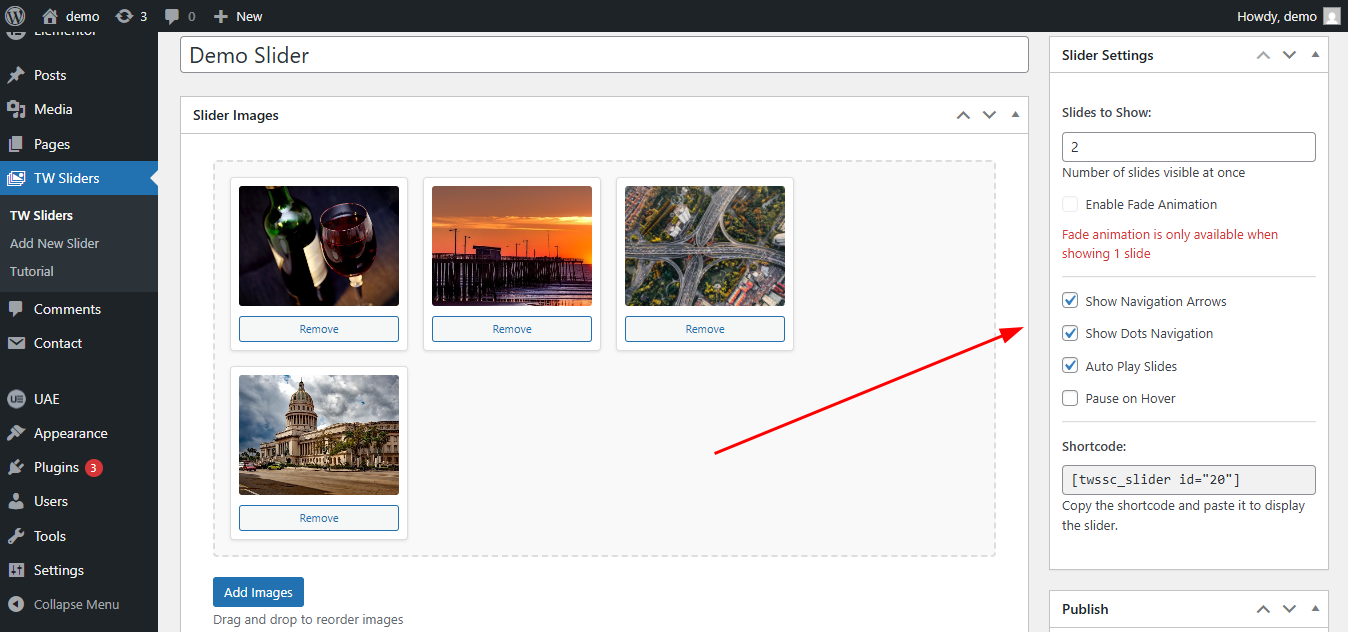
Screenshot 1: Slider Setting – Adding images and choosing between different slider options. 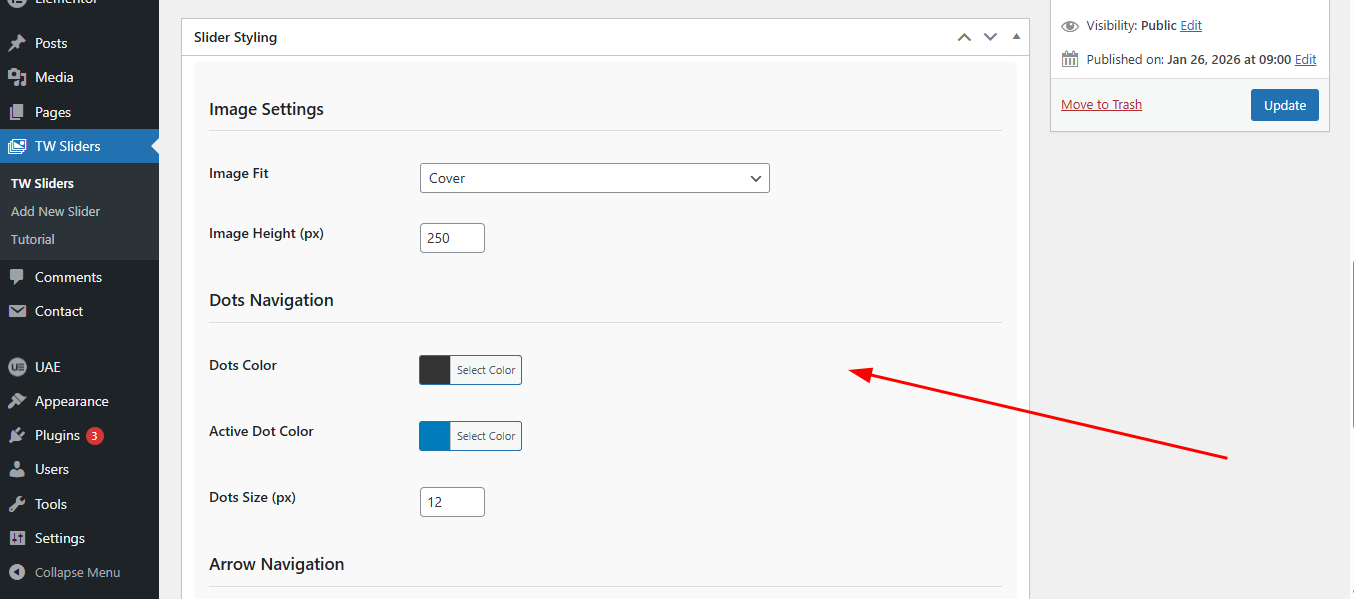
Screenshot 2: Slider Styling – Customizing slider appearance, including height, Image Fit, and visual effects. 
Screenshot 3: Frontend Display – Responsive slider on a website.
Installatie
Method 1: WordPress Admin (Recommended)
- Go to Plugins Add New in your WordPress admin
- Click Upload Plugin
- Choose the tw-simple-slider.zip file
- Click Install Now
- Activate the plugin
Method 2: Manual Installation
- Download the plugin zip file
- Extract the contents to your /wp-content/plugins/ directory
- Rename the folder to simple-slider
- Go to Plugins in WordPress admin
- Find TW Simple Slider and click Activate
FAQ
-
How many images can I add to a slider?
-
You can add unlimited images to each slider.
-
Can I use different slider types on the same page?
-
Yes, you can use multiple sliders with different types on the same page.
-
Is the slider responsive?
-
Yes, all sliders are fully responsive and work on mobile, tablet, and desktop devices.
-
How do I change the slider speed?
-
Slider speed is preset for optimal viewing. Custom speed control will be added in future versions.
-
Can I use the slider in page builders?
-
Yes! The plugin works with all major page builders using the shortcode.
Beoordelingen
Er zijn geen beoordelingen voor deze plugin.
Bijdragers & ontwikkelaars
“TW Simple Slider” is open source software. De volgende personen hebben bijgedragen aan deze plugin.
Bijdragers
Vertaal “TW Simple Slider” in je eigen taal.
Interesse in ontwikkeling?
Bekijk de code, haal de SVN repository op, of abonneer je op het ontwikkellog via RSS.
Changelog
1.0.0
- Initial release
- Basic slider functionality
- Fade animation support
- Drag & drop image reordering
- Shortcode support
- Responsive design