
Beschrijving
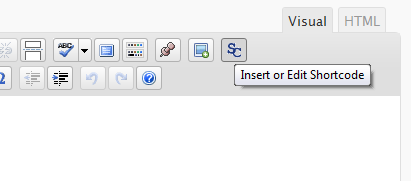
The Generic WP Shortcode Editor plugin gives to TinyMCE the ability to create or edit shortcodes in a visual way, instead of editing the code directly.
Schermafbeeldingen

Installatie
- Upload the entire folder
shortcode-editorto the/wp-content/plugins/directory - Activate the plugin through the ‘Plugins’ menu in WordPress
- Search for the [SC] button in TinyMCE toolbar
FAQ
- There are other plugins that adds buttons to manipulate shortcodes. Is this a problem?
-
Some plugins that work with shortcodes adds their own buttons to TinyMCE and we try to respect it, using a lower priority when adding the TinyMCE hooks.
- When editing, we can see the`sc_id` property in all shortcodes. What is this?
-
This property is used internally by the plugin and it is removed from all shortcodes when you submit the form.
Beoordelingen
Er zijn geen beoordelingen voor deze plugin.
Bijdragers & ontwikkelaars
“TinyMCE Generic WP Shortcode Editor” is open source software. De volgende personen hebben bijgedragen aan deze plugin.
Bijdragers
Vertaal “TinyMCE Generic WP Shortcode Editor” in je eigen taal.
Interesse in ontwikkeling?
Bekijk de code, haal de SVN repository op, of abonneer je op het ontwikkellog via RSS.
Changelog
1.0
First release.