
Beschrijving
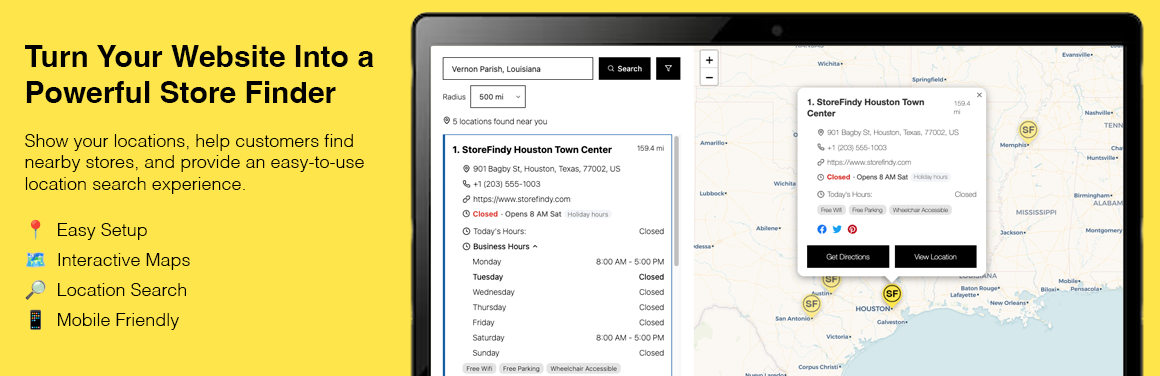
Storefindy Store Locator is a WordPress store locator plugin that helps
businesses create a searchable store finder and display their locations
on an interactive map.
Help customers quickly find nearby stores, branches, dealers, offices,
and other business locations directly from your WordPress website.
Create a customizable store locator with:
- Search by location
- Interactive maps
- Store listings
- Location filters
- Store details
- Business hours
- Get directions
- Bulk CSV location import
- Responsive design
- WCAG-friendly interface
- No Google Maps API key required
Demo Links
Schermafbeeldingen


Blokken
Deze plugin heeft 1 blok.
- Store Locator Embed one of your Storefindy locators. Pick which locator to display in the block settings.
Installatie
- Upload the
storefindy-store-locatorfolder to/wp-content/plugins/. - Activate the plugin through the Plugins screen.
- Go to https://www.storefindy.com/ and sign up for a Storefindy account.
- In Storefindy, go to Account API Access and generate your API key.
- In your WordPress dashboard, go to Store Locator Settings, paste your API key, and click Save.
- Create a locator under Store Locator Locators.
- Add your locations under Store Locator Locations.
- In the block editor, add the Store Locator block to any page or post using Add Block Store Locator.
- In the Classic Editor, Elementor, or any page-builder text widget, place the
[storefindy_locator id="6a62dc48ea08c051a7cb793e"]shortcode on any page or post to display your interactive Store Locator. Your locator IDs — and a ready-to-copy shortcode for each — are listed under Store Locator How to Use.
FAQ
-
Is this a WordPress store locator plugin?
-
Yes. Storefindy Store Locator lets you add a searchable store locator
and interactive store map to your WordPress website using the Store
Locator block or the[storefindy_locator]shortcode. -
Is there a shortcode?
-
Yes:
[storefindy_locator id="YOUR_LOCATOR_ID"]. It renders the same
store locator as the block, so it works in the Classic Editor,
Elementor, page-builder text widgets, and in theme templates via
do_shortcode(). Copy a ready-made shortcode for each of your locators
from Store Locator How to Use. -
Can I add multiple store locations?
-
Yes. You can create and manage multiple locations and organize them
with Storefindy locators. -
Can visitors search for nearby stores?
-
Yes. Visitors can search by location and find nearby stores using the
interactive map and location listings. -
Does it require a Google Maps API key?
-
No. Storefindy uses OpenStreetMap for its maps and does not require
a Google Maps API key. -
Can I create a store locator without Google Maps?
-
Yes. Storefindy Store Locator uses OpenStreetMap and does not require
a Google Maps API key.
Beoordelingen
Er zijn geen beoordelingen voor deze plugin.
Bijdragers & ontwikkelaars
“Storefindy Store Locator” is open source software. De volgende personen hebben bijgedragen aan deze plugin.
Bijdragers
Vertaal “Storefindy Store Locator” in je eigen taal.
Interesse in ontwikkeling?
Bekijk de code, haal de SVN repository op, of abonneer je op het ontwikkellog via RSS.
Changelog
1.0.0
- Initial release: settings, locator CRUD, location CRUD, CSV import, help
screen, the Store Locator block and the [storefindy_locator] shortcode.
1.0.1
- Support shortcode for Classic Editor, Elementor, or any page-builder text widget