

Beschrijving
Map pins makes it easy to create a map with locations of businesses, events, or venues on a map.
You can:
- Insert a Google Map with custom markers anywhere on your blog using a shortcode.
- Show a scrollable list of locations next to the Google Map.
- Order the locations based on distance from visitor location (based on browser location).
- Oodles of information can be maintained per pin/location.
- Business hours are defined per location. Visitors can search for currently opened locations.
- Most options are highly customizable:
- All options can be controlled by shortcode parameters
- Toon verschillende sets van locaties op diverse pagina’s via de locatie categorie optie.
- You can display only a map, display a map and list combination and even show only a list of locations (for example in your sidebar). All variants are searchable.
- Includes country specific search options, for example zip-code optimized searching (powered by Google Maps).
- Large number of marker-icons provided (courtesy of Maps Icons Collection project by Nicolas Mollet). You can add your own custom icons to the map as well.
- Configurable admin environment to make location maintenance very easy.
- Automatic scaling of the map boundaries based on locations shown.
- English and Dutch translations are included.
- Translatable using .mo and .po files.
- Optimized for WordPress Multisite
Your visitors can:
- Browse a Google Map with all the locations you added.
- Use an intelligent search option to find locations close to a location (search powered by Google Maps).
- Find locations based on their current location (using GPS / IP location via the browser).
- Search based on business hours of a location is opened right now or not.
- Find information about the location you added by clicking a map marker including: name, address, business hours, any text you add and a hyperlink).
Example shortcode:
[mappins-map width=”500″ height=”900″ searchbar=”Y” list=”left” showmap=”show” listwidth=”40%”]
List of location attributes:
name, address, zipcode, city, country, telephone, category, markericon, openinghours, link URL, latitude/longitude
Licenses:
- The plugin uses wonderful custom marker icons from the Maps Icons Collection project by Nicolas Mollet. (http://mapicons.nicolasmollet.com/)
- Header photo by Dave77459 (http://www.flickr.com/photos/dave77459/6335868568/) cc license (http://creativecommons.org/licenses/by-nc-sa/2.0/)
Schermafbeeldingen
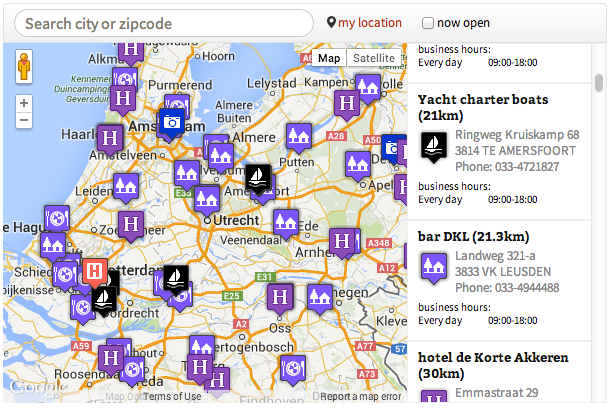
Map pins with map, list and search bar 
Defining your pins 
Configure map-pins
Installatie
To install Map Pins manually, follow these steps:
- Installeer de plugin via het plugins->toevoegen menu and zoek op
map-pins - Activate the plugin through the Plugins menu in WordPress
- Get a Google Maps API key here: https://developers.google.com/maps/documentation/javascript/get-api-key (and also enable Google Places API on this key if you want to use the search box)
- Go the the plugin settings page and paste your Google Maps API key there. All other settings are optional.
- Configure the Map Pins locations through the Map Pins menu (located in the left menu or in case of WPMU on network level)
- Embed the Map Pins map on any page or post using the [mappins-map] shortcode.
- Enjoy
Gebruik anders gewoon de plugin installatie pagine in wordpress
FAQ
- Q: How many maps I can insert into a post or page?
-
het aantal objecten op de pagina is begrensd op 1 per pagina. Op andere pagina’s kun je de shortcut parameters wijzigen, zoals width, list-stijl, categorie.
- Q: Hoe kan ik andere locaties tonen op verschillende pagina’s
-
A: Je kunt filteren op basis van categorie. Via een shortcut-parameter kun je de categorie opgeven, zodat je elke pagina met een andere categorie kunt vullen.
- Q: Can I upload a CSV of XLS file with locations?
-
A: No. But you can use phpAdmin or another mysql tool to fill the database.
- Q: Klik op ‘mijn-locatie’ geeft een foutmelding
-
A: De browser vereist een https (SSL) beveiligde site voor deze functie
- Q: I am using WP Multisite and have one child site for each of my stores. Can I use one database defined in the network?
-
A: Yes. The database is maintained on the network level.
- Q: Is Google Maps a free service? I don’t want to pay Google.
-
A: Helaas is Google Maps tegenwoordig een betaalde service. Echter de free-tier is vrij groot en voor een kleine site zal het gebruik gratis zijn. Beveilig wel je google API sleutel (zie google sleutel management) want anders kunnen (en zullen!) anderen je sleutel copieren en gebruiken.
- Q: I want to use my own pin icons.
-
A: You can! Just put them in the plugin pics directory (so that is wp-content/plugins/map-pins/pics in your install). The plugin will find them automagically.
Beoordelingen
Er zijn geen beoordelingen voor deze plugin.
Bijdragers & ontwikkelaars
“Map pins” is open source software. De volgende personen hebben bijgedragen aan deze plugin.
Bijdragers

Vertaal “Map pins” in je eigen taal.
Interesse in ontwikkeling?
Bekijk de code, haal de SVN repository op, of abonneer je op het ontwikkellog via RSS.
Changelog
1.29
- Submenu gefixt. Was best lastig om dit te doen, maar uiteindelijk de juiste pointer gevonden op https://wordpress.stackexchange.com/questions/52675/how-to-remove-duplicate-link-from-add-menu-page
1.20
- Je kunt nu filteren op categorie
1.13
- wat styling aangepast
1.10
- Google maps api toegevoegd
1.02
- fixed short php tags
- getest met de nieuwste wordpress versie
1.01
- php 5.2 compatible and php version check
1.0
- After hours notification with moon icon
- screenshots and other nice info on wordpress.org
- made responsive
0.1
- Initial release.