

Beschrijving
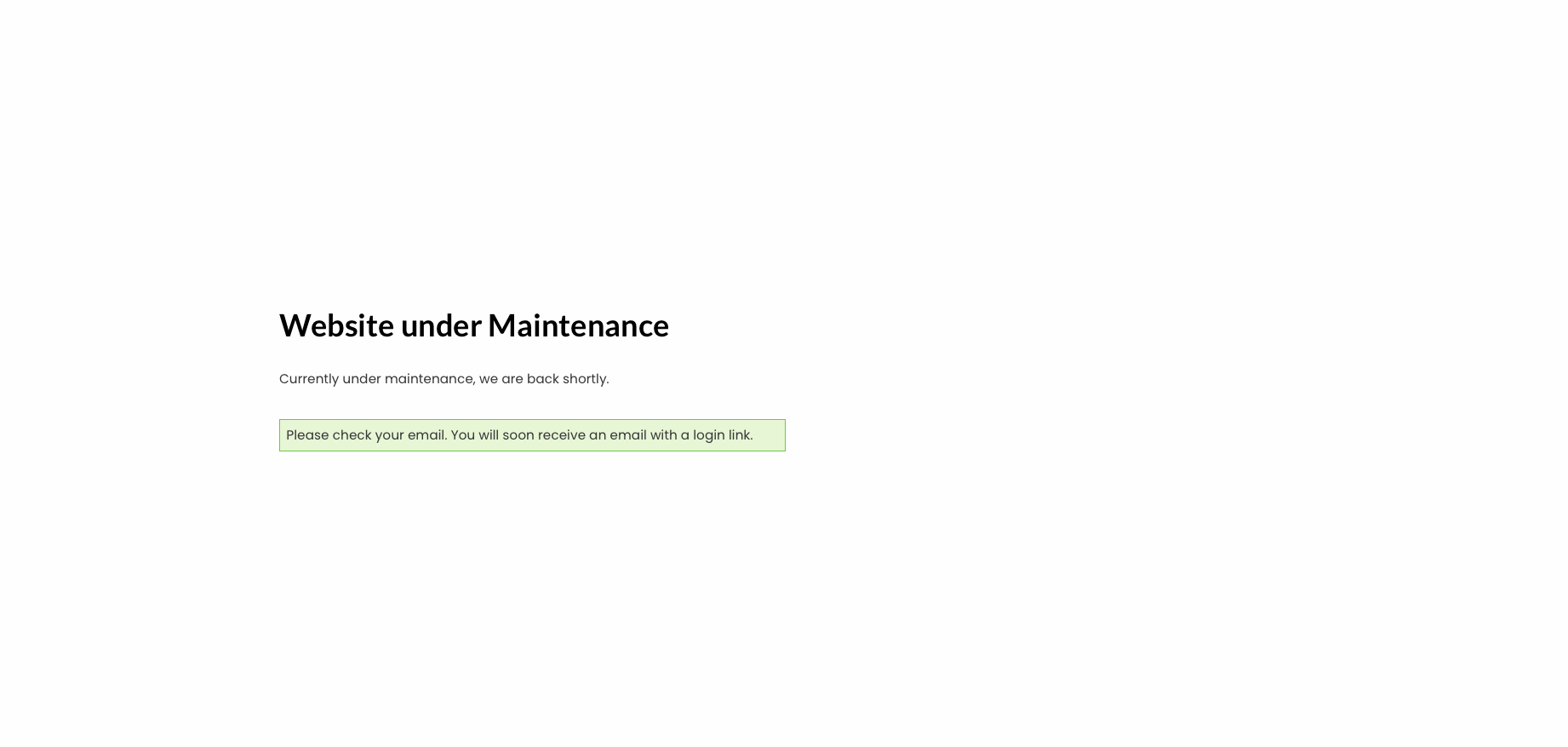
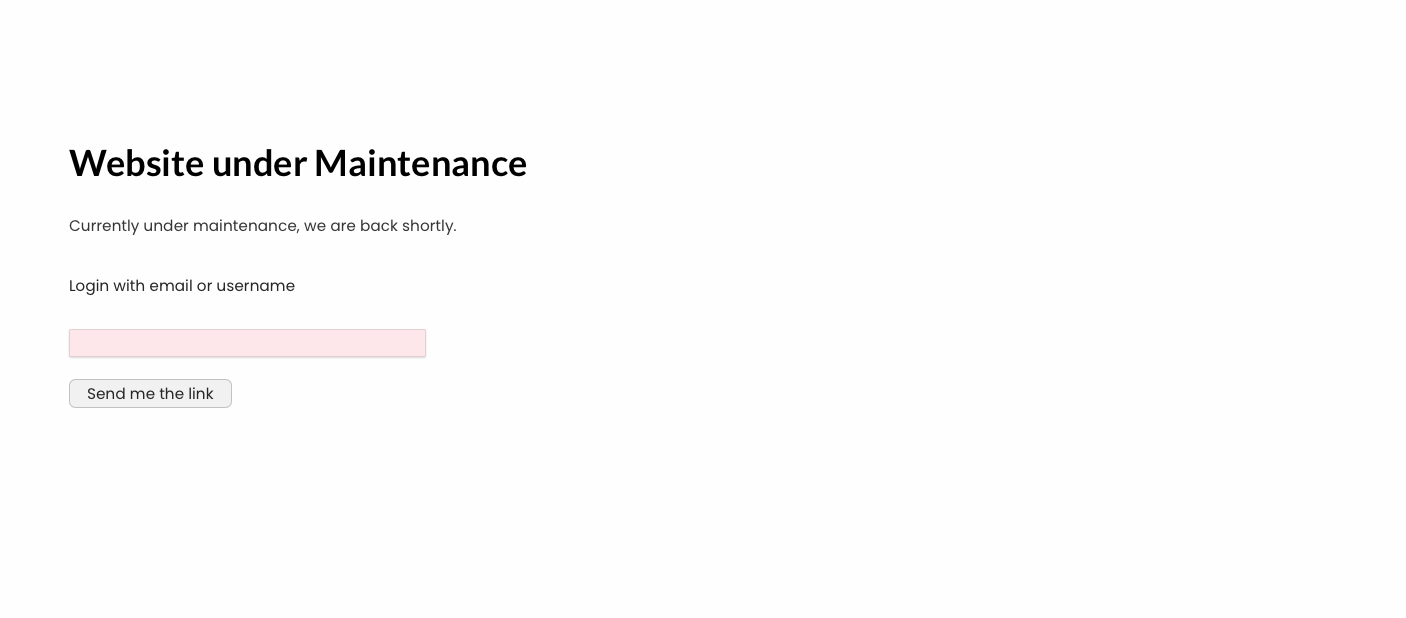
Transform your WordPress login experience with passwordless authentication. Users simply enter their email address and receive a secure magic link – click to login instantly. It’s more secure than weak passwords and infinitely more user-friendly.
Why Choose Keyless Auth?
- Enhanced Security: No more weak, reused, or compromised passwords
- Better User Experience: One click instead of remembering complex passwords
- Reduced Support: Eliminate “forgot password” requests
- Modern Authentication: Enterprise-grade security used by Slack, Medium, and others
- Security Hardening: Built-in protection against brute force attacks and username enumeration
Quick Start
- Install and activate the plugin
- Create a new page and add the shortcode
[keyless-auth] - Configure email templates in Keyless Auth Templates
- Done! Users can now login passwordlessly
Core Features
Ready to Use
* Magic Link Authentication – Secure, one-time login links via email
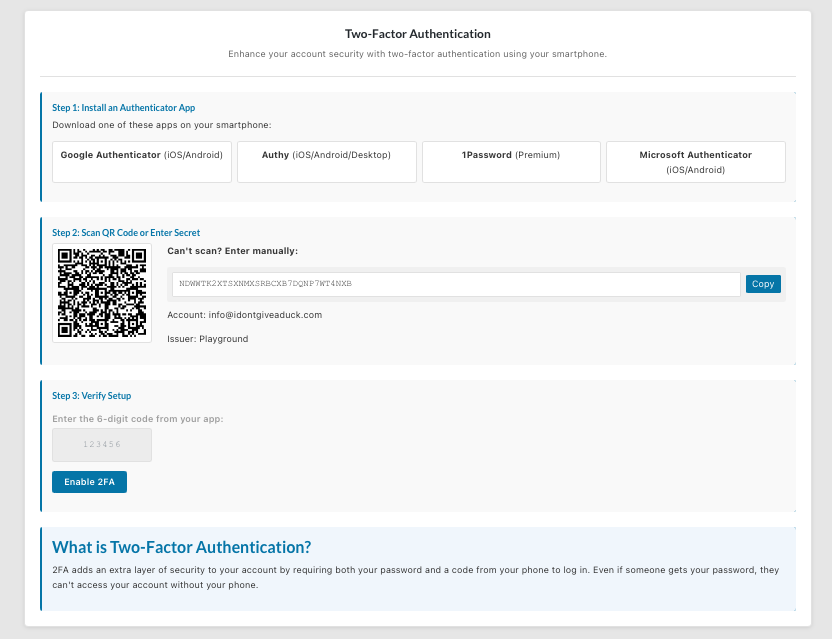
* Two-Factor Authentication (2FA) – Complete TOTP support with Google Authenticator
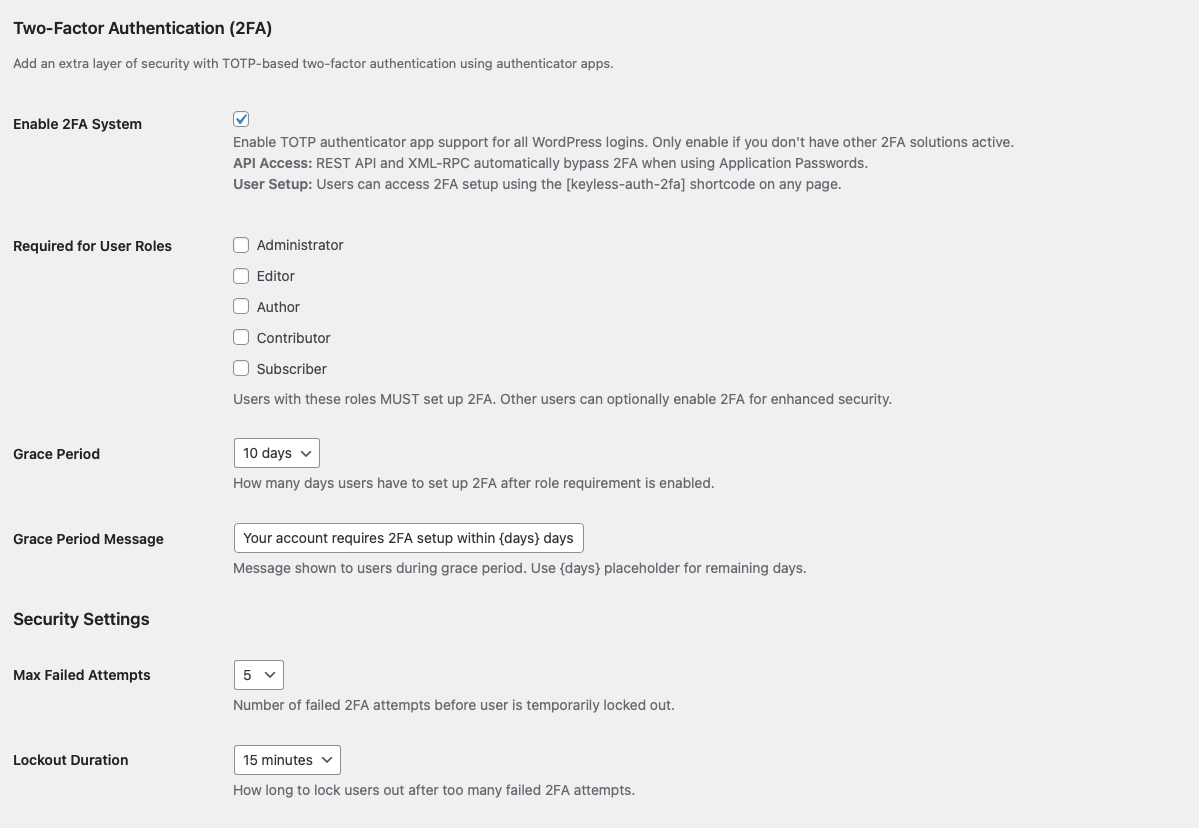
* Role-Based 2FA – Require 2FA for specific user roles (admins, editors, etc.)
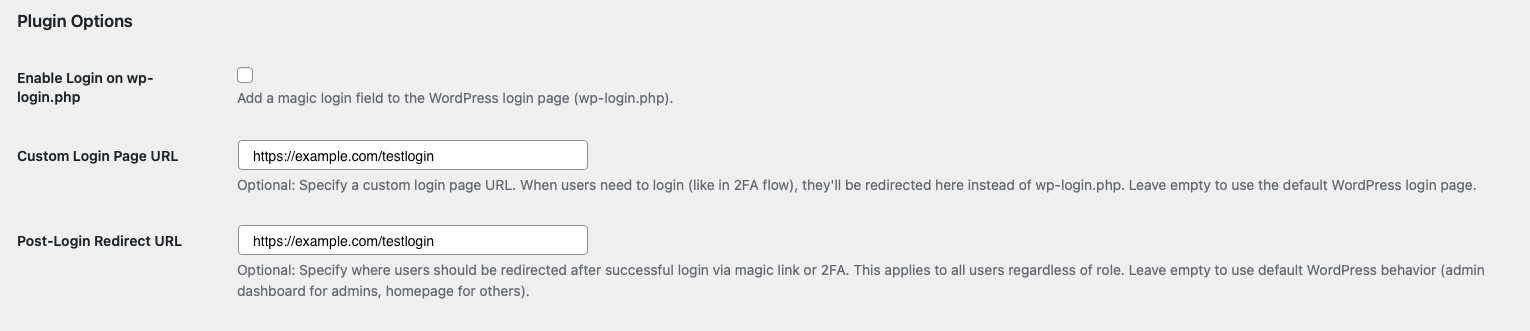
* Custom 2FA Setup URLs – Direct users to branded frontend 2FA setup pages
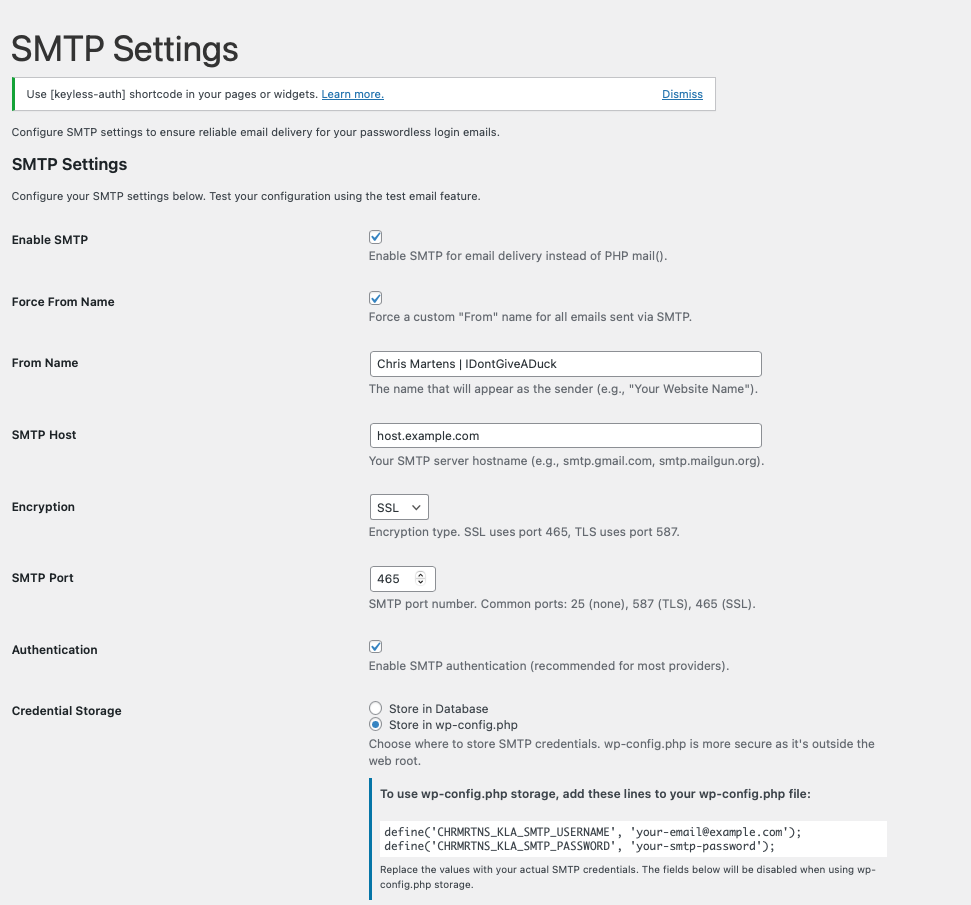
* SMTP Integration – Reliable email delivery through your mail server
* Email Templates – Professional, customizable login emails
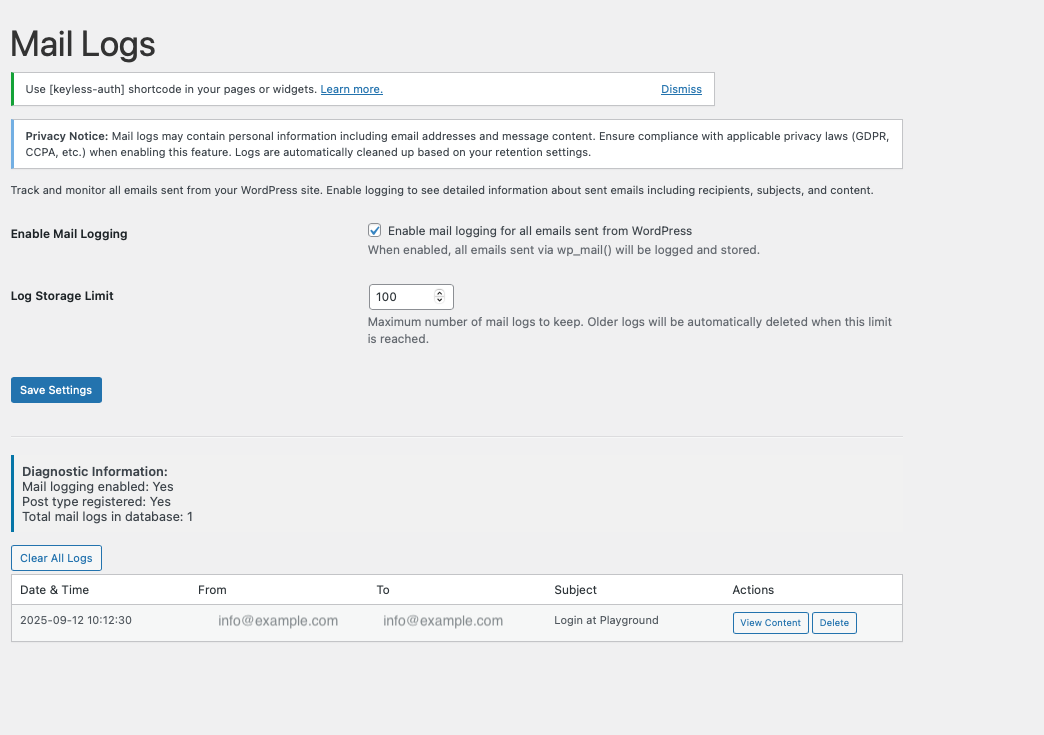
* Mail Logging – Track all sent emails with delivery status
* Custom Database Tables – Scalable architecture with dedicated audit logs
Advanced Security
* Token Security: 10-minute expiration, single-use tokens
* Audit Logging: IP addresses, device types, login attempts
* Emergency Mode: Grace period system with admin controls
* Secure Storage: SMTP credentials in wp-config.php option
* XML-RPC Disable: Block brute force attacks via XML-RPC interface
* Application Passwords Control: Disable programmatic authentication when not needed
* User Enumeration Prevention: Block username discovery attacks
Customization
* WYSIWYG Email Editor: Full HTML support with live preview
* Advanced Color Controls: Hex, RGB, HSL color formats
* Template System: German, English, and custom templates
* Branding Options: Custom sender names and professional styling
Installation & Setup
Basic Installation
1. WordPress Admin Plugins Add New
2. Search for “Keyless Auth”
3. Install and activate
4. Add [keyless-auth] shortcode to any page
SMTP Configuration (Recommended)
1. Navigate to Keyless Auth SMTP
2. Configure your email provider (Gmail, Outlook, SendGrid, etc.)
3. Test email delivery
4. Save settings
Two-Factor Authentication Setup
1. Go to Keyless Auth Options
2. Enable “Two-Factor Authentication”
3. Select required user roles
4. Users scan QR code with authenticator app
Email Templates
Template Options
* German Professional: Sleek German-language template
* English Simple: Clean, minimalist design
* Custom HTML: Create your own with WYSIWYG editor
Customization Features
* Full HTML and CSS support
* Color picker for buttons and links
* Responsive email design
* Live template preview
* Placeholder system for dynamic content
Security & Compliance
Token Security
* Generated using WordPress security standards
* Based on user ID, timestamp, and wp-config.php salt
* 10-minute expiration with single-use enforcement
* Secure database storage with automatic cleanup
Two-Factor Authentication
* TOTP-based system compatible with Google Authenticator, Authy
* Role-based requirements for granular control
* Grace period system for smooth user transitions
* Custom verification forms with professional styling
Database Architecture
* Custom tables for optimal performance
* Comprehensive audit logging
* Device tracking and IP monitoring
* Automatic maintenance and cleanup routines
Security Hardening
Keyless Auth includes comprehensive security hardening features to protect your WordPress site from common attack vectors. All features are optional and can be enabled based on your site’s needs.
XML-RPC Disable
* Prevents brute force attacks via WordPress XML-RPC interface
* Reduces attack surface by disabling legacy API
* Recommended for sites not using Jetpack, mobile apps, or pingbacks
Application Passwords Control
* Disable REST API and XML-RPC authentication when programmatic access isn’t needed
* Prevents unauthorized API access
* Recommended for simple sites without third-party integrations
User Enumeration Prevention
* Blocks REST API user endpoints (/wp-json/wp/v2/users)
* Redirects author archives and ?author=N queries
* Removes login error messages that reveal usernames
* Strips comment author CSS classes
* Removes author data from oEmbed responses
* Recommended for business/corporate sites without author profiles
Benefits
* Combined protection against brute force attacks
* Prevents username discovery for targeted attacks
* Reduces unauthorized API access
* Easy to configure without code or .htaccess modifications
* All features include comprehensive documentation
* FTP recovery available if needed
SMTP & Email Delivery
Supported Providers
* Gmail / Google Workspace
* Outlook / Microsoft 365
* Mailgun, SendGrid, Amazon SES
* Any SMTP-compatible service
Advanced Email Features
* Message-ID domain alignment for deliverability
* SPF/DKIM/DMARC compliance
* Custom sender names and addresses
* Bulk email log management
* Delivery status tracking
Secure Credential Storage
Store SMTP credentials securely in wp-config.php:
define('CHRMRTNS_KLA_SMTP_USERNAME', 'your-email@example.com');
define('CHRMRTNS_KLA_SMTP_PASSWORD', 'your-smtp-password');
WordPress Integration
Login Page Integration
* Optional magic login field on wp-login.php
* Seamless integration with existing login flow
* Toggle control for easy enable/disable
* Clean, responsive form styling
Shortcode Usage
Use [keyless-auth] anywhere: pages, posts, widgets, or custom templates.
Developer Features
Hooks & Filters
Customize login redirect:
add_filter(‘wpa_after_login_redirect’, ‘custom_redirect_function’);
Modify email headers:
add_filter(‘wpa_email_headers’, ‘custom_email_headers’);
Change token expiration:
add_filter(‘wpa_change_link_expiration’, ‘custom_expiration_time’);
Modular Architecture
* Clean, organized class structure
* Separated concerns for easy maintenance
* WordPress coding standards compliance
* Extensive documentation and comments
Requirements
- WordPress: 3.9 or higher (tested up to 6.8)
- PHP: 7.4 or higher
- Email Delivery: SMTP recommended for reliability
Note: Keyless Auth complements WordPress’s default login system – it doesn’t replace it.
Developed by Chris Martens | Based on the original Passwordless Login plugin by Cozmoslabs
Schermafbeeldingen




Installatie
- Upload the keyless-auth folder to the ‘/wp-content/plugins/’ directory
- Activate the plugin through the ‘Plugins’ menu in WordPress
- Go to Keyless Auth > Templates to configure email templates and colors
- Create a new page and use the shortcode [keyless-auth]
FAQ
-
Is this secure?
-
Yes. The token is created using wp_hash and it’s based on the user id, the current time and the salt in wp-config.php
-
Couldn’t anyone login if they have that link?
-
The token expires after 10 minutes and can only be used once. If people have access to that link it’s supposed they have access to your email, in which case it’s as safe as the default login, since they could reset their passwords.
-
Isn’t it more complicated they just entering a password?
-
Weak passwords are used every day by users. There are also people who use the same password across various services and websites. By using the Keyless Auth plugin your users will have one less password to worry about.
-
How do I customize the email templates?
-
Go to Keyless Auth > Templates in your WordPress admin. You can choose from predefined templates (German or English) or create your own custom HTML template using the built-in WYSIWYG editor with full HTML and CSS support.
-
Can I change the colors in the emails?
-
Yes! In the settings page, you can customize button colors, button hover colors, and link colors. Supports multiple color formats including hex (#007bff), RGB (rgb(0,123,255)), HSL (hsl(211,100%,50%)), and HSLA colors. You can use either color pickers or enter color codes manually.
-
Does the custom email editor support HTML?
-
Absolutely! The custom template editor includes a full WYSIWYG editor with HTML support. You can create rich email templates with custom styling, different font sizes, colors, tables, and more. Switch between visual and HTML editing modes as needed.
-
How do I configure SMTP for reliable email delivery?
-
Go to Keyless Auth > SMTP in your WordPress admin. You can configure SMTP settings for providers like Gmail, Outlook, Mailgun, SendGrid, and more. The plugin includes automatic port configuration for SSL/TLS, connection testing, and debug tools to ensure your emails are delivered reliably.
-
Can I track what emails are being sent?
-
Yes! The Mail Logs feature allows you to monitor all emails sent from your WordPress site. You can view complete email history with timestamps, recipients, subjects, and even preview the full email content. This is perfect for troubleshooting delivery issues and monitoring your site’s email activity.
-
Can I customize the sender name in emails?
-
Absolutely! In the SMTP settings, you can enable “Force From Name” and set a custom sender name like “Your Website Name” instead of just showing the email address. This makes emails look more professional and branded. The feature includes a toggle control so you can easily enable or disable it.
-
Can I store SMTP credentials securely outside the database?
-
Yes! Version 2.0.4 introduces secure credential storage options. You can choose to store SMTP username and password in wp-config.php instead of the database. This is more secure as wp-config.php is typically outside the web root. Simply add these constants to your wp-config.php:
define('CHRMRTNS_PA_SMTP_USERNAME', 'your-email@example.com'); define('CHRMRTNS_PA_SMTP_PASSWORD', 'your-smtp-password'); Then select "Store in wp-config.php" in the SMTP settings. -
How do I set up Two-Factor Authentication (2FA)?
-
Go to Keyless Auth > Options in your WordPress admin and enable “Two-Factor Authentication”. You can then configure which user roles require 2FA and manage individual users who have 2FA enabled. Users can set up 2FA by visiting their profile page where they’ll see a QR code to scan with Google Authenticator, Authy, or any TOTP-compatible app.
-
Can I require 2FA for specific user roles only?
-
Yes! In the 2FA settings, you can select which user roles should be required to use 2FA. For example, you might require 2FA for Administrators and Editors while leaving it optional for Subscribers. Users in required roles will be prompted to set up 2FA on their next login.
-
How does 2FA work with magic links?
-
When 2FA is enabled, the magic link authentication flow is enhanced for security. If a user has 2FA enabled (or their role requires it), they’ll first receive the magic link email, but after clicking the link, they’ll be prompted to enter their 2FA code before being logged in. This prevents 2FA bypass vulnerabilities.
-
What’s different from the original Passwordless Login plugin?
-
This enhanced version includes: modular class-based architecture, complete Two-Factor Authentication system, SMTP configuration, email logging & monitoring, WYSIWYG email editor, visual template previews, advanced color controls (hex/RGB/HSL), separate button and link colors, dedicated admin menu, enhanced security with comprehensive nonce verification, HTML email support, and professional styling options.
-
What does the modular architecture mean for developers?
-
In v2.0.1, we completely refactored the plugin from a single 1868-line file into clean, organized classes. Each functionality (authentication, SMTP, mail logging, email templates, admin interface) is now in its own dedicated class file. This makes the code much easier to maintain, extend, and debug. Developers can now easily customize specific features without affecting others.
-
Why did you create this plugin? What inspired Keyless Auth?
-
Great question! We built Keyless Auth out of real-world frustration with password complexity and user experience challenges. The story involves too many plugins, security concerns, and the quest for the perfect balance between usability and security. Read the full story behind the plugin’s creation: How Many Plugins Are Too Many? Just One More: Why We Built Keyless Auth
-
Password login not working with [keyless-auth-full] shortcode?
-
If the password login form reloads without logging in or showing errors, but magic link login works fine, check if your page builder has custom authentication page settings enabled. Page builders like Bricks Builder, Elementor Pro, and Divi often have settings that redirect wp-login.php to custom pages, which conflicts with WordPress’s default password form submission.
**Solution for Bricks Builder**: Go to Bricks → Settings → General → Custom authentication pages, and disable the "Login Page" setting. **Solution for other page builders**: Look for similar "custom login page" or "authentication page" settings in your page builder's configuration and disable them. **Why does magic link work?** Magic link forms submit to the current page, while WordPress's password form (wp_login_form) submits to wp-login.php, which gets intercepted by the page builder. -
I can’t find a question similar to my issue; Where can I find support?
-
For plugin support, please use the WordPress.org support forum for Keyless Auth. For bug reports and feature requests, you can also visit our GitHub repository. For support with the original Passwordless Login functionality, visit http://www.cozmoslabs.com.
Beoordelingen
Er zijn geen beoordelingen voor deze plugin.
Bijdragers & ontwikkelaars
“Keyless Auth – Login without Passwords” is open source software. De volgende personen hebben bijgedragen aan deze plugin.
Bijdragers
Vertaal “Keyless Auth – Login without Passwords” in je eigen taal.
Interesse in ontwikkeling?
Bekijk de code, haal de SVN repository op, of abonneer je op het ontwikkellog via RSS.
Changelog
3.2.4
- FIX: Critical error when entering unregistered email in login form – Fixed missing namespace prefix for WP_Error class
- IMPROVEMENT: WordPress 6.9 email compatibility – Added Sender property for better SPF/DMARC alignment
- IMPROVEMENT: Envelope-From (Sender) now matches From address for improved email deliverability
- TECHNICAL: SMTP configuration now sets both From and Sender properties for authentication compliance
3.2.3
- SECURITY: Replaced all wp_redirect() with wp_safe_redirect() for enhanced security (21 occurrences)
- SECURITY: Added wp_validate_redirect() validation for custom/external URLs with fallback to safe defaults
- FIX: WordPress Plugin Check compliance – All redirect security warnings resolved
- FIX: Core hook “wp_login” properly ignored with phpcs comment (WordPress core hook, not plugin hook)
- IMPROVEMENT: Dynamic notification hooks properly documented with phpcs ignore comments
- TECHNICAL: Custom redirect URLs from options now validated before redirect
- TECHNICAL: Magic login redirect URLs from transients validated with fallback to admin_url()
- TECHNICAL: All 4 files updated: Core.php (8 fixes), TwoFA/Core.php (11 fixes), Admin/Admin.php (1 fix), Notices.php (6 comments)
3.2.2
- FIX: Login error display on custom login pages – Wrong password/username errors now display properly instead of blank error
- FIX: wp_login_failed hook integration – Failed login attempts now redirect to custom login page with error parameters
- IMPROVEMENT: Error messages preserved during wp-login.php to custom page redirect flow
- IMPROVEMENT: Better error handling for standard WordPress password forms on custom login pages
- TECHNICAL: Added handle_failed_login() method to catch authentication failures and redirect with error codes
- TECHNICAL: Error parameters (login_error, login) now properly preserved and displayed via shortcodes
- COMPATIBILITY: Works harmoniously with User Enumeration Prevention feature – no conflicts
3.2.1
- NEW: Support URL setting in Options page – Configure optional support footer on password reset page
- FIX: Registered missing chrmrtns_kla_support_url option that was referenced but not functional
- IMPROVEMENT: Password reset page can now display custom support link when configured
3.2.0
- NEW: Custom Password Reset Page – Replace wp-login.php with branded shortcode-based reset page
- NEW: Password reset shortcode [keyless-auth-password-reset] – Embed on any page with any slug
- NEW: Custom password reset URL setting – Specify your own password reset page URL
- NEW: Two-step password reset flow – Email request form and password reset form with token validation
- NEW: Beautiful styled reset forms – Matching Keyless Auth gradient branding
- IMPROVEMENT: Flexible page URL – No hardcoded /reset-password route, users choose their own slug
- IMPROVEMENT: Smart “Forgot password?” link – Auto-switches between custom page and wp-login.php
- IMPROVEMENT: Optional support footer – Only displays if support URL is configured
- IMPROVEMENT: Properly scoped CSS – All styles prefixed to avoid theme conflicts
- TECHNICAL: New PasswordReset class at includes/Core/PasswordReset.php
- TECHNICAL: Full translation support with _e() and esc_html_e() functions
- TECHNICAL: Token validation using WordPress check_password_reset_key() function
- TECHNICAL: Secure nonce validation for both email request and password reset forms
3.1.0
- NEW: WooCommerce Integration – Magic link authentication on WooCommerce login forms
- NEW: Collapsible UI design – “Or login with magic link instead” toggle link on My Account and Checkout pages
- NEW: WooCommerce setting toggle – Enable/disable integration from Options page
- NEW: Modular architecture – Separate WooCommerce.php class for clean code organization
- NEW: Auto-detection – Only loads when WooCommerce is active and setting is enabled
- NEW: Smart checkout redirect – Users return to checkout after login, preserving cart
- FIX: Custom email template not saving – Fixed field name mismatch (chrmrtns_kla_custom_email_body vs chrmrtns_kla_custom_email_html)
- FIX: Reset custom template function now uses correct option name (chrmrtns_kla_custom_email_body)
- FIX: Template sanitization now preserves inline styles and tags properly with wp_kses
- IMPROVEMENT: Real-time color preview updates – All template previews update instantly when colors change
- IMPROVEMENT: WordPress standard notice classes – Replaced inline styles with ‘notice notice-warning/info inline’ classes
- IMPROVEMENT: Added helpful notice explaining WYSIWYG placeholder behavior in custom template editor
- IMPROVEMENT: Seamless integration with WooCommerce themes – Minimal, non-intrusive styling
- IMPROVEMENT: Vanilla JavaScript implementation – No jQuery dependency for WooCommerce integration
- IMPROVEMENT: Dynamic toggle text – Changes from “Or login with magic link instead” to “Close magic link form”
- IMPROVEMENT: Dedicated AJAX handler – Separate handler for WooCommerce requests with proper JSON responses
- DEVELOPER: Foundation for Pro features – WooCommerce integration ready for future enhancements
- TECHNICAL: PSR-4 namespaced class at includes/Core/WooCommerce.php
- TECHNICAL: Uses Fetch API for modern AJAX requests
- TRANSLATION: Added 10+ new translatable strings for WooCommerce integration
3.0.5
- NEW: Help page tabs – Added tabbed navigation for better organization of help content
- UX: Organized help content into 7 sections: Getting Started, Shortcodes, Two-Factor Auth, Customization, Security, Troubleshooting, and Advanced
- TECHNICAL: Implemented pure CSS tabs using :checked pseudo-selectors (no JavaScript required)
- IMPROVEMENT: Better content discoverability and navigation in admin help interface
3.0.4
- FIX: Critical – wp-login.php options conflict – cannot login when both “Enable Login on wp-login.php” and “Redirect wp-login.php” are active
- IMPROVEMENT: Added mutual exclusion logic – redirect option now automatically disables wp-login.php magic login integration
- IMPROVEMENT: Added admin warning notice explaining when options conflict and why one is disabled
- IMPROVEMENT: Enhanced help text under both options explaining their incompatibility
- UX: Clear visual feedback when conflicting options are enabled with actionable guidance
- TECHNICAL: wp-login.php integration hooks only fire when redirect is disabled to prevent login issues
3.0.3
- NEW: CSS variable customization hooks – chrmrtns_kla_custom_css_variables and chrmrtns_kla_2fa_custom_css_variables filters
- NEW: Theme integration system – Map plugin CSS variables to your theme’s color system without !important
- NEW: Comprehensive theme integration documentation in Help page with code examples
- IMPROVEMENT: Enhanced 2FA active page styling – Proper boxed containers matching setup page design
- IMPROVEMENT: Better CSS cascade order using wp_add_inline_style() for clean theme customization
- FIX: Email template settings save – Added proper PHPCS ignore comments for nonce verification (verified in parent method)
- DEVELOPER: Filter hooks allow programmatic CSS variable overrides for automatic theme matching
- DEVELOPER: Supports dark mode integration via filter hooks with theme-specific CSS variable mapping
- DOCUMENTATION: Added “Theme Integration (Advanced)” section to Help page with basic and advanced examples
3.0.2
- FIX: Critical – Fixed fatal error in 2FA magic link login flow (Core::get_instance() namespace confusion)
- FIX: Critical – Fixed incorrect get_redirect_url() method call (Admin vs OptionsPage class reference)
- FIX: WooCommerce compatibility – Changed 2FA verification hook from ‘init’ to ’template_redirect’ to prevent cart warnings
- FIX: Database query – Fixed wpdb::prepare() called without placeholder in get_2fa_users() causing PHP notice
- IMPROVEMENT: Better timing for 2FA verification page rendering to ensure compatibility with WooCommerce and other plugins
- TECHNICAL: Added OptionsPage import to Core class for proper redirect URL handling
- TECHNICAL: Updated TwoFA Core class to use template_redirect hook for proper WordPress hook sequence
3.0.1
- ACCESSIBILITY: Full WCAG 2.1 Level AA compliance achieved
- ACCESSIBILITY: Added ARIA live regions for error/success messages (role=”alert”, role=”status”)
- ACCESSIBILITY: Added aria-label to all forms and interactive elements for screen readers
- ACCESSIBILITY: Added aria-required=”true” to required form inputs
- ACCESSIBILITY: Added aria-describedby linking form inputs to helper text
- ACCESSIBILITY: Added screen reader only text (.sr-only) utility class to all CSS files
- ACCESSIBILITY: QR code containers now have proper role=”img” and descriptive labels
- ACCESSIBILITY: 2FA verification inputs include screen reader hints for code format
- ACCESSIBILITY: Copy buttons now have contextual aria-label for better screen reader support
- ACCESSIBILITY: All status indicators use aria-live for dynamic content announcements
- IMPROVEMENT: Enhanced keyboard navigation with visible focus states throughout
- IMPROVEMENT: Error messages now properly announced to assistive technology
- IMPROVEMENT: Loading states communicated to screen readers with appropriate ARIA
- COMPATIBILITY: Admin page logos already compliant with proper alt attributes
3.0.0
- ARCHITECTURAL: Complete refactoring to PSR-4 autoloading with namespaces
- IMPROVEMENT: Modern PHP class organization –
Chrmrtns\KeylessAuthnamespace - IMPROVEMENT: Better IDE support and code intelligence
- IMPROVEMENT: Cleaner code structure organized by functionality
- TECHNICAL: Autoloader replaces manual class loading
- TECHNICAL: Classes organized: Core/, Admin/, Email/, Security/TwoFA/
- BREAKING: Internal class names changed (no impact on users, data preserved)
- MAINTENANCE: All database tables, options, and user data remain unchanged
- MAINTENANCE: Seamless upgrade – no manual steps required
- FIX: Mail logging status tracking – Fixed critical bug where failed emails showed as “Sent”
- FIX: DNS validation for invalid email domains – Emails with non-existent domains now marked as “Failed”
- FIX: Database.php log_email() now returns actual insert_id instead of row count
2.7.3
- CRITICAL FIX: Magic link token validation – Fixed database table name mismatches causing “token expired” errors
- CRITICAL FIX: 2FA grace period redirect – Fixed malformed URL when grace period expires (proper use of add_query_arg)
- FIX: Database queries now correctly reference chrmrtns_kla_* tables instead of kla_* tables (10 query fixes)
- FIX: Removed unused variable $code_hash in backup code validation function
- TECHNICAL: Token validation was querying non-existent kla_login_tokens table instead of chrmrtns_kla_login_tokens
- TECHNICAL: Fixed inconsistency between table creation (chrmrtns_kla_) and queries (kla_)
- IMPACT: Users experiencing immediate token expiration on magic links should now login successfully
2.7.2
- FIX: Database table naming – Renamed all tables from kla_* to chrmrtns_kla_* for unique namespace and collision prevention
- IMPROVEMENT: Automatic migration – Old kla_* tables automatically renamed to chrmrtns_kla_* on plugin update (zero data loss)
- IMPROVEMENT: WordPress best practices – Tables now use unique plugin identifier prefix following WordPress.org guidelines
- TECHNICAL: Database version bumped to 1.2.0 with automatic version detection and migration
- TECHNICAL: Added migrate_old_tables() method for seamless backward compatibility
2.7.1
- FIX: User Enumeration Prevention now blocks ?author=N queries before WordPress canonical redirect
- FIX: Misleading “2FA system is now active” message no longer appears when saving unrelated settings
- ENHANCEMENT: ?author=N queries now blocked earlier using parse_request hook (more reliable)
- ENHANCEMENT: Emergency mode message only displays when emergency mode checkbox is actually toggled
- TECHNICAL: Added block_author_query_early() function to catch author queries before redirect_canonical()
- TECHNICAL: Fixed boolean type comparison in emergency mode setting change detection
2.7.0
- NEW: XML-RPC disable option for enhanced security – prevent brute force attacks via XML-RPC
- NEW: Application Passwords disable option – block REST API and XML-RPC authentication when not needed
- NEW: User Enumeration Prevention – comprehensive protection against username discovery attacks
- NEW: Security Settings section in Options page with three hardening options
- SECURITY: Block REST API user endpoints, author archives, login errors, and comment author classes
- SECURITY: Option to disable WordPress XML-RPC interface to reduce attack surface
- SECURITY: Option to disable Application Passwords for sites not requiring programmatic access
- ENHANCEMENT: Admin can now easily harden WordPress without code or .htaccess modifications
- ENHANCEMENT: Comprehensive Help page documentation for all security features
- COMPATIBILITY: All security options are optional and respect existing integrations
- COMPATIBILITY: Recovery via FTP deactivation if needed
2.6.3
- PERFORMANCE: CSS files now load conditionally only when shortcodes are used (saves ~15KB on pages without login forms)
- PERFORMANCE: 2FA CSS and JS now load conditionally only when [keyless-auth-2fa] shortcode is used (saves additional ~38KB)
- PERFORMANCE: CSS no longer loads on every page globally, only when [keyless-auth], [keyless-auth-full], or [keyless-auth-2fa] shortcodes are rendered
- PERFORMANCE: wp-login.php integration still loads CSS automatically when enabled
- NEW: Dark Mode Behavior setting in Options page – control how forms appear in dark mode
- NEW: Three dark mode options: Auto (default, respects system + theme), Light Only (force light), Dark Only (force dark)
- NEW: Separate CSS files for light-only and dark-only modes (forms-enhanced-light.css, forms-enhanced-dark.css)
- ENHANCEMENT: Better performance for sites with many pages without login forms (total savings: ~53KB per page)
- ENHANCEMENT: Admin can now force light or dark theme regardless of user system preferences
- COMPATIBILITY: Dark mode setting works with all major WordPress themes and block themes
2.6.2
- FIX: Replaced hardcoded colors in style-front-end.css with CSS variables for proper dark mode support
- FIX: Added max-width (400px) to .chrmrtns-box for consistent message box width matching form width
- NEW: Added shortcode customization parameters to [keyless-auth]: button_text, description, label
- IMPROVEMENT: Alert/success/error boxes now support dark mode and can be customized via CSS variables
- ENHANCEMENT: Shortcode now allows custom button text, field labels, and description text for better branding
2.6.1
- FIX: Dark mode CSS variable inheritance – fixed –kla-primary-light not defined for dark mode causing light backgrounds in 2FA info boxes
- FIX: Replaced all remaining hardcoded colors in 2fa-frontend.css with CSS variables for proper dark mode support
- FIX: Secondary button hover states now use CSS variables instead of hardcoded light blue colors
- FIX: Copy button styling now uses CSS variables for proper theme adaptation
- FIX: Notice sections (.chrmrtns-2fa-notice) now use CSS variables instead of hardcoded #f0f6fc
- IMPROVEMENT: Added cache busters to CSS file enqueues (forms-enhanced.css .4, 2fa-frontend.css .2) to force browser refresh
- IMPROVEMENT: All CSS variables now properly cascade from :root level for easy theme customization via WPCodeBox or custom CSS
- COMPATIBILITY: CSS variables can now be easily overridden using custom CSS snippets for complete color control
2.6.0
- NEW: Enhanced CSS system using CSS custom properties for consistent theming across all forms
- NEW: Block theme compatibility – forms now work perfectly with Twenty Twenty-Five and other block themes
- NEW: Professional blue color scheme (#0073aa) aligned with WordPress admin UI standards
- NEW: Dark mode support with automatic color adjustments based on system preferences
- NEW: High contrast mode support for improved accessibility
- NEW: Reduced motion support for users with motion sensitivity
- IMPROVEMENT: Higher CSS specificity without using !important rules for better maintainability
- IMPROVEMENT: Responsive mobile-first design with proper touch targets (16px minimum on mobile)
- IMPROVEMENT: Enhanced accessibility with proper focus states, ARIA support, and keyboard navigation
- IMPROVEMENT: Added wrapper classes (chrmrtns-kla-form-wrapper) for better style isolation
- FIX: Form styling conflicts with block themes completely resolved
- FIX: Input field styling now consistent across all WordPress themes
- FIX: Button hover, active, and focus states properly styled with visual feedback
- FIX: Checkbox styling enhanced with custom SVG checkmark
- COMPATIBILITY: Full responsive design optimized for mobile devices
- ACCESSIBILITY: Comprehensive accessibility improvements including focus indicators and screen reader support
For older changelog entries (versions 2.5.0 and earlier), please visit:
https://github.com/chrmrtns/keyless-auth/blob/main/README.md