
Beschrijving
DC Login Designer transforms your WordPress login page with professional design and zero bloat.
Key Features
- Your Brand Color – Pick any color with automatic shade generation
- 22+ Tailwind Color Presets – Ready-made professional color schemes
- Logo & Branding – Custom logo or text with full control
- Background Images – Upload custom backgrounds
- Pure CSS – Zero JavaScript on frontend, blazing fast performance
- Lightweight – Single file plugin, minimal database footprint
- Auto Color Sync – Text colors automatically match your scheme
- Non-clickable Elements – No unwanted links on login page
Perfect For
- Agencies branding client sites
- Businesses matching company colors
- Designers wanting quick customization
- Anyone who wants a professional login page in 60 seconds
Why Choose DC Login Designer?
✓ Custom color picker with automatic shade generation
✓ 22 beautiful Tailwind CSS color presets
✓ Non-clickable logos and text (no unwanted links)
✓ Real-time color synchronization
✓ Responsive design on all devices
✓ WordPress coding standards compliant
✓ No external dependencies
✓ Settings link in plugins list for quick access
Available Color Presets
Red, Orange, Amber, Yellow, Lime, Green, Emerald, Teal, Cyan, Sky, Blue, Indigo, Violet, Purple, Fuchsia, Pink, Rose, Slate, Gray, Zinc, Neutral, Stone
Technical Excellence
- Pure CSS implementation (zero JavaScript on frontend)
- Single database option for all settings
- WordPress Media Uploader integration
- Automatic color shade generation
- Clean, documented code
- GPL v2 licensed
Additional Info
Author: Dheeraj Codex
Author URI: https://dheerajcodex.github.io/
Support
For support, feature requests, or bug reports, please use the WordPress.org support forums.
Contribute
Developers can contribute to the source code on GitHub or through the WordPress.org plugin repository.
Privacy Policy
DC Login Designer does not collect, store, or transmit any user data. All settings are stored locally in your WordPress database.
Schermafbeeldingen

Your Brand Color – Custom color picker with automatic shade generation 
Quick Color Presets – 22 Tailwind CSS professional color options 
Logo & Branding – Flexible logo and text customization options 
Background Image – Easy background image upload and preview 
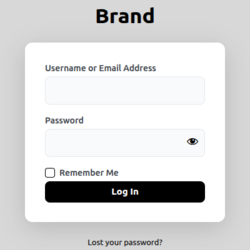
Example: Custom black color scheme with clean design 
Example: Blue preset with professional styling 
Settings page overview – Clean, intuitive interface
Installatie
Automatic Installation
- Log in to your WordPress dashboard
- Navigate to Plugins Add New
- Search for “DC Login Designer”
- Click “Install Now” and then “Activate”
- Go to Settings DC Login Designer
Manual Installation
- Download the plugin ZIP file
- Log in to your WordPress dashboard
- Navigate to Plugins Add New Upload Plugin
- Choose the ZIP file and click “Install Now”
- Click “Activate Plugin”
- Go to Settings DC Login Designer
Configuration
- Your Brand Color – Pick your brand color or use default black
- Quick Color Presets – Or select from 22 Tailwind presets
- Logo & Branding – Choose: Remove WordPress logo, Custom logo, or Custom text
- Background Image – Upload a background image (optional)
- Click “Save Changes”
- Visit your login page to see the transformation!
FAQ
-
Is this plugin free?
-
Yes! DC Login Designer is completely free with no premium upsells or hidden costs.
-
Does it work with any WordPress theme?
-
Yes! The plugin only affects the WordPress login page (/wp-login.php), not your site’s theme or frontend.
-
Will it slow down my site?
-
No! The plugin uses pure CSS with zero JavaScript on the frontend, ensuring maximum performance.
-
Can I use my exact brand colors?
-
Yes! Use the custom color picker to match your exact brand colors. The plugin automatically generates matching shades for buttons, backgrounds, and hover effects.
-
Does it work with custom login URL plugins?
-
Yes! It works with any custom login URL plugin or solution.
-
Can I remove the WordPress logo?
-
Yes! You have three options:
1. Remove WordPress logo completely
2. Replace it with your custom logo
3. Display custom text instead -
Are the logos and text clickable?
-
No! All logos and text are non-clickable by design to prevent unwanted navigation.
-
Does it support background images?
-
Yes! You can upload custom background images that automatically override the color scheme background.
-
Can I revert to the default WordPress login page?
-
Yes! Simply deactivate the plugin and your login page returns to the default WordPress design.
-
Is it translation ready?
-
Yes! The plugin is coded with WordPress internationalization standards.
-
Does it work on multisite?
-
Yes! It works on both single WordPress installations and multisite networks.
-
Will it conflict with other plugins?
-
No! The plugin is designed to work harmoniously with other WordPress plugins.
Beoordelingen


Bijdragers & ontwikkelaars
“DC Login Designer” is open source software. De volgende personen hebben bijgedragen aan deze plugin.
Bijdragers
Vertaal “DC Login Designer” in je eigen taal.
Interesse in ontwikkeling?
Bekijk de code, haal de SVN repository op, of abonneer je op het ontwikkellog via RSS.
Changelog
1.0.0 – 2024-03-10
- Initial release
- Custom color picker with automatic shade generation
- 22 Tailwind CSS color presets with visual preview
- Your Brand Color section with black default
- Quick Color Presets with radio button selection
- Logo & Branding options (Remove WordPress logo, Custom logo, Custom text)
- Background image upload support
- Pure CSS implementation (zero JavaScript on frontend)
- Non-clickable logos and text elements
- Auto-sync text colors with color schemes
- Real-time color preview in admin
- Settings link in plugins list
- Font size slider (16-72px) for custom text
- Color picker for text color customization
- Responsive design for all devices
- WordPress Media Uploader integration
- Single database option for efficiency
- WordPress coding standards compliance