
Beschrijving
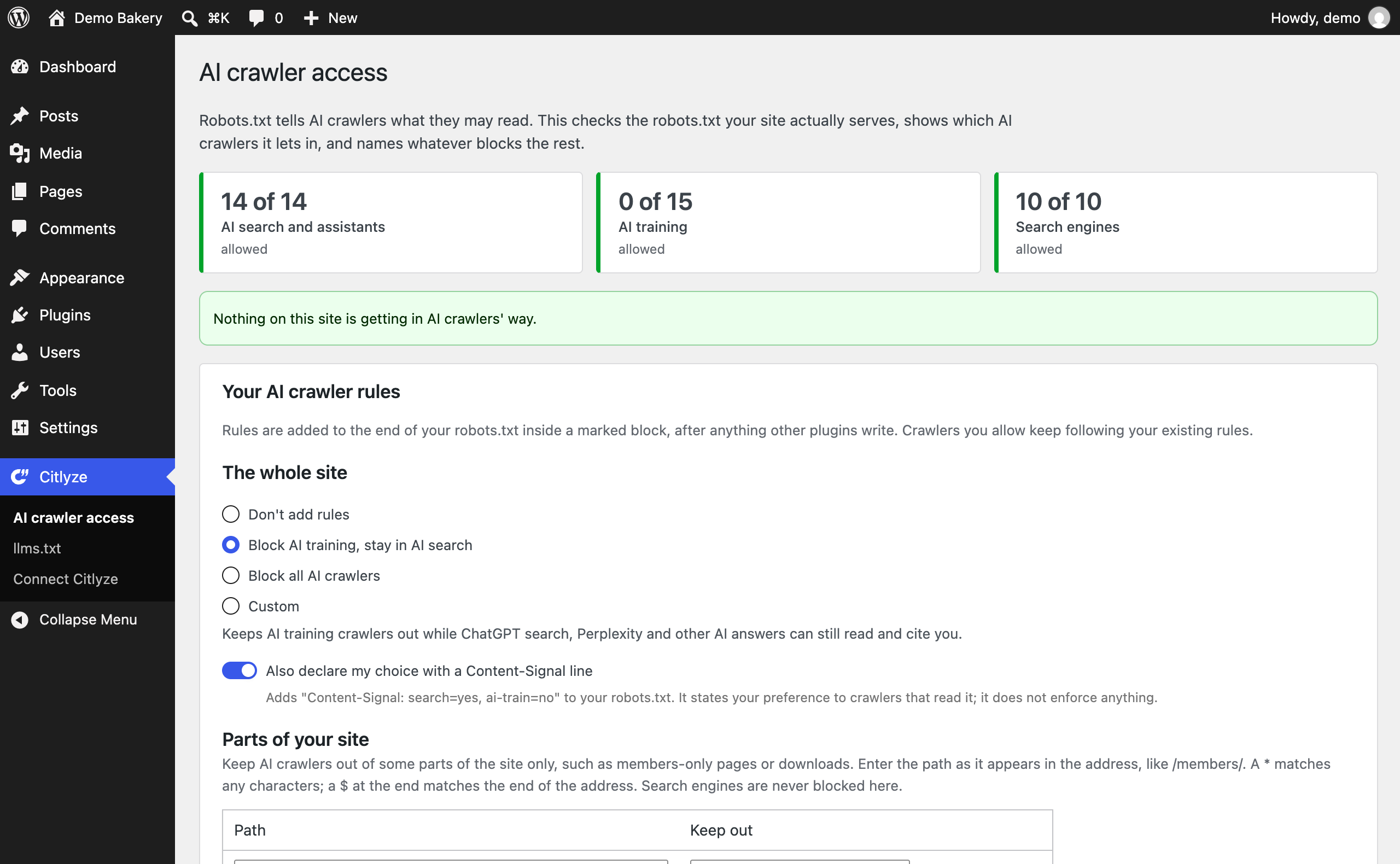
AI Crawler Control shows which AI crawlers can read your WordPress site and names whatever blocks the rest. You can keep AI training crawlers out of your content and stay in ChatGPT search, Perplexity and other AI answers. It is free, works without an account, and never blocks Google, Bing or other search engines.
De robots.txt is het bestand dat AI-crawlers controleren voordat ze een pagina lezen, en daarmee de eerste stap van answer engine optimization (AEO) en generative engine optimization (GEO). Het is ook makkelijk om er iets fout aan te doen. Een plugin, een thema, je hostingprovider of je CDN kan regels toevoegen die je nooit ziet, en één verkeerde regel kan je uit AI-zoeken halen zonder iets aan AI-training te veranderen.
Gratis, geen account nodig
- Controle van de toegang voor AI-crawlers. Leest de robots.txt die je site echt serveert, zoals crawlers hem ontvangen, en laat zien welke van 44 bekende AI-crawlers erdoor mogen: AI-zoekcrawlers (OAI-SearchBot, PerplexityBot, Claude-SearchBot), AI-assistenten die pagina’s op aanvraag ophalen (ChatGPT-User, Claude-User, Perplexity-User) en AI-trainingscrawlers (GPTBot, ClaudeBot, Google-Extended, CCBot).
- Vindt wat ze tegenhoudt. Noemt de plugin, het thema of de instelling achter elke blokkerende regel. Meldt ook een robots.txt-bestand op de server dat WordPress overschrijft, de instelling “Zoekmachines ontmoedigen om deze site te indexeren”, de beheerde robots.txt van Cloudflare en hostingproviders of beveiligingsplugins die crawlers kunnen weigeren voordat de robots.txt wordt gelezen.
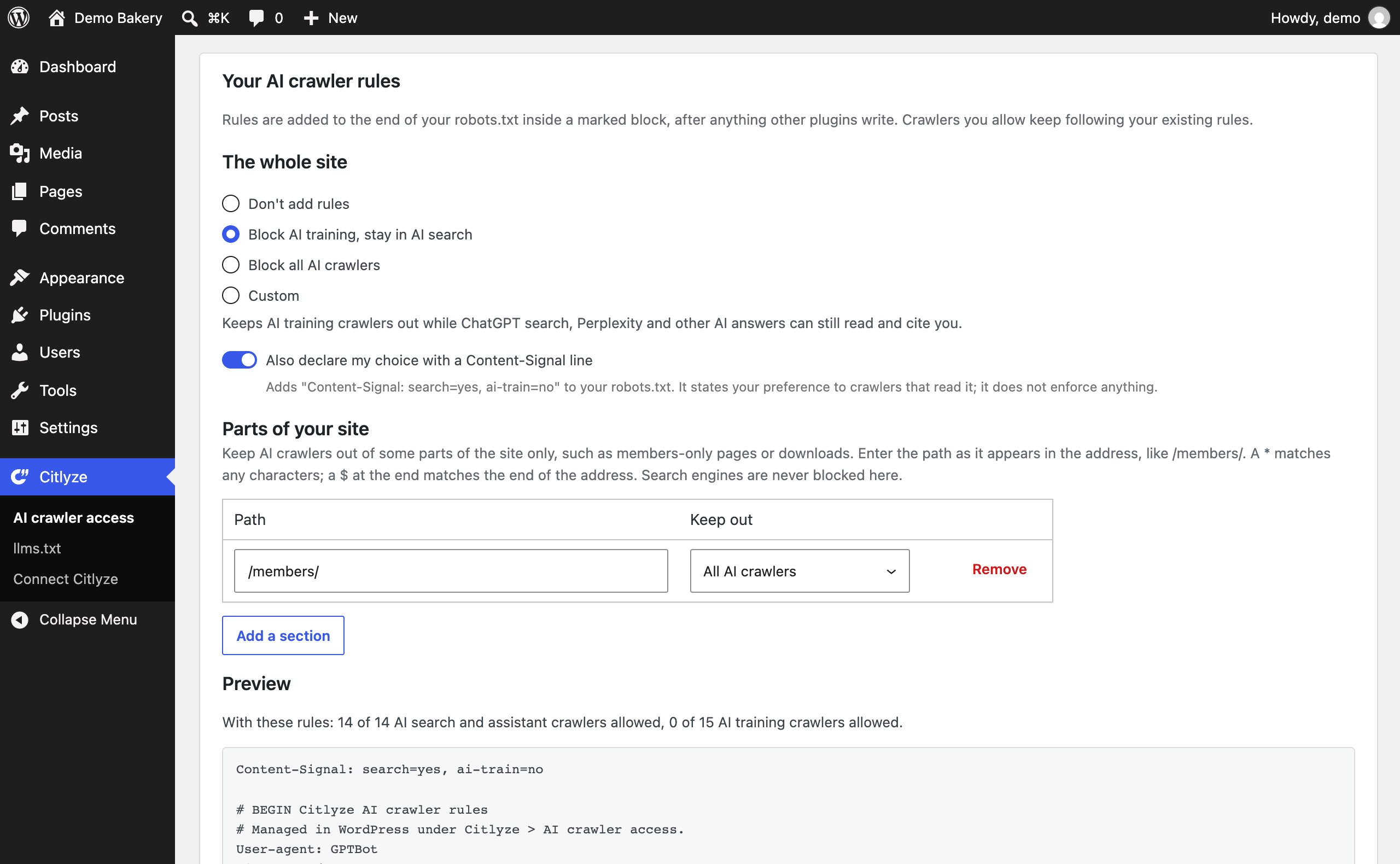
- Regels voor AI-crawlers met voorbeeld. Blokkeer AI-training en blijf in AI-zoeken, blokkeer alle AI-crawlers of kies crawlers een voor een. Je ziet de precieze regels voordat je opslaat en kunt alles ongedaan maken. Zoekmachines zoals Google en Bing worden hier nooit geblokkeerd.
- Content-Signal-regel (optioneel). Legt in de robots.txt je voorkeur over AI-training vast voor crawlers die de Content Signals-conventie lezen.
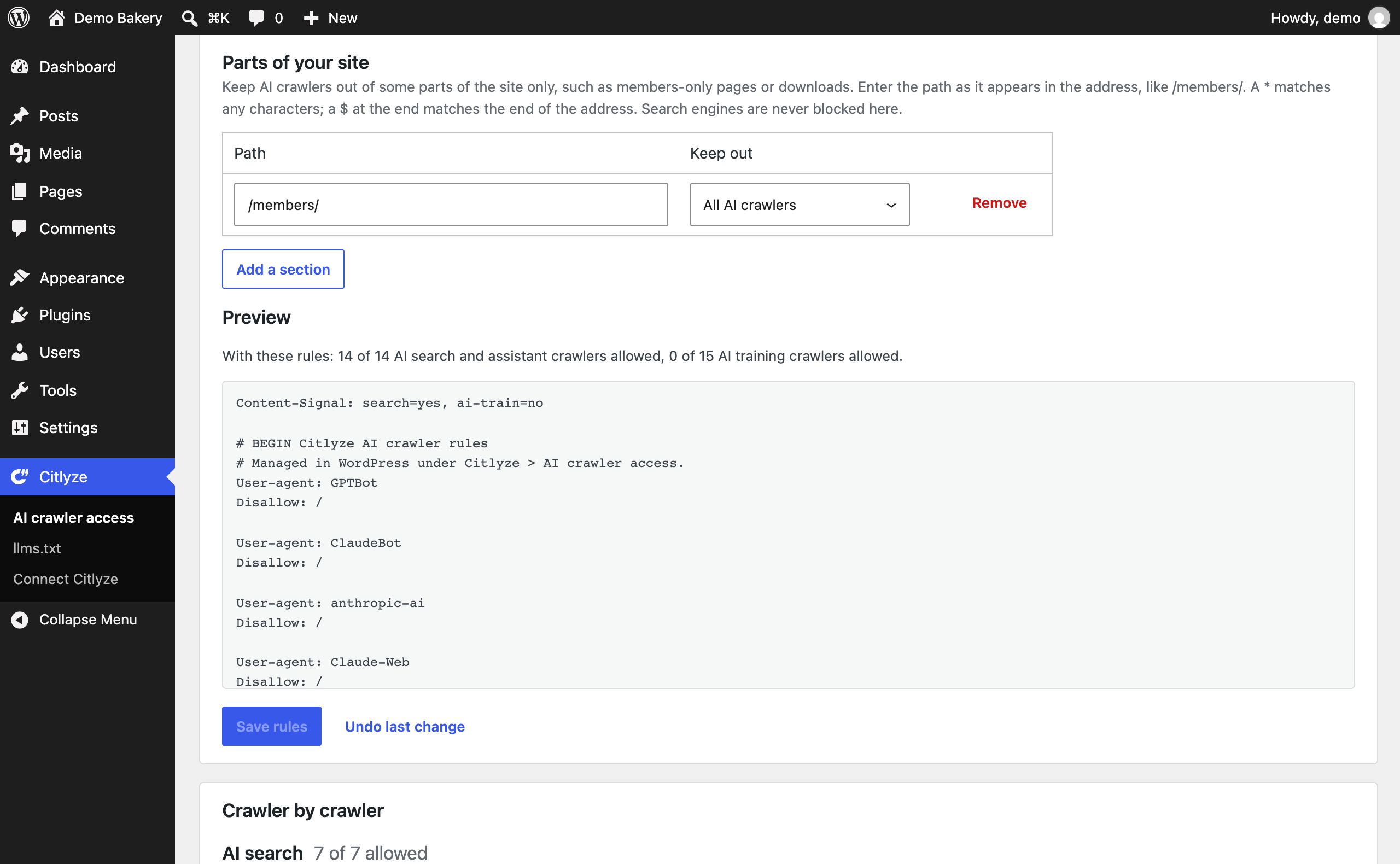
- Rules for parts of your site. Keep AI training crawlers, or every AI crawler, out of sections such as /members/ or /downloads/ while the rest of the site stays open. The check marks crawlers kept out of a section as “Limited”.
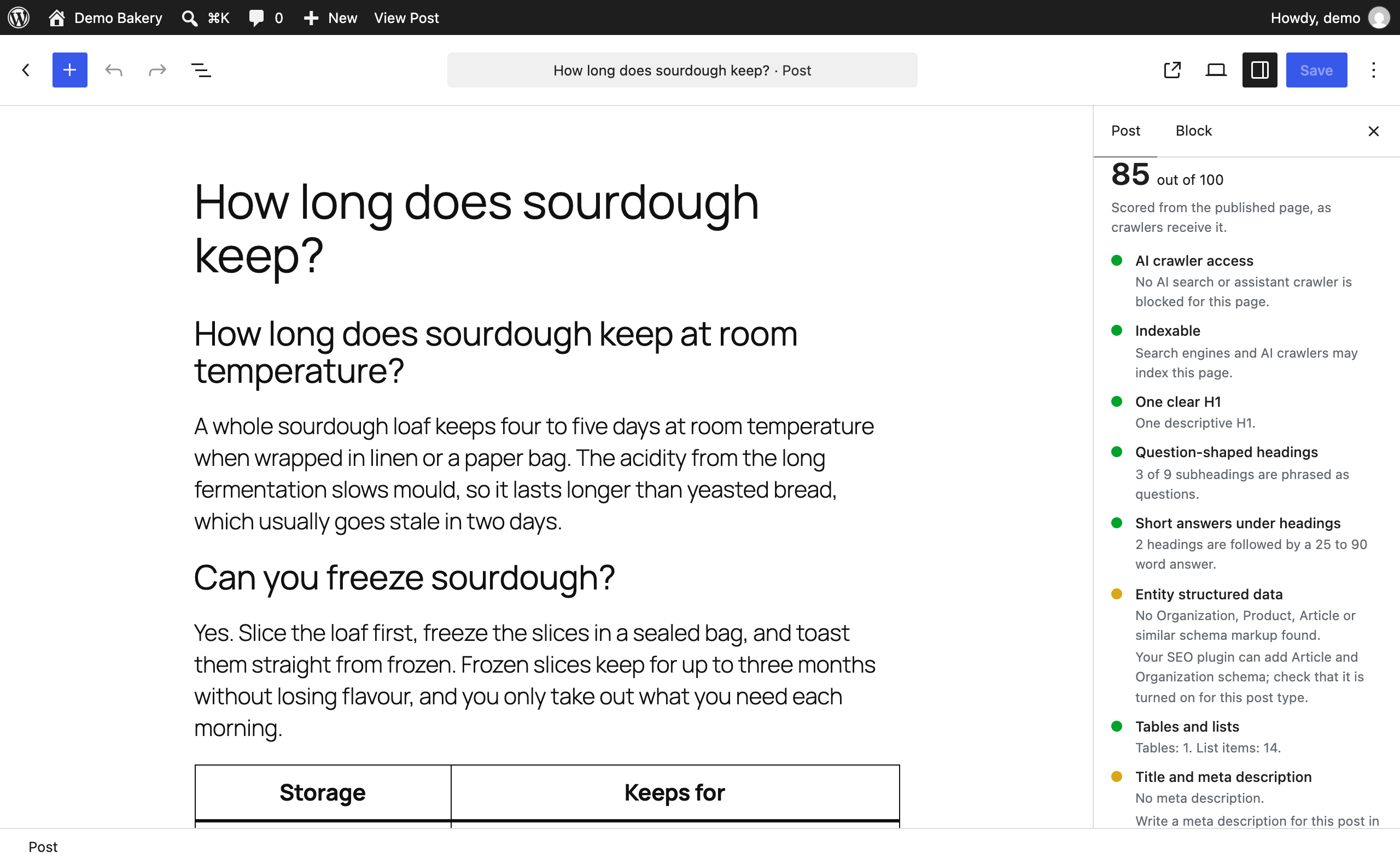
- AI readiness in the editor. A panel in the block editor, or a box in the classic editor, scores each post for AI answers from 0 to 100: crawler access for that exact page, one clear H1, question-shaped headings, short answers under headings, tables and lists, schema markup, and title and meta description. Content checks update as you write; the full score runs after you save. It uses the same scoring as the Citlyze Chrome extension.
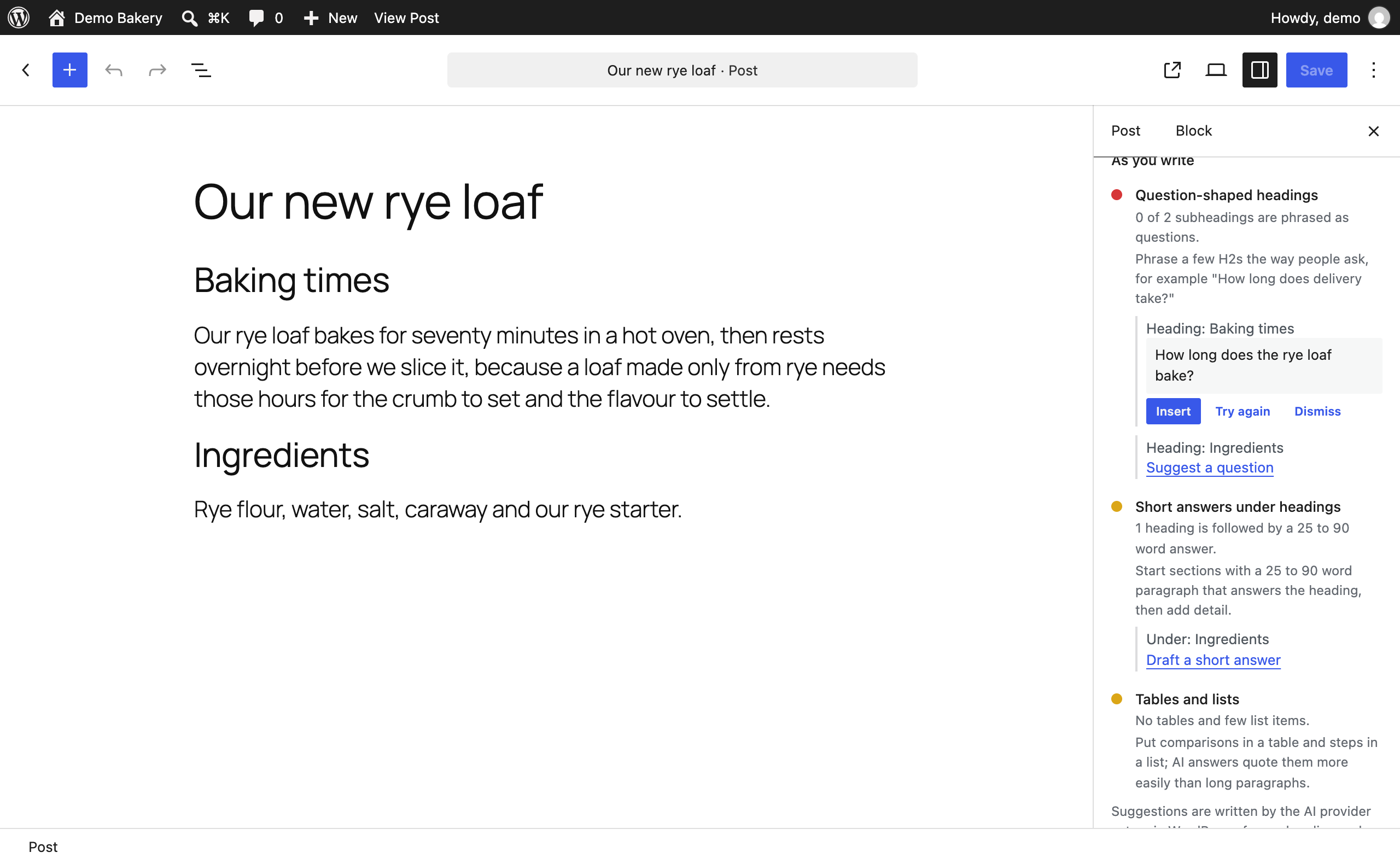
- AI suggestions, only when you ask. On WordPress 7.0 and later, with an AI provider set up in WordPress, the editor panel can suggest a question for a heading or draft a short answer under it. You read the suggestion first; nothing changes until you click Insert, and Undo takes it back out.
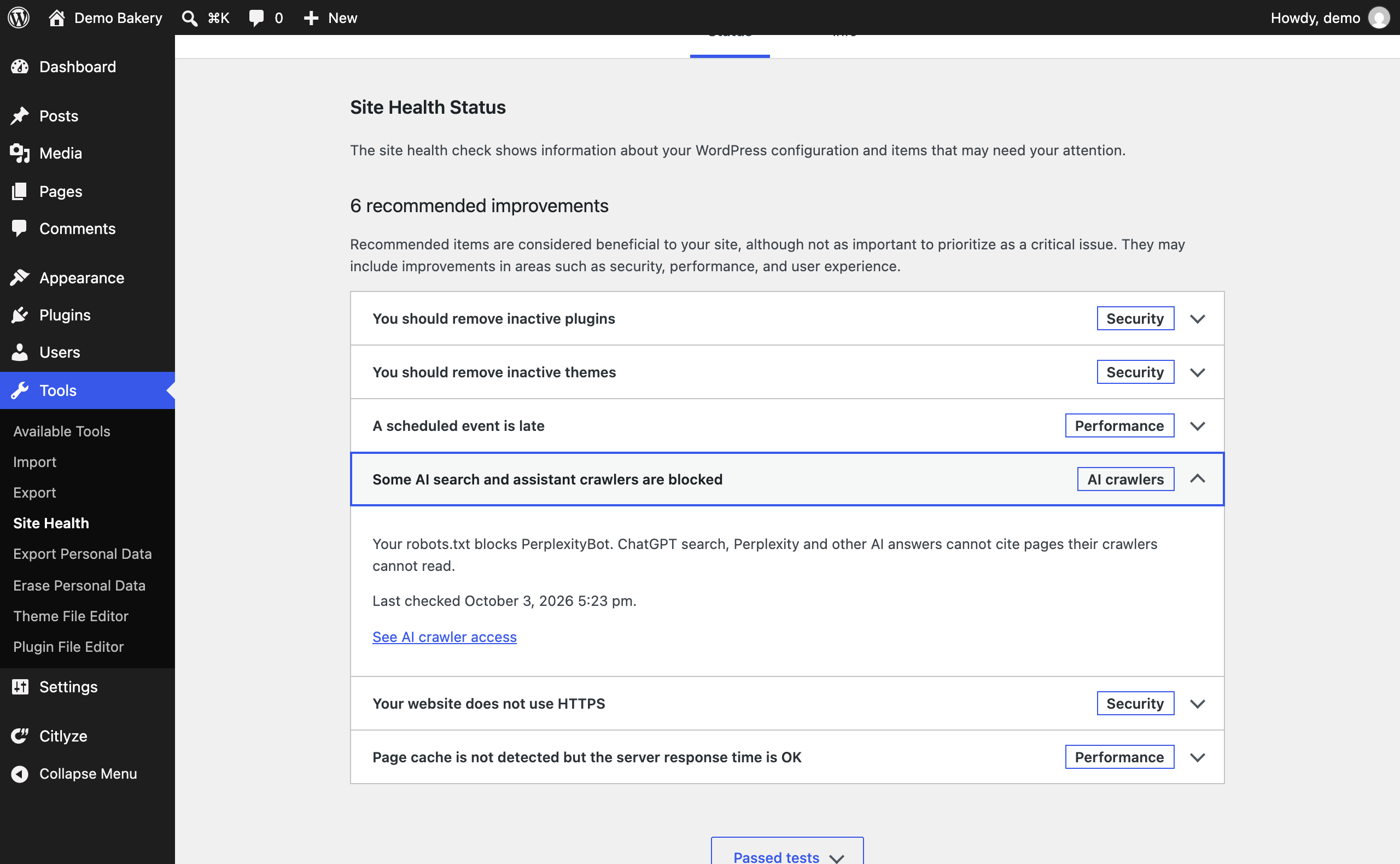
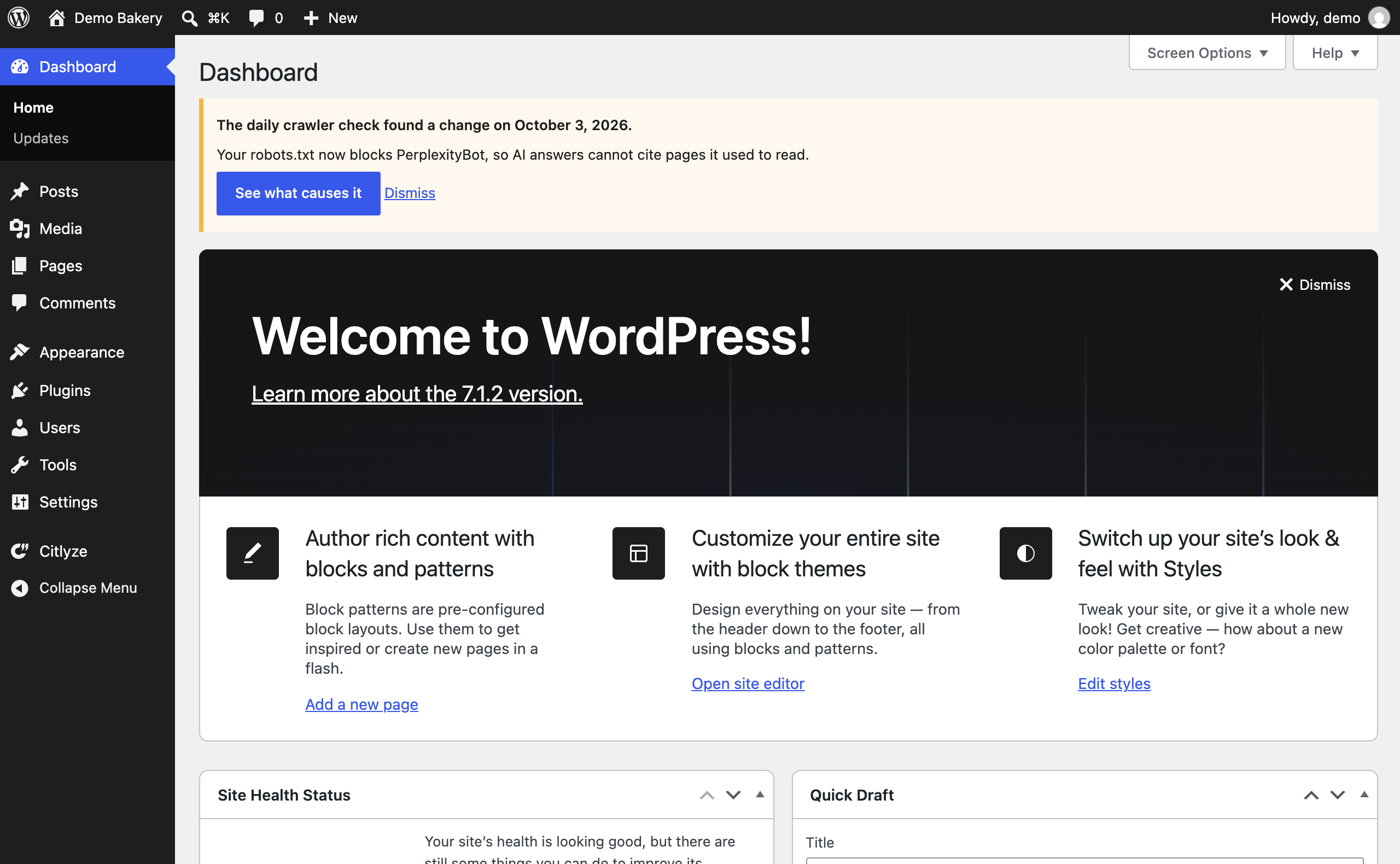
- Keep watching. Once a day the plugin checks the robots.txt crawlers receive. If something you did not choose starts blocking AI search crawlers, AI assistants or search engines, a notice appears in wp-admin and Site Health reports it. Email alerts are optional.
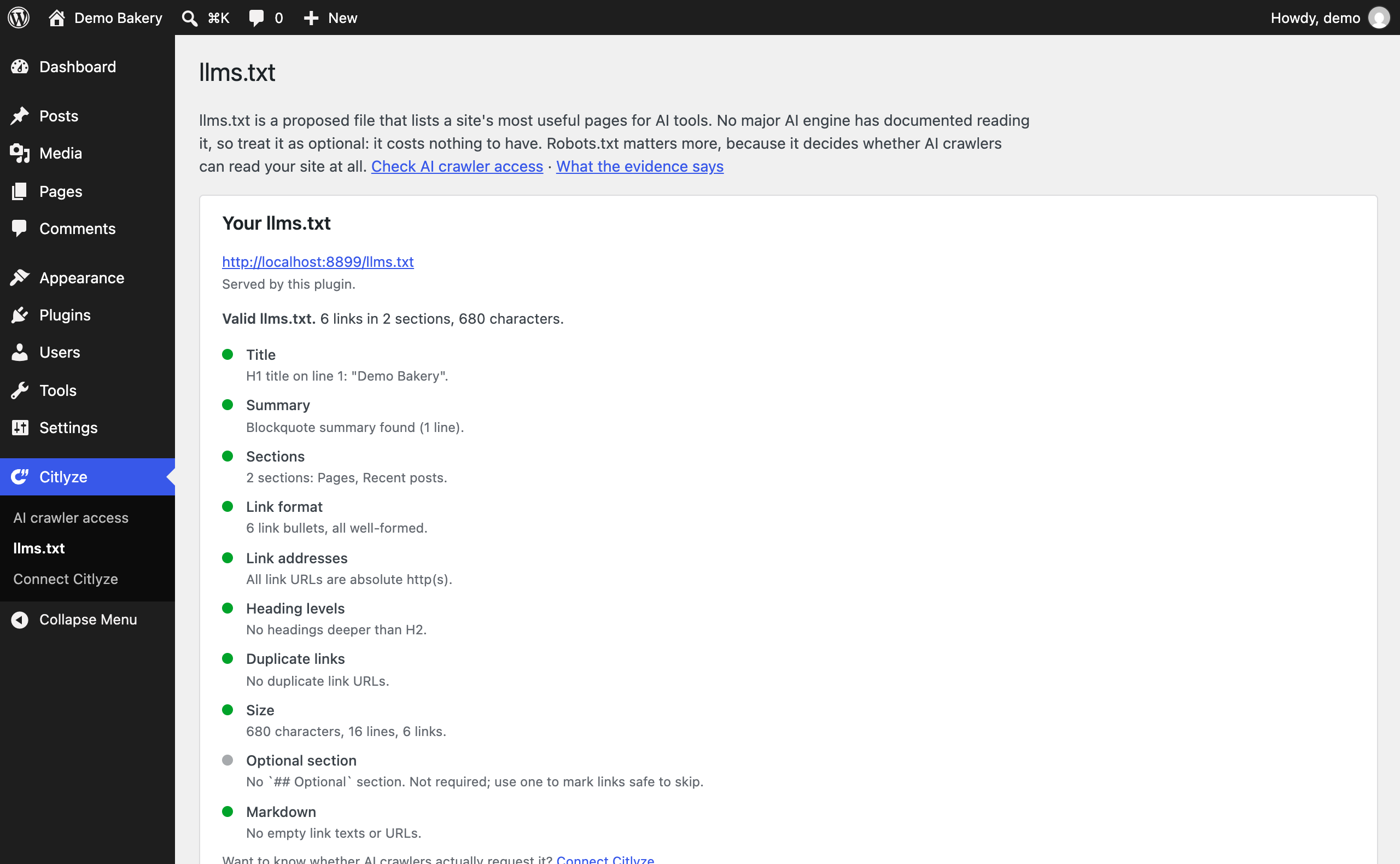
- llms.txt, handled honestly. Finds the llms.txt your site serves, whatever generates it, and checks it against the llmstxt.org format. If your site has none, the plugin can serve a simple one listing your pages and recent posts. If Yoast SEO, Rank Math or another plugin already generates one, it stays out of the way.
- Works with WordPress AI agents. On WordPress 6.9 and later, AI agents connected through the Abilities API and the WordPress MCP adapter can read your AI crawler access and llms.txt status. They cannot change anything.
Everything above runs inside your WordPress site and your browser, and nothing is sent to Citlyze. AI suggestions are the one exception, and only when you click: they go to the AI provider you set up in WordPress.
AI-training blokkeren, in AI-zoeken blijven
OpenAI, Anthropic, Perplexity and others run separate crawlers for separate jobs. GPTBot collects training data. OAI-SearchBot builds the index ChatGPT search cites. ChatGPT-User fetches a page when someone asks ChatGPT about it. Blocking GPTBot keeps your content out of future model training. Blocking OAI-SearchBot removes you from ChatGPT search answers, which is rarely what a site owner wants.
The “Block AI training, stay in AI search” choice blocks training crawlers only, and leaves Google-Extended allowed unless you tick “Also block Google-Extended”. Google uses that token for Gemini training and for grounding answers in the Gemini app and Vertex AI, so blocking it also keeps your pages out of those answers. It has no effect on Google Search, AI Overviews or AI Mode.
Optioneel: Citlyze verbinden
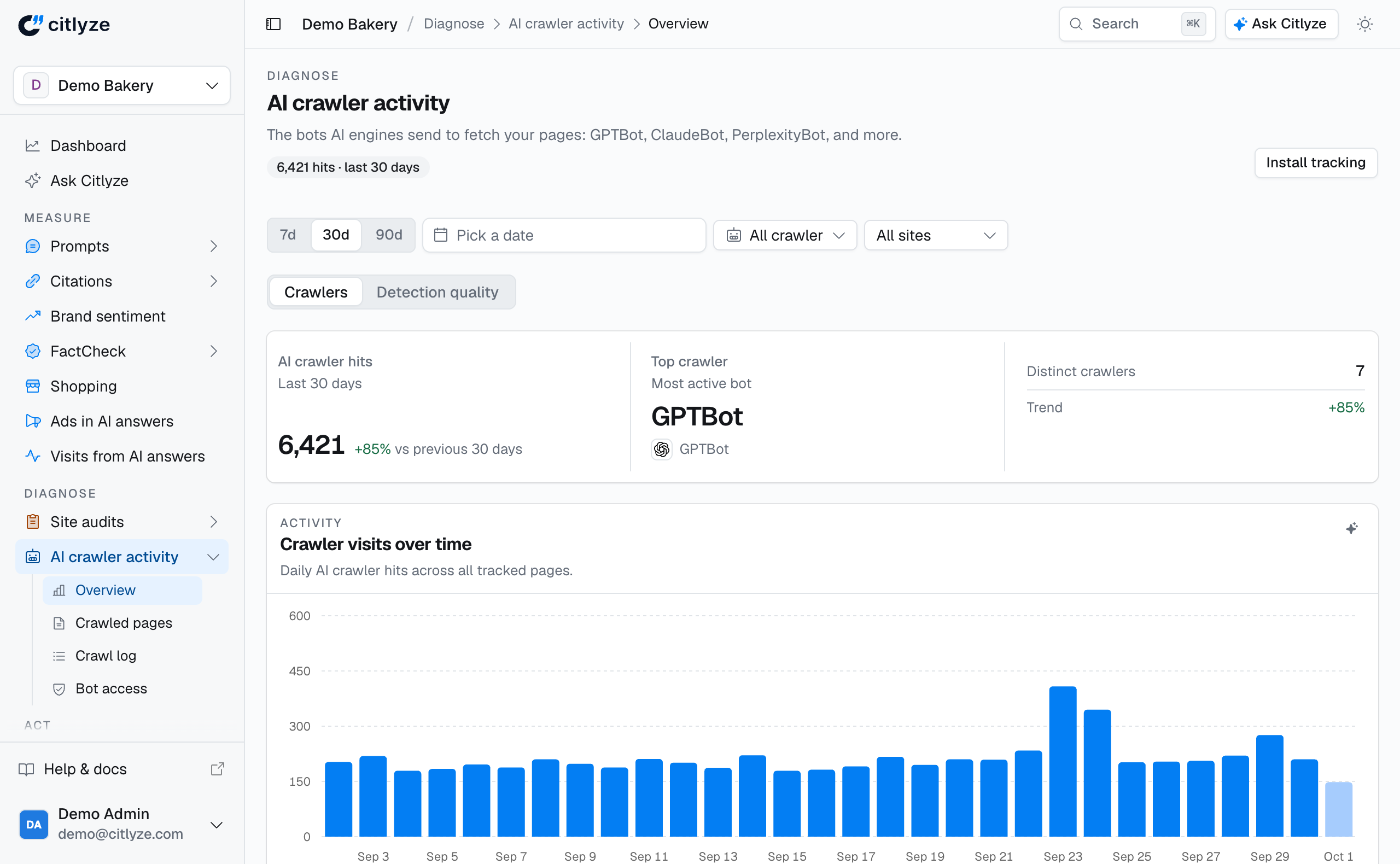
Robots.txt says what crawlers may do, not what they actually do. With a Citlyze account, the plugin also reports AI crawler visits and visits from AI answers to your Citlyze workspace:
- Serverside detectie van AI-bots die JavaScript-statistieken missen: GPTBot, ChatGPT-User, OAI-SearchBot, ClaudeBot, PerplexityBot, Bingbot, Amazonbot, Applebot, de AI-crawlers van Google en Meta, en nog veel meer.
- Verified AI crawler analytics: Citlyze independently confirms that a request came from the bot it claims to be, so spoofed user agents never inflate your numbers.
- Volging van AI-verwijzingen: zie wanneer ChatGPT, Perplexity, Gemini, Copilot, Claude, Meta AI, Grok, DeepSeek of Mistral echte bezoekers naar je pagina’s sturen.
- Ondersteuning voor Web Bot Auth: cryptografisch ondertekende AI-agents worden herkend en voor verificatie aan Citlyze doorgegeven.
- No impact on page speed: a matching request is noted in the site’s own database, and delivery happens after the response is finished or on a one-minute schedule. Nothing loads in visitors’ browsers, and the plugin sets no cookies.
- Exact status codes and redirects: counts show the real response (200, 301, 404, 410, 500), including requests another plugin redirects before WordPress renders a page, and where each redirect pointed.
- Betrouwbare verzending: gebeurtenissen worden in ondertekende batches verzonden en opnieuw geprobeerd als Citlyze even niet bereikbaar is.
- Instellingen met beveiliging voorop: het ondertekeningsgeheim kan alleen worden beschreven en wordt versleuteld opgeslagen, met optionele constanten in wp-config.php zodat het de database nooit raakt.
- Drafts from Citlyze: send a content draft from your Citlyze workspace to this site, and it arrives as a WordPress draft for you to review. Nothing is published, a published post is never changed, and Citlyze holds no password for your site.
Citlyze zelf volgt hoe ChatGPT, Gemini, Perplexity en de AI-antwoorden van Google reageren op de vragen die je klanten stellen, en of ze je citeren.
A Citlyze account and a site key generated in Citlyze are required for tracking and for receiving drafts only. Both stay inactive until an administrator enters valid settings.
Externe diensten
The free tools in this plugin make no requests to Citlyze. They read your own site from your browser, such as its robots.txt file and the pages being checked.
Once a day, the crawler check also requests your site’s own robots.txt from your server. Alert emails, if you turn them on, are sent by your site through WordPress’s own mail.
AI suggestions in the editor use the AI provider set up in WordPress (WordPress 7.0 and later), and only when an author clicks “Suggest a question” or “Draft a short answer”. The heading and up to about 4,000 characters of the text under it then go to that provider through WordPress’s AI client, under that provider’s terms and privacy policy. Nothing goes to Citlyze. Without an AI provider set up in WordPress, the editor shows no suggestions and sends nothing.
The optional Citlyze connection connects to the Citlyze endpoint entered by the site administrator. It requires a Citlyze account and cannot provide tracking without that service.
For a request from a known AI crawler or signed agent, the plugin sends the visitor IP address, user agent, requested path, query string, HTTP status code, HTTP method, the request host, and for redirects the redirect destination (a same-site path, or only the domain for an external destination) and the name of the plugin that issued it. When Web Bot Auth is present, it also sends bounded Signature, Signature-Input, Signature-Agent, and safe original-request metadata so Citlyze can independently verify the signature. When a human visitor arrives from a supported AI answer engine, the plugin sends the referrer URL without its query string, and the value of the visit’s utm_source parameter when it names a supported AI service (for example chatgpt.com). The site key ID, a timestamp, a request signature, and a one-time nonce authenticate each batch. A batch also names the page cache the plugin detected, if any (a caching plugin such as WP Rocket, or a host such as WP Engine), because a page cache answers some requests before the plugin runs. Once a day the plugin also downloads Citlyze’s current list of known crawlers, signed with your site key, so newly launched crawlers are recognised without a plugin update.
Data is sent only when the connection is configured and the request carries a recognised crawler user agent, contains bounded Web Bot Auth headers, comes from a supported AI-referrer host, or when an administrator explicitly sends a connection test. Requests are never sent for ordinary human page views, and nothing else from a human visitor’s query string is sent. Matching requests wait in a table in your WordPress database until delivery, at most one day. Citlyze uses the IP address and signature metadata transiently for verification and does not store them. Referrer URLs are not stored. Citlyze persists aggregate counters, and on plans that include the crawl log it also keeps a per-request record of verified crawler and signed agent visits (time, path, sanitized query string, status code, and redirect destination; never an IP address or user agent) for up to 30 days. Sanitized user-agent samples may be retained in bounded diagnostics for unrecognized bots.
With the connection configured, the plugin also asks Citlyze once an hour, and when an administrator presses “Check for drafts now”, whether your workspace has sent a content draft to this site. That request carries the site key ID, a timestamp, a request signature, a one-time nonce and the plugin version, and nothing about your visitors or your content. A waiting draft comes back as a title, HTML, an excerpt and a suggested slug, and is saved as a WordPress draft after passing through WordPress’s own content filter. The plugin then tells Citlyze the ID and edit address of the draft it saved, so the workspace can link to it. You can switch this off under Citlyze > Connect Citlyze > Drafts from Citlyze, and no request is made while it is off.
Servicevoorwaarden: https://citlyze.com/terms-of-service
Privacybeleid: https://citlyze.com/privacy-policy
Schermafbeeldingen
Installatie
- Ga in WordPress naar Plugins > Nieuwe plugin toevoegen, zoek naar “AI Crawler Control” en installeer en activeer de plugin.
- Open Citlyze > Toegang voor AI-crawlers. De controle start meteen.
- Optional: choose AI crawler rules, review the preview, and save.
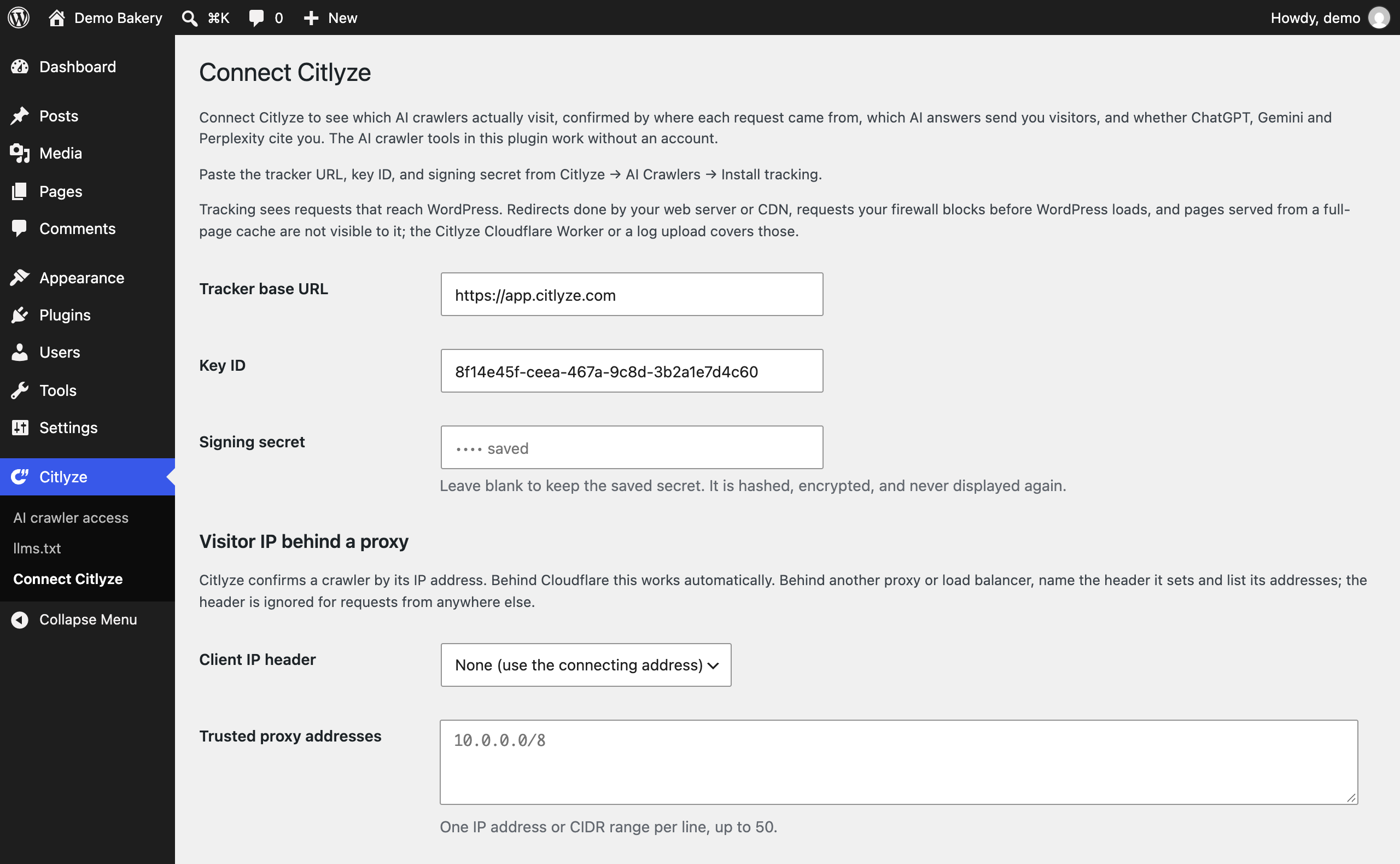
- Optional, to track AI crawler visits: in Citlyze, open AI Crawlers > Install tracking and generate a site key. In WordPress, open Citlyze > Connect Citlyze, enter the tracker URL, key ID and signing secret, save, and use “Send test event” to verify the connection.
Definieer voor hosting met extra aandacht voor beveiliging CITLYZE_CRAWLER_SIGNING_KEY in wp-config.php. De plugin hasht de waarde in het geheugen en slaat hem niet op in de WordPress-database. CITLYZE_CRAWLER_ENDPOINT en CITLYZE_CRAWLER_KEY_ID kunnen daar ook worden gedefinieerd.
FAQ
-
Hoe blokkeer ik GPTBot zonder uit ChatGPT Search te verdwijnen?
-
Open Citlyze > Toegang voor AI-crawlers en kies “AI-training blokkeren, in AI-zoeken blijven”. Dat blokkeert GPTBot en de andere trainingscrawlers en laat OAI-SearchBot en ChatGPT-User met rust, zodat ChatGPT Search je pagina’s kan blijven lezen en citeren. Het voorbeeld toont de precieze regels voordat je opslaat.
-
Waarom vinden ChatGPT of Perplexity mijn site niet?
-
Start with Citlyze > AI crawler access. It shows whether your robots.txt blocks OAI-SearchBot, PerplexityBot or the assistants that fetch pages, and which plugin, theme or setting wrote the rule. It also flags the “Discourage search engines” setting and hosts or firewalls that can block crawlers before robots.txt is read. Being readable is the first requirement; whether AI answers then cite you depends on your content and your competitors, which is what Citlyze measures.
-
Verandert de plugin mijn robots.txt?
-
Only when you choose AI crawler rules and save them. The plugin then adds a marked block of rules to the end of the robots.txt WordPress serves, after anything other plugins write. Until then it changes nothing, and “Undo last change” puts back your previous choice.
-
Can I block AI crawlers from part of my site only?
-
Yes. Under “Parts of your site”, add a path such as /members/ and choose whether to keep out AI training crawlers or all AI crawlers. The rest of the site keeps your choice for the whole site. Crawlers that get rules for a section keep following your site’s other robots.txt rules too, because the plugin repeats them in their group.
-
Where do AI suggestions come from?
-
From the AI provider set up in WordPress 7.0 and later, such as OpenAI, Anthropic or Google, never from Citlyze. A suggestion is only requested when you click, you see it before anything changes, and Insert adds it as plain text that Undo removes. Without a provider set up in WordPress, the panel shows no suggestions.
-
Will the plugin tell me if AI crawlers get blocked later?
-
Yes. Once a day it checks the robots.txt crawlers receive. If another plugin, a theme, a file on the server or the “Discourage search engines” setting starts blocking AI search crawlers, AI assistants or search engines, you get a notice in wp-admin, a Site Health result, and, if you turn it on, an email. Rules you chose on the AI crawler access screen never raise an alert.
-
Werkt de plugin met Yoast SEO, Rank Math en All in One SEO?
-
Yes. Their robots.txt rules stay as they are, and the check names them when they block a crawler. The plugin’s own rules are added after theirs.
If one of them already generates llms.txt, this plugin checks that file instead of serving its own. -
Mijn site heeft een robots.txt bestand op de server. Wat gebeurt er dan?
-
Een robots.txt-bestand op de server wordt rechtstreeks door je webserver verzonden, dus WordPress en zijn plugins kunnen er niets aan toevoegen. De controle leest dat bestand, en de plugin toont de gekozen regels zodat je ze erin kunt kopiëren.
-
Is er een Citlyze-account nodig?
-
Nee. De tools voor AI-crawlers werken zonder account. Je hebt alleen een account nodig om bezoeken van AI-crawlers en bezoeken vanuit AI-antwoorden in Citlyze bij te houden.
-
Does the AI readiness score match the Citlyze Chrome extension?
-
Yes. The editor panel uses the same checks and scoring as the Citlyze Chrome extension and the free AEO grader on citlyze.com. A published page gets the same score on all three.
-
Does llms.txt work?
-
No major AI engine has documented reading llms.txt, and public log studies show little evidence that they request it. It costs nothing to have, so the plugin helps you keep a valid one, but robots.txt matters far more: it decides whether AI crawlers can read your site at all. Our read of the evidence: https://citlyze.com/blog/does-llms-txt-work
-
Maakt de plugin mijn site trager?
-
No. The checks run only on the plugin’s admin screens. On the public site, the plugin only adds its rules when robots.txt is requested, and, if you connect Citlyze, notes AI crawler requests without loading anything in visitors’ browsers.
-
With Citlyze: does tracking work with full-page caching or a CDN?
-
Only when the request reaches WordPress. A full-page cache or CDN can respond without running PHP, so those crawler visits are not visible to this plugin. The connection screen tells you when it detects a page cache. Use the Citlyze Cloudflare Worker, or upload your server logs in Citlyze, for sites where most traffic is served from a cache or the edge.
-
With Citlyze: what can tracking not see?
-
Anything that never reaches WordPress: redirects done by your web server or CDN (for example rules in .htaccess or nginx, or a host-level redirect to https or www), requests a firewall blocks before WordPress loads, and pages served from a full-page cache. The Citlyze Cloudflare Worker or a log upload covers those.
-
Met Citlyze: mijn site staat achter een proxy of load balancer. Werkt de verificatie dan nog?
-
Citlyze confirms a crawler by its IP address, so the plugin needs the real visitor address. Behind Cloudflare this works automatically: the plugin trusts Cloudflare’s visitor header only for requests that come from Cloudflare’s own network. Behind another proxy, choose the header it sets and list its addresses under Citlyze > Connect Citlyze > Visitor IP behind a proxy.
-
Met Citlyze: welke crawlers worden geteld?
-
The plugin recognises crawlers that issue live page requests, including GPTBot, ChatGPT-User, OAI-SearchBot, ClaudeBot, PerplexityBot, Googlebot, Google Gemini Notebook, Google-Agent, Atlassian Rovo, Amazonbot, Applebot, Bingbot, Meta crawlers, and others. The list is updated daily from Citlyze and with each release.
Citlyze independently confirms that a request genuinely came from the crawler it claims to be before counting it as verified. A user-agent string on its own is only a claim, so unconfirmed requests are reported separately as diagnostics and never inflate verified crawler totals.
-
With Citlyze: how do drafts reach my site?
-
Someone in your Citlyze workspace opens a content draft and chooses Export > Send to WordPress. Within the hour, or straight away when you press “Check for drafts now” under Citlyze > Connect Citlyze, the draft appears under Posts as a WordPress draft. Sending the same draft again updates that draft while it is still unpublished; WordPress keeps the earlier text as a revision. Once you publish a post, the plugin never touches it again.
-
With Citlyze: can Citlyze publish to or change my site?
-
No. Citlyze has no password for your site and cannot reach it. Your site asks Citlyze for waiting drafts, saves them as drafts, and nothing more. Publishing is always done by you in WordPress. To stop receiving drafts, untick “Receive drafts from Citlyze” under Citlyze > Connect Citlyze.
-
Waar gaan de gegevens naartoe?
-
The free tools send nothing anywhere. With the Citlyze connection configured, events go to the Citlyze endpoint entered in Citlyze > Connect Citlyze. See the External services section for the exact fields, timing, retention summary, and policy links.
-
Hoe wordt het ondertekeningsgeheim opgeslagen?
-
Het geheim dat je plakt, wordt nooit opgeslagen. Het wordt meteen omgezet in een afgeleide ondertekeningssleutel, en die sleutel wordt versleuteld met de WordPress salts van je site voordat hij in de database wordt geschreven. Het veld kan alleen worden beschreven: na het opslaan kan de waarde niet meer via het beheerscherm worden uitgelezen.
Je kunt opslag in de database helemaal vermijden door in plaats daarvan CITLYZE_CRAWLER_SIGNING_KEY in wp-config.php te definiëren.
If a database backup leaks, rotate the site key in Citlyze under AI Crawlers > Install tracking. Rotation invalidates the old key immediately.
Beoordelingen
Er zijn geen beoordelingen voor deze plugin.
Bijdragers & ontwikkelaars
“AI Crawler Control by Citlyze – robots.txt, llms.txt & AEO Audit” is open source software. De volgende personen hebben bijgedragen aan deze plugin.
Bijdragers
“AI Crawler Control by Citlyze – robots.txt, llms.txt & AEO Audit” is vertaald in 1 locale. Dank voor de vertalers voor hun bijdragen.
Vertaal “AI Crawler Control by Citlyze – robots.txt, llms.txt & AEO Audit” in je eigen taal.
Interesse in ontwikkeling?
Bekijk de code, haal de SVN repository op, of abonneer je op het ontwikkellog via RSS.
Changelog
3.3.0
- New: drafts from Citlyze. With Citlyze connected, a content draft sent from your workspace is saved here as a WordPress draft for you to review. Nothing is published and a published post is never changed.
- New: “Drafts from Citlyze” on the Connect Citlyze screen, with a switch to turn it off, a “Check for drafts now” button and the drafts received recently.
- The External services section describes the hourly request this adds.
3.2.2
- Changed: “Block AI training, stay in AI search” no longer blocks Google-Extended. Google uses that token for Gemini training and for answers in the Gemini app, so blocking it also kept your pages out of Gemini app answers. To keep blocking it, tick “Also block Google-Extended” under that choice.
- If you already use that choice, Google-Extended stays blocked after the update until you untick the new box.
- Changed: the Content-Signal line says ai-train=no once you block every training crawler other than Google-Extended.
3.2.1
- Fixed: the access check matches robots.txt rules written with non-ASCII paths, such as /über/.
- Fixed: a robots.txt rule ending in “$” matches only at the end of a path, in the access check and the daily check.
- Fixed: Applebot follows your Googlebot rules when no group names it, as Apple documents.
- Fixed: the daily check no longer warns about blocks that come from your own rules in this plugin.
- Fixed: the generated llms.txt shows what a logged-out visitor sees, so pages only members or editors can open never end up in it.
- Fixed: the llms.txt check accepts horizontal rules and plain lists before the first section, and page titles with brackets in links.
- Fixed: the delivery queue stays within its limit while delivery keeps failing.
- Fixed: a deprecation notice on PHP 8.4.
- Improved: the editor check counts words in Chinese and Japanese text.
- The privacy section now also lists two values a delivery batch carries: the AI service named in a visit’s utm_source, and the page cache the plugin detected.
3.2.0
- New: llms.txt screen. Finds the llms.txt your site serves, whatever generates it, and checks it against the llmstxt.org format.
- New: serve a simple llms.txt listing your pages and recent posts when your site has none. It steps aside when another plugin or a file provides one.
- New: read-only abilities for AI agents on WordPress 6.9 and later: list AI crawlers, read AI crawler access, and read the llms.txt status.
- New: daily crawler check. A notice in wp-admin and a Site Health result when something you did not choose starts blocking AI search crawlers, AI assistants or search engines, or robots.txt stops loading. Optional alert emails.
- New: an “AI Crawler Control” section under Site Health > Info for support requests.
3.1.0
- New: AI readiness panel in the block editor and a box in the classic editor. Scores each post for AI answers with the same checks as the Citlyze Chrome extension.
- New: pre-publish AI readiness checks.
- New: AI crawler rules for parts of your site, for AI training crawlers or all AI crawlers. Groups repeat your site’s other robots.txt rules so nothing else changes for those crawlers.
- New: AI suggestions in the block editor, from the AI provider set up in WordPress 7.0 and later: a question for a heading, or a short answer under it, inserted only when you click.
3.0.0
- Nieuw: gratis controle van de toegang voor AI-crawlers. Leest de robots.txt die je site serveert en laat zien welke van 44 AI-crawlers erdoor mogen, gegroepeerd in AI-zoeken, AI-assistenten en AI-training.
- Nieuw: noemt de plugin, het thema, het bestand of de instelling achter elke blokkerende regel, en meldt hostingproviders, CDN’s en beveiligingsplugins die crawlers kunnen blokkeren voordat de robots.txt wordt gelezen.
- Nieuw: regels voor AI-crawlers in de robots.txt: AI-training blokkeren en in AI-zoeken blijven, alle AI-crawlers blokkeren of crawlers een voor een kiezen, met voorbeeld en ongedaan maken. Zoekmachines worden nooit geblokkeerd.
- Nieuw: optionele Content-Signal-regel.
- New: Citlyze menu in wp-admin. The connection settings moved from Settings > AI Crawler Tracker to Citlyze > Connect Citlyze; old links redirect.
- Hernoemd naar AI Crawler Control door Citlyze.
- Vereist WordPress 6.4 of nieuwer.
2.3.0
- Reports the exact HTTP status code (301, 302, 404, 410, 500 and others) instead of only 404.
- Counts requests that are redirected before WordPress renders a page, such as redirects from the Redirection plugin, canonical redirects, and REST API requests, and records where each redirect pointed.
- Delivery is now queued in the site database and sent in signed batches after the response is finished, with retries, so a short outage no longer loses events and crawlers never wait for it.
- Herkent het echte bezoekers-IP achter Cloudflare automatisch, en achter andere proxy’s via een nieuwe instelling voor vertrouwde proxy’s, zodat crawlers kunnen worden geverifieerd.
- Downloadt dagelijks de ondertekende lijst met bekende crawlers van Citlyze, zodat nieuwe crawlers worden herkend zonder op een nieuwe pluginrelease te wachten.
- Detecteert volledige paginacaches en legt uit wat de plugin niet kan zien.
- Requires the Citlyze beacon format introduced with this release.
2.2.0
- Hits die de plugin meldt, krijgen in het Citlyze-dashboard nu hun eigen bron, zodat verkeer dat de plugin verzamelt te onderscheiden is van andere verzamelaars.
2.1.0
- Expanded the AI answer-engine referrer list (Copilot, Duck.ai, Poe, Phind, HuggingChat and more).
- AI verwijzingen worden nu ook gedetecteerd op basis van utm_source waarden die AI-engines toevoegen wanneer er geen referrer wordt verzonden (bijvoorbeeld ChatGPT’s utm_source=chatgpt.com).
- Reports the matched utm_source with referral events for stripped-referrer attribution.
2.0.0
- De plugin hernoemd naar AI Crawler Tracker door Citlyze.
- Versleutelde, alleen beschrijfbare opslag van het ondertekeningsgeheim en overschrijvingen via wp-config toegevoegd.
- Enforced HTTPS endpoints and improved request-input sanitization.
- Een ondertekende verbindingstest toegevoegd die niet meetelt.
- Privacyvermeldingen, vertaalbare beheerteksten en opschoning bij het verwijderen toegevoegd.
- Moved delivery to a stricter, signed request format.
- Doorsturen van beperkte handtekeningmetadata van Web Bot Auth toegevoegd.
- Crawlerdekking uitgebreid, met onbevestigde claims gescheiden van geverifieerde totalen.