

Beschrijving
ChatMaxima AI Chatbot puts a chatbot on your WordPress site that answers questions from your own content. A guided setup takes about five minutes and never leaves WordPress:
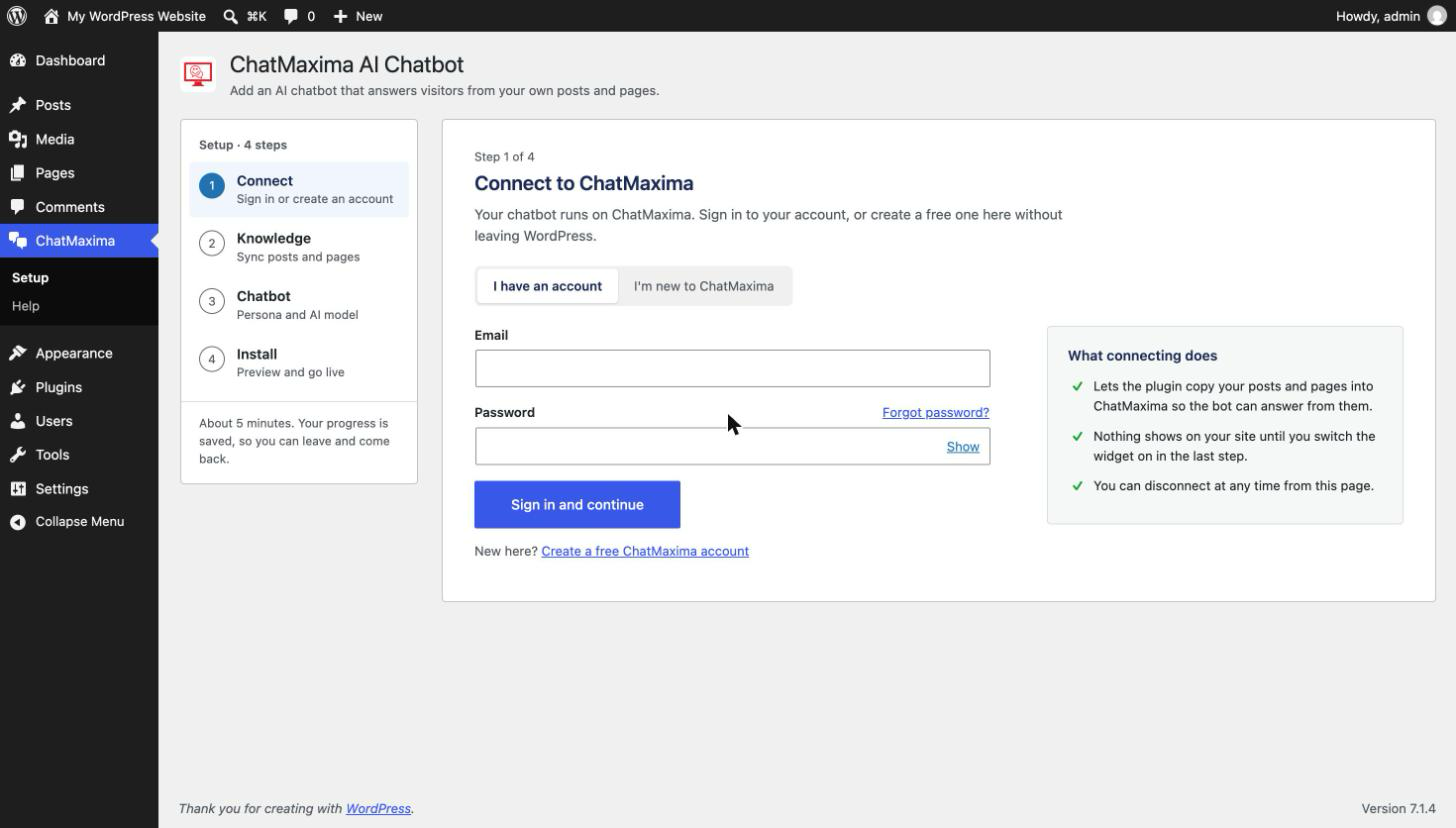
- Connect – Sign in to ChatMaxima, or create a free account right in the plugin.
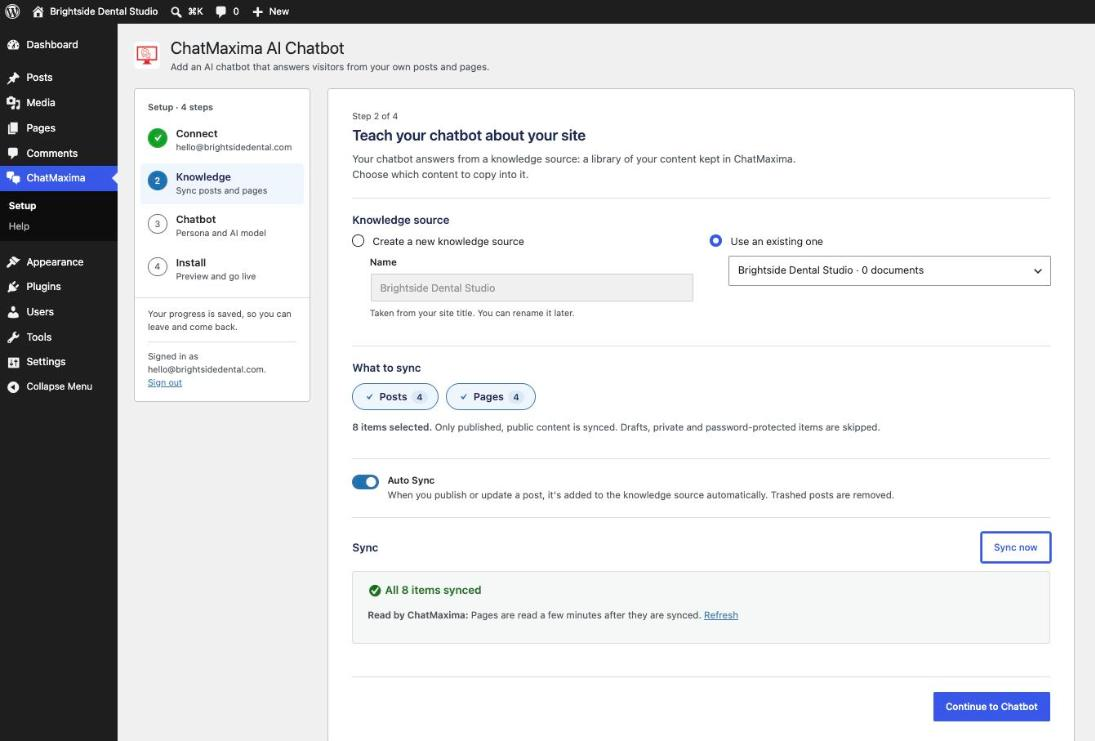
- Knowledge – Choose which posts, pages and other content types to sync. The plugin copies them into a ChatMaxima knowledge source in small batches, with progress shown as it goes.
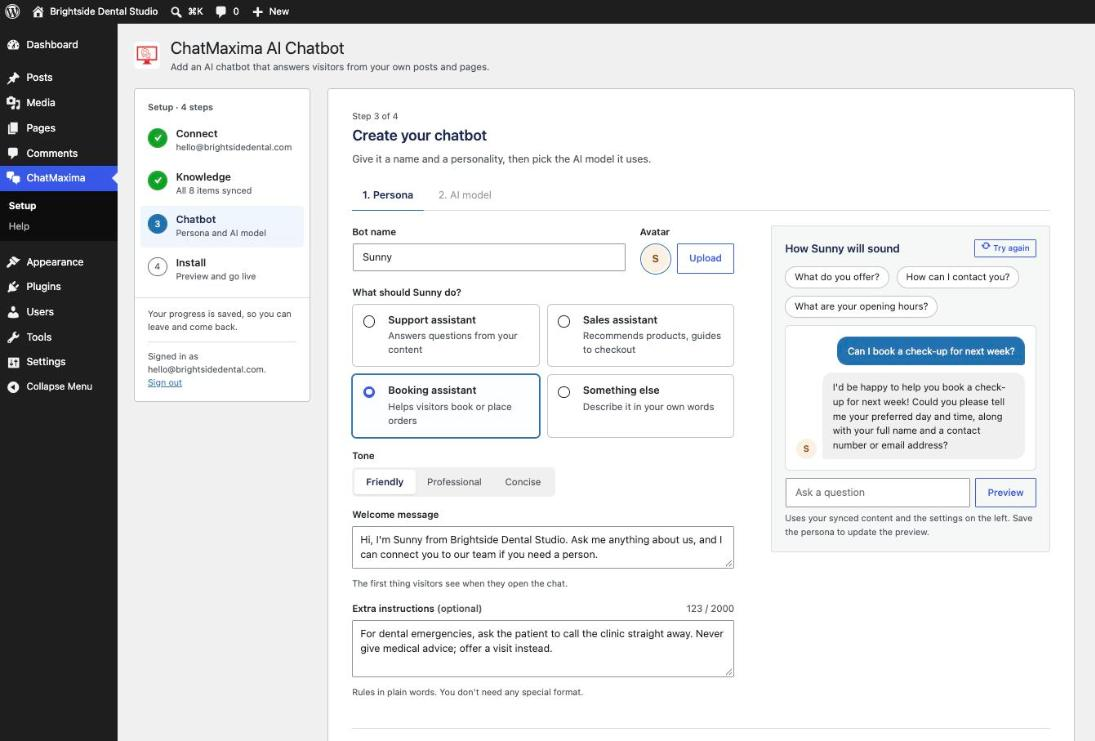
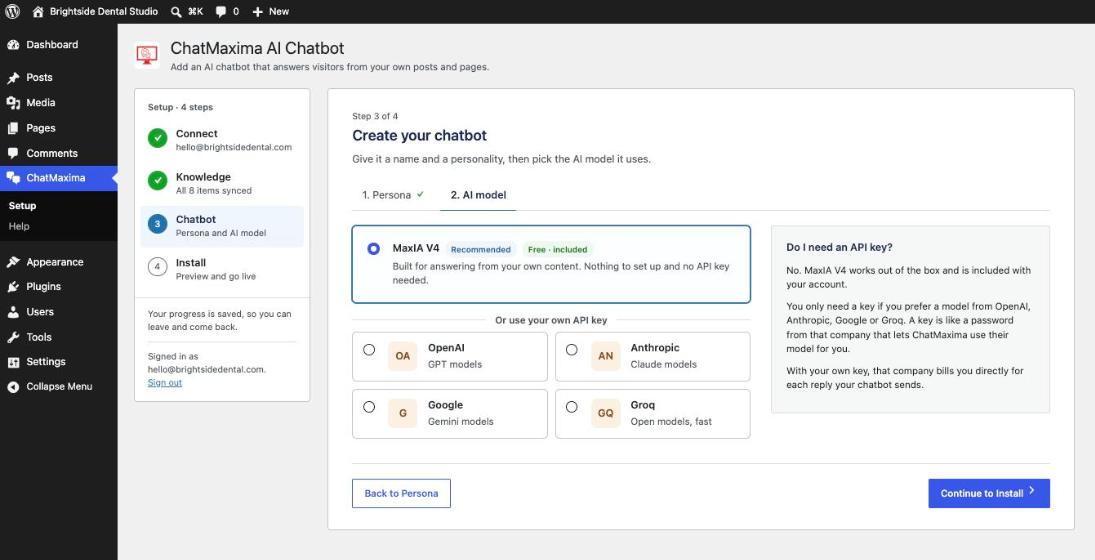
- Chatbot – Give the bot a name, an avatar, a role (support, sales, booking, or your own words), a tone, a welcome message and any extra rules. Try sample questions and see how it answers before anyone else does. MaxIA V4 is included at no cost; you can also use your own OpenAI, Anthropic, Google Gemini or Groq key.
- Install – Preview the real chat widget in the admin, then switch it on for visitors when you are ready.
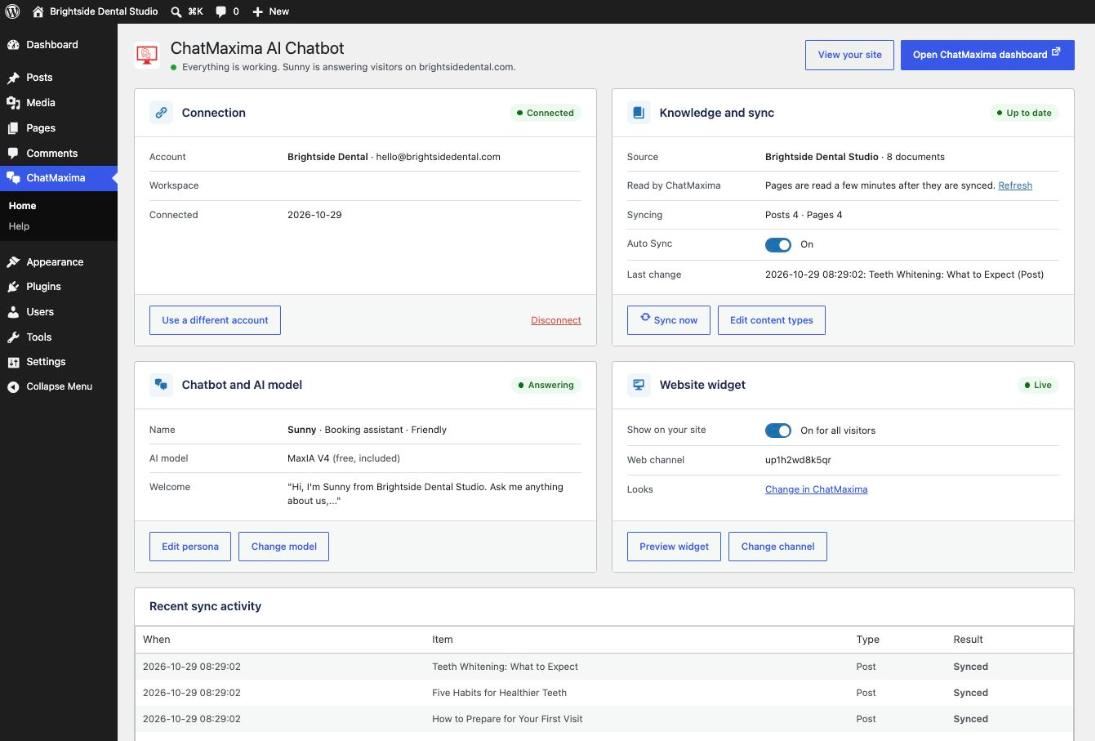
After setup, the plugin’s Home page shows the connection, knowledge source, chatbot and widget at a glance, each editable in place.
Features
- Guided setup – Four steps with progress saved, so you can leave and come back
- Free account from the plugin – 1,000 messages a month and the MaxIA V4 AI model, no API key needed
- Content sync – Published, public posts and pages only; drafts, private and password-protected content are never sent
- Auto Sync – New and updated posts are added to the knowledge source when published, and removed when trashed
- Per-post control – A sync box in the editor shows status and lets you exclude a post
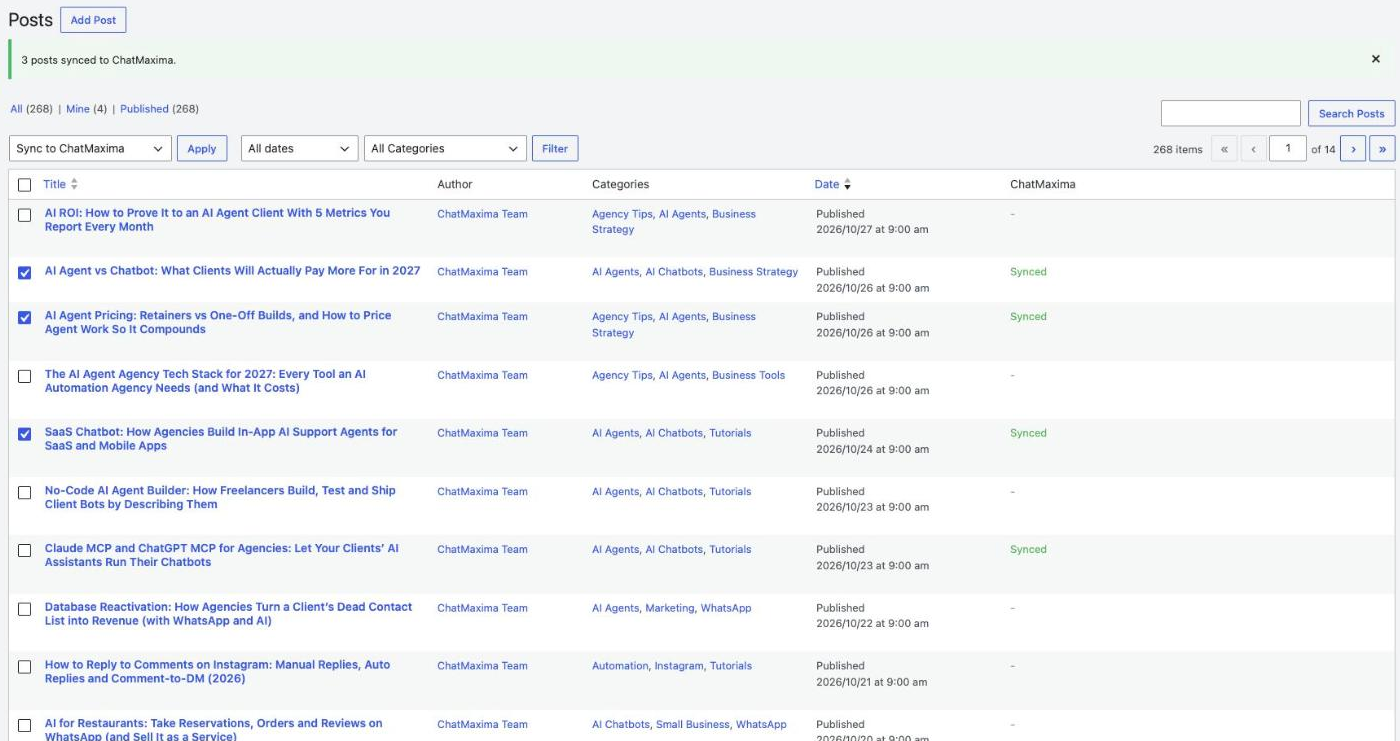
- Bulk sync – Sync selected posts from the Posts list
- Chatbot persona – Name, avatar, role, tone, welcome message and extra instructions
- Live preview – Ask the chatbot sample questions while you set it up
- Your own AI key – OpenAI, Anthropic, Google Gemini or Groq, checked before it is saved and kept in your ChatMaxima workspace, never in WordPress
- One switch to go live – The widget shows to visitors only when you turn it on
- Multisite ready – Each site connects on its own
Requirements
- A ChatMaxima account (one can be created during setup)
- WordPress 5.0 or higher
- PHP 7.4 or higher
External Services
This plugin connects to ChatMaxima, a third-party AI chatbot and customer messaging service, to provide its core functionality. A ChatMaxima account is required.
The plugin communicates with ChatMaxima in the following ways:
- Chatbot widget: On pages where the widget is enabled, the plugin loads the ChatMaxima widget script from https://widget.chatmaxima.com/embed.min.js so the chatbot can render for your visitors.
- Account authentication: When you connect the plugin, your ChatMaxima login credentials are sent to the ChatMaxima API to obtain an access token. Only the resulting token is stored in your WordPress database.
- Content sync: When you sync content, the URLs of the published, public WordPress posts and pages you choose are sent to the ChatMaxima API, which reads those pages so they can be indexed into your selected knowledge source for AI training.
- Chatbot setup: The chatbot name, avatar image, role, tone, welcome message and instructions you enter, and any AI provider API key you choose to add, are sent to the ChatMaxima API and stored in your ChatMaxima workspace. Keys are never stored in WordPress.
- Account creation: If you create an account from the plugin, the name, email address and password you enter and your site’s title are sent to the ChatMaxima API. ChatMaxima emails a code to confirm the address.
Data is sent to ChatMaxima only when you connect the plugin, sync content, or serve the widget. The plugin itself does not collect personal data from your site visitors.
- ChatMaxima Terms of Service: https://chatmaxima.com/tos/
- ChatMaxima Privacy Policy: https://chatmaxima.com/privacy/
Support
For support and documentation, visit ChatMaxima Documentation or contact support@chatmaxima.com.
Privacy Policy
This plugin connects to ChatMaxima services to provide chatbot and knowledge source functionality. When you sync content:
– Post URLs are sent to ChatMaxima for crawling
– Content is indexed for AI training
– No personal user data is collected from your visitors
Please review ChatMaxima’s privacy policy (https://chatmaxima.com/privacy/) for complete information about data handling.
Schermafbeeldingen
Installatie
Automatic Installation
- Log in to your WordPress admin dashboard
- Go to Plugins > Add New
- Search for “ChatMaxima AI Chatbot”
- Click “Install Now” and then “Activate”
Manual Installation
- Download the plugin zip file
- Go to Plugins > Add New > Upload Plugin
- Choose the zip file and click “Install Now”
- Activate the plugin
Setup
- Open ChatMaxima in the admin menu
- Sign in to ChatMaxima, or create a free account
- Choose the content to sync and let the sync run
- Name your chatbot, pick its role and tone, and try it
- Switch “Show on your site” on when you want visitors to see it
FAQ
-
Do I need a ChatMaxima account?
-
Yes. You can create a free one during setup without leaving WordPress. The free plan includes 1,000 messages a month and the MaxIA V4 AI model.
-
Do I need an AI API key?
-
No. MaxIA V4 is included with your ChatMaxima account. You only need a key if you prefer a model from OpenAI, Anthropic, Google or Groq, and that company then bills you for each reply. A key you add is checked with the provider first and stored in your ChatMaxima workspace, never in WordPress.
-
What is a knowledge source?
-
A knowledge source is where your content is stored and indexed for AI training. When you sync your WordPress posts, they are added to the knowledge source so the AI chatbot can answer questions about your content.
-
How does content sync work?
-
The plugin sends the addresses of your published, public posts and pages to ChatMaxima’s API. ChatMaxima then reads those pages into your knowledge source. Drafts, private posts and password-protected posts are never sent.
-
Can I customize the chatbot appearance?
-
The name, avatar and welcome message are set in the plugin. Colours, position and the rest of the widget’s look are changed in the ChatMaxima dashboard.
-
Where do the chats go?
-
To the ChatMaxima inbox, under the web channel the plugin sets up for your site. A person on your team can take over any chat from there.
-
Will this slow down my website?
-
No, the plugin uses lightweight JavaScript that loads asynchronously. Content syncing happens via AJAX in the admin area and won’t affect frontend performance.
-
Can I exclude certain posts from syncing?
-
Yes, each post has a “ChatMaxima Sync” meta box where you can check “Exclude from sync” to prevent that post from being synced.
-
Does auto-sync work with custom post types?
-
Yes, you can select which post types to sync in the settings. Auto-sync will work for all selected post types.
Beoordelingen
Er zijn geen beoordelingen voor deze plugin.
Bijdragers & ontwikkelaars
“ChatMaxima AI Chatbot” is open source software. De volgende personen hebben bijgedragen aan deze plugin.
Bijdragers
Vertaal “ChatMaxima AI Chatbot” in je eigen taal.
Interesse in ontwikkeling?
Bekijk de code, haal de SVN repository op, of abonneer je op het ontwikkellog via RSS.
Changelog
2.1.0
- New guided setup: Connect, Knowledge, Chatbot, Install, with progress saved between visits. The old Settings, Knowledge Sources and Content Sync pages are replaced by Setup (then Home) and Help
- Create a free ChatMaxima account from the plugin, confirmed by an emailed code
- Workspace picker when your account has more than one workspace
- Create the chatbot in the plugin: name, avatar, role, tone, welcome message and extra instructions, with a live preview of its answers
- Choose MaxIA V4 (included) or your own OpenAI, Anthropic, Google Gemini or Groq key; keys are checked with the provider and only the models the key can use are offered
- The web channel is created or reused for you and the real widget is previewed in the admin before you go live
- Home page after setup with every part editable in place
- Content sync now skips password-protected posts and respects the content type selection and the per-post exclude flag on auto sync, as the documentation always said
- “Sync now” and the bulk action only work on posts the user can edit
- Hardened the admin against injected names from ChatMaxima data; tokens are no longer autoloaded options
- Removed the unused theme colour, social media and token ID settings
2.0.4
- New settings page layout: a setup tracker across the top and a two-column view that uses the full screen width
- Auto Sync and the post types to sync now save as soon as you change them (they were not saved before)
- Show the chat widget to visitors with one switch, with the live status shown above it
- Knowledge source details shown as documents, storage and type at a glance
2.0.3
- Fixed: after Sync All Content, posts still showed as not synced in the Posts list and the editor sync box
2.0.2
- Fixed: the Chatbot Widget channel list showed blank entries, so no channel could be selected or installed
2.0.1
- The chatbot widget now loads through wp_enqueue_script, so caching and optimization plugins handle it like any other script
- All admin text is escaped on output and all form input is unslashed and sanitized
- The post editor sync box shows sync errors inline instead of in a browser alert
- Uninstall now also removes the installed-channel settings on every site of a multisite network
- Updated documentation, support and terms links
2.0.0
- Added API v2 authentication with JWT
- Added knowledge source management
- Added content sync feature
- Added bulk sync with progress tracking
- Added auto-sync on publish
- Added post meta box for sync control
- Added bulk action for syncing multiple posts
- Added ChatMaxima column in posts list
- Improved admin UI with card-based layout
1.0.0
- Initial release
- AI chatbot widget integration
- Theme color customization
- Social media platform support
- Token-based authentication