

Beschrijving
De snelste en enige volledig uitgeruste SEO-plugin die de richtlijnen en regels volgt die zijn opgelegd door WordPress en zoekmachines.
Bekijk een voorbeeld van The SEO Framework in WordPress Playground.
Begin met het gebruiken van bewezen SEO tactieken om de ranking van je site te verbeteren. Schoon, toegewijd, uitbreidbaar, onbeperkt, zonder advertenties en zonder verplichtingen.
Om het af te maken, dit is de snelste volledig uitgeruste SEO-plugin, en het past perfect in je WordPress-website, zonder je in het donker achter te laten.
Het is eenvoudig om te beginnen. Activeer deze plugin en je site is direct beschermd tegen prominente SEO-aanvallen. The SEO Framework vult ook alle essentiële metatags voor je in. Een echte tijdsbesparing. Geniaal.
Migreren | Setup | Verbeteren | Extensies | API | Ondersteuning | Privacy
We poured over 30 000 hours of love into this plugin.
Here are the results:
-
Het is briljant.
The SEO Framework is een expertsysteem voor SEO. Het is de enige oplossing die op intelligente wijze kritieke SEO-metatags kan genereren in elke taal door je WordPress-omgeving te lezen. Deze automatisering bespaart je een aanzienlijke hoeveelheid tijd die kan worden gebruikt om meer inhoud te schrijven of je te richten op andere taken. Het verwijdert ook de noodzaak van geavanceerde SEO-kennis. -
Het wordt vooraf geconfigureerd geleverd.
Met The SEO Framework bieden we een uitstekend startpunt voor je website door al je pagina’s rationeel te optimaliseren. Natuurlijk kun je het ook aanpassen zoals je wilt. Als je geen SEO-expert bent, leer dan wat je zou willen optimaliseren in onze Installatiehandleiding. -
Het helpt je bij het optimaliseren van je metadata.
We hebben de enige SEO-plugin gemaakt die de richtlijnen van Google voor webmasters tot op de letter volgt. Het kostte jaren van onderzoek en aanpassingen om dit goed te vertalen binnen je WordPress-interface. Eindelijk kun je vrij je pagina’s optimaliseren zonder zorgen over het maken van kritieke fouten. -
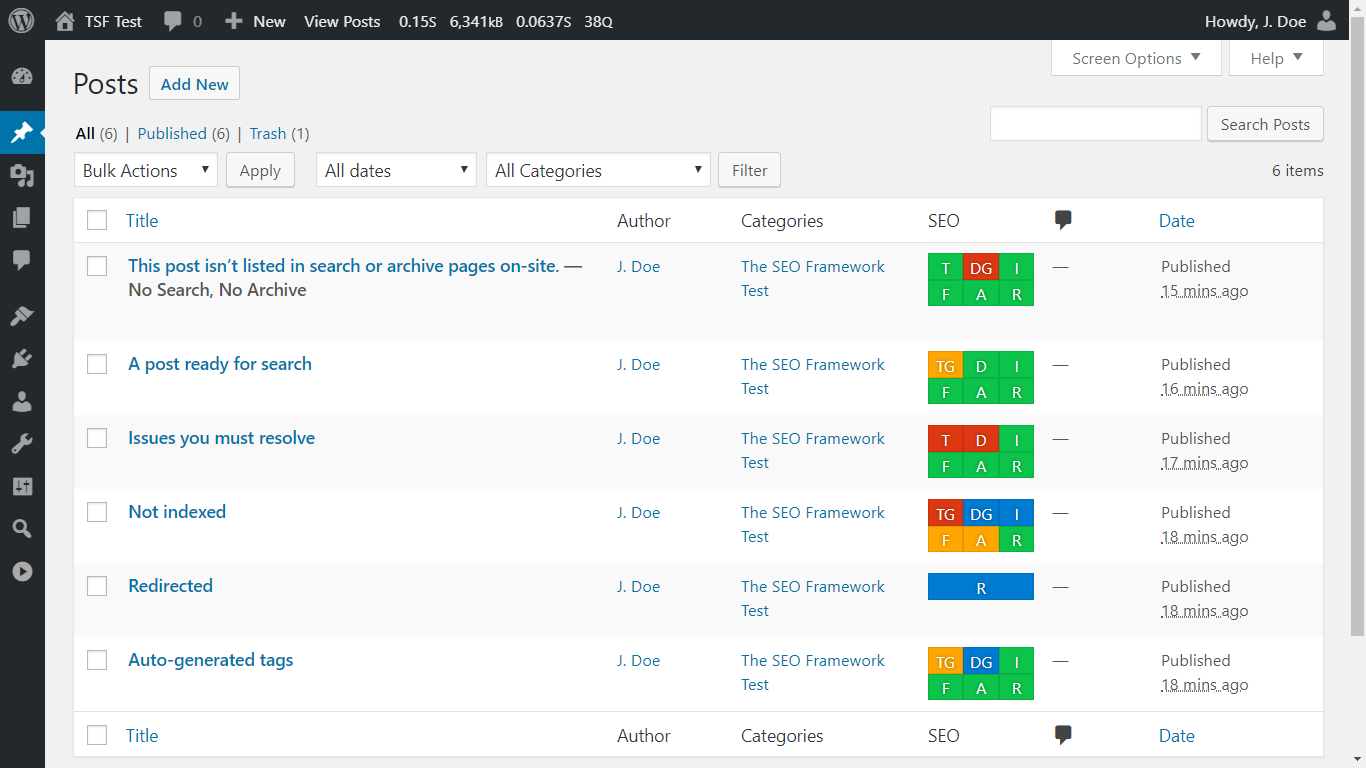
It creates a beautiful overview.
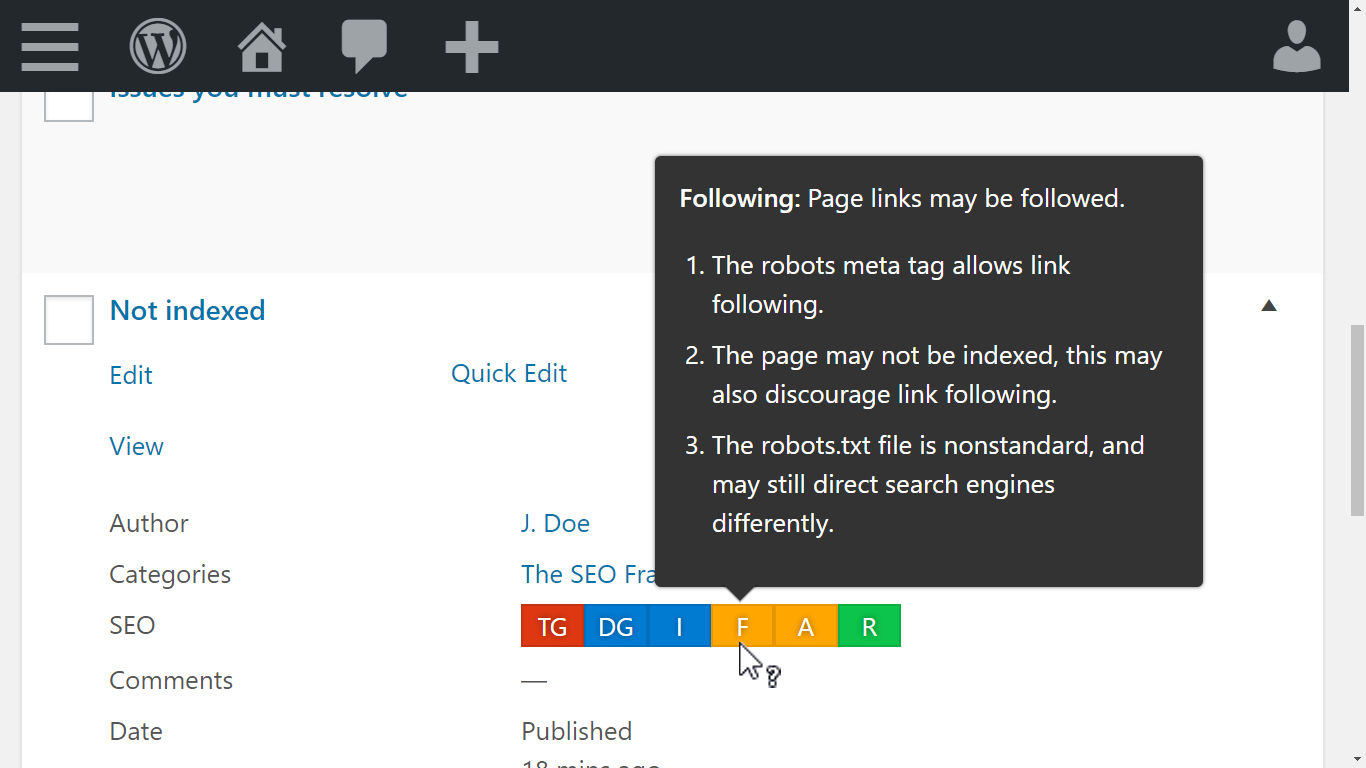
On your post, term, and user overview pages, you’ll find color-coded guidelines. They suggest how to improve your pages as you hover over them with your mouse cursor. For example, when your titles are unbranded or when WordPress blocks indexing. Instinctively, touch-and keyboard navigation is also supported. -
It includes exceptional support.
We don’t outsource our support. We’re here for you. Feel free to drop by our support channels at any time to ask a question. More than 5000 inquiries have been answered personally in the past nine years, typically within 72 hours. -
Het laat geen ruimte voor fouten.
We richten ons op de kwaliteit van functies die je nodig hebt boven de kwantiteit van functies die je niet nodig hebt. Deze eigenschap maakt deze plugin uniek, sneller, nauwkeuriger, bijna bugvrij en duurzamer. Het extra voordeel is dat het onwaarschijnlijk is dat je site wordt bestraft door zoekmachines. We zullen je niet aansporen om onnatuurlijke inhoud te schrijven of je toestaan zoekmachines te misleiden. -
Het blijft authentiek en puur.
We hebben The SEO Framework gebouwd voor kleine tot grote bedrijven en ondernemingen. De interface is volledig toegankelijk en integreert naadloos in je dashboard. Daarom voelt het natuurlijk aan om met deze plugin te werken. Het kan misschien saai aanvoelen, maar je WordPress-dashboard zou geen reclamebord moeten zijn voor onze branding. We zullen dit nooit veranderen. -
Het verbetert de zoekaanwezigheid.
The SEO Framework rangschikt je site onderscheidend door kruimelpaden voor Google Zoeken mogelijk te maken via gestructureerde gegevens. Het genereert ook automatisch titels en beschrijvingen volgens de richtlijnen van Google en helpt zoekmachines snel de nieuwste wijzigingen op je site te vinden via de ingebouwde geoptimaliseerde sitemap. -
It makes social sharing easy.
The SEO Framework automatically supports and allows you to further tailor the Open Graph, Facebook, Twitter Cards, and Fediverse protocols. It helps your posts stand out when they’re shared on various social networks, including Pinterest, Discord, WhatsApp, and Mastodon. -
Het voelt meer dan toegankelijk aan.
We hebben ons kleurenschema zorgvuldig gekozen, zodat mensen met een medisch erkende kleurenblindheid de richtlijnen van zoekmachines kunnen onderscheiden. We hebben ook volledige toetsenbordnavigatie en ondersteuning voor schermlezers geïmplementeerd. -
Het beschermt je tegen fouten.
The SEO Framework behoedt je voor het maken van belangrijke en veelvoorkomende SEO-fouten. Het laat weinig ruimte over voor fouten, omdat de plugin al het SEO-werk voor je doet. Zo voorkomt het bijvoorbeeld automatisch fouten met dubbele inhoud door strenge canonieke regels af te dwingen. -
Het volgt best practices en meer.
De grootste problemen met WordPress-plugins zijn beveiliging en compatibiliteit. Als deeltijdse beveiligingsonderzoekers richten we ons erop om deze plugin ondoordringbaar te maken. The SEO Framework maakt ook gebruik van de API van WordPress waar mogelijk, waardoor deze plugin naadloos integreert met elke andere plugin die met dat in gedachten is geschreven. -
Het heeft ontwikkelaars in gedachten.
We moedigen andere ontwikkelaars aan om functionaliteit toe te voegen en te verbeteren aan deze plugin. We hebben dit zelf al gedaan met onze extensies. Bekijk onze API en voel je vrij om bij te dragen! -
Het respecteert je privacy.
The SEO Framework stuurt ons geen informatie en maakt geen cookies aan. Leer meer vanuit ons strikt nageleefde privacybeleid.
Aan de slag
- Een andere SEO plugin gebruikt? migreer je metadata gemakkelijk.
- Heb je hulp nodig bij het opstarten? Lees onze snelle installatiegids.
- Wil je je pagina’s verbeteren? Leer hoe je je metadata optimaliseert.
Doe meer met extensies
Voor aanvullende functionaliteit, bekijk onze gratis metgezel-plugin Extensiebeheerder. Het biedt tal van gratis en betaalde extensies, zoals:
- Focus begeleidt je bij het proces van het schrijven van gerichte inhoud die rangschikt met focuskeywords en synoniemen.
- Articles verrijkt je gepubliceerde berichten door automatisch belangrijke Gestructureerde Gegevens toe te voegen.
- Transport migreert en transformeert metagegevens van Rank Math, Yoast SEO en SEOPress naar deze plugin.
- Honeypot vangt reactie spammers op door middel van vijf lichte maar krachtige manieren.
- Cord helpt je om je website te verbinden met Google Analytics en Meta Pixel.
- Local laat je belangrijke lokale bedrijfsinformatie instellen voor zoekmachines om te verwerken.
- AMP koppelt The SEO Framework aan de AMP-plugin voor AMP-ondersteunde artikelen en pagina’s.
- Monitor houdt de SEO-optimalisaties en statistieken van je website bij.
- Incognito verbergt alle ontwikkelingscommentaar van The SEO Framework.
- Origin leidt bezoekers van bijlagenpagina’s terug naar het hoofdbericht.
- Title Fix zorgt ervoor dat je titeluitvoer is zoals geconfigureerd, zelfs als je thema het verkeerd doet.
Bezoek onze overzichtspagina van extensies voor meer informatie.
Zonder merknaam, gratis en voor professionals
The SEO Framework is een unieke white label plugin die naadloos integreert in je WordPress-dashboard. Dit betekent dat we zelfs de naam “The SEO Framework” nergens binnen je WordPress-interface plaatsen. Geen advertenties, geen opdringerige berichten. Niemand hoeft te weten welke tools je hebt gebruikt om je website te maken. Let op dat we gestandaardiseerde ontwikkelingsopmerkingen uitvoeren die de plugin-uitvoer in de broncode onderscheiden. Je kunt deze verwijderen met onze gratis Incognito-extensie.
Achter de schermen
The SEO Framework werkt aan veel dingen zonder je op de hoogte te stellen, want de beste software is snel, behendig, responsief en zou je kostbare tijd moeten besparen. Hier zijn een paar dingen die het achter de schermen doet.
- Het voorkomt canonieke fouten voor categorieën, pagina’s, subdomeinen en WordPress Multisite domeinmapping.
- Het stopt SEO-aanvallen die worden veroorzaakt door pagineringsexploits in WordPress door de zoekmachine te vertellen naar de bestaande laatste pagina te kijken in plaats daarvan.
- Het ontmoedigt het indexeren van 404-pagina’s en lege categorieën, zelfs wanneer ze geen 404-response verzenden.
- Het ontmoedigt zoekmachines om feeds en de sitemap te indexeren. Dit betekent niet dat ze deze niet zullen gebruiken; alleen dat ze deze niet tonen in hun zoekresultaten.
- Het leidt zoekmachines van de reactiepagina’s terug naar het bericht waarin die reacties zijn opgeslagen.
Compatibility and accessibility
The SEO Framework ondersteunt:
- Internationalisatie via WordPress.org. Je kunt hier bijdragen.
- Unicode (UTF-8) karakterherkenning en weergave, inclusief Emoji en CJKV (Chinees, Japans, Koreaans, Vietnamees).
- Rechts naar links (RTL) talen (Arabisch, Hebreeuws, Farsi, enz.), via zijn interface en meta tag generatie.
- Complete toegankelijkheid voor kleurenblindheid dankzij een zorgvuldig gekozen kleurenschema.
- Volledige toetsenbordnavigatie, zodat je tooltips snel kunt inspecteren zonder ooit je muis te hoeven gebruiken.
- Volledige toegankelijkheid voor schermlezers via veldaanknoppen, ARIA-labels en titelattributen.
- Multisite-structuren, deze plugin is in feite op een gebouwd.
- Detectie en uitvoer van robots.txt- en sitemap.xml-bestanden.
- Volledige integratie met de WordPress Core sitemaps.
- SEO controls for posts, pages, custom post types, terms, post type archives, and author archives.
- Selectie van het primaire term (categorie) om invloed uit te oefenen op kruimelpaden en links.
- Output van gestructureerde gegevens via Schema.org JSON-LD-scripts.
- Aanpassing van oEmbed voor verbeterd delen op Discord.
- Detectie van verschillende andere SEO plugins om je soepel te laten overstappen.
- Translation plugins like WPML, Polylang, TranslatePress, WPGlobus, and MultilingualPress.
- Page builders like Elementor and Bricks, including generated descriptions from Bricks Text and Section elements.
- E-commerce plugins zoals WooCommerce en Easy Digital Downloads.
- Blocking of SEO analysis and AI crawlers for Moz, OpenAI, Apple, and others, via robots.txt.
- Forum plugins zoals bbPress en wpForo.
- Berichten en termen bewerken via de native bulk- en snel-bewerkingsinterfaces van WordPress.
- Headless-modus via een enkele constante definitie.
Schermafbeeldingen

Installatie
Deze plugin vereist:
- PHP 7.4 of hoger.
- WordPress 7.0 or higher.
- Een moderne browser voor administratie.
Installatie-instructies:
- Installeer The SEO Framework via je WordPress-dashboard met behulp van de plugin-zoekfunctie of door de bestanden naar je server te uploaden.
- Activeer deze plugin netwerkbreed of activeer het op een enkele site.
- That’s it! The plugin now handles your website’s SEO. It also protects your website against SEO attacks.
Deze plugin configureert automatisch zijn globale instellingen
Het is echter het beste als je onze installatiegids voor de plugin leest om het meeste uit The SEO Framework te halen.
Deze plugin configureert SEO-metatags automatisch
Still, you may want to read up on our page improvement guide to learn how you can optimize your pages.
Verkrijg meer SEO-kracht
Optioneel kun je ook onze gratis Extension Manager-plugin installeren voor aanvullende SEO-oplossingen.
FAQ
-
Is The SEO Framework gratis?
-
Absoluut! Het blijft ook gratis, zonder advertenties, tracking, opgeblazenheid of meldingen!
Deze plugin is slank maar allesomvattend. Het is 100% freeware, geen crippleware. -
Nee. We behandelen deze plugin nu al als premium.
Echter, we bieden veel gratis en betaalde extensies aan die deze gratis plugin ondersteunen. We bieden deze aan via onze gratis Extension Manager-plugin.
-
Waarom zijn er geen analyses, tracking of 404-monitoring?
-
SEO-experts die geavanceerde tools zoals Ahrefs, SEMrush, Screaming Frog en Google Analytics gebruiken, geven de voorkeur aan het gebruik van The SEO Framework omdat het niet probeert hun werk lukraak te doen.
Om je site correct te analyseren, moet dit van buitenaf gebeuren. Als we deze functies op je site laden, zullen slechte robots duizenden valse positieven veroorzaken die je database vullen met nutteloze informatie die niet van toepassing is op zoekmachines. We onthouden ons hiervan omdat het je toch nooit zal helpen.
-
Ik heb een feature-verzoek, een vraag of een bug gevonden.
-
Bezoek alsjeblieft de ondersteuningsforums en vertel ons er vriendelijk over.
We proberen binnen een week bij je terug te komen. Meestal reageren we binnen drie dagen.
-
Ik ben een ontwikkelaar; hoe kan ik helpen?
-
Elke input wordt zeer gewaardeerd, en alles zal worden overwogen.
Ga naar de GitHub-projectpagina om issues te openen of zelfs “pull requests” in te dienen.Lees meer over bijdragen.
-
Wat vertellen de kleuren mij?
-
We gebruiken verschillende kleuren om berichten over te brengen. Rood is een fout die je moet oplossen. Geel is een niet-kritische waarschuwing die je misschien wilt aanpakken. Groen is goed. Blauw is informatief en situationeel. Grijs is ongedefinieerd of niet-verwerkbaar.
-
De sitemap bevat geen categorieën, afbeeldingen, enz.
-
Het is geen probleem als niet elke pagina vermeld staat. Zoekmachines vinden het heerlijk om WordPress te crawlen omdat de structuur consistent en goed bekend is.
Als een bezoeker een pagina niet kan vinden, waarom zou een zoekmachine dat dan wel kunnen? Vertrouw niet op je sitemap, maar op je inhoud en de bruikbaarheid van je website.
Bekijk onze Extension Manager. Het brengt extensies, zoals Artikelen, die de lacunes opvullen via moderne en robuustere middelen.
-
De sitemap bevat ongevraagde links.
-
The SEO Framework neemt alle publiekelijk doorzoekbare berichten, pagina’s en CPT’s mee en plaatst deze in de sitemap.
Als je een pagina niet in de sitemap wilt hebben, overweeg dan om de
noindex-optie ervoor in te schakelen. Deze optie verwijdert de pagina ook uit de resultatenpagina’s van zoekmachines.Als de link niet in de sitemap staat omdat deze om structurele redenen is bedoeld, laat u de plug-in of thema-auteur weten die deze heeft gemaakt.
Je moet de auteur vertellen om de “publicandrewritepost type arguments” te bekijken. De plugin of thema-auteur zou moeten weten wat dat betekent.In the meantime, you can disable SEO for the unwanted entries via the “General Settings” under “Exclusions.”
-
Waarom zijn focus keywords niet inbegrepen?
-
Google waarschuwt voor de keyword stuffing-benadering die door sommige andere SEO-plugins wordt toegepast. Het dwingt gebruikers om onnatuurlijke inhoud te schrijven, en het kan nadelige effecten hebben op de ranking van je site.
Moderne zoekmachines gebruiken AI om de context van je artikelen te begrijpen. Dit betekent dat zolang je relevante inhoud schrijft, je je geen zorgen hoeft te maken over zoekwoorden.
We hebben echter dezelfde API geïmplementeerd die Google gebruikt om je te helpen bij het vinden van passende synoniemen en vervoegingen voor je zoekwoorden. Deze functionaliteit maakt deel uit van onze premium set van extensies.
-
Wat doen de application/ld+json scripts?
-
De JSON-LD-scripts zijn zoekmachinehulpmiddelen die zoekmachines vertellen hoe ze de site moeten verbinden en indexeren. We doen dit via de standaard van Schema.org.
Ze kunnen de zoekmachine vertellen of je site een interne zoekmachine bevat, met welke sociale sites je verbonden bent en welke paginastructuur je gebruikt. Dit wordt ook wel gestructureerde gegevens genoemd.
-
The SEO Framework geeft verborgen kruimelpaden uit zodat zoekmachines ze kunnen vinden via de instellingen van Schema.org.
Je kunt deze kruimelpaden ook visueel weergeven in je thema door een shortcode te gebruiken.
Beoordelingen


Bijdragers & ontwikkelaars
“The SEO Framework – Snel, Geautomatiseerd, Moeiteloos.” is open source software. De volgende personen hebben bijgedragen aan deze plugin.
Bijdragers
“The SEO Framework – Snel, Geautomatiseerd, Moeiteloos.” is vertaald in 28 localen. Dank voor de vertalers voor hun bijdragen.
Vertaal “The SEO Framework – Snel, Geautomatiseerd, Moeiteloos.” in je eigen taal.
Interesse in ontwikkeling?
Bekijk de code, haal de SVN repository op, of abonneer je op het ontwikkellog via RSS.
Changelog
5.2.0 – Complete
Pray take care, Glaucon, that your daring ambition doesn’t lead to a fall! Don’t you see how risky it is to say or do what you don’t understand? – Xenophon
Releasehoogtepunten
- Authors now have complete SEO controls: a meta title and description, social tags, a canonical URL, robots directives, and a redirect.
- You can now click a generated title or description and edit it directly, instead of retyping it from scratch.
- We added Fediverse support, so Mastodon can credit the author when someone shares your page.
- Breadcrumb settings now let you pick the taxonomy for each post type and omit the post type archive.
- The breadcrumb shortcode can now omit the Home crumb and collapse long trails with its new
maxattribute. - The optimized sitemap now has a CSS stylesheet, so it stays readable when browsers stop applying XSLT.
- TranslatePress sites now get a sitemap for each language, and Polylang and WPML now advertise working sitemap URLs in robots.txt.
- You can now add a TikTok profile in the Schema.org settings.
- You can now enter a Facebook domain verification code in the Webmaster settings.
- Pages built with Bricks now get a generated description from their text.
- We fixed many edge-case issues and corrected inaccurate or outdated PHP and JavaScript documentation throughout the plugin.
Complete
After the “Profound” v5.1 update, we’re proud to present TSF v5.2 “Complete.” Posts, pages, custom post types, terms, and post type archives each had their own SEO controls for years. Authors never did: they only got Facebook and X profile fields, and everything else came from your global settings.
That ends now. Every kind of content you edit in the WordPress dashboard now carries its own SEO settings: posts, pages, terms, and users. Every author archive can be tuned, indexed, redirected, and inspected like any other page. We named this update “Complete” because it closes the last gap in the way TSF handles your content.
We didn’t stop there. This update also brings a long-requested way to edit generated values, Mastodon support, and a sitemap that survives the end of XSLT.
SEO for every author
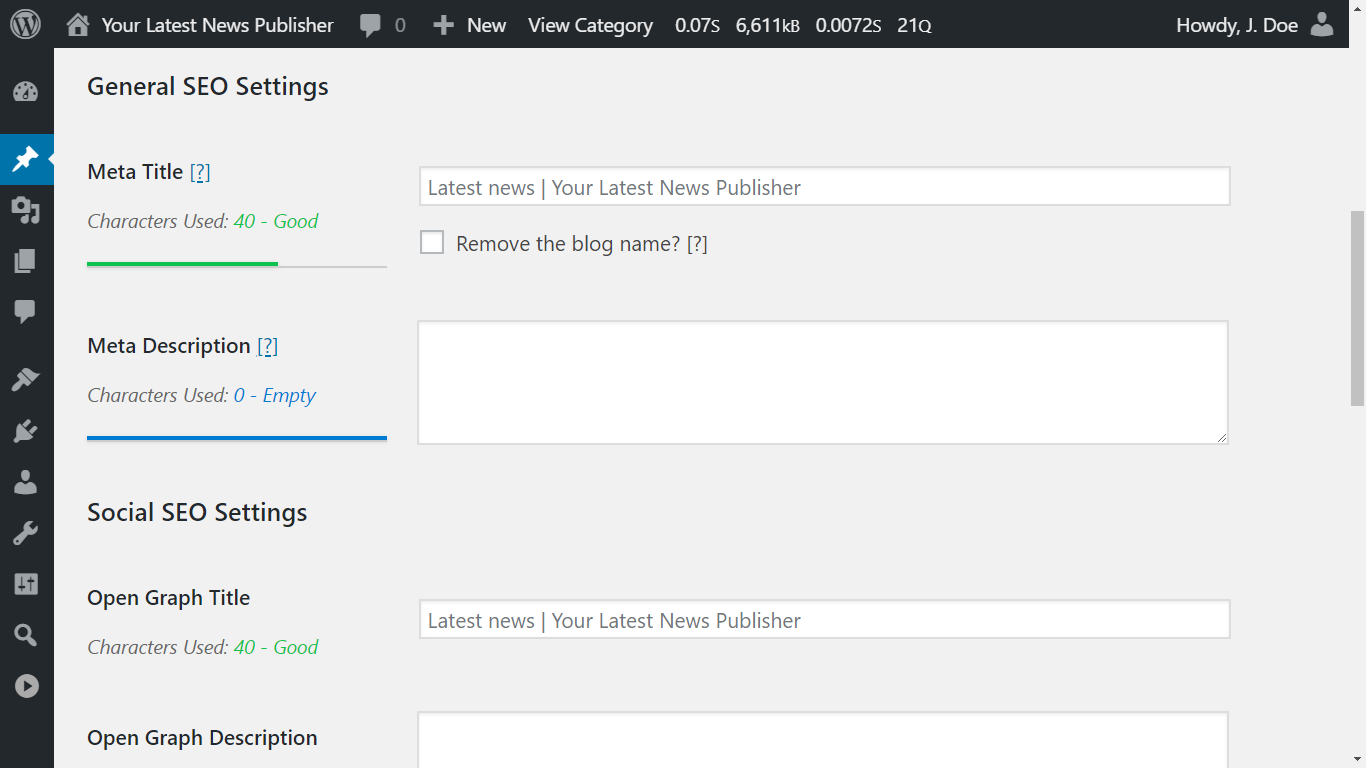
Each user’s profile page now has General, Social, and Visibility settings for their author archive, next to the existing Authorial Info fields:
- General: meta title and meta description fields, and a “Remove the site title?” checkbox.
- Social: Open Graph title and description fields, Twitter Card title, description, and card type fields, and a social image field.
- Authorial Info: Facebook, Fediverse (new), and X profile fields.
- Visibility: canonical URL, robots indexing, link following, archiving, and 301 redirect fields.
Those values apply to that author’s archive. On an author archive, twitter:creator and fediverse:creator use the author’s X handle and Fediverse profile when you’ve set them. We store these fields once per user, including on Multisite, the same way we already stored Authorial Info.
The WordPress users sitemap listens to these settings. An author you set to noindex or to redirect leaves the sitemap, and an author you set to index stays listed, even when you set all author archives to noindex. The sitemap still lists only authors who have published posts. It also returns a 404 error when no author is indexable.
The SEO Bar comes along. The users list now shows it, and profile pages show it, too. A user who can’t edit posts isn’t a public author, so the SEO Bar shows only the indexing item for them.
Edit generated values directly
TSF fills empty title and description fields with a blurred placeholder showing what it generates. Until now, you had to retype that text from scratch to change a word. Now, click the empty field and the placeholder stays, with your cursor where you clicked. Start typing and the text becomes normal text you can edit. Clear the field and the placeholder returns.
New sites have this enabled by default. Existing sites keep the previous behavior until you enable “Edit generated values directly?” at SEO Settings > General Settings > Layout, under Editing Settings.
Fediverse support
Mastodon can credit an author when someone shares your page, provided your page says who wrote it. We added the fediverse:creator meta tag and rel=me profile links for that, so Mastodon and other Fediverse platforms can credit and verify the profile.
You set a site profile and an author fallback at SEO Settings > Social Meta Settings, and each author can override that fallback on their own profile page. Each profile has a handle and a profile URL. Enter the @username@domain handle from Mastodon’s Author attribution, or paste a profile URL to fill both fields. TSF also adds the author’s Fediverse profile to the Schema.org sameAs links.
Our Fediverse creator and Mastodon article walks through setting up the credit and the green checkmark.
Breadcrumb settings
Two new settings at SEO Settings > Schema.org Settings change your breadcrumbs, and one cleanup applies automatically:
- Choose the taxonomy: singular breadcrumbs can use a chosen taxonomy for each post type. The default keeps the current trail, so products keep using Brands until you select Product categories. “Exclude taxonomy crumb” removes the term trail.
- Omit the archive: singular breadcrumbs can omit the post type archive. For products, that archive is the shop page.
- Cleaner names: breadcrumbs no longer prefix archive names, such as “Category:”, “Archives:”, or “Author:”. This affects structured data and the shortcode alike, and the trail skips parent pages that visitors can’t view.
Until you change the new settings, singular trails keep following the previous taxonomy and archive crumbs.
Breadcrumb shortcode
The breadcrumb shortcode changed, too:
- Shorter trails: the new
maxattribute collapses a longer trail. Amaxbelow 3 is treated as 3. - No Home crumb: the shortcode now omits the Home crumb when its
homeattribute is empty. - Whole crumbs: crumbs now wrap as a whole instead of breaking mid-word.
Read the breadcrumb shortcode article for the details.
A sitemap that survives XSLT
Major browsers will soon no longer apply XSLT by default. That means the styled, readable version of your optimized sitemap would turn into plain, unstyled XML. We ported the styling to CSS, so browsers that no longer apply XSLT still show a styled sitemap. As long as browsers still apply XSLT, the XSL view stays the preferred way to display it.
The CSS view has presentation and usability differences, but none of them affect the XML output. URLs aren’t clickable, the title and logo don’t link to the homepage, and the browser tab has no document title. Our sitemap styling article lists them all.
Sitemaps for every language
Multilingual sites got a lot of attention:
- TranslatePress: each published language that has a language directory now gets its own sitemap, and robots.txt lists every language except the one served without a directory.
- Polylang and WPML: robots.txt now advertises sitemap URLs that work. Before, the URLs could include the language directory twice, or the static front-page slug, so they returned a 404 error or redirected to WordPress’s sitemap.
- Cache clearing: clearing the sitemap cache now clears every language, including when your site uses a persistent object cache.
- Translated sitemap links: SEO Settings now lists the language sitemaps under “View translated sitemaps,” using the language name as the link text.
Our translation plugin compatibility article has the URL formats.
Facebook’s real language list
Facebook doesn’t document which languages it supports for Open Graph. So, we scraped their network and tested all 46500 possible locale combinations. TSF now drops 39 locales that Facebook doesn’t support, and adds three that it does: Haitian Creole, Inupiaq, and Inuktitut. For example, Spanish (Mexico) now falls back to Spanish (Spain). This affects only the Open Graph locale output, not your site’s language.
Even more
- TikTok: you can now add a TikTok profile at SEO Settings > Schema.org Settings. TSF includes it in your site’s Schema.org
sameAslinks. - Facebook verification: you can now enter a Facebook domain verification code at SEO Settings > Webmaster Meta Settings, under Webmaster Integration Settings. Thanks, Contributolo!
- Bricks: a page edited with Bricks now gets a generated description from the text in its Text and Section elements.
- Twitter Card labels: “Twitter Title” is now “Twitter Card Title,” and “Twitter Description” is now “Twitter Card Description.”
- Feeds: posts you exclude from on-site archive listings are now also omitted from the feed.
Edge cases, hunted down
We fixed many edge-case issues. For example, a backslash in a post or term SEO field no longer disappears on every save. Saving a post through the REST API or WP-CLI now refreshes the sitemap. A homepage title or description of 0 is no longer treated as empty. The detailed log linked below lists the rest.
We also corrected inaccurate or outdated PHP and JavaScript documentation throughout the plugin.
It has been a slow year for releases: over 10 months without an update. Behind the scenes, we spent months experimenting with and refining our development workflow. AI-assisted review helped us uncover issues, but Sybre personally verified every single letter written for this update.
We also built and published open-source tools:
- wp-plugin-regression runs WordPress Playground sites and compares plugin output before and after changes.
- makepot-tsf generates translation templates using WP-CLI’s internationalization tools, without requiring a WordPress installation.
We published the accompanying AI workflows for regression testing and translation template generation, too. Our expanded coding instructions guide AI assistants toward the conventions we use throughout TSF.
We can now build features we previously considered too costly to maintain. Bricks description generation and TranslatePress sitemap support are two results. There’s a lot more to come.
Clear your cache
We’ve updated the plugin’s CSS and JavaScript files. If you find issues with the interface, you may need to flush your browser caches. Check out our updated KB article to learn more.
If your cache plugin has no exclusion rules for sitemap endpoints, it could serve an empty sitemap or sitemap stylesheet on later visits. TSF now tells cache plugins that honor DONOTCACHEPAGE not to store those responses. That can’t remove an empty response your cache already stored, so run your cache plugin’s “Purge All,” “Clear all cache,” or equivalent action after updating.
Ondersteun de ontwikkeling
We hope you’ll love this update as much as we do. Please consider supporting us by posting a fantastic review, getting a license, or doing your friends and colleagues a favor by installing TSF for them.
If this update saved you time, you can also sponsor our work on GitHub. Sponsorship helps fund development without adding nags or upsells.
Gedetailleerd log
To hit on something right by luck without search I call good luck, to do something well after study and practice I call doing well; and those who pursue this seem to me to do well.
Full changelog
- You can find the full changelog here.