
Beschrijving
Met deze plugin kun je eenvoudig een dynamisch login/logout menu item toevoegen aan elk menu op je WordPress site. Het menu item zal veranderen op basis van of de huidige gebruiker is ingelogd of uitgelogd. Je kunt ook een specifieke login pagina url, login redirect url en een logout redirect url instellen.
Thanks to Juliobox for his prior efforts on the BAW Login/Logout Menu plugin which this is derived from
CONFIGURE SETTINGS
After installing and activating the plugin, you can find the settings in your dashboard under: Settings > Login or Logout
Login Page URL – This should be the URL to the page where your users will login at. For most wordpress sites this will be /wp-login.php but if you’re using a membership plugin like MemberPress, it might be something like /login/ instead.
Login Redirect URL – This is the URL you would like your users to be redirected to after they’ve successfully logged in. You can set it to / to take them to the home page after logging in. If you’re using a membership plugin like MemberPress, you might want to use /account/ instead. NOTE: Some plugins may override this if they are configured to redirect your users somewhere else during login.
Logout Redirect URL – This is the URL you would like your users to be redirected to after they click the Logout link from this menu item. Use a / to redirect them to the home page, or you might want to redirect them back to the login page at /login/ or /wp-login.php etc.
ADD ITEM TO MENU
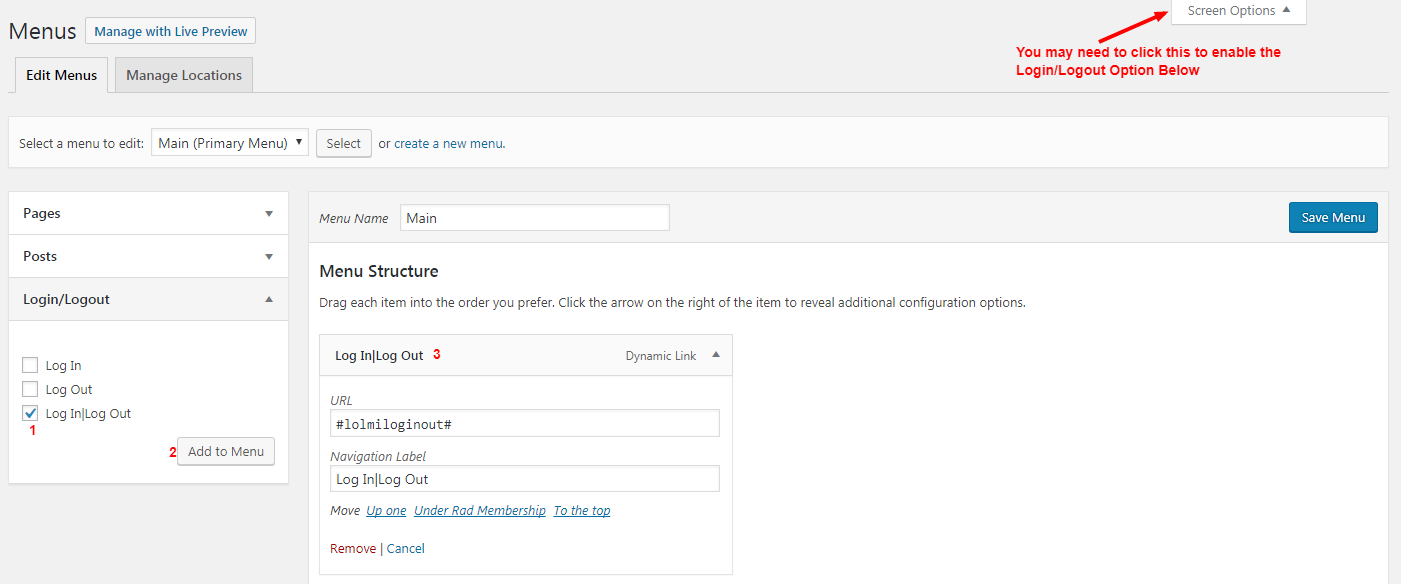
In your dashboard visit Appearance > Menus.
Then at the top right of that page click the Screen Options button and ensure that Login/Logout checkbox is checked.
Then select a menu to edit, or create a new menu if you don’t already have one.
In the left sidebar find Login/Logout and click the checkbox next to Login|Logout and then click Add to Menu.
You can now drag the menu item wherever you’d like it to appear in your menu. The URL in the menu settings must be left at #lolmiloginout# but you can change the Navigation Label if you’d like it to say something else. Just ensure that the | is there in the label separating the two words.
Now save your menu. That’s it!
BLOCK EDITOR (NAVIGATION BLOCK)
If you’re using the block editor’s Navigation block:
- Add or edit a Navigation block on your page or in the Site Editor
- Click the (+) to add a new link
- In the search field, type “login” or “logout”
- Select “Login|Logout” from the suggestions
- The link will automatically show “Login” to logged-out users and “Logout” to logged-in users
You can also manually type #lolmiloginout# as the URL if you prefer.
Troubleshooting
After logging in, menu still shows “Login” or Vice-Versa – This is most commonly caused by caching. If you’re using a caching solution such as Cloudflare, WPRocket, or others, be sure that caching is disabled for logged in users, and disable browser caching options as well.
Login is redirecting users somewhere other than my settings – Many times other plugins will have their own login redirect handling which overrides this plugin’s, such as MemberPress for example. In this case, the other plugins will need to be configured to redirect the user where you’d like them to go.
Schermafbeeldingen
Login or Logout Menu Item 
Login or Logout Menu Item – instellingen
Installatie
- Download een .zip bestand van deze plugin
- Ga naar je WordPress dashboard -> plugins pagina
- Klik op “Nieuw toevoegen” -> “Uploaden”
- Upload het .zip bestand van deze plugin en activeer het
- For usage instructions, see
Detailstab and screenshots
Beoordelingen


Bijdragers & ontwikkelaars
“Login or Logout Menu Item” is open source software. De volgende personen hebben bijgedragen aan deze plugin.
Bijdragers
Vertaal “Login or Logout Menu Item” in je eigen taal.
Interesse in ontwikkeling?
Bekijk de code, haal de SVN repository op, of abonneer je op het ontwikkellog via RSS.
Changelog
1.3.1
- Removed translations in-plugin, these can be managed at wordpress.org
1.3.0
- Added support for the block editor Navigation block
- Search “login” or “logout” in the Navigation block link picker to add the dynamic link
1.2.3
- Small tweaks to help avoid hosting blocks
- Fix nonce validation
1.2.2
- Bump WP compatibiliteit
1.2.1
- Fout bij het opslaan van opties op sommige web-hosts opgelost
1.2.0
- Het beveiligingslek in de opslaanopties is verholpen
1.1.1
- Opgelost – beheerders niet omleiden bij inloggen
1.1.0
- Een instellingen pagina toegevoegd
- Instelling voor inlogpagina URL toegevoegd
- Instelling toegevoegd voor login redirect URL
- Instelling toegevoegd voor URL om uit te loggen
1.0.0
- Eerste release