

Beschrijving
Zinn® Translate turns a WordPress site into a genuinely multilingual one. Each language gets its own web addresses — /fr/a-propos/ alongside /about/ — with translated URL slugs, the right hreflang tags, its own sitemap, and its own llms.txt for AI answer engines.
It translates what a visitor actually reads, which is more than a page’s body text: titles, bodies and excerpts, URL slugs, SEO titles and descriptions, OpenGraph tags, image alt text, categories and tags, navigation menus, your site title and tagline, and — on a shop — product names, descriptions, short descriptions, purchase notes, attribute labels and variation descriptions.
Where the translations happen
Two things run, and it is worth knowing which is which.
The plugin runs on your site. It lists every translatable string, stores the finished translations in one table on your own server, and swaps the words in while a page renders. It also tells WordPress which language the page is in, so your theme’s and WooCommerce’s own buttons — “Add to cart”, “Read more” — come out in that language too, from the language packs WordPress already publishes.
The translation itself is bought from a provider, and you choose which:
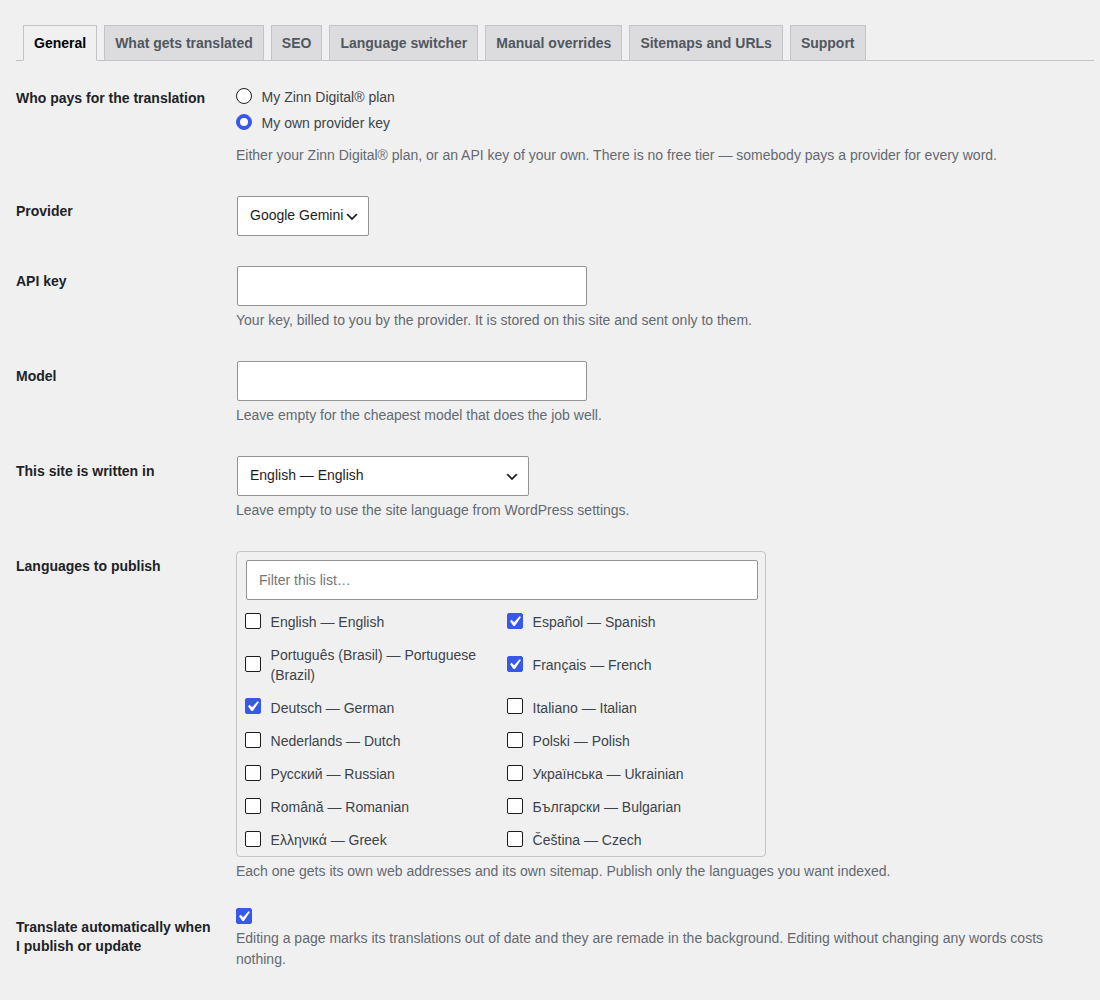
- Your Zinn Digital® plan. Connect the site with its ID and token and the words are translated on Zinn Digital®, against that site’s Site Translation plan.
- Your own API key. Paste a Google Gemini, DeepL or OpenAI key and the plugin translates directly with it. No Zinn Digital® account is needed and the provider bills you.
There is no free translation tier. Machine translation costs money per word, and somebody pays a provider for every one of them — either through your Zinn Digital® plan or on your own key.
What it does not do
- It does not duplicate your content. No shadow posts, no second post type, no parallel site to keep in step. Translations are applied while the page renders, so deactivating the plugin returns your site to exactly what it was.
- It does not add a REST endpoint. It adds a shortcode, a block, a widget and a nav-menu item for the language switcher, and no public route of its own.
- It does not fetch anything while a visitor waits. Translations are read from your own database. A provider being slow can never make your site slow.
Corrections that stick
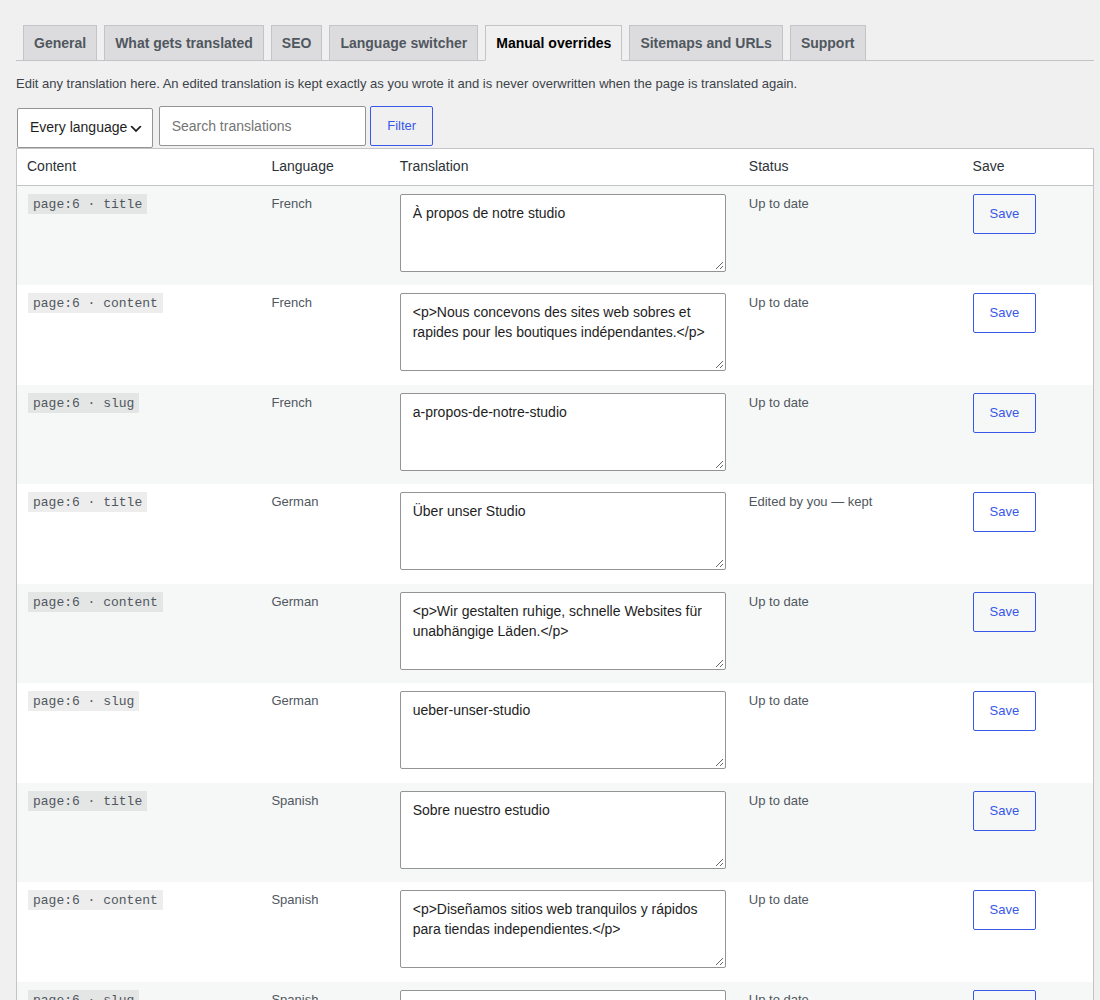
Every translation can be edited by hand, and an edited translation is never overwritten. Re-translating the page leaves your wording exactly as you typed it.
The language switcher
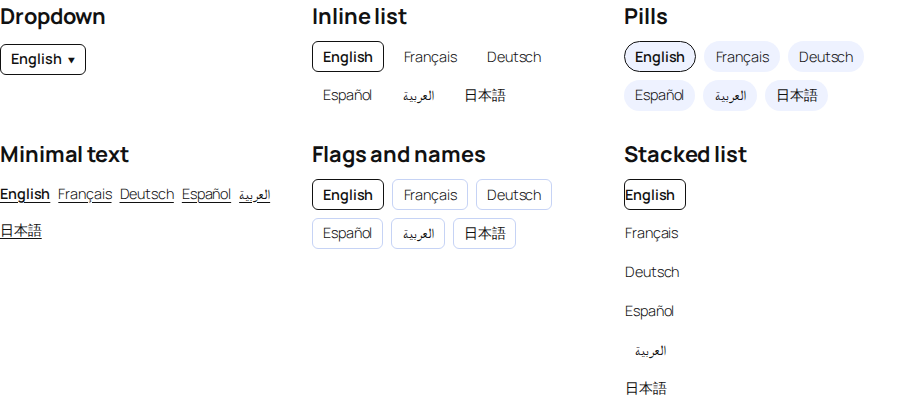
A shortcode ([zinn_language_switcher]), a block, a widget and a nav-menu item, all the same control. Six styles — dropdown, inline list, pills, minimal text, flags and names, stacked list — each with editable colours, spacing, corners and text size. You choose which languages appear, and whether they are named in their own language (Deutsch) or in yours (German). Right-to-left languages are laid out correctly, and the switcher is keyboard-operable with a visible focus ring.
SEO
- Reciprocal
hreflangon every page, withx-defaultand a self-reference. <html lang>anddir="rtl"where the language needs it.- The canonical of a translated page is that page, never the original.
- Works alongside Yoast SEO, Rank Math, All in One SEO and SEOPress by filtering what they output rather than competing with them, so a page never ends up with two canonicals or two titles.
- Its own per-language sitemaps, indexed at
/zinn-sitemap-index.xml, withxhtml:linkalternates, announced inrobots.txtalongside whatever else is there. - If another translation plugin is active, this one stops emitting
hreflangrather than fighting it.
WooCommerce
Product names, descriptions, short descriptions, purchase notes, attribute labels, attribute values and variation descriptions. Prices, SKUs and the stored option values that identify a variation are never touched — translating those would put the wrong item in a basket.
External services
This plugin sends the text of your site to a translation provider that you choose and configure. It makes no outbound request at all until you have chosen one and saved a credential for it.
What is sent, and when
- To Zinn Digital®, only if you connect the site (mode “My Zinn Digital® plan”). On an hourly background pass and when you press Translate, the plugin posts your site’s translatable text — page and post titles, bodies, excerpts and slugs, SEO titles and descriptions, image alt text, term names, menu labels and WooCommerce product fields — to
https://api.zinndigital.com/v1/sites/{site}/translation/sources, with the site identifier and token you pasted in. It then fetches the finished translations fromhttps://api.zinndigital.com/v1/sites/{site}/translation/bundle/{locale}. Terms: https://zinndigital.com/legal/terms — Privacy: https://zinndigital.com/legal/privacy - To Google Gemini, only if you choose it and save a Google API key. On the background translation pass, the plugin posts batches of that same text to
https://generativelanguage.googleapis.com/v1beta/models/{model}:generateContentwith your key in a request header. Terms: https://ai.google.dev/gemini-api/terms — Privacy: https://policies.google.com/privacy - To DeepL, only if you choose it and save a DeepL API key. The plugin posts batches of that text to
https://api.deepl.com/v2/translate(orhttps://api-free.deepl.com/v2/translatefor a free key) with your key in a request header. Terms: https://www.deepl.com/en/pro-license — Privacy: https://www.deepl.com/en/privacy - To OpenAI, only if you choose it and save an OpenAI API key. The plugin posts batches of that text to
https://api.openai.com/v1/chat/completionswith your key in a request header. If you set a different base URL, it goes to that service instead of OpenAI. Terms: https://openai.com/policies/row-terms-of-use — Privacy: https://openai.com/policies/row-privacy-policy - To WordPress.org, when you publish a language. The plugin asks
https://api.wordpress.orgfor the WordPress, theme and plugin language packs for that language, so your theme’s own buttons are shown in it. This is the same request WordPress makes when you change the site language yourself.
No visitor data, analytics, personal data or order data is transmitted. What is sent is the published content of your site, which is already public, plus the credential you saved for the provider you chose.
- Support diagnostics (only when you press send). If you ask us for help, the plugin can send
a support report tohttps://api.zinndigital.com/v1/connector/diagnostics. You are shown the
exact payload first, already redacted, and nothing leaves your site until you press send.
Credentials are excluded by declaration rather than by matching key names, and render as
[not sent — credential]. The plugin never sends this on its own initiative.
What this plugin stores on your site
One database table, {prefix}zinn_translations, holding one row per translated string: which content it belongs to, which language, the translation, a hash of the source it was made from, and whether you edited it by hand. It also stores your settings, including the API credential you saved.
Uninstalling the plugin drops that table and deletes those settings. Deactivating does not — so switching the plugin off to test something never destroys translations you have paid for.
Schermafbeeldingen
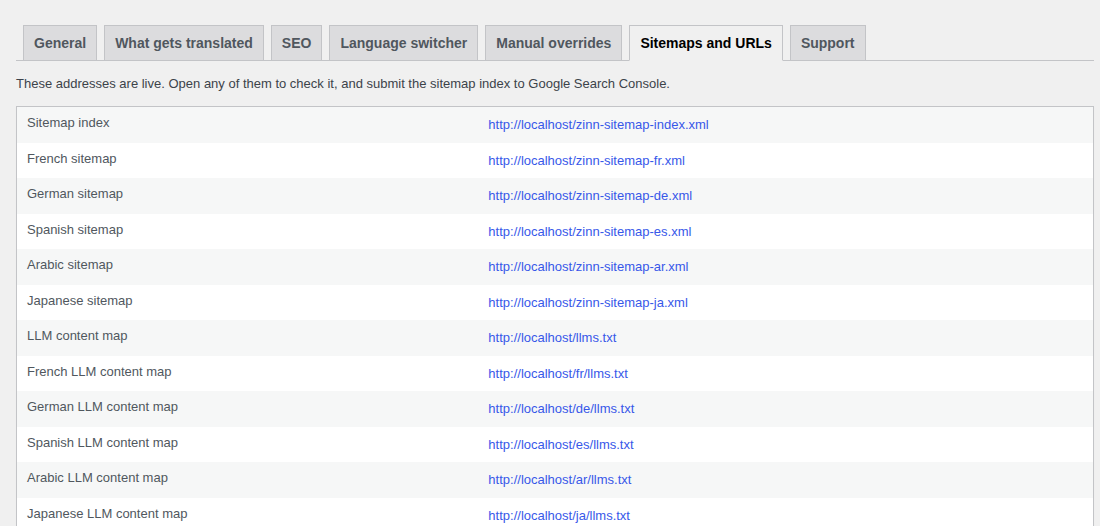
llms.txt addresses, with links to check them.Blokken
Deze plugin heeft 1 blok.
- Language switcher
Installatie
- Upload the plugin and activate it.
- Go to Zinn® Translate.
- Choose who pays: your Zinn Digital® plan (paste the Site ID and token from the site’s Translation tab) or your own provider key.
- Choose the languages to publish, and save.
Translation runs in the background. Publishing or updating a page marks its translations out of date and they are remade automatically; editing a page without changing any words costs nothing.
FAQ
-
Does it duplicate my posts?
-
No. There is no second copy of anything. A translated page is your own page with the words swapped in as it renders, so your content, your permalinks and your editor are untouched.
-
What happens if the translation service is down?
-
Nothing on your site changes. Translations are already stored on your own server, so pages keep serving in every language. New or edited content is translated on the next background pass.
-
Can I correct a translation?
-
Yes, on the Manual overrides tab. An edited translation is marked as yours and is never overwritten by a later re-translation.
-
What happens to my old URLs if I turn on translated slugs?
-
They keep working. The untranslated address redirects permanently to the translated one, and if a re-translation ever changes a slug the previous address redirects too.
-
Will it clash with my SEO plugin?
-
No. It detects Yoast SEO, Rank Math, All in One SEO and SEOPress and translates what they emit through their own filters, rather than printing a second title, description or canonical of its own.
-
Do I need a Zinn Digital® account?
-
No. With your own Google Gemini, DeepL or OpenAI key the plugin works on its own and the provider bills you. A Zinn Digital® plan is the alternative, not a requirement.
Beoordelingen
Er zijn geen beoordelingen voor deze plugin.
Bijdragers & ontwikkelaars
“Zinn® Translate” is open source software. De volgende personen hebben bijgedragen aan deze plugin.
Bijdragers
“Zinn® Translate” is vertaald in 3 localen. Dank voor de vertalers voor hun bijdragen.
Vertaal “Zinn® Translate” in je eigen taal.
Interesse in ontwikkeling?
Bekijk de code, haal de SVN repository op, of abonneer je op het ontwikkellog via RSS.
Changelog
2.4.7
- The Dropdown language switcher (the default style) is visible again: it now shows the current language as a button that opens the list on hover or keyboard focus; before, it showed nothing at all.
2.4.6
- Serbian: quotation marks are now „…“ throughout, as the Serbian WordPress translation team writes them.
2.4.5
- Translations follow each language’s WordPress.org translation team style guide: its quotation marks, spacing before punctuation, apostrophes and ellipsis, and the forms of address it uses.
2.4.4
- Japanese follows the WordPress.org Japanese team’s style guide: a half-width space around Latin text, half-width colons and question marks.
2.4.3
- New: two wp-config.php switches for the Zinn Digital® panel. define( ‘ZINN_TRANSLATE_PROMO’, false ); removes the panel (dashboard widget, settings block and footer), and define( ‘ZINN_TRANSLATE_PROMO_HOSTING_URL’, ‘https://…’ ); points its hosting offer at another https address.
2.4.2
- Every bundled translation of this plugin is redone with the current Google model: each locale in its own script (Serbian in Cyrillic), in the register its WordPress translation team uses, with the original spacing, placeholders and entities preserved.
2.4.1
- The Gemini provider now defaults to gemini-3.8-flash, the current Google model for translation (the older default is no longer offered to new API keys). A model you chose in Settings is unchanged.
- Translations of this plugin itself are corrected: every locale is in its own script, with the original spacing and placeholders preserved.
2.4.0
- Smaller download: the editable translation sources (.po) are no longer shipped; WordPress only ever loads the compiled .mo and .l10n.php files, which are unchanged.
2.3.0
- Updates install whenever you click Update, even months later: the download link is fetched fresh at install time instead of expiring in WordPress’s saved update data.
2.2.11
- Security: every translation handed back to WordPress (post, page and menu titles, excerpts, term names, the site title and tagline, SEO titles and descriptions, image alt text, WooCommerce labels and descriptions) is now escaped before it is returned.
- Security: the design-token stylesheet validates every component id and strips anything that could close the inline style.
- Security: the language switcher’s shortcode, block, menu item and widget wrapper are escaped as they are output.
2.2.10
- Translations: a word written in the wrong alphabet (for example a Korean word inside a Malayalam sentence, or an Urdu word ending a Punjabi one) is corrected in every language that had one. Each affected string was translated again and checked.
2.2.9
- Translations: re-translated the strings where a locale had dropped or altered a protected product name.
2.2.8
- Tested up to: 7.1 — the major version only, as WordPress.org’s Plugin Check requires (7.1.1 was refused as invalid_tested_upto_minor).
2.2.7
- Tested up to WordPress 7.1.1.
2.2.6
- Changed: on a Zinn Digital® plan, the languages this site publishes are now the ones you switch on under “Shown to visitors” on the site’s Translation tab in your dashboard. The site checks that choice every hour, straight after you save the Site ID and token, and when you open these settings. Until it has read the choice once, it keeps publishing the languages chosen on this screen. With your own provider key, you still choose the languages here.
- Fixed: the dashboard’s language choice was saved but never used, so switching a language on or off there changed nothing on the site.
- Fixed: the “Site token” setting now says what it is — an API key from your dashboard’s API keys page, with the sites.view and sites.translation.manage permissions — and a rejected token says the same.
2.2.5
- Fixed: on a site configured through the settings screen, the plugin behaved as if it had never been set up — no language addresses, no hreflang, and a status card saying “Not connected” beside the saved Site ID and token. Settings read very early in a page load, before the settings screen had registered, were the defaults, and they were then kept for the rest of that page load. They are now read from what you saved.
- Fixed: “Languages to publish”, the language switcher’s language list and “Post types” could not be saved — saving the screen stored none of them, so no language was published and, after one save, no content was collected for translation.
- Fixed: a language published on the settings screen now gets its web addresses straight away. Previously its pages answered “not found” until the plugin was reactivated or the site’s permalinks were saved.
- Fixed: a translated address in a language that does not use the Latin alphabet — Japanese, Chinese, Arabic, Hindi, Thai and others — now opens the page it names. It previously redirected to the site’s front page, and on those pages the “other languages” links and the search-engine language annotations pointed at the front page rather than at the same page in each language.
2.2.4
- In a right-to-left admin language, the Zinn Digital® menu entry showed its trademark symbol on the wrong side of the name. The name is now isolated so it reads correctly in Arabic, Hebrew, Persian, Pashto and Urdu.
2.2.3
- The admin screens’ styles and scripts are now enqueued through WordPress rather than printed into the page, so they can be dequeued, deferred or optimised by your site like any other asset — and they still work on a site whose security policy forbids inline code.
2.2.2
- Translations: every string this plugin’s admin shows is now translated in every bundled language. A few strings the machine translator refused were shipping in English; they are now translated by hand.
- The Japanese plugin description is translated.
- Every query against the plugin’s translation table binds the table name as an identifier.
2.2.1
- Fixed a fatal error when opening or saving the settings screen on a site that updated to 2.2.0 before 13:44 UTC on 9 September 2026. Three classes the screen uses were shipped in that build but never loaded. Sites that installed 2.2.0 later already had the fix; this release makes sure every site gets it.
2.2.0
- Fixed: your OpenGraph title and description are now translated as themselves. A page with an OpenGraph title different from its SEO title had the SEO title shared to Facebook, LinkedIn and X instead — translated, and not what you wrote.
- Fixed: variation descriptions are shown in the visitor’s language. They were being translated and stored, and the shopper still saw the original text under the variation picker.
- Fixed: custom product attribute values are shown in the visitor’s language, so “Material: Oak, Walnut” no longer answers a translated question in the original language.
- New sites now translate WooCommerce products by default, alongside posts and pages. A site that had already chosen its post types keeps exactly what it chose.
2.1.1
- Fixed a fatal error on activation: the settings screen’s class was never loaded, which took the site down on the front end and in wp-admin.
2.1.0
- Real settings, real styling and a real connection status, on the shared Zinn® plugin framework.
2.0.0
- Translated URL slugs, with permanent redirects from the untranslated address and from any slug a re-translation supersedes.
- SEO metadata: titles, descriptions, OpenGraph, image alt text, and compatibility with Yoast SEO, Rank Math, All in One SEO and SEOPress.
- Categories, tags, navigation menus (classic and block themes), the site title and the tagline.
- WooCommerce: products, short descriptions, purchase notes, attribute labels and variation descriptions.
- A language switcher as a shortcode, a block, a widget and a nav-menu item, with six customisable styles and right-to-left support.
- Manual overrides that survive re-translation.
- Standalone operation with your own Google Gemini, DeepL or OpenAI key — no Zinn Digital® account needed.
- Per-language sitemaps and
llms.txt/llms-full.txt. - WordPress, theme and plugin language packs installed automatically for each published language.
- Translations are now stored on your own site, so pages keep serving when the provider cannot be reached.
1.1.2
- Rendering of translated titles, bodies and excerpts with locale-prefixed URLs and hreflang.