
Beschrijving
Compatibility: Version 1.0.17 was tested on WordPress 7.1 and PHP 8.4, plus WordPress 6.5 and PHP 7.4. Minimums: WordPress 6.5 and PHP 7.4.
Opace AI Hub is onafhankelijk ontwikkeld door Opace Digital Agency en is niet verbonden aan, bekrachtigd door of gesponsord door OpenAI, Anthropic of Google.
Opace AI Hub gives compatible WordPress plugins one shared connection to AI providers. Add an OpenAI, Anthropic Claude or Google Gemini key once, test it, and let compatible plugins use the same saved configuration.
Opace AI Hub is independently installable infrastructure, not a content generator. AI Scribe is a separate companion plugin that sends content-generation requests through it.
Waarom Opace AI Hub werd gebouwd
As separate WordPress plugins added AI features, each one risked duplicating provider settings, model lists, request formats, prompt storage and cost calculations. Opace AI Hub moves that security-sensitive infrastructure into one maintained plugin. Site administrators get one place to rotate keys, choose models and review usage, while compatible plugins stay focused on their own workflows.
Hoe AI Scribe Opace AI Hub gebruikt
AI Scribe owns article planning, writing, SEO metadata, editorial review and WordPress publishing. Opace AI Hub supplies its encrypted credentials, provider and model selection, normalised generation requests, reusable prompts, model capabilities and usage records.
Wat biedt Opace AI Hub
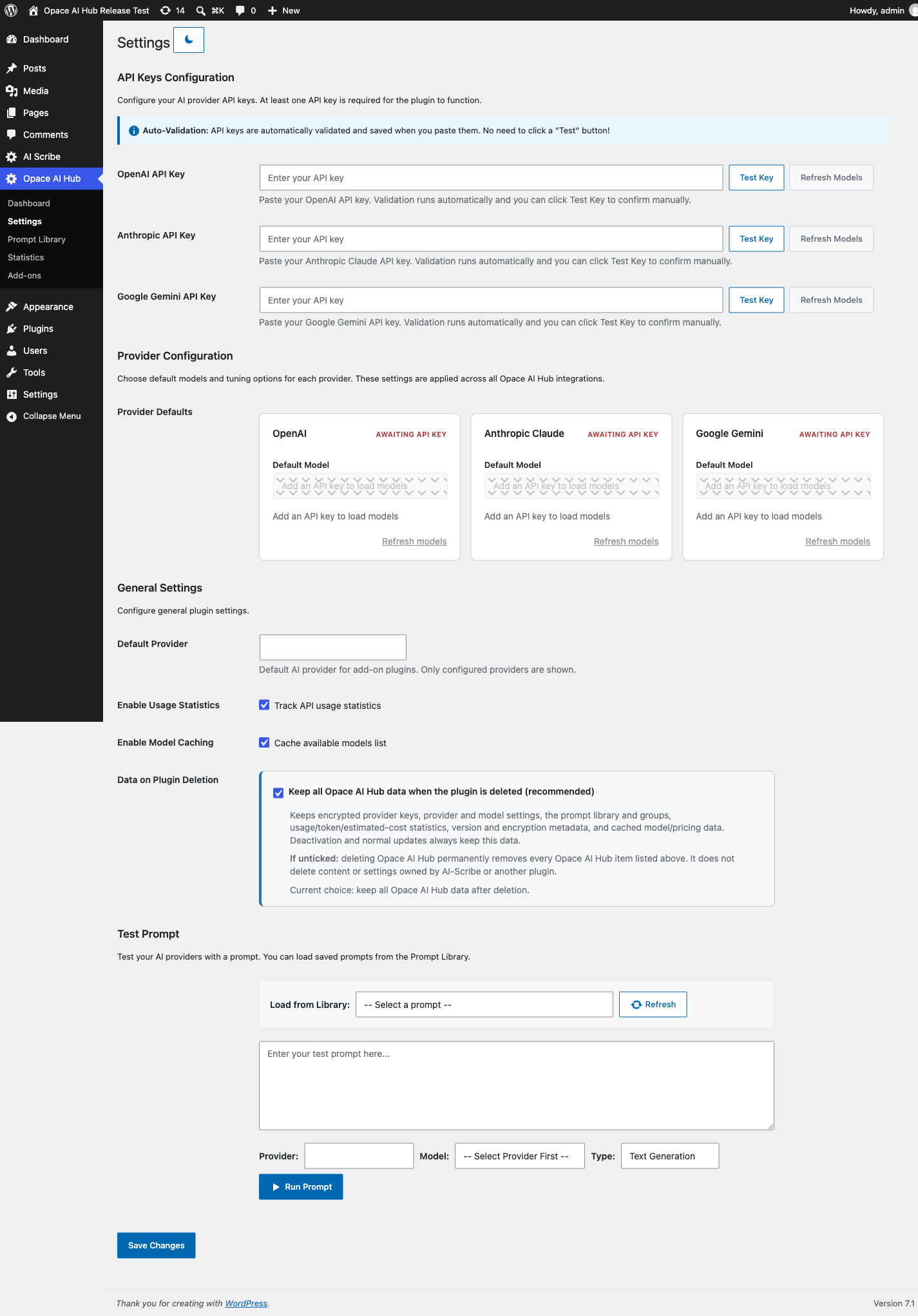
- Een instellingen scherm voor ondersteunde provider referenties
- Live model discovery based on the models available to your provider account
- Provider-bewuste behandeling voor tekst, afbeeldingen en gestructureerde uitvoer
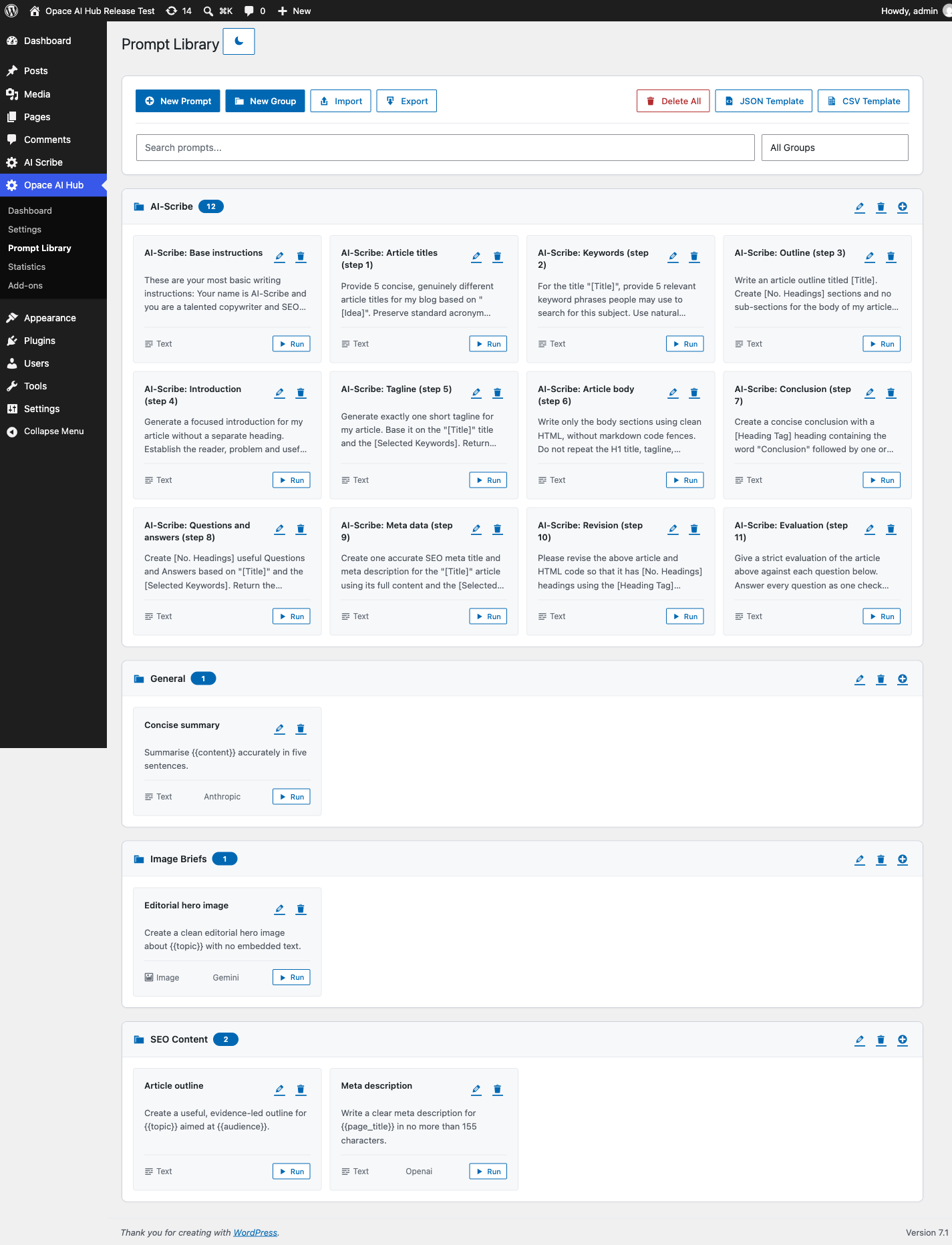
- Een gegroepeerde promptbibliotheek met import en export
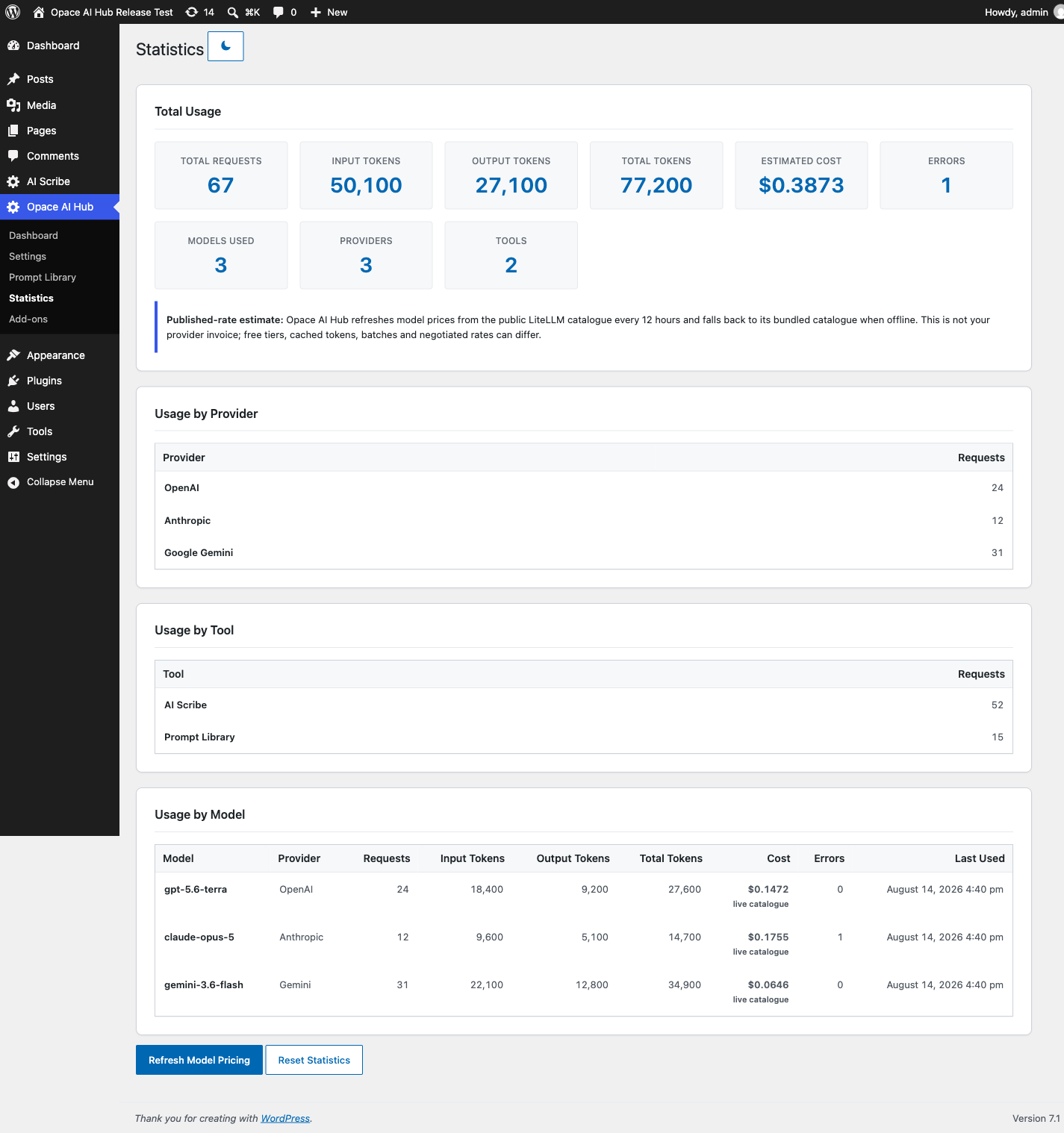
- Aanvraag, token en gepubliceerde kostenramingen per aanbieder en model
- A PHP API voor compatibel WordPress plugins
- Versleutelde credential opslag en een expliciete keuze voor data-retentie op uninstall
Ondersteunde providers
- OpenAI – tekst- en beeldgeneratie via de Chat Completes, Reacties en Afbeeldingen API’s
- Anthropic Claude – tekstgeneratie via de Berichten API; Anthropic biedt geen beeldgeneratie
- Google Gemini – text and image generation through the Gemini API
Model lists are fetched using your key. Providers may make different models available to different accounts, so two sites can show different choices.
Huidige aanbieders en live modelcatalogus
Live catalogue snapshot: 23 August 2026 at 13:03 BST (UTC+1). The Hub refreshed configured provider accounts at that time and received 132 OpenAI, 10 Anthropic Claude and 50 Google Gemini identifiers. Provider access varies by account, region and rollout; Settings always uses the current list returned for your own key. The built-in registry is only a fallback and metadata source when live discovery is unavailable.
Multimodale tekstmodellen te selecteren in de hub
These generate text and accept visual input. Image input does not make them dedicated image generators.
- OpenAI (45):
gpt-5.6-sol,gpt-5.6-terra,gpt-5.6-luna,gpt-5.5-pro,gpt-5.5-pro-2026-04-23,gpt-5.5,gpt-5.5-2026-04-23,gpt-5.4-pro,gpt-5.4-pro-2026-03-05,gpt-5.4,gpt-5.4-2026-03-05,gpt-5.4-mini,gpt-5.4-mini-2026-03-17,gpt-5.4-nano,gpt-5.4-nano-2026-03-17,gpt-5.2-pro,gpt-5.2-pro-2025-12-11,gpt-5.2,gpt-5.2-2025-12-11,gpt-5.1,gpt-5.1-2025-11-13,gpt-5-pro,gpt-5-pro-2025-10-06,gpt-5,gpt-5-2025-08-07,gpt-5-mini-2025-08-07,gpt-5-mini,gpt-5-nano-2025-08-07,gpt-4.1-2025-04-14,gpt-4.1,gpt-4.1-mini-2025-04-14,gpt-4.1-mini,gpt-4.1-nano,gpt-4.1-nano-2025-04-14,gpt-4o-2024-05-13,gpt-4o-2024-08-06,gpt-4o-2024-11-20,gpt-4-0613,gpt-4o,gpt-4-turbo,gpt-4-turbo-2024-04-09,gpt-4o-mini-2024-07-18,gpt-4o-mini,o3,o3-mini - Anthropic Claude (7):
claude-opus-5,claude-opus-4-8,claude-opus-4-7,claude-opus-4-6,claude-sonnet-4-6,claude-opus-4-5-20251101,claude-sonnet-4-5-20250929 - Google Gemini (6):
gemini-3.6-flash,gemini-3.1-pro-preview,gemini-3.1-pro-preview-customtools,gemini-2.5-pro,gemini-2.5-flash,gemini-pro-latest
Tekst- en redeneermodellen te selecteren in de hub
- OpenAI (17):
gpt-5-nano,gpt-4,gpt-3.5-turbo-0125,gpt-3.5-turbo-1106,gpt-3.5-turbo-16k,gpt-3.5-turbo,o4-mini-2025-04-16,o4-mini,o3-pro,o3-pro-2025-06-10,o3-2025-04-16,o3-mini-2025-01-31,o1-pro,o1-pro-2025-03-19,o1,o1-2024-12-17,chat-latest - Anthropic Claude (3):
claude-sonnet-5,claude-fable-5,claude-haiku-4-5-20251001 - Google Gemini (11):
gemini-3.7-flash,gemini-3.5-flash,gemini-3.5-flash-lite,gemini-3.1-flash-lite-preview,gemini-3.1-flash-lite,gemini-3-flash-preview,gemini-2.5-flash-lite,gemini-flash-latest,gemini-flash-lite-latest,gemma-4-26b-a4b-it,gemma-4-31b-it
Image-generation models selectable in the Hub
- OpenAI (6):
gpt-image-2,gpt-image-2-2026-04-21,gpt-image-1.5,gpt-image-1,gpt-image-1-mini,chatgpt-image-latest - Google Gemini (7):
gemini-3.1-flash-image,gemini-3.1-flash-image-preview,gemini-3.1-flash-lite-image,gemini-3-pro-image,gemini-3-pro-image-preview,gemini-2.5-flash-image,nano-banana-pro-preview - Anthropic Claude: no image-generation models were returned.
Live gespecialiseerde modellen gecatalogiseerd, momenteel niet aangeroepen
The Hub retains these live identifiers for capability-aware add-ons, but its present public helpers only execute text, structured-output and image requests. Listing a specialist model here does not claim a working Hub request path for that category.
- OpenAI audio, spraak en real-time (31):
gpt-4o-transcribe,gpt-4o-transcribe-diarize,gpt-4o-mini-transcribe,gpt-4o-mini-transcribe-2025-03-20,gpt-4o-mini-transcribe-2025-12-15,gpt-4o-mini-tts,gpt-4o-mini-tts-2025-03-20,gpt-4o-mini-tts-2025-12-15,gpt-realtime-2.1,gpt-realtime-2.1-mini,gpt-realtime-2,gpt-audio-1.5,gpt-realtime-1.5,gpt-transcribe,gpt-audio,gpt-audio-2025-08-28,gpt-audio-mini,gpt-audio-mini-2025-10-06,gpt-audio-mini-2025-12-15,gpt-live-transcribe,gpt-realtime,gpt-realtime-2025-08-28,gpt-realtime-mini,gpt-realtime-mini-2025-12-15,gpt-realtime-translate,gpt-realtime-whisper,whisper-1,tts-1,tts-1-1106,tts-1-hd,tts-1-hd-1106 - Gemini audio, muziek en live (10):
gemini-3.5-live-translate-preview,gemini-3.1-flash-live-preview,gemini-3.1-flash-tts-preview,gemini-2.5-pro-preview-tts,gemini-2.5-flash-native-audio-latest,gemini-2.5-flash-native-audio-preview-09-2025,gemini-2.5-flash-native-audio-preview-12-2025,gemini-2.5-flash-preview-tts,lyria-3-pro-preview,lyria-3-clip-preview - Inbeddingen (6): OpenAI
text-embedding-3-small,text-embedding-3-large,text-embedding-ada-002; Geminigemini-embedding-2-preview,gemini-embedding-2,gemini-embedding-001 - Video (5): OpenAI
sora-2-pro,sora-2; Geminiveo-3.1-fast-generate-preview,veo-3.1-generate-preview,veo-3.1-lite-generate-preview - OpenAI Code (6):
gpt-5.3-codex,gpt-5.2-codex,gpt-5.1-codex-max,gpt-5.1-codex,gpt-5.1-codex-mini,gpt-5-codex - OpenAI onderzoek en onderzoek (10):
o4-mini-deep-research,o4-mini-deep-research-2025-06-26,o3-deep-research,o3-deep-research-2025-06-26,gpt-5-search-api,gpt-5-search-api-2025-10-14,gpt-4o-search-preview,gpt-4o-search-preview-2025-03-11,gpt-4o-mini-search-preview,gpt-4o-mini-search-preview-2025-03-11 - Gemini onderzoek (3):
deep-research-max-preview-04-2026,deep-research-preview-04-2026,deep-research-pro-preview-12-2025 - Computer- en agentmodellen (4): OpenAI
computer-use-preview,computer-use-preview-2025-03-11; Geminigemini-2.5-computer-use-preview-10-2025,antigravity-preview-05-2026 - Gemini robotica en antwoord op de vraag (4):
gemini-robotics-er-2-preview,gemini-robotics-er-2-streaming-preview,gemini-robotics-er-1.6-preview,aqa - OpenAI matiging (2):
omni-moderation-2024-09-26,omni-moderation-latest - Legacy of provider specifieke tekst ID’s uitgesloten van de prose picker (9): OpenAI
gpt-5.3-chat-latest,gpt-5.2-chat-latest,gpt-5.1-chat-latest,gpt-5-chat-latest,gpt-3.5-turbo-instruct,gpt-3.5-turbo-instruct-0914,babbage-002,davinci-002; Geminigemini-omni-flash-preview
Standaardinstellingen voor dynamisch model
Een geldige opgeslagen keuze wordt altijd bewaard. Als het ontbreekt of met pensioen gaat, Opace AI Hub rangschikt de live lijst van de geconfigureerde account binnen de beoogde familie: nieuwste Terra met medium redenation voor OpenAI schrijven; nieuwste Claude Opus met middelmatige inspanning voor Anthropic schrijven; nieuwste non-Lite Gemini Flash met medium denken voor Gemini schrijven; nieuwste GPT Afbeelding voor OpenAI beelden; en nieuwste Gemini Flitsafbeelding – Nano Banana voor Gemini afbeeldingen.
The maintained offline fallbacks are currently gpt-5.6-terra, claude-opus-5, gemini-3.6-flash, gpt-image-2 and gemini-3.1-flash-image (Nano Banana 2). Live discovery takes precedence, so a later model in the same preferred family can become the default without a plugin update. Opace AI Hub never silently replaces an explicit valid choice made by an administrator.
Compatibele plugins
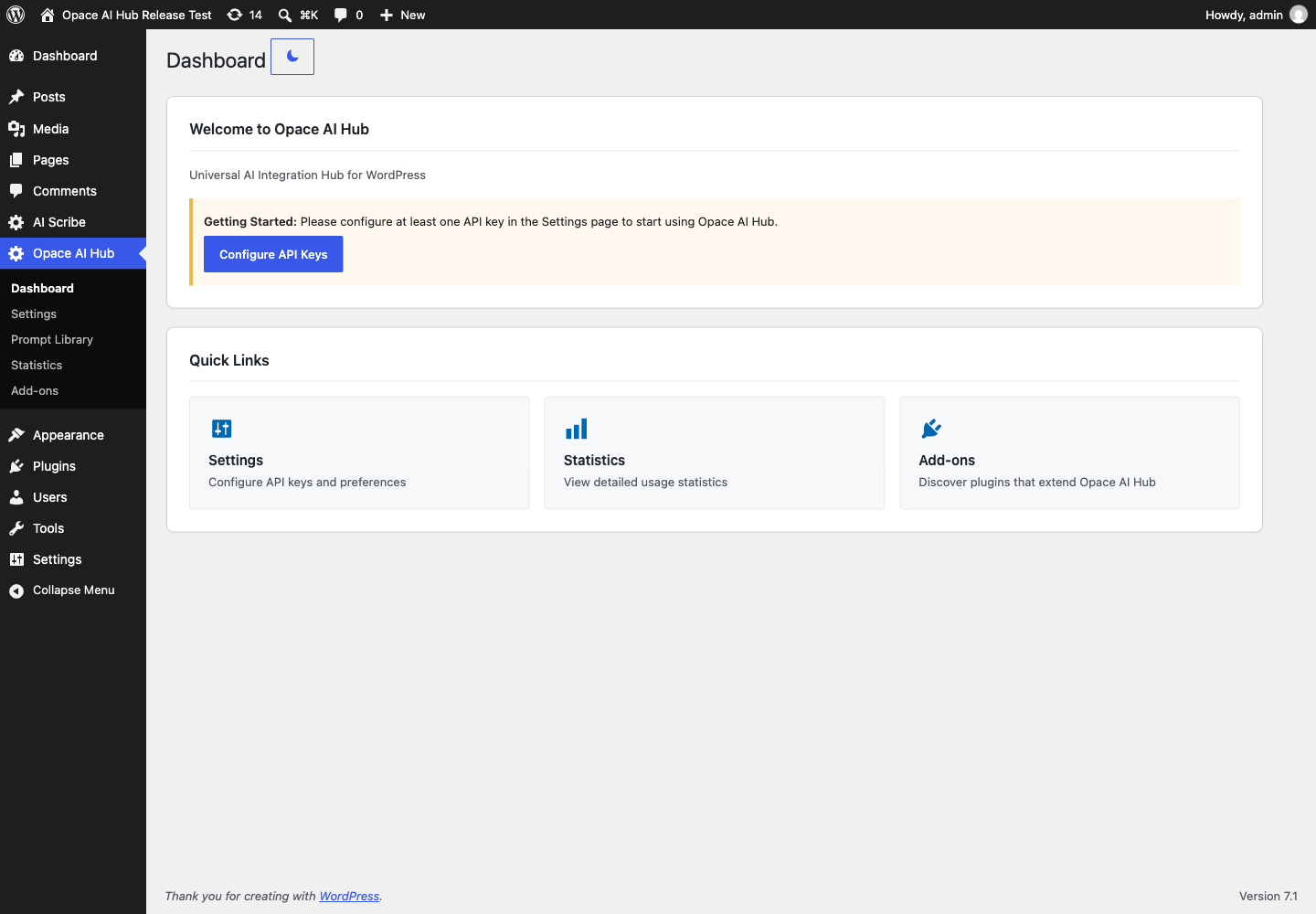
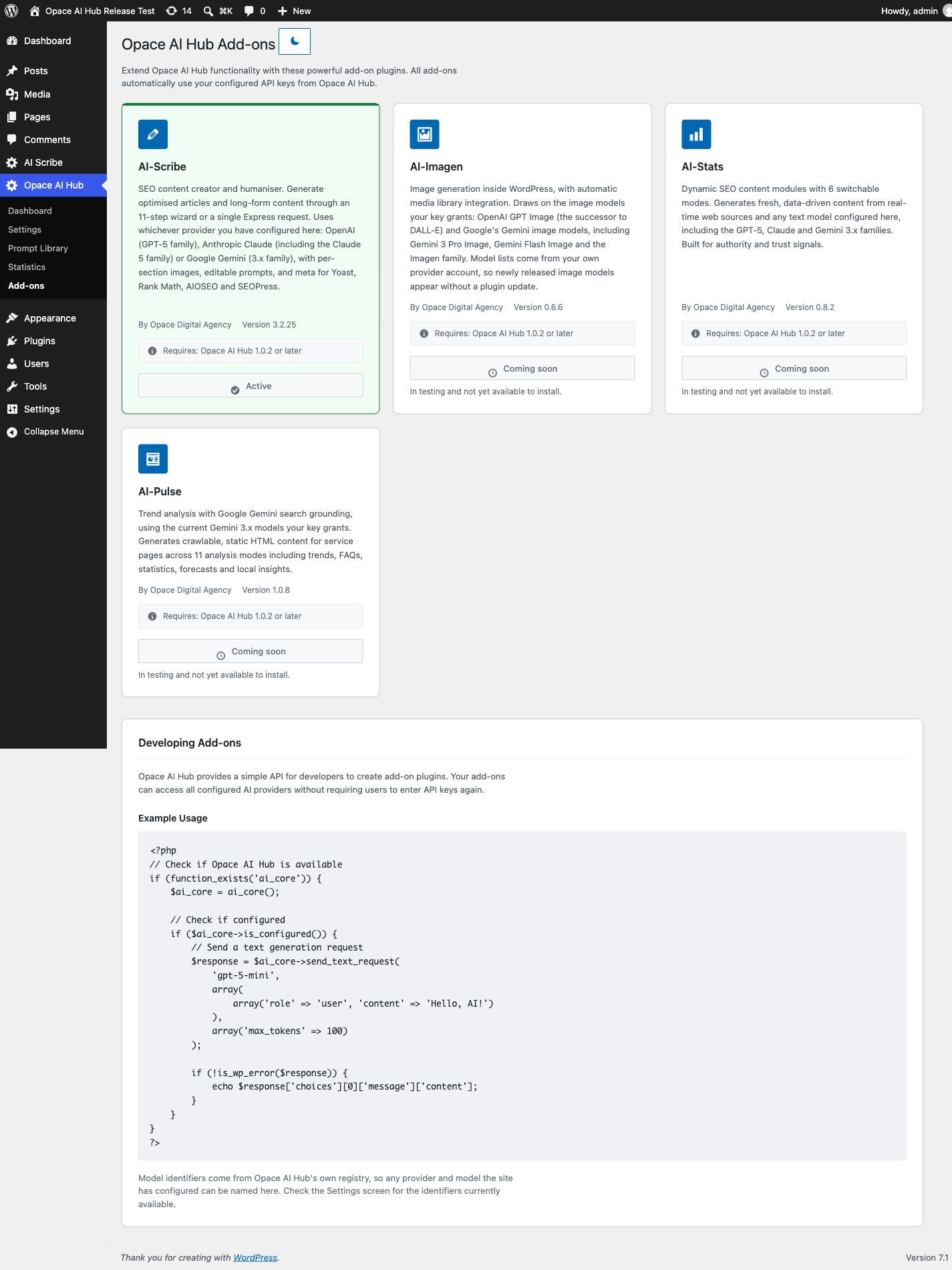
- AI Scribe 3.0 or later – AI content creation and SEO optimisation. Hub 1.0.13 or newer supports AI Scribe 3.2.36’s corrected install and upgrade flow. The Add-ons screen installs the public AI Scribe package after explicit consent, then waits for the administrator to activate it from the same card.
Ontwikkelaars kunnen ook Opace AI Hub’s PHP API in hun eigen plugins.
Wat komt er nu
AI-Imagen is a planned image-generation workflow intended to use Opace AI Hub. It is not included in this release and has no announced release date. Other compatible plugins can use the same PHP API as the project grows.
Veiligheid en privacy
Provider keys are stored in the ai_core_settings option on your WordPress site. They are encrypted at rest with AES-256-CBC, using a random initialisation vector per value and a key derived from the site’s WordPress salts. If encryption fails, Opace AI Hub does not save the key as plain text.
Het roteren van de zouten in wp-config.php maakt opgeslagen sleutels onleesbaar. Voer ze opnieuw in na een zoutrotatie.
Opace AI Hub does not include analytics or user tracking. Generation data is sent only when an administrator tests a provider or a compatible plugin requests a generation.
Externe diensten
Opace AI Hub connects to the following third-party services. Each provider bills you directly under the terms of your account.
OpenAI
Used when an administrator tests an OpenAI key or refreshes its model list, and when OpenAI is chosen for a generation. Opace AI Hub sends the OpenAI API key, requested model, request settings and prompt or image instructions supplied by the calling plugin. Requests go to api.openai.com.
Anthropic Claude
Used when an administrator tests an Anthropic key or refreshes its model list, and when Anthropic is chosen for a generation. Opace AI Hub sends the Anthropic API key, requested model, request settings and prompt supplied by the calling plugin. Requests go to api.anthropic.com.
Google Gemini
Used when an administrator tests a Gemini key or refreshes its model list, and when Gemini is chosen for a generation. Opace AI Hub sends the Gemini API key, requested model, request settings and prompt or image instructions supplied by the calling plugin. Requests go to generativelanguage.googleapis.com.
LiteLLM openbare modelcatalogus
Used when Opace AI Hub needs current published pricing for a discovered model and when an administrator selects Refresh Model Pricing. Opace AI Hub sends only the provider name and model identifier to api.litellm.ai. API keys, prompts, generated content, site details and usage totals are not sent. Successful results are cached for 12 hours. Opace AI Hub uses its bundled catalogue when no current result is available and shows Cost unavailable rather than treating an unknown price as zero.
WordPress.org plugin directory
Used only when an administrator chooses Install AI Scribe on the Add-ons screen. Opace AI Hub asks the WordPress plugin API for AI Scribe’s public package and passes its download URL to WordPress’s core installer. WordPress.org receives the normal plugin-information and package-download requests; Opace AI Hub does not send API keys, prompts, generated content, site settings or usage records. Installation stops for the administrator to choose Activate AI Scribe and continue.
De door Opace AI Hub getoonde kostencijfers zijn schattingen van het gepubliceerde tarief. Vrije niveaus, gecached-token tarieven, batch pricing, onderhandelde tarieven en wijzigingen in de facturering van de leverancier kunnen een factuur afwijken van de schatting.
Videodemonstratie
Bekijk de huidige Opace AI Hub walkthrough, covering provider setup, live model discovery, de Prompt Library, gebruiksstatistieken en metgezel-plugin integratie.
Opace en verwante links
Schermafbeeldingen
Installatie
- Install Opace AI Hub from Plugins > Add New Plugin, or upload the
opace-ai-prompt-library-api-hubZIP through Plugins > Add New Plugin > Upload Plugin. - Activeer Opace AI Hub.
- Open Opace AI Hub > Instellingen.
- Voer een sleutel in voor ten minste één aanbieder, of op WordPress 7.0+ configureren onder Instellingen > Connectoren.
- Een standaard provider en opslaan selecteren.
Compatibele plugins kunnen dan de gedeelde configuratie gebruiken.
FAQ
-
Heeft Opace AI Hub een API sleutel of gratis AI gebruik?
-
No. Obtain a key directly from OpenAI, Anthropic or Google. The provider charges your account for usage under its own pricing and terms.
-
Genereert Opace AI Hub zelf inhoud?
-
No. It manages provider connections, models, prompts and usage data. Install a compatible plugin such as AI Scribe to generate content.
-
How does the WordPress core AI Client integration work?
-
The core AI Client (WordPress 7.0+) can use multiple configured providers, discover suitable models and generate text or images. Version 1.0.11 uses a Connector credential without copying it into Hub storage. If the key is stored in the Hub, the Hub supplies its decrypted value to the matching WordPress provider for that request only, so external plugins using the core client can use it too. The official OpenAI, Anthropic or Google provider plugin must be active. When both stores contain a key, WordPress Connectors takes precedence. WordPress 6.5 to 6.9 continues to use the Hub’s direct provider integration.
-
Kan ik meer dan één provider gebruiken?
-
Yes. You can save keys for multiple supported providers. A compatible plugin can use one provider for text and another for images.
-
Waarom ontbreekt er een model?
-
Opace AI Hub asks each provider which models your key can access. Availability can differ by account, region and provider rollout.
-
Zijn API-sleutels zichtbaar voor browserbezoekers?
-
No. Keys stored by Opace AI Hub are server-side, encrypted at rest, and are not printed into public pages or normal Hub responses. WordPress Connector credentials remain under WordPress core’s storage rules and are not copied into the Hub. Other trusted server-side plugins can use the Hub or WordPress AI Client APIs.
-
Wat gebeurt er als ik Opace AI Hub verwijder?
-
Opace AI Hub bewaart zijn gegevens standaard omdat andere plugins kunnen afhangen van het. Om alle verwijderen Opace AI Hub-owned referenties, instellingen, prompt tabellen, statistieken en caches, uitschakelen Persist-instellingen op verwijderen voordat u de plugin verwijdert. Opace AI Hub verwijdert geen gegevens van een andere plugin.
-
Where can I get support or report a development issue?
-
For user help, use the WordPress.org support forum. Developers can review the source or report a reproducible code issue through the Opace AI Hub GitHub repository and its issue tracker.
Opace AI Hub is free, open-source software supplied on a best-effort basis. Support response times and feature requests are not guaranteed. Reviews are welcome but always optional and are never required for support or functionality. The Hub does not guarantee search rankings, generated-content outcomes, provider availability or third-party pricing.
Beoordelingen
Er zijn geen beoordelingen voor deze plugin.
Bijdragers & ontwikkelaars
“Opace AI Prompt Library & API Integration Hub for OpenAI, Claude & Gemini” is open source software. De volgende personen hebben bijgedragen aan deze plugin.
Bijdragers
“Opace AI Prompt Library & API Integration Hub for OpenAI, Claude & Gemini” is vertaald in 1 locale. Dank voor de vertalers voor hun bijdragen.
Interesse in ontwikkeling?
Bekijk de code, haal de SVN repository op, of abonneer je op het ontwikkellog via RSS.
Changelog
1.0.17
- Corrected the installation guidance now that Opace AI Hub is publicly available on WordPress.org.
- Added the canonical Opace AI Hub product page and standardised the AI Scribe product name in public documentation.
- Added a purpose-made 1280 × 640 GitHub social preview.
1.0.16
- Shows each stored Hub credential as saved and validated, saved but invalid, or saved and not yet tested.
- Keeps explicit credential validation separate from model catalogue refreshes.
- Lets administrators re-test an encrypted saved key without exposing it to the browser.
1.0.15
- Added a consistent, responsive More from Opace card to every Hub admin screen with clearly labelled WordPress plugin, GitHub, ChatGPT and Opace service links.
1.0.14
- Documented the paired AI Scribe 3.2.36 install and upgrade compatibility boundary.
- Made Hub release ZIPs reproducible so the reviewed source always rebuilds to the same hash.
- Rechecked the complete readme for unwanted forced line breaks and retained the prominent companion and source links.
1.0.13
- Split AI Scribe installation and activation into two explicit actions in the same Add-ons card.
- Kept installation progress, success and errors inside the card with no unrelated admin notice.
- Improved WordPress.org paragraph rendering, companion links, focused tags and human-first search copy.
1.0.12
- Added one consent-led action that installs and activates AI Scribe from WordPress.org.
- Added state-aware Activate and Open AI Scribe actions for existing installations.
- Kept installation progress and errors inside the AI Scribe add-on card.
- Corrected Dashicon alignment across Add-ons, Settings and Prompt Library buttons.
1.0.11
- Toegevoegd twee-weg runtime credential delen met de WordPress 7.0 AI Client en Connectors API’s.
- Gebruikte Connector, omgevingsvariabele of constante referenties in de Hub zonder ze te kopiëren naar Hub-opslag.
- Gedeelde gecodeerde Hub referenties met overeenkomende geregistreerde WordPress AI provider plugins zonder het schrijven van een tweede Connector sleutel.
- Added WordPress AI provider models to Hub selectors and made Settings and Prompt Library requests use the active core provider.
- Made credential precedence and duplicate-key status explicit: WordPress Connectors wins when both stores contain a key.
- Maakte de complete bereikbaar admin en Prompt Library interface vertaalklaar, inclusief JavaScript acties, bevestigingen en fouten.
1.0.10
- Vervangde de onvolledige ingebouwde terugval lijst met een tijdstempel snapshot van alle 192 modellen terug door live provider ontdekking.
- Gedocumenteerd
gpt-5.6-sol,gpt-5.6-terraengpt-5.6-lunaals levend, multimodaal en selecteerbaar. - Distinguished selectable text and image models from live specialist models that the Hub catalogues but does not yet invoke.
1.0.9
- Maakte elke gebruikersgerichte URL in de WordPress.org beschrijving een gelabelde, klikbare Markdown link.
- Documented all 40 built-in model identifiers, grouped by text, multimodal, image and embedding roles.
- Uitstekende modellen de Hub kan beroep doen op gespecialiseerde modellen behouden door middel van live provider ontdekking.
1.0.8
- Removed the unsupported
Tested up tofield from the main PHP plugin header following final WordPress.org review guidance; compatibility remains declared in readme.txt. - Prepared the approved permanent slug and listing assets for the first WordPress.org SVN release.
- Added a Leave a Review link to the plugin row on the main Plugins page, matching AI Scribe.
1.0.7
- Changed plugin page headings to the complete approved Opace AI Hub logo and the WordPress sidebar to a centred white 20px symbol.
- Fixed the admin page header layout so WordPress notices occupy their own row and cannot displace or hide the logo.
- Toegevoegd een expliciete non-affiliation statement voor OpenAI, Anthropic en Google.
- Documenteerde de doelbewuste provider integratie van de Hub op de exacte code sites, dus Plugin Check voltooit zonder fouten of waarschuwingen.
1.0.6
- Added the approved Opace AI Hub logo to every plugin admin screen and the WordPress admin menu.
- Inclusief symbol-only 16px, 32px en 48px favicon varianten plus een 32pX ICO bestand.
1.0.5
- Classified the complete live provider inventory by capability for current and future add-ons.
- Kept text selectors focused on prose models without removing image, audio, video, embedding or specialist models from the Hub API.
- We hebben de ondersteunde generatiemethoden van Gemini vastgelegd en één regel voor prose typen toegepast op de standaardinstellingen van Hub en de tekstkiezer van AI Scribe.
1.0.4
- Verbeterde betrouwbaarheid van de provider door eenmaal opnieuw te proberen wanneer WordPress mislukt voordat de providers verbinding wordt ingesteld.
- Generic response timeouts are not retried, preventing duplicate generation requests.
1.0.3
- De bibliotheek en fallback-versie constanten hersteld zodat elke runtime versie marker akkoord gaat met de plugin header.
- Toegevoegd build controles die een ZIP weigeren wanneer een runtime versie marker verschilt.
1.0.2
- Fixed the Prompt Library asset hook after the public menu rename so its stylesheet, drag-and-drop scripts and controls load correctly.
1.0.1
- Renamed the plugin to Opace AI Prompt Library & API Integration Hub for OpenAI, Claude & Gemini (slug opace-ai-prompt-library-api-hub) following plugin review feedback.
- Het admin theme-boot script verplaatst naar het WordPress enqueue systeem (wp_add_inline_script).
- Correctie van de LiteLLM privacy link en gedocumenteerd waarom de plugin integreert met aanbieders direct.
1.0.0
- Eerste publieke vrijlating.
- Toegevoegd gedeeld credential management voor OpenAI, Anthropic Claude en Google Gemini.
- Added live model discovery, provider-aware text and image requests, and structured-output handling.
- Toegevoegd de prompt library en PHP integratie API voor compatibele plugins.
- Toegevoegd versleutelde credential opslag, gebruiksstatistieken en gepubliceerde kostenramingen.
- Toegevoegd expliciet behouden-of-verwijderen gedrag voor Opace AI Hub gegevens op uninstall.
- Toegevoegd provider-family-aware dynamische standaards met behoud van geldige opgeslagen modelkeuzes.
- Het releasepakket is getest op WordPress 7.1 met PHP 8.3.
- Consolidated all completed pre-release work as the first public 1.0 release.