

Beschrijving
WordSec is an advanced WordPress security and threat intelligence platform, built for modern security teams and site owners who need enterprise-grade protection. Eight integrated modules, from a Web Application Firewall to real-time security alerts, work together behind a single modern dashboard, and your live security score is always in view. Every module can be enabled or disabled independently, so you get exactly the protection your site needs without paying for it in performance.
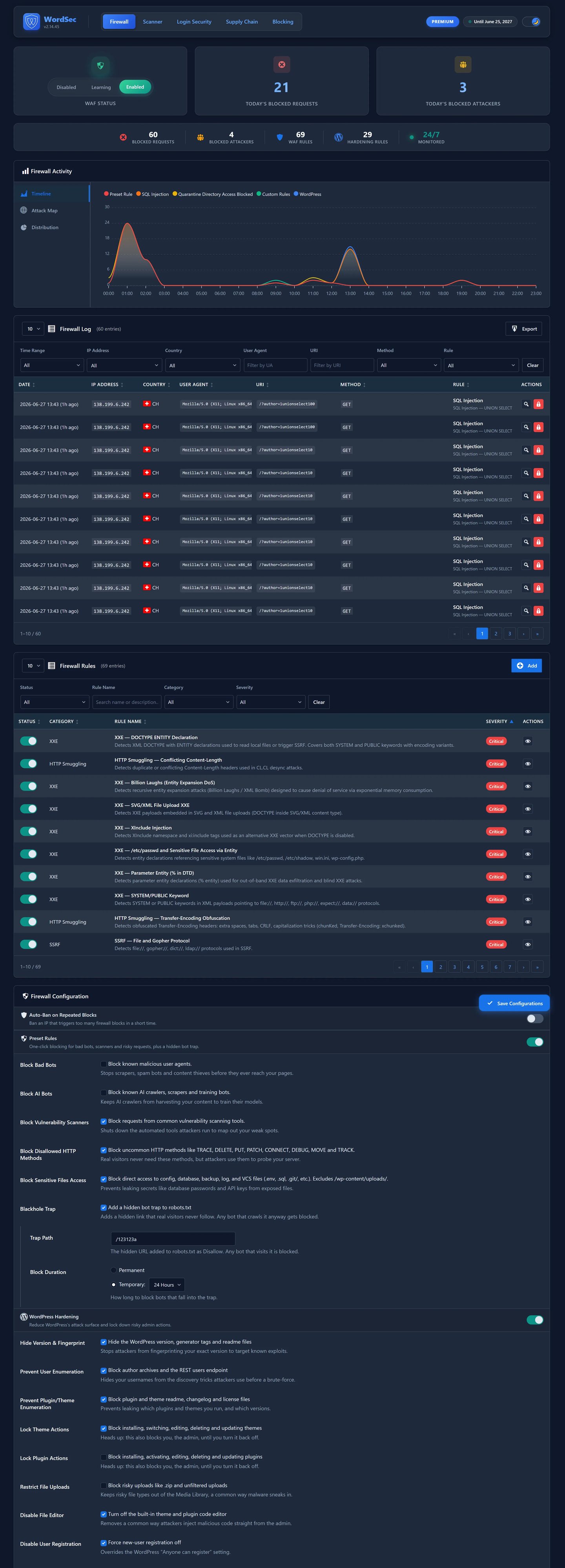
Firewall
Inspect every request, write your own rules, and harden WordPress with one-click toggles.
* Multi-condition custom rule builder with regex and wildcard matching
* Built-in rules across the major attack categories (SQL injection, XSS, path traversal, PHP and command injection, and more)
* WAF learning and active modes, bot blocking and security headers
* 25+ one-click hardening toggles for wp-config access, author enumeration, REST API and more
* Optional Extended Protection: pre-WordPress request inspection via an auto_prepend_file bootstrap (explicit opt-in, fully reverted when disabled or on deactivation)
* Endpoint rate limiting, XML-RPC protection and detailed firewall logs
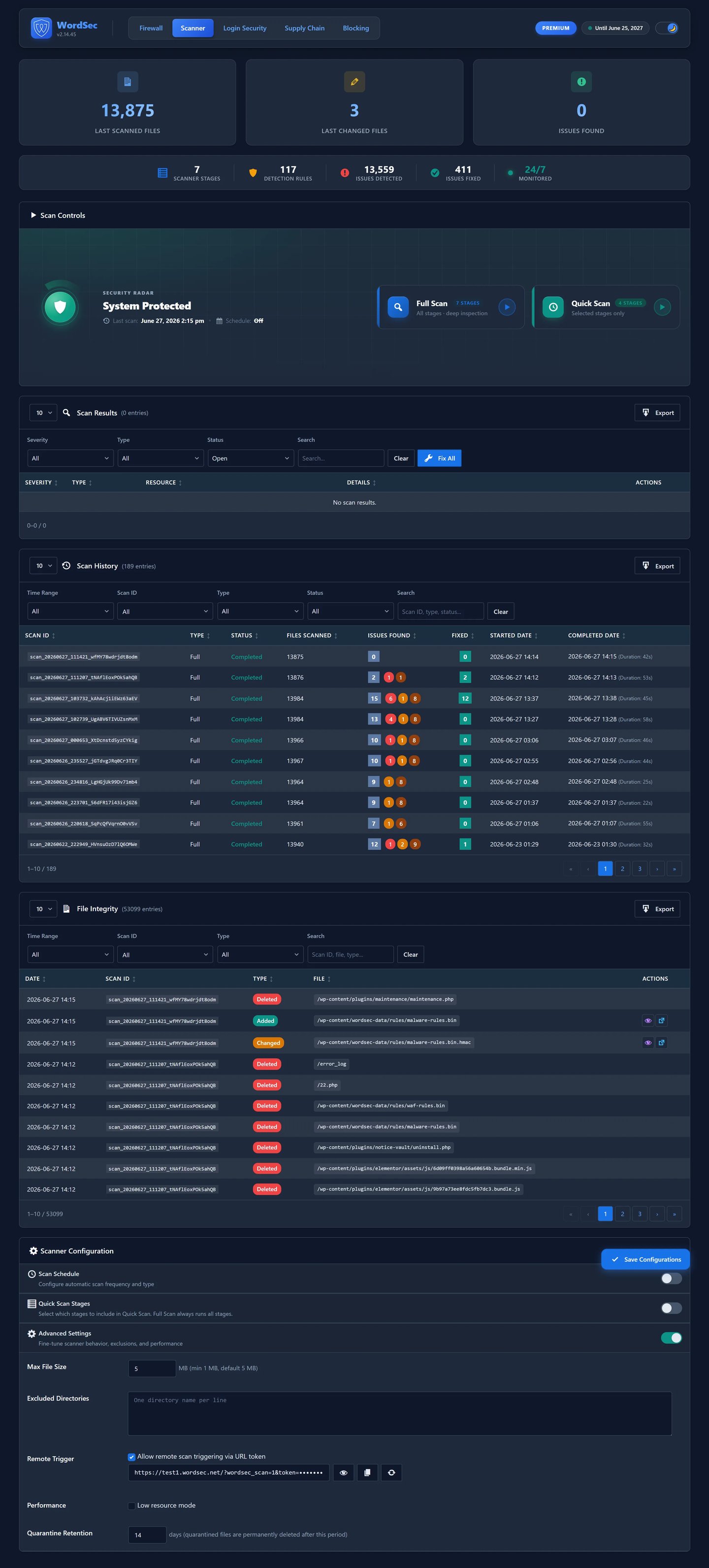
Scanner
A seven-stage scanning system that examines files, the database and scheduled tasks.
* malware detection rules (synced from the WordSec service) based content scanning
* WordPress core, plugin and theme file-integrity verification (via the WordPress.org API)
* Scheduled scans with batch processing to avoid timeouts
* One-click quarantine and restore, with complete scan history
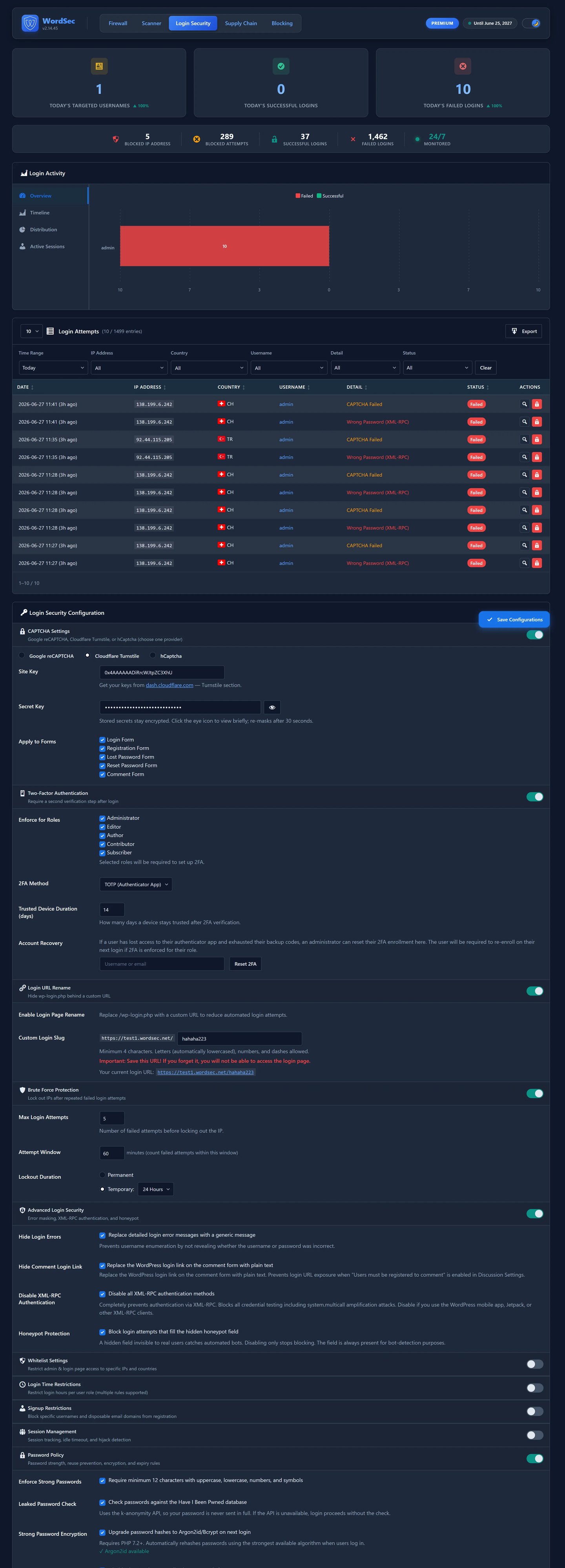
Login Security
Stop credential attacks before they start.
* Role-based two-factor authentication (RFC 6238 TOTP), no external library required
* Three CAPTCHA providers (reCAPTCHA, hCaptcha, Cloudflare Turnstile) plus a built-in math CAPTCHA
* Brute-force protection with progressive lockout and honeypot traps
* Leaked-password checking (Have I Been Pwned, k-anonymity) and Argon2 password enforcement
* Session management and a custom login page designer
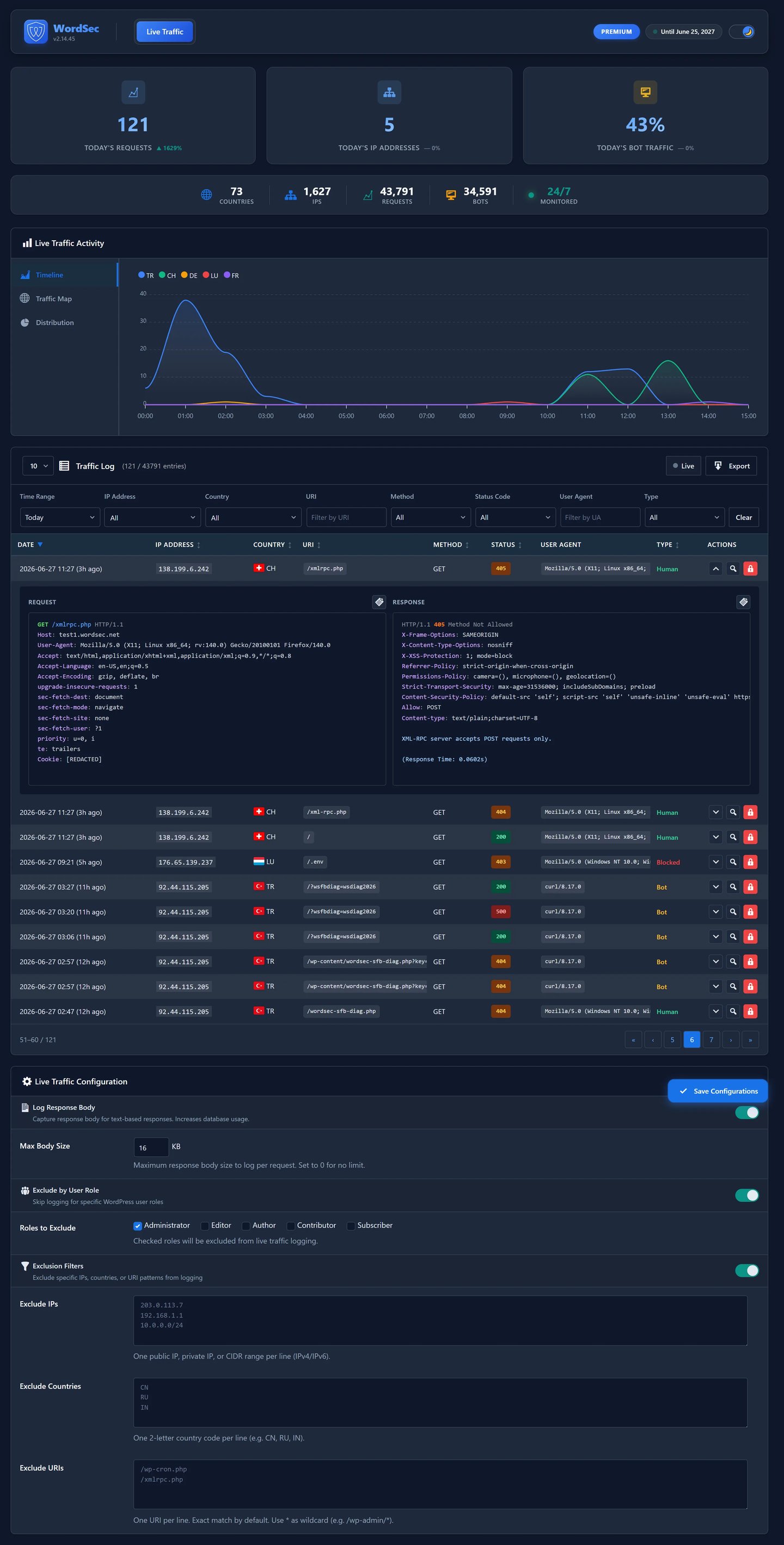
Live verkeer
Watch your traffic in real time, then replay it historically.
* Real-time request logging (IP, URI, method, status, response time)
* Safe request and response inspection with automatic bot detection
* Exclusion filtering by role, IP, country or URI, with CSV export
Blokkeren
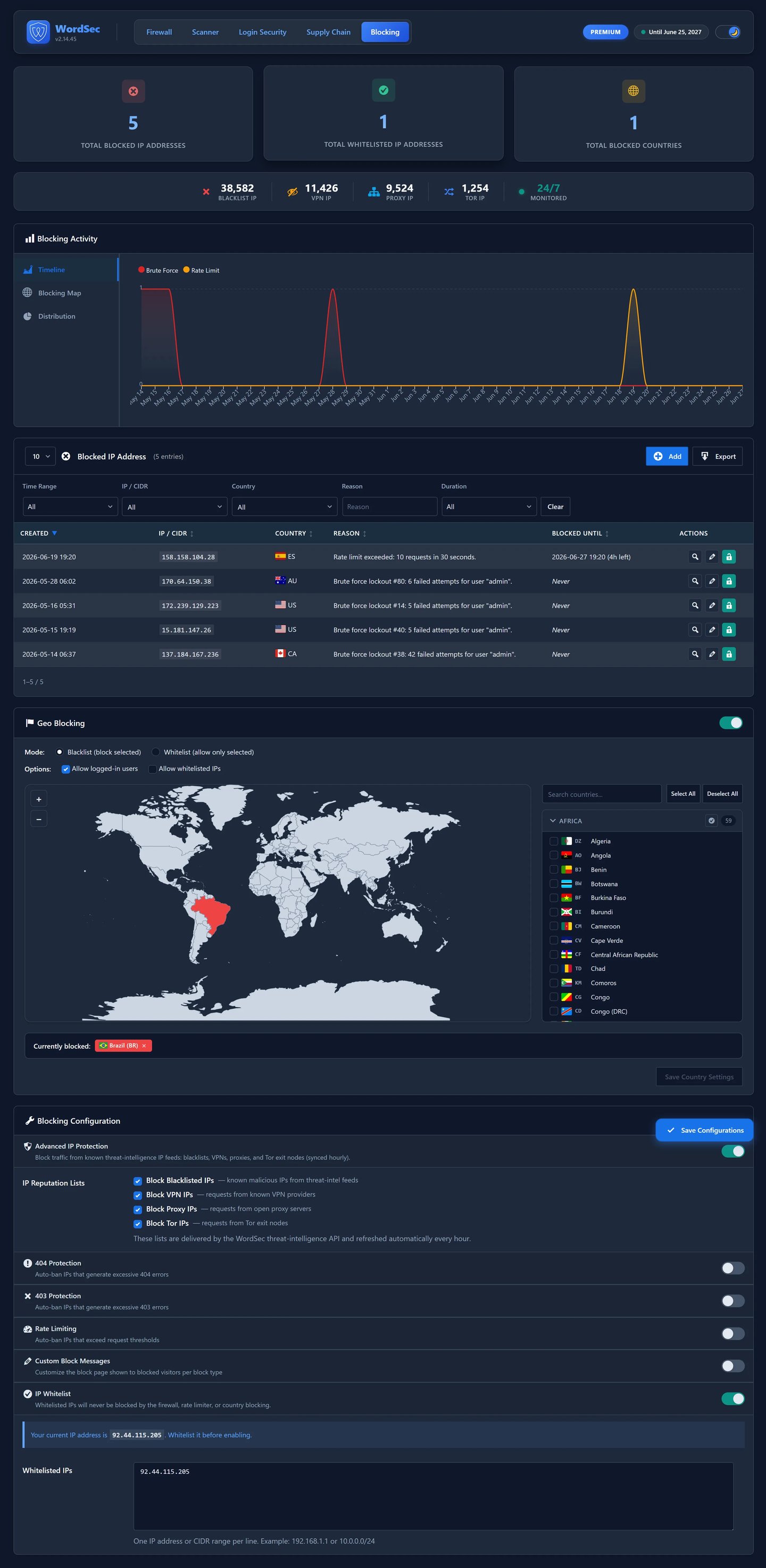
- Country and continent allow or block lists
- Single IP and CIDR range blocking, temporary or permanent, with allow-list support
- Automatic abuse protection and endpoint rate limiting
- Aangepaste blokkeerberichten
Toeleveringsketen
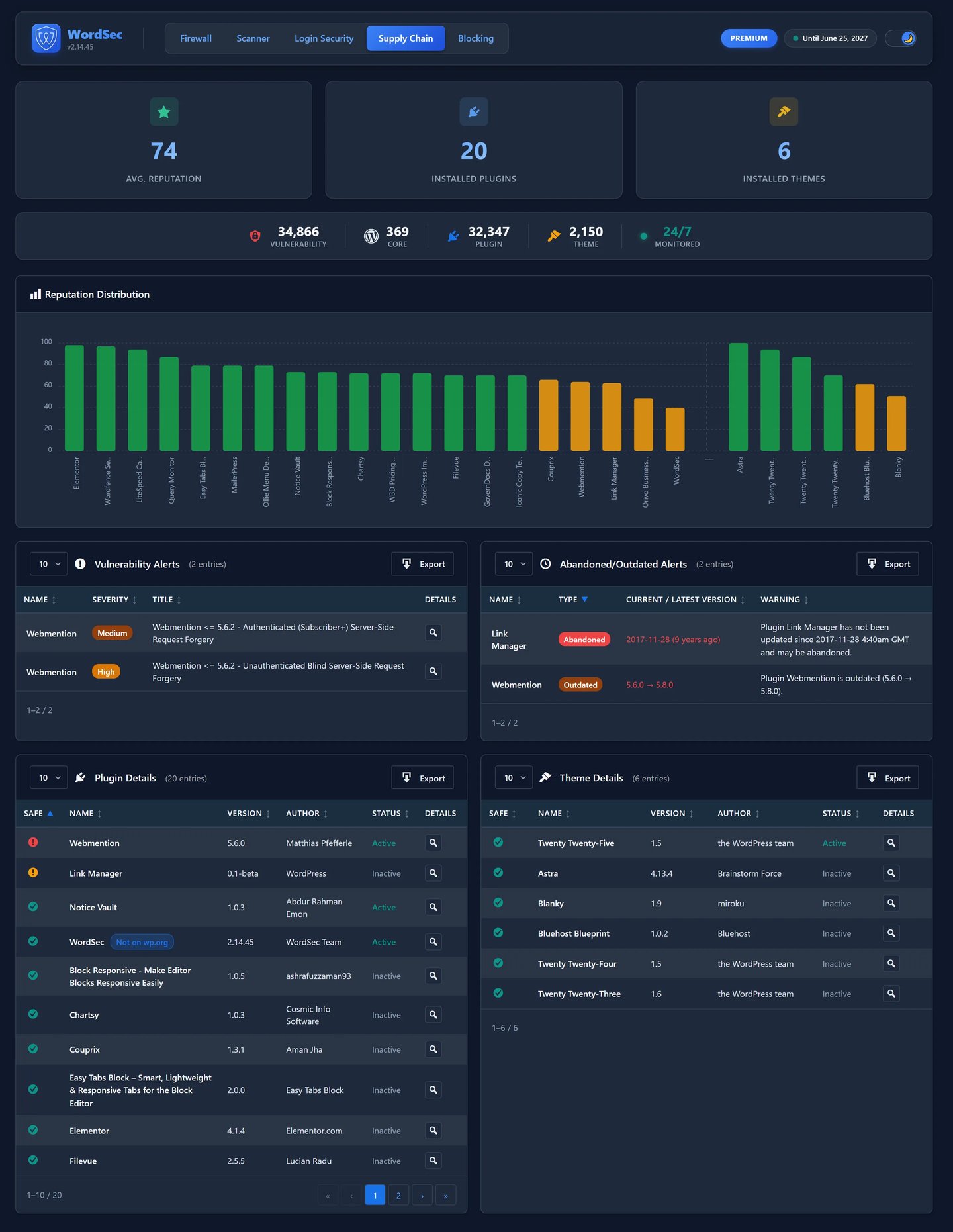
- Reputatiescores voor elke geïnstalleerde plugin en elk geïnstalleerd thema
- Known-vulnerability alerts (data from the WordSec service) for core, plugins, themes and PHP
- Detectie van verlaten plugins en thema’s
- Verificatie van de update-integriteit met automatische back-ups en een volledige SBOM inventaris
Audit Log
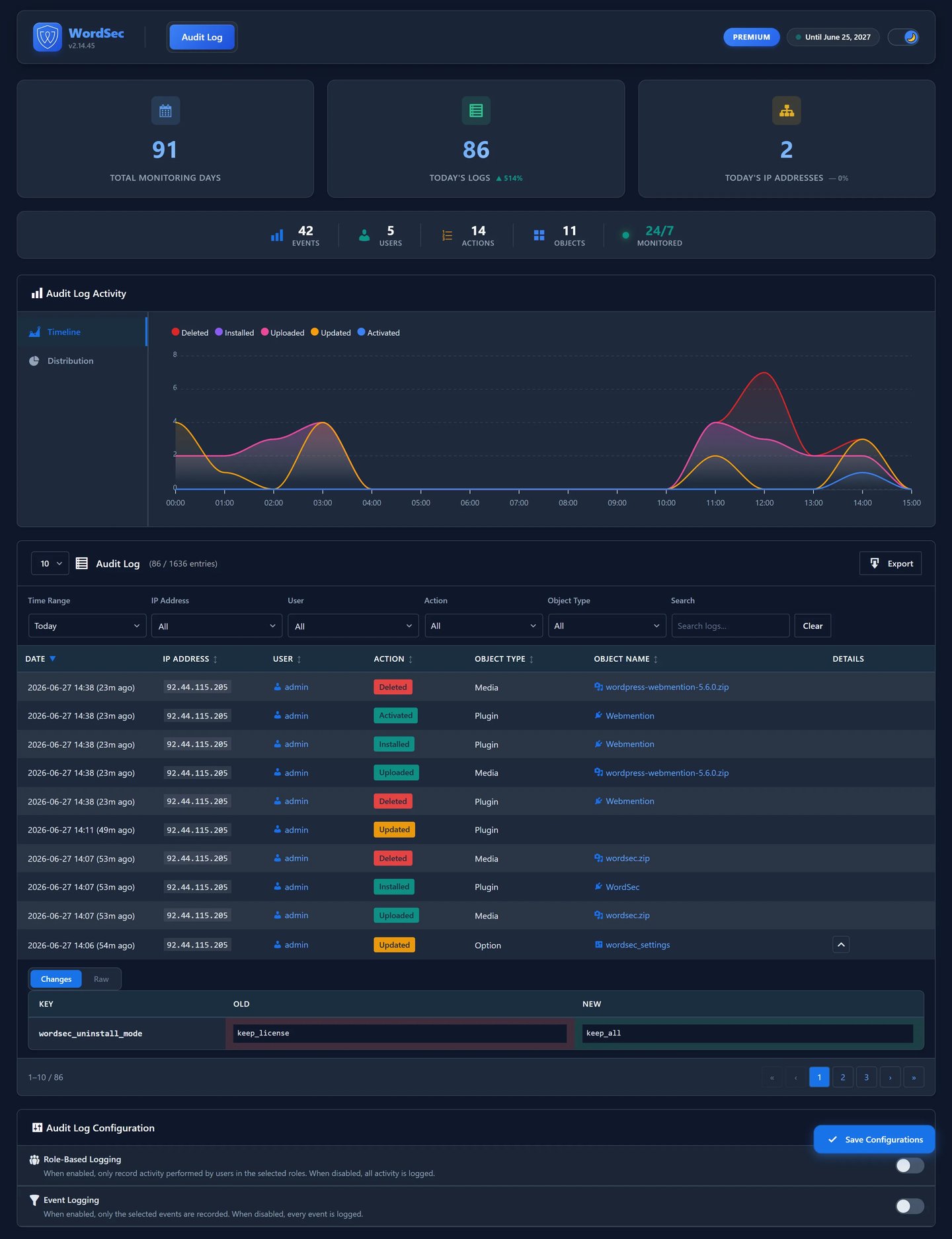
- Complete activity tracking across 11 object types and 14 actions
- Content changes, plugin, theme and setting changes, and more
- Snel filteren en export met één klik
Alarm
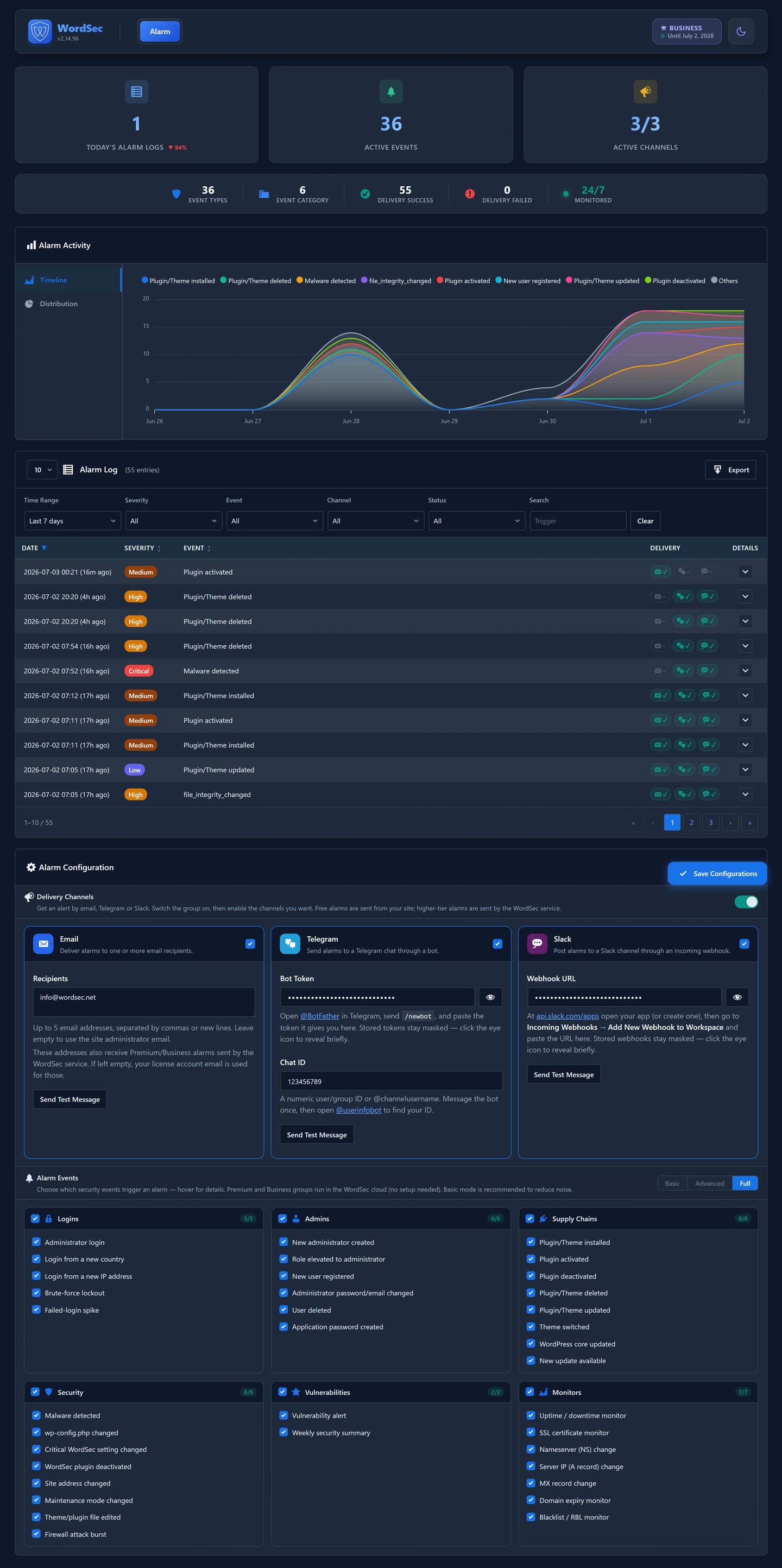
- 36 gebeurtenistypen in zes categorieën
- Bezorging via e-mail, Telegram of Slack
- Basic, Advanced and Full alert modes
WordSec is fully functional out of the box. Every feature (WAF, malware and file-integrity scanning, login security, two-factor authentication, hardening, IP and country blocking, audit log, supply-chain monitoring and alarms) runs locally on your server with no license key and no restrictions. Optionally, the WordSec service at wordsec.net supplies continuously-updated threat-intelligence data that cannot be produced locally: managed WAF rule sets, the full malware signature feed, IP-reputation lists, the GeoIP database, the disposable-email domain list and known-vulnerability records. Connecting the service is optional; the local features work with or without it, simply using whatever data is available. Every external service and the data it receives is documented in the “External services” section below.
Externe diensten
WordSec is designed to run locally, and with no license key it makes no outbound requests to the WordSec service. Core request filtering and file scanning run on your server. The services listed below are contacted only for the specific features described, and most of them only when you explicitly enable that feature (or, for the WordSec API, only after you activate a license key). This section documents every third-party service the plugin can connect to and the data each one receives.
WordSec API (api.wordsec.net)
WordSec runs free without a license, in which case it does not contact this service at all. A free license is available to everyone; once you activate a key the plugin communicates with the WordSec service for two distinct purposes:
- Required service calls (only while a license key is active): license activation and validation, and threat-data updates (firewall rules, malware signatures, IP reputation lists, GeoIP data, the disposable-email domain list and known-vulnerability data). These enable the cloud-backed features and cannot be performed locally; with no key, none of these calls are made. The local enforcement code for these features (the WAF engine, the malware scanner, the IP-blocking filters and the signup-restriction filter) is always present and active; without an up-to-date feed it simply has no threat-intelligence data to check requests against.
* When: on activation/validation and on scheduled threat-data update checks.
* Data sent: your site URL and license key (used to authenticate you and bind the license to this site) and, for update checks, the current versions of your installed threat-data feeds.
- Optional usage/environment telemetry (OPT-IN, OFF by default): an anonymous once-daily snapshot used to improve WordSec. It is only sent after you explicitly enable “Share usage & environment data” (at license activation or in Settings Advanced Usage Data) and can be turned off again at any time.
* Wanneer: eenmaal per dag, alleen zolang de opt-in is ingeschakeld.
* Verzonden gegevens: een niet-persoonlijke momentopname van de siteomgeving (server-, WordPress-, PHP- en databaseversies, de lijst met actieve plugins en thema’s) en geaggregeerde statistieken over WordSec-functiegebruik en beveiliging. Er worden nooit wachtwoorden, databasegegevens, geheime sleutels of e-mailadressen verzonden.
- Dienstvoorwaarden: https://wordsec.net/terms
- Privacybeleid: https://wordsec.net/privacy
Have I Been Pawned (api.pwnedpasswords.com)
Used by the optional leaked-password check to detect whether a password appears in known data breaches, using k-anonymity.
* When: when a user sets or submits a password and the leaked-password check is enabled.
* Data sent: only the first 5 characters of the SHA-1 hash of the password. The password itself and its full hash never leave your site.
* Terms & Privacy: https://haveibeenpwned.com/Privacy
WordPress.org API (api.wordpress.org, downloads.wordpress.org, wordpress.org, core.svn.wordpress.org, plugins.svn.wordpress.org, themes.svn.wordpress.org)
Used to verify WordPress core, plugin and theme file integrity, to look up public plugin/theme information (plugins_api/themes_api) for the supply-chain reputation scores and update-integrity checks, to download WordSec’s own translation language pack from translate.wordpress.org when you pick a Display Language that is not installed yet (the same mechanism WordPress itself uses when the site language changes), and — only when you click “Repair” on a scanner finding — to download the original copy of a modified core/plugin/theme file so it can be restored. Repair downloads fetch single original files from plugins.svn.wordpress.org / themes.svn.wordpress.org / core.svn.wordpress.org, falling back to full packages from downloads.wordpress.org (plugin/theme zips) and wordpress.org (core release zips).
* When: during malware/integrity scans and supply-chain reputation checks, on an explicit repair action, and when you save a Display Language whose translation is not installed yet.
* Data sent: the WordPress core version, site locale, and the slugs/versions of the plugins/themes being checked; for a language download, the plugin slug/version and the chosen locale.
* Terms & Privacy: https://wordpress.org/about/privacy/
RDAP (rdap.org)
Used by the WHOIS/RDAP lookup tool on the Tools page to show ownership information for an IP address or domain you inspect.
* When: only when you run the WHOIS/RDAP lookup tool.
* Data sent: the IP address or domain you chose to look up.
* Terms & Privacy: https://about.rdap.org/
ipify (api.ipify.org)
Used by the Tools page blacklist checker and the server-info tool to determine your server’s own public IP address.
* When: only when you run the “Blacklist Check” or “Server IPs” tool.
* Data sent: a plain request from your server; no site data is included (the service simply echoes the requesting IP).
* Terms & Privacy: https://www.ipify.org/
DNS-blokkeerlijstaanbieders (Blokkeerlijst controle tool)
The Tools page “Blacklist Check” queries DNS-based blocklists (DNSBLs) to tell you whether your server’s public IPv4 address is listed. Each provider receives a standard DNS query containing your server’s IP address in reversed form. Five providers are queried:
* Spamhaus ZEN (zen.spamhaus.org) – https://www.spamhaus.org/privacy-notice/
* SpamCop (bl.spamcop.net), operated by Cisco – https://www.cisco.com/c/en/us/about/legal/privacy-full.html
* Barracuda Reputation Block List (b.barracudacentral.org) – https://www.barracuda.com/company/legal/privacy-policy
* UCEPROTECT Level 1 (dnsbl-1.uceprotect.net) – https://www.uceprotect.net/en/index.php
* PSBL (psbl.surriel.com) – https://psbl.org/
Details:
* When: only when you click “Blacklist Check” on the Tools page.
* Data sent: your server’s public IPv4 address, embedded in each DNS blocklist query.
Telegram Bot API (api.telegram.org)
Optional alarm delivery channel. Active only when you configure your own Telegram bot token and chat ID.
* When: when a security alarm you enabled fires and Telegram delivery is configured.
* Data sent: the alarm message text (event type, site name, relevant IP/user context) to the bot/chat you configured.
* Terms of Service: https://telegram.org/tos
* Privacy Policy: https://telegram.org/privacy
Slack Incoming Webhooks (hooks.slack.com)
Optional alarm delivery channel. Active only when you configure your own Slack incoming-webhook URL.
* When: when a security alarm you enabled fires and Slack delivery is configured.
* Data sent: the alarm message text (event type, site name, relevant IP/user context) to the webhook you configured.
* Terms of Service: https://slack.com/terms-of-service
* Privacy Policy: https://slack.com/privacy-policy
Google reCAPTCHA (www.google.com, www.gstatic.com)
Optional login/registration CAPTCHA. Active only when you select reCAPTCHA and provide your own keys.
* When: on login and registration forms while enabled.
* Loaded remotely: reCAPTCHA requires its widget script (www.google.com/recaptcha/api.js, served with assets from www.gstatic.com) to be loaded from Google in the visitor’s browser; it is enqueued only on those forms and only while reCAPTCHA is the selected provider. Token verification is a server-side call from your site to www.google.com.
* Data sent: the CAPTCHA response token, your public site key, and the visitor’s IP address.
* Terms of Service: https://policies.google.com/terms
* Privacy Policy: https://policies.google.com/privacy
hCaptcha (hcaptcha.com, js.hcaptcha.com)
Optional login/registration CAPTCHA. Active only when you select hCaptcha and provide your own keys.
* When: on login and registration forms while enabled.
* Loaded remotely: hCaptcha requires its widget script (js.hcaptcha.com/1/api.js) to be loaded from hCaptcha in the visitor’s browser; it is enqueued only on those forms and only while hCaptcha is the selected provider. Token verification is a server-side call from your site to hcaptcha.com.
* Data sent: the CAPTCHA response token, your public site key, and the visitor’s IP address.
* Terms of Service: https://www.hcaptcha.com/terms
* Privacy Policy: https://www.hcaptcha.com/privacy
Cloudflare Turnstile (challenges.cloudflare.com)
Optional login/registration CAPTCHA. Active only when you select Turnstile and provide your own keys.
* When: on login and registration forms while enabled.
* Loaded remotely: Turnstile requires its widget script (challenges.cloudflare.com/turnstile/v0/api.js) to be loaded from Cloudflare in the visitor’s browser; it is enqueued only on those forms and only while Turnstile is the selected provider. Token verification is a server-side call from your site to challenges.cloudflare.com.
* Data sent: the CAPTCHA response token, your public site key, and the visitor’s IP address.
* Terms of Service: https://www.cloudflare.com/website-terms/
* Privacy Policy: https://www.cloudflare.com/privacypolicy/
ipwhois.io (ipwho.is)
Optional IP geolocation service, disabled by default. All requests go over HTTPS with certificate verification, and none are made until you enable “External IP Lookup Service” in WordSec Settings (Visitor IP Handling section). It is used for three things: (1) resolving a visitor IP’s country when no local GeoIP database is available, (2) resolving a visitor IP’s city for the Live Traffic log when the local database cannot answer, and (3) the “IP details” lookup in Live Traffic (country, region, city, ISP, organization, ASN).
* When: only while the External IP Lookup Service opt-in is enabled — automatically for country/city during traffic logging, and on your click for the IP details lookup.
* Data sent: the IP address being looked up (a visitor’s IP for country/city, or the IP you chose to inspect).
* Terms of Service: https://ipwhois.io/terms
* Privacy Policy: https://ipwhois.io/privacy
VirusTotal (virustotal.com)
Not contacted automatically. The scanner shows a “Check on VirusTotal” link you can click to open VirusTotal in your browser for a given file.
* When: only when you click the link.
* Data sent: the file hash contained in the link URL.
* Terms & Privacy: https://docs.virustotal.com/docs/privacy-policy
Qualys SSL Labs (ssllabs.com)
Not contacted automatically. The Tools page “Check SSL Health” test runs entirely on your own server (it opens a TLS connection to your own domain and reads the certificate). Next to it, a “Deep Scan (SSL Labs)” link opens the Qualys SSL Labs test in a new browser tab; SSL Labs then connects to your site from the outside and grades its TLS configuration. The link carries the “hide results” flag, so the report is not published on the SSL Labs public board.
* When: only when you click the “Deep Scan (SSL Labs)” link.
* Data sent: your site’s domain name, contained in the link URL.
* Terms: https://www.ssllabs.com/about/terms.html
* Privacy: https://www.qualys.com/company/privacy/
Credits
WordSec bevat de hieronder genoemde bibliotheken van derden. Elke bibliotheek wordt gedistribueerd onder een licentie die compatibel is met de eigen “GPLv2 or later” licentie van WordSec. Elke meegeleverde bibliotheek behoudt zijn licentiebanner in het bestand en/of zijn upstream licentiebestand, en de volledige oorspronkelijke (niet-verkleinde) broncode van elke bibliotheek is beschikbaar bij het gelinkte project en de gelinkte versie.
PHP-bibliotheken (`vendor/`)
TCPDF 6.11.3
* Licentie: LGPL-3.0-or-later
* Auteursrecht: Nicola Asuni, Tecnick.com LTD
* Bron: https://github.com/tecnickcom/TCPDF
* Licentiebestand: vendor/tecnickcom/tcpdf/LICENSE.TXT
* Gebruikt voor: genereren van PDF-rapporten/export
SimpleXLSXGen 1.5.x
* Licentie: MIT
* Auteursrecht: (c) 2020-2022 Sergey Shuchkin
* Bron: https://github.com/shuchkin/simplexlsxgen
* Licentiebestand: vendor/shuchkin/simplexlsxgen/LICENSE
* Gebruikt voor: XLSX (Excel)-export
JavaScript / CSS-bibliotheken (`assets/*/vendor/`)
Select2 4.1.0-rc.0
* Licentie: MIT
* Auteursrecht: Kevin Brown, Igor Vaynberg en de Select2-bijdragers
* Bron: https://github.com/select2/select2
* Licentietekst: https://github.com/select2/select2/blob/master/LICENSE.md
* Meegeleverde bestanden: assets/js/vendor/select2.min.js, assets/css/vendor/select2.min.css
ApexCharts 5.16.0
* Licentie: MIT
* Auteursrecht: (c) 2018-2026 ApexCharts
* Bron: https://github.com/apexcharts/apexcharts.js
* Licentietekst: https://github.com/apexcharts/apexcharts.js/blob/main/LICENSE
* Meegeleverde bestanden: assets/js/vendor/apexcharts.min.js
jsVectorMap 1.7.0
* Licentie: MIT
* Auteursrecht: (c) Mustafa Omar en de jsVectorMap-bijdragers
* Bron: https://github.com/themustafaomar/jsvectormap
* Licentietekst: https://github.com/themustafaomar/jsvectormap/blob/master/LICENSE
* Meegeleverde bestanden: assets/js/vendor/jsvectormap.min.js, assets/css/vendor/jsvectormap.min.css
* Gebruikt voor: wereldkaartvisualisaties (Live verkeer / Blokkeren / Firewall)
Wereldkaartgegevens (world_mill), geregistreerd als de jsVectorMap kaart “world”
* Licentie: MIT
* Auteursrecht: jvectormap-content-bijdragers; kaartgeometrie afgeleid van Natural Earth (public domain)
* Bron: https://www.npmjs.com/package/jvectormap-content
* Meegeleverde bestanden: assets/js/vendor/world.js
* Gebruikt voor: de landgeometrie die door de bovenstaande wereldkaartvisualisaties wordt weergegeven
qrcode-generator 1.4.4
* Licentie: MIT
* Auteursrecht: Kazuhiko Arase
* Bron: https://github.com/kazuhikoarase/qrcode-generator
* Licentietekst: https://github.com/kazuhikoarase/qrcode-generator/blob/master/LICENSE
* Meegeleverde bestanden: assets/js/vendor/qrcode.min.js
Iconen / assets
flag-icons (country flag SVGs)
* License: MIT (SVG markup); the flag designs themselves are in the public domain
* Copyright: (c) 2013 Panayiotis Lipiridis
* Source: https://github.com/lipis/flag-icons
* License text: https://github.com/lipis/flag-icons/blob/main/LICENSE
* Bundled files: assets/images/flags/*.svg (country flags, 4×3 viewBox="0 0 640 480")
Schermafbeeldingen
Installatie
- Upload de pluginbestanden naar
/wp-content/plugins/wordsec/of installeer via het WordPress scherm Plugins. - Activeer de plugin via het scherm Plugins in WordPress.
- Open het menu WordSec om met configureren te beginnen.
Activation only creates the plugin’s database tables, default settings and its own data directory. WordSec never modifies .htaccess, .user.ini or wp-config.php, changes file permissions, or installs the pre-WordPress WAF bootstrap without an explicit, clearly-labelled action from you, and deactivation reverts every such change.
FAQ
-
Vertraagt WordSec mijn site?
-
Nee. WordSec is opgebouwd rond minimale databasequery’s, batchverwerking en slimme caching, zodat bescherming niet ten koste gaat van de prestaties.
-
Heb ik een licentiesleutel nodig om WordSec te gebruiken?
-
No. WordSec installs and runs as a fully functional free plugin with local protection: the web application firewall (your own custom rules plus the built-in preset rules), brute-force and login protection, two-factor authentication, hardening, geo-blocking configuration, the audit log and more all work without any key.
-
Is er een externe dienst voor nodig?
-
No, not to run. WordSec’s core protection runs locally on your server, and with no license key it contacts no external WordSec service at all.
-
Wat zijn de minimale vereisten?
-
WordPress 6.9+, PHP 7.4+ en MySQL 5.6+ / MariaDB 10.1+.
Beoordelingen
Er zijn geen beoordelingen voor deze plugin.
Bijdragers & ontwikkelaars
“WordSec” is open source software. De volgende personen hebben bijgedragen aan deze plugin.
Bijdragers
“WordSec” is vertaald in 2 localen. Dank voor de vertalers voor hun bijdragen.
Vertaal “WordSec” in je eigen taal.
Interesse in ontwikkeling?
Bekijk de code, haal de SVN repository op, of abonneer je op het ontwikkellog via RSS.
Changelog
1.0.6
- New: The scanner now reports unexpected extra files inside WordPress.org-hosted plugin and theme folders (files that are not part of the official release). Such files are a common hiding spot for dropped payloads that match no malware signature. Findings support quarantine and are covered by Fix All.
- Improved: Plugin and theme file repair now fetches the single original file directly from WordPress.org SVN (the same channel core repairs already use) instead of downloading and extracting the whole plugin/theme zip; the zip package remains as an automatic fallback.
- Fixed: Plugin and theme repair could report “the plugin may not be hosted on WordPress.org” for plugins that ARE hosted there, because the zip extraction step ran without an initialized WordPress filesystem.
- Fixed: Default themes bundled with WordPress (e.g. Twenty Twenty-Five) no longer produce false “Changed Theme File” findings. WordPress ships its own builds of these themes that can differ byte-for-byte from the theme-directory release of the same version; files matching the official core checksums are now recognized as genuine.
- Improved: The Scan History table shows a full severity breakdown (total, critical, high, medium, low, info) when hovering the Issues Found column.
1.0.5
- Fixed: The malware scanner no longer flags WordSec’s own unmodified files. Files that byte-match the official WordPress.org release checksums for the installed WordSec version are excluded from signature matching; a modified or unknown file still fails the checksum and is scanned normally.
1.0.4
- New: Setup wizard. First activation now opens a guided, step-by-step setup: pick a Recommended, Standard or fully Custom configuration for the firewall, login security, blocking and settings, configure CAPTCHA, two-factor authentication, login URL rename and alarm delivery channels, and finish with the license step. Every data-sharing and server-file change is disclosed before it is applied, and the wizard can be re-run anytime from Settings.
- New: Choosing what happens to your data on uninstall (keep everything, keep only the license key, or delete everything) is now offered in a dialog when deactivating the plugin, in addition to the existing Settings control.
- Improved: Malware scanner detection and performance.
- Improved: Visual refinements across the admin interface.
- Fixed: Known issues reported since 1.0.3.
1.0.3
- WordPress 6.9 is nu de minimaal ondersteunde versie.
- De pre-WordPress WAF bootstrap (“Uitgebreide bescherming”) wordt niet langer bij activering geïnstalleerd. Het is een expliciete opt-in op de pagina Firewall die elke serverwijziging vermeldt die deze maakt, en het uitschakelen ervan (of het deactiveren van de plugin) draait ze allemaal terug.
- Hardening features that write to .htaccess, .user.ini or wp-config.php, change file permissions or delete files now default to off, and each toggle’s description states exactly what it writes.
- Deactivation now restores the original wp-config.php debug constants and original file permissions, and removes every file and directive the plugin added; uninstall re-runs this cleanup as a safety net.
- IP geolocation fallback and the Live Traffic IP-details lookup switched from ip-api.com to ipwhois.io, always over HTTPS with certificate verification, and every request is now gated behind a new default-off “External IP Lookup Service” opt-in (Settings Visitor IP Handling).
- Reputatiescores van de toeleveringsketen werken nu volledig zonder licentiesleutel: openbare plugin/thema gegevens van wordpress.org worden rechtstreeks opgehaald wanneer de dienst mirror niet beschikbaar is.
- The Live Traffic IP-details dialog shows the local request statistics (totals, blocked count, threat level) even while external lookups are disabled.
- Pagina instellingen gereorganiseerd: Gebruiksgegevens naar boven verplaatst, de taal- en interface-opties samengevoegd tot één kaart beheerdersinterface, en de sectie Bezoekers IP hernoemd naar Bezoekers IP verwerking.
- Beschrijvingen op de pagina Tools noemen nu de externe diensten die elke tool benadert (api.ipify.org, rdap.org en de DNS-blokkeerlijstaanbieders).
- Documentatie over externe diensten uitgebreid: DNS-blokkeerlijstaanbieders, alle wordpress.org download hosts en de ipwhois.io dienst worden nu vermeld.
- Some known bugs have been fixed.
- Er zijn visuele verbeteringen doorgevoerd.
1.0.2
- Alle functies zijn nu volledig functioneel op lokaal niveau, zonder licentiebeperkingen.
- A bug in the malware scanner has been fixed.
- Runtimegegevens (WAF regels, blokkeerlijsten, GeoIP, quarantaine) bevinden zich nu onder de uploads-map (uploads/wordsec).
- Additional file/directory location and wp.org guideline compliance fixes.
1.0.1
- Inline scripts/styles verplaatst naar de WordPress enqueue API.
- Stronger input sanitization across request handling.
- Updated bundled libraries: ApexCharts 5.16.0, TCPDF 6.11.3.
- GeoIP database wordt nu opgeslagen onder wp-content/wordsec-data/ in plaats van in de plugin map.
- De documentatie over externe diensten in deze readme uitgebreid.
1.0.0
- Eerste openbare release.