

Beschrijving
NivoSearch delivers a fast, lightweight WooCommerce Ajax search experience: instant product results appear as customers type, with no page reload required. Built for speed, conversion, and full customization, NivoSearch is a capable alternative to the slow default WooCommerce search.
Give your customers a smooth live product search experience that keeps them engaged and moving toward checkout, without paying for a premium plugin.
Why Store Owners Choose NivoSearch
⚡ Instant Ajax Search Results: Products appear in a scrollable dropdown as customers type. Real-time results with no page reload means faster discovery and fewer abandoned sessions.
🛒 Add to Cart from Search Results: Shoppers can add simple products directly from the search dropdown, complete with an optional quantity selector and instant mini-cart update. Variable products get a quick-link to their product page. Fewer clicks, more conversions.
📋 Rich Product Cards: Each result shows the product thumbnail, title, inline SKU, current price, short description, stock status badge, and category badges, all toggled per preset.
🔍 SKU Search: B2B stores and repeat customers find products instantly by SKU. Supports exact and partial SKU matching alongside title and description search.
📂 Category & Tag Search: Matching product categories and tags appear in dedicated sections above product results, helping customers browse and discover related products.
🗂️ Unlimited Search Presets: Create separate search bars for your header, footer, sidebar, or any page. Each preset has its own search scope, display settings, and styling, deployed via shortcode or Gutenberg block.
⚡ Cached for Speed: Search results are cached with auto-invalidation on product edits, so repeat queries are served in milliseconds without hitting the database.
🌍 Multilingual & Global Ready: Translation-ready with a .pot file included. Compatible with WPML, Polylang, and TranslatePress.
🛠️ Developer-Friendly: 14+ PHP hooks and filters, 8 JavaScript events, PSR-4 autoloading, nonce-secured AJAX endpoints. Clean, well-documented architecture built to extend.
WooCommerce Ajax Search Features
Search Capabilities
- Real-time Ajax product search on every keystroke
- Search by product title, short description, description, and SKU
- Category and tag search with dedicated result sections
- Exclude out-of-stock products from results
- Configurable minimum character threshold
- Configurable results limit per preset
- Configurable search delay (debounce) per preset
Display Options (per preset)
- Product thumbnail with lazy loading
- Product title with keyword highlighting
- Inline SKU display (right of title)
- Current selling price
- Short description excerpt
- Stock status badge: In Stock, Out of Stock, On Backorder
- Category badges on each result
- Add-to-cart button (AJAX) with optional quantity selector
- Instant mini-cart fragment update after add-to-cart
- “View All Results” sticky footer link
- Separate sections for matching categories and tags
Unlimited Search Presets
- Unlimited presets stored as a native WordPress custom post type
- Independent search scope, display settings, and styling per preset
- Shortcode:
[nivo_search id="123"] - Gutenberg block with visual preset selector
- Color picker for search bar and results panel
- Custom CSS class support via shortcode attributes
Performance & Reliability
- Transient-cached Ajax responses (5-minute TTL, auto-invalidated)
- Single optimized WP_Query per request
- Target response time under 200ms
- Database migration system for safe zero-downtime updates
- Preset data preserved on plugin deletion by default (opt-in cleanup)
- WooCommerce HPOS compatible
Developer Features
- PSR-4 autoloading via Composer
- 14+ WordPress actions and filters
- 8 JavaScript custom events
- Nonce-secured Ajax endpoints
- Translation-ready, .pot file included
- WPML and Polylang compatible
- Inline PHPDoc documentation throughout
Coming Soon
- Fuzzy search & typo tolerance: finds “iPhon” and returns “iPhone”
- Synonym expansion: “phone” finds “mobile,” “smartphone”
- GTIN / UPC / EAN / ISBN search support
- Product attribute search
- Custom index engine (Pro): sub-100ms on 100,000+ product catalogs
- REST API endpoints (Pro): headless WooCommerce search
- Template overrides (Pro): full HTML control over result items
- Search analytics dashboard (Pro)
Compatibility
- Themes: Storefront, Astra, OceanWP, Flatsome, Hello Elementor, WoodMart, Kadence, GeneratePress, and all standard WooCommerce-compatible themes
- Page builders: Gutenberg, Elementor, Beaver Builder, WPBakery
- Caching: WP Rocket, W3 Total Cache, WP Super Cache, LiteSpeed Cache
- Multilingual: WPML, Polylang, TranslatePress, translation-ready (.pot file included)
- WooCommerce: HPOS compatible, supports variable products, grouped products, and external products
Quick Start
- Go to NivoSearch > Search Presets > Add New
- Set your results limit, minimum characters, and placeholder text
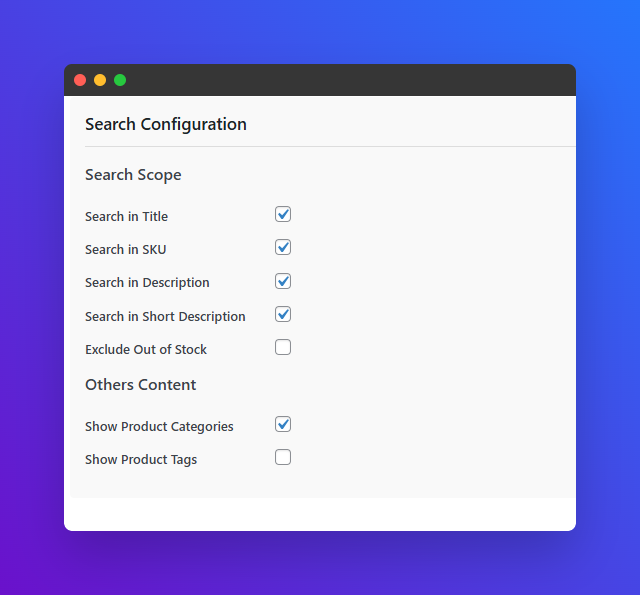
- Choose what to search: title, SKU, description, categories, tags
- Choose what to display: images, price, SKU, descriptions
- Customize colors and sizing using the built-in style controls
- Click Publish, your shortcode is generated automatically
- Paste
[nivo_search id="123"]into any page, post, widget, or template
Developer Hooks
PHP Filters
nivo_search_args: Modify search query arguments before execution.
nivo_search_results: Modify the full results array before the JSON response.
nivo_search_result_item: Modify an individual product result item.
nivo_search_shortcode_html: Override the complete shortcode HTML output.
nivo_search_localize_data: Modify the JavaScript localization data object.
nivo_search_should_enqueue_assets: Return false to conditionally skip asset loading.
nivo_search_typo_corrections: Register a custom typo correction map (array of misspelling to correction).
nivo_search_synonyms: Register synonym groups (array of term to array of synonyms).
JavaScript Events
nivo_search:init: Search widget initialized.
nivo_search:beforeSearch: Fired before an Ajax request is sent.
nivo_search:resultsDisplayed: Fired after results are rendered in the dropdown.
nivo_search:noResults: Fired when the search returns zero products.
nivo_search:error: Fired when an Ajax error occurs.
nivo_search:resultsCleared: Fired when the results dropdown is cleared.
nivo_search:focus: Fired when the search input receives focus.
nivo_search:blur: Fired when the search input loses focus.<h3>Developer</h3>
NivoSearch is developed and maintained by Nazmun Sakib.
Privacy: NivoSearch collects no user data, sends no external analytics, and is 100% GPL-licensed.
Schermafbeeldingen


Blokken
Deze plugin heeft 1 blok.
- Nivo Search
Installatie
Automatic Installation (Recommended)
- Go to Plugins > Add New in your WordPress admin
- Search for NivoSearch
- Click Install Now, then Activate
- Go to NivoSearch > Search Presets > Add New
- Configure your preset settings and styling
- Copy the generated shortcode and paste it anywhere on your site
Manual Installation
- Download the plugin ZIP from WordPress.org
- Go to Plugins > Add New > Upload Plugin
- Upload the ZIP file and click Install Now
- Activate the plugin and go to NivoSearch > Search Presets
FAQ
-
Does NivoSearch replace the default WooCommerce search?
-
No. NivoSearch adds a separate Ajax search widget deployed via shortcode or Gutenberg block. The default WooCommerce search continues to work normally alongside it.
-
How do I add the search bar to my site?
-
Create a preset under NivoSearch > Search Presets > Add New, then copy its shortcode (e.g.
[nivo_search id="5"]) and paste it into any page, post, widget area, or theme template file. You can also insert the NivoSearch Gutenberg block directly in the block editor. -
Can I create multiple search bars with different settings?
-
Yes, unlimited presets is a core feature. Create as many as you need, each with its own search scope, display options, colors, and sizing. Common use cases: a compact header search, a full-width homepage search bar, and a sidebar widget.
-
Does it support fuzzy search and typo correction?
-
Fuzzy search and typo correction are on the roadmap and coming in a future release. Currently NivoSearch performs exact and partial keyword matching across title, description, excerpt, and SKU.
-
Can customers add products to the cart directly from search results?
-
Yes. NivoSearch includes an AJAX add-to-cart button inside the search results dropdown. Simple products can be added without leaving the page, with an optional quantity selector. Variable products get a chevron link directly to their product page to choose options. The WooCommerce mini-cart updates instantly after adding.
-
Does it search by SKU?
-
Yes. NivoSearch supports both exact and partial SKU matching. GTIN, UPC, EAN, and ISBN search are on the roadmap for a future release.
-
Will it work with my theme?
-
NivoSearch uses scoped CSS classes prefixed with
nivo-to prevent styling conflicts. It has been tested with Storefront, Astra, OceanWP, Flatsome, Hello Elementor, WoodMart, Kadence, and GeneratePress. For any styling conflict, override the styles using.nivo-search-*CSS selectors or add a custom CSS class via thecontainer_classshortcode attribute. -
Is it compatible with multilingual plugins?
-
Yes. NivoSearch is fully translation-ready and ships with a
.potfile. It is compatible with WPML, Polylang, and TranslatePress. -
Is it compatible with WooCommerce HPOS?
-
Yes. NivoSearch is fully compatible with WooCommerce High-Performance Order Storage (HPOS).
-
What happens to my presets if I delete the plugin?
-
By default, all your presets and settings are preserved when you delete the plugin, reinstalling restores everything instantly. To perform a complete clean removal, enable Delete all data on uninstall in NivoSearch > Settings before deleting.
-
Is NivoSearch GDPR compliant?
-
Yes. NivoSearch collects no user data, sends no data to external servers, and contains no tracking scripts. It is 100% self-hosted and GPL-licensed.
-
Can developers extend NivoSearch?
-
Yes. NivoSearch provides 14+ PHP filters and actions, 8 JavaScript events, nonce-secured Ajax endpoints, and PSR-4 autoloading via Composer. See the Developer Hooks section above for the complete reference.
Beoordelingen


Bijdragers & ontwikkelaars
“NivoSearch – Ajax Search for WooCommerce” is open source software. De volgende personen hebben bijgedragen aan deze plugin.
Bijdragers
Vertaal “NivoSearch – Ajax Search for WooCommerce” in je eigen taal.
Interesse in ontwikkeling?
Bekijk de code, haal de SVN repository op, of abonneer je op het ontwikkellog via RSS.
Changelog
2.0.1
- FIX: Short description trimmed to meet WordPress.org 150-character limit
- FIX: Removed em dashes throughout readme for better compatibility
- FIX: Restored live demo link in description
- FIX: Replaced arrow symbols in admin menu paths with standard “>” notation
2.0.0
- NEW: Add-to-cart button directly in search results, AJAX-powered with instant WooCommerce mini-cart fragment update
- NEW: Quantity selector in search results (configurable per preset)
- NEW: Variable product support, chevron icon links to product page to select options
- NEW: Stock status badge: In Stock, Out of Stock, On Backorder per result
- NEW: Category badges on each product result
- NEW: Short description shown immediately below product title in results
- NEW: Current selling price shown per result (no crossed-out regular/sale HTML clutter)
- NEW: SKU displayed inline next to product title
- NEW: Transient caching for Ajax search responses (5-min TTL, auto-invalidated on product/preset edits)
- NEW: “View All Results” sticky footer link always visible at the bottom of the results panel
- NEW: Admin settings page updated, accurate feature list, preset settings reference, new Key Features section
- IMPROVED: Compact two-column result layout, left column (title, description, badges), right column (price, qty, cart)
- IMPROVED: Search results panel is now a scrollable flex container, footer link never scrolls away
- IMPROVED: SKU, short description, and category badge font size increased to 12px for legibility
- REMOVED: Star ratings removed from results and settings (cleaner UI)
- FIX: Double add-to-cart bug when quantity selector was used
- FIX: Mini-cart not updating after AJAX add-to-cart (now uses WooCommerce jQuery fragment events)
- FIX: Settings checkboxes (category badge, add-to-cart, qty selector) not taking effect, cache invalidation and missing default keys resolved
- FIX: Price/qty/cart wrapping to separate lines, now grouped as a single right-side flex unit
1.2.0
- FIX: Activation race condition, default preset now reliably created on fresh install
- FIX: Deactivation hook now correctly flushes rewrite rules
- FIX: Shortcode
container_class,input_class, andresults_classattributes now applied to rendered HTML - FIX: Duplicate clear button, suppressed browser-native X icon on
type="search"inputs - NEW: Database migration system for safe, zero-downtime plugin updates
- NEW: Safe uninstall, preset data is preserved by default when the plugin is deleted
- NEW: “Data & Privacy” settings card with opt-in data deletion toggle
- IMPROVED:
aria-labelon search input andaria-liveon results panel for screen readers - IMPROVED: Submit button restored for keyboard navigation and accessibility users
- IMPROVED: Default preset now pre-populated with all current settings keys on fresh install
1.1.1
- Compatibility: Verified with WordPress 6.8 and WooCommerce 9.0
1.1.0
- NEW: Unlimited search presets with independent styling and logic
- NEW: Enhanced Gutenberg block with live preset selection
- UPDATED: Improved shortcode parsing
1.0.1
- UPDATED: Plugin name clarification for WordPress.org compliance
- UPDATED: Gutenberg block registration improvements
1.0.0
- Initial release