
Ga naar de inhoud
WordPress.org

Nederlands

  • Thema’s
  • Plugins
  • Nieuws
    • Documentatie
    • Forums
  • Over
    • Vertaalproces
    • Stijlgids
    • Onze community
    • Meetups
    • WordCamps
  • Contact
  • WordPress downloaden
WordPress downloaden
WordPress.org

Plugin Directory

WP Term Icons

  • Dien een plugin in
  • Mijn favorieten
  • Login
  • Dien een plugin in
  • Mijn favorieten
  • Login

WP Term Icons

Door John James Jacoby
Download
  • Details
  • Beoordelingen
  • Installatie
  • Ontwikkeling
Ondersteuning

Beschrijving

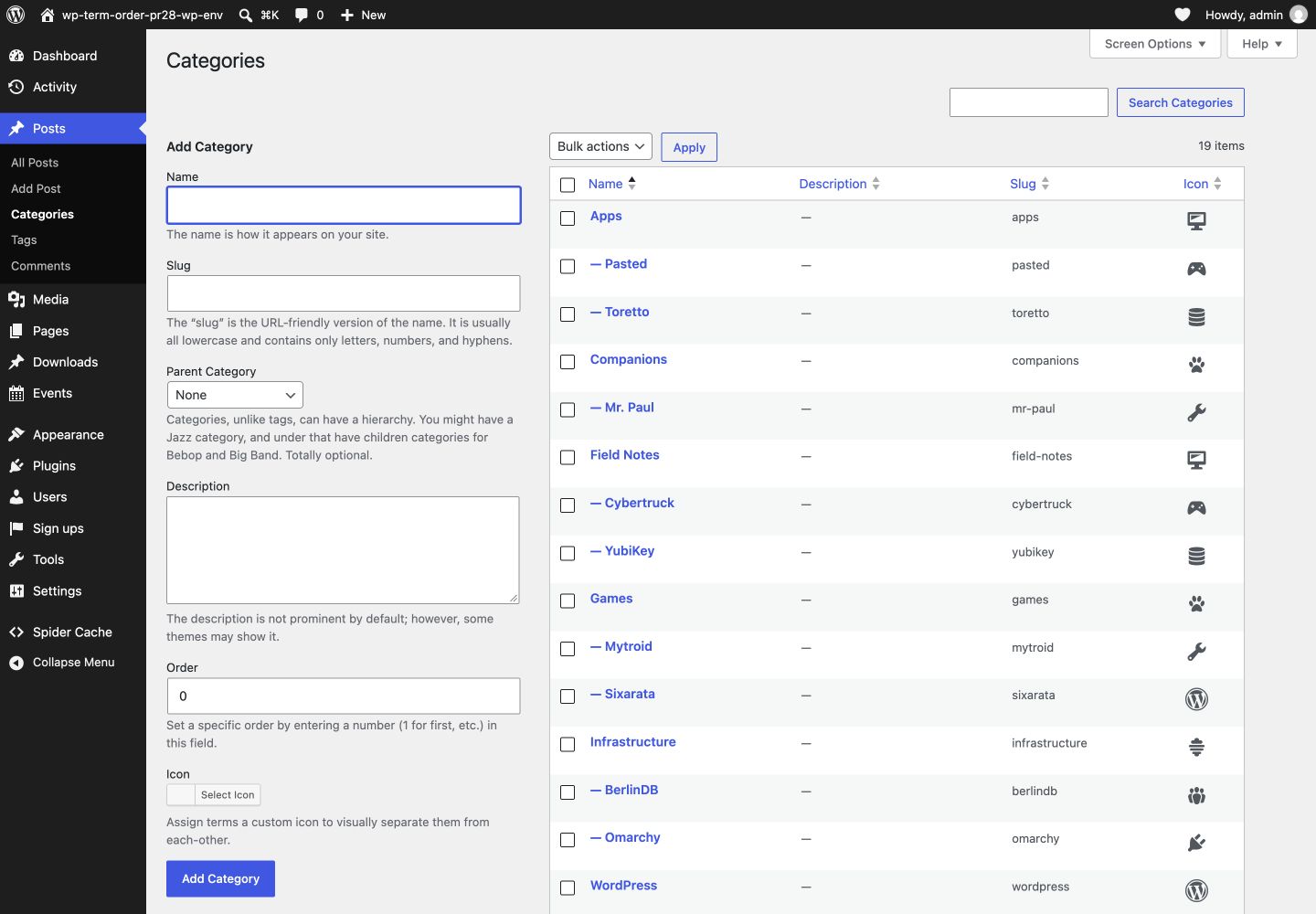
Pretty icons for categories, tags, and other taxonomy terms

WP Term Icons allows users to assign icons to any visible category, tag, or taxonomy term using a fancy icon picker, providing a customized look for their taxonomy terms.

Also checkout

  • WP Chosen
  • WP Pretty Filters
  • WP Event Calendar
  • WP Media Categories
  • WP Term Order
  • WP Term Authors
  • WP Term Colors
  • WP Term Icons
  • WP Term Visibility
  • WP User Activity
  • WP User Avatars
  • WP User Groups
  • WP User Profiles

Schermafbeeldingen

Category Icons
Category Icons

Installatie

  • Download and install using the built in WordPress plugin installer.
  • Activate in the “Plugins” area of your admin by clicking the “Activate” link.
  • No further setup or configuration is necessary.

FAQ

Does this plugin depend on any others?

No. Not since WordPress 4.4.

Does this create new database tables?

No. There are no new database tables with this plugin.

Does this modify existing database tables?

No. All of WordPress’s core database tables remain untouched.

How do I query for terms via their icons?

With WordPress’s get_terms() function, the same as usual, but with an additional meta_query argument according the WP_Meta_Query specification:
https://developer.wordpress.org/reference/classes/wp_meta_query/

$terms = get_terms( 'category', array(
    'depth'      => 1,
    'number'     => 100,
    'parent'     => 0,
    'hide_empty' => false,

    // Query by icon using the "wp-term-meta" plugin!
    'meta_query' => array( array(
        'key'   => 'icon',
        'value' => 'dashicons-networking'
    ) )
) );

Where can I get support?

The WordPress support forums: https://wordpress.org/support/plugin/wp-term-icons/

Where can I find documentation?

https://github.com/stuttter/wp-term-icons/

Beoordelingen

Er zijn geen beoordelingen voor deze plugin.

Bijdragers & ontwikkelaars

“WP Term Icons” is open source software. De volgende personen hebben bijgedragen aan deze plugin.

Bijdragers
  • John James Jacoby
  • Stuttter

Vertaal “WP Term Icons” in je eigen taal.

Interesse in ontwikkeling?

Bekijk de code, haal de SVN repository op, of abonneer je op het ontwikkellog via RSS.

Changelog

2.0.0

  • Update base class

0.2.0

  • Update base class

0.1.2

  • Add “term-icon-wrap” class to fields

0.1.1

  • Remove erroneous “form-required” class from field

0.1.0

  • Initial release

Meta

  • Versie 2.0.0
  • Laatst geüpdatet 1 maand geleden
  • Actieve installaties 200+
  • WordPress versie 6.4 of nieuwer
  • Getest t/m 7.1.4
  • PHP versie 7.4 of nieuwer
  • Taal
    English (US)
  • Tags
    iconmetametadatataxonomyterm
  • Geavanceerde weergave

Waarderingen

Er zijn nog geen beoordelingen ingediend.

Je beoordeling

Bekijk alle beoordelingen

Bijdragers

  • John James Jacoby
  • Stuttter

Ondersteuning

Iets te melden? Hulp nodig?

Het supportforum bekijken

Doneren

Wil je de groei van deze plugin ondersteunen?

Doneer aan deze plugin

  • Over
  • Nieuws
  • Hosting
  • Privacy
  • Showcase
  • Thema's
  • Plugins
  • Patronen
  • Leren
  • Ondersteuning
  • Ontwikkelaars
  • WordPress.tv ↗
  • Raak betrokken
  • Evenementen
  • Doneren ↗
  • Swag ↗
  • WordPress.com ↗
  • Matt ↗
  • bbPress ↗
  • BuddyPress ↗
WordPress.org

Nederlands

The WordPress® trademark is the intellectual property of the WordPress Foundation.

  • Bezoek ons X (voorheen Twitter) account
  • Bezoek ons Bluesky account
  • Bezoek ons Mastodon account
  • Bezoek ons Threads account
  • Onze Facebook pagina bezoeken
  • Bezoek ons Instagram account
  • Bezoek ons LinkedIn account
  • Bezoek ons TikTok account
  • Bezoek ons YouTube kanaal
  • Bezoek ons Tumblr account
Code is poëzie.