
Beschrijving
WBW Currency Switcher for WooCommerce Plugin allows you to display prices in multiple currencies, use the unlimited number of currencies and set the exchange rate for each currency manually or automatically. The plugin makes full use of Cryptocompare and Free Converter platforms, providing the latest exchange rates, and converting displayed prices in real-time. Currency can be changed automatically according to the customer’s IP.
You can use Currency Switcher with additional modules – Currency Rates, Converter and Tooltip modes. This will give your customers the opportunity to pay with their preferred currency, thus increasing shop sales. The best currency switcher to make an online store working with different currencies!
Currency Switcher Features
-
Unlimited number of currencies
You can convert any currency you want and add as many currencies as you need. Select the currency from a list and with simple settings add it to the Currency switcher straight away to your online store. -
Manual/ automatic exchange rate for each currency
Currency switcher uses Cryptocompare and Free Converter aggregatots. The plugin allows setting exchange rates manually and automatically. Besides, the Pro version has a feature of an automatic exchange rate updates available for a certain period: every minute, hourly, twice a day, daily, weekly. You can set the option “Notify admin by email” about the last exchange rate values every time when it updates.. -
Checkout in selected currency
Plugin provides an opportunity to change the currency at checkout and allow customers to pay with their selected (preferred) currency.
This feature is perfect for WooCommerce shops in case of currencies which aren’t included in this list: “AUD, BRL, CAD, CZK, DKK, EUR, HKD, HUF, ILS, JPY, MYR, MXN, NOK, NZD, PHP, PLN, GBP, SGD, SEK, CHF, TWD, THB, USD”. It’s also useful if you want to convert a given currency into a different PayPal currency to avoid conversion fees by PayPal. -
Display setting for each currency
Set the Base currency, Name, Title, Symbol, Position, Cents, Rate. Insert the rate manually or press the Get Rate button in one click. -
Currency switcher design
With Currency Plugin, you can make the Currency Switcher which is not just functional but has a beautiful design as well. Simple, Rotating, Floating types of a switcher. Position, Color settings for all elements of switcher easily make the Switcher unique, so it perfectly matches the store design. -
Custom flags and currencies**
If you need to add any custom currency or your own designed icon, you can easily do it! -
Compatible with WordPress themes
WBW Currency Switcher for WooCommerce perfectly works with any WordPress theme. Plugins are tested at least on 4 testing servers before the release of each. -
Currency converter, Currency Rates and Tooltip**
The plugin comes with three additional modes– tooltip, currency rates, and currency converter. These modes give the user an opportunity to display the rate as well as to convert it at the same time and see the tooltip with a price cost of the product compared to the other currencies. You have an opportunity to customize and set their display matching the design of your store and easily place them on the pages, product categories, and custom post types. - Increase the cart conversion
Store conversion rates could be improved up to 30% if you let the customers see the prices in a preferred currency. You don’t lose customers just because they don’t have the option to pay in their native currency. - Geo IP rules**
When Geo IP rules feature is on, Currencies Switcher will automatically identify your customers’ countries by their IP address and they will see products in their country’s currency. Besides, using custom settings you can specify the definition of the currency yourself, just select your list of countries for each currency. -
Mobile Friendly
With our plugin, you can have two versions of currency switcher, rates, and converter for your website : one for smartphones, one for desktops and laptops. The plugin automatically identifies the device accessing your website and then automatically display a mobile-optimized version to the user. You can choose the devices that will display modules: mobile, desktops, or both. A nice bonus is an opportunity to choose the size of the screen on which your site will be displayed in a mobile version.** – Pro features
Support and suggestions for WBW Currency Switcher for WooCommerce Plugin
If you have suggestions for Currency Switcher Plugin, please contact us via Contact Form on a website.
Video tutorial on how to set up WBW Currency Switcher for WooCommerce Plugin
Schermafdrukken
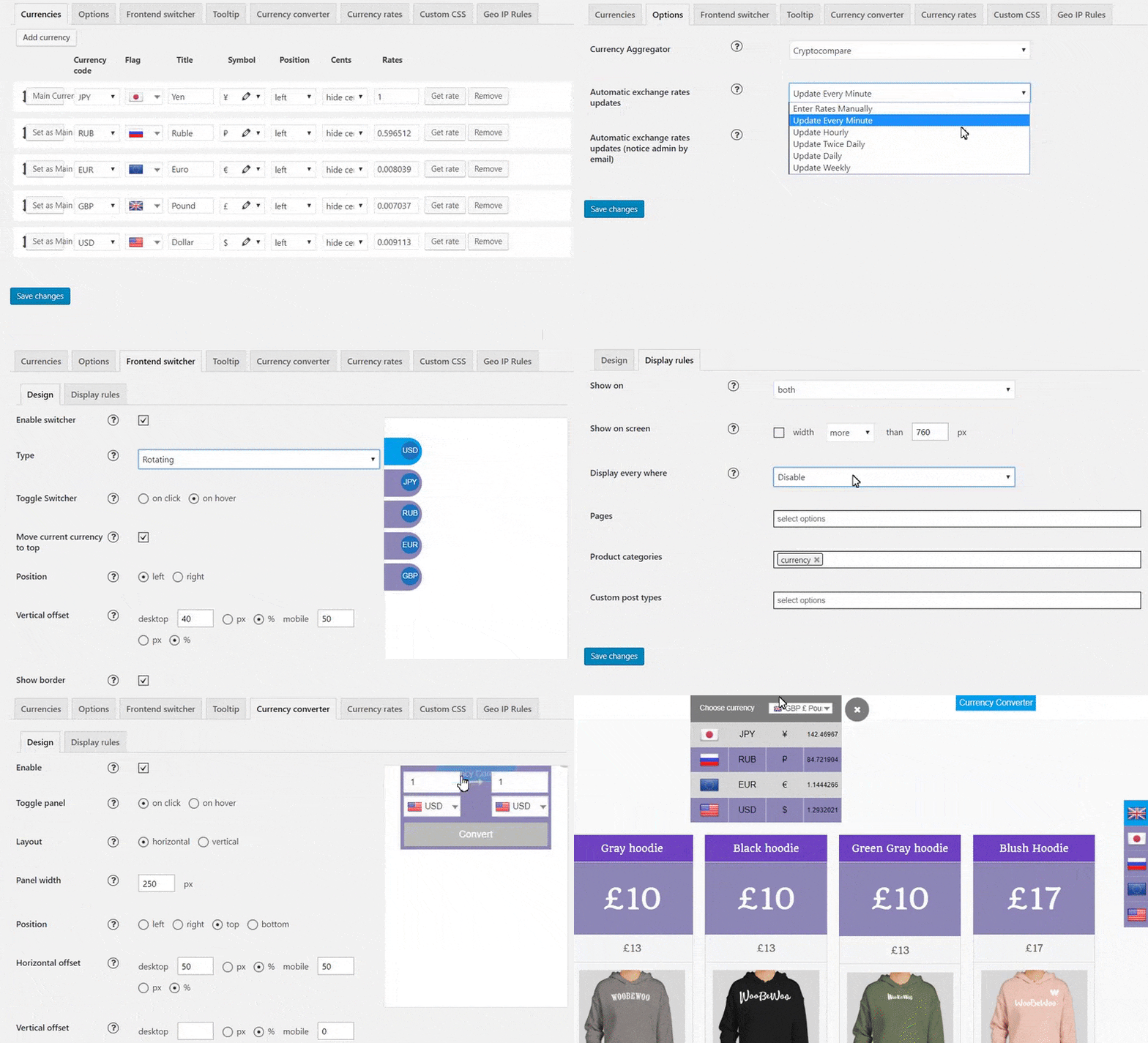
Currency Switcher demo 
Rates, Switcher and Converter examples on the Shop page 
WBW Currency Switcher for WooCommerce Plugin admin panel. Currencies settings 
WBW Currency Switcher for WooCommerce Plugin admin panel. Options 
Admin panel. Frontend Switcher Design 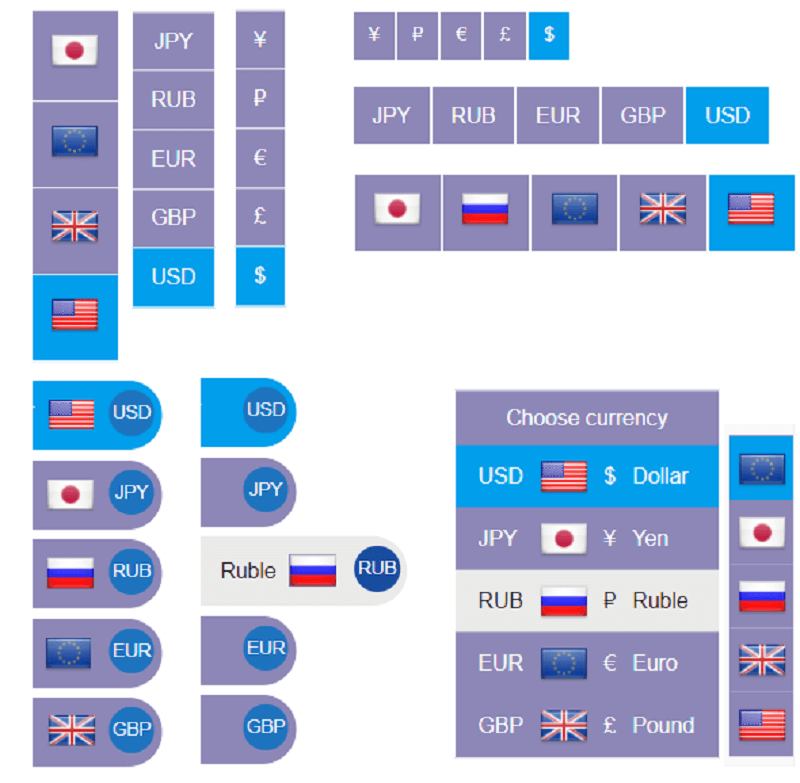
Admin panel. Frontend Switcher types: simple (vertical & horizontal), rotating, floating. 
Admin panel. Frontend Switcher Display rules 
Admin panel. Tooltip settings 
Admin panel. Currency Converter settings 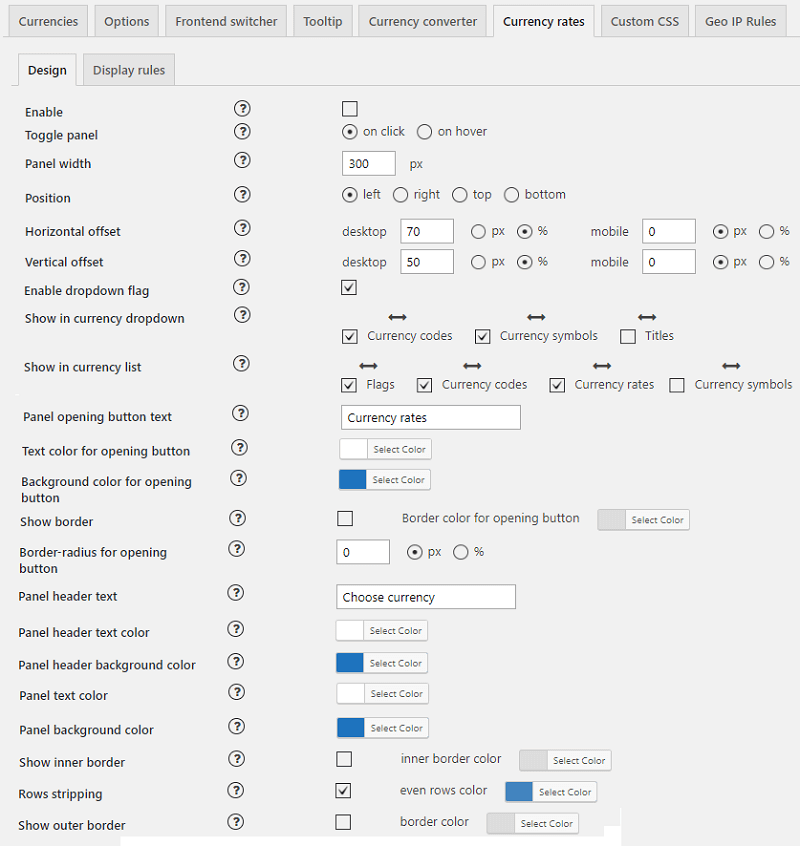
Admin panel. Currency Rates settings 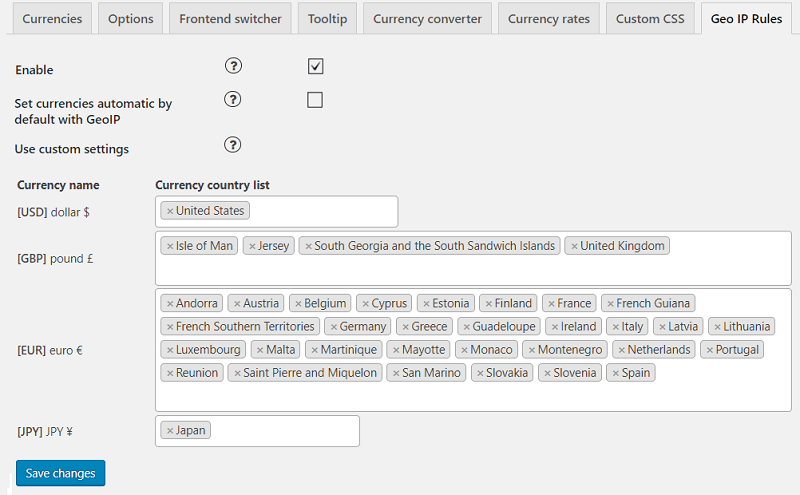
Admin panel. Geo IP Rules 
Admin panel. Custom flags 
Admin panel. Custom Currencies
Installatie
a) VIA FTP
Download zip archive with plugin
Extract files
Copy the folder with the plugin
Open via FTP folder \wp-content\plugins\
Paste plugin folder into here
Go to admin panel => Plugins => press activate
B) DIRECT UPLOAD VIA ADMIN AREA
Download zip archive with plugin
Go to admin panel => Plugins => Add new
Choose the archive with a plugin and upload it
Wait until you get the notification installation went successfully
Press the Activate button
C) VIA WORDPRESS REPOSITORY
Navigate to admin panel => Plugins => Add new
Type “WBW Currency Switcher for WooCommerce” in the search field
Choose our plugin from the list and click “Install”
Wait until you get the notification installation went successfully
Press the Activate button
FAQ
-
How do I get started?
-
- Move to WooCommerce > Setting > Currency.
- In the Currency tab firstly you need to set your WooCommerce shop basic currency. Then choose currencies you want to add from drop-down lists and set the exchange rate for each currency.
- In the Options tab select the rate using these interactive platforms and grab the latest exchange rates.
- Move to the Design settings of Switcher, Converter, Rates or Tooltip modules and set the type, position, colour settings etc.
- In Display Rules set the page to display switcher: on All pages, on selected pages, product categories, custom post types.
Also, once you set the options, you can display WooCommerce Currency as a widget in “Appearance” > Widget.
Follow this tutorial Getting Started with WBW Currency Switcher for WooCommerce plugin for more detailed instructions.
-
I’ve installed your WBW Currency Switcher for WooCommerce, but can’t find see the plugin configuration
-
WBW Currency Switcher for WooCommerce plugin created special tab Currency in the WooCommerce Settings menu. You can follow the link in plugin window to move there, or go there manually via WooCommerce plugin. Follow this tutorial Main Settings and you can easily set the Currency Switcher plugin.
-
Will transactions are processed in the base currency or in the chosen currency?
-
Currency conversions are estimated and should be used for informational purposes only. Purchases still using your WooCommerce store’s base currency itself. Read more about Manual / automatic exchange rate for each currency
-
How can I add currency switcher to my shop?
-
Currency Switcher is flexible and easy to set up. The plugin provides 2 ways to add a module into the site content: with a help of widgets or using the Display Rules tab for each mode.
1. Move to the “Widgets” tab in the Appearance menu, and there our plugin widgets can be easily managed.
2. Display rules tab allows to show the switcher on All pages, on selected pages or posts or exclude display on selected pages/posts. -
Which kind of design is available for switcher?
-
The plugin provides a range of settings for switcher design You can select position on the page (left or right), position of the switch in accordance with the header and footer of the page and the type of switcher:
- Simple type display the Switcher like a bar (horizontal and vertical), to pick the currency by click.
- Rotating type has the animation and creative form and design.
- Floating type saves space on your store page and floating by mouse-over.
-
How to add custom flags and currency?
-
If you need to add any custom currency or your own designed icon, you can easily do it.
*In order to add your own image, move to the Custom Flag tab, press “add a custom flag” and press “Save” and upload an icon. You can view all the added custom icons and add or remove the previously uploaded ones.
*With Custom Currencies feature, you are free to add your own currency in the same way. Move to the Custom Currency tab and enter a required code and symbol. Save the changes and currency will be available for selection in the Currencies tab.
Look at detailed instruction in Main Settings tutorial -
Is this plugin mobile friendly?
-
Large or small, desktop or handheld, WBW Currency Switcher for WooCommerce is fully compatible and responsive! The plugin works and displays perfectly on tablet or phone, making it easy and convenient for customers to enjoy their shopping time and make purchases on all devices.
-
How to update the currency by the latest exchange rate?
-
The plugin uses the Cryptocompare and Free Converter platforms which are providing the latest exchange rates, and substitute displayed prices in real-time. You can update the currency Manually or Automatically (Pro). Automatic update option comes with a selection of period for currency updates: every minute, hourly, twice a day, daily, weekly or manually.
Beoordelingen


Bijdragers & ontwikkelaars
“WBW Currency Switcher for WooCommerce” is open source software. De volgende personen hebben bijgedragen aan deze plugin.
Bijdragers
Vertaal “WBW Currency Switcher for WooCommerce” naar jouw taal.
Interesse in ontwikkeling?
Bekijk de code, haal de SVN repository op, of abonneer je op het ontwikkellog via RSS.
Changelog
2.0.1
- Fixed Finance Yahoo
2.0.0
- Minor code optimizations
1.9.9
- Minor code fix
1.9.8
- Minor code fix
- Currency provider stopped working – added notification and use last course vaues
1.9.7
- Minor code fix
1.9.6
- Fixed geo ip option
- Fixed dropdown switcher
1.9.5
- Fixed cents round
- Added thousand and decimal separators for each currency
- Fixed custom symbols
- Fixed dropdown currency widget by window resize
1.9.4
- Added compatibility with Elementor menu mini cart
- Minor code fix
1.9.3
- Fixed problem with HPOS
- Minor code fix
1.9.2
- Minor code fix
1.9.1
- Minor code fix
1.9.0
- Minor code optimizations
1.8.9
- Minor code fix
1.8.8
- Compatibility improvement
1.8.7
- Minor code fix
1.8.6
- Minor code optimizations
1.8.5
- Minor code fix
1.8.4
- Fixed converter styles
- Minor issues fix
1.8.3
- Minor issues fix
1.8.2
- Fixed price decimals for emails
1.8.1
- HPOS compatibility improvement
- Minor issues fix
1.8.0
- Fixed deprecated functions
- Fixed compatibility with HPOS
1.7.9
- Added compatibility with HPOS
1.7.8
- Minor code optimization
1.7.7
- Minor issues fix
1.7.6
- Minor issues fix
1.7.5
- Minor issues fix
1.7.4
- Added COP and SVC
- Minor issues fix
1.7.3
- Minor issues fix
1.7.2
- Fixed exchange rates by European central bank
1.7.1
- Cookie fix
1.7.0
- Minor issues fix
1.6.9
- Fix for plugin WooCommerce PayPal Payments
- Minor issues fix
1.6.8
- Added Currency Convertion API
- Minor issues fix
1.6.7
- Fixed getting price when saving
1.6.6
- Added html escaping when saving options
- Fixed location detection automatic by IP
- Minor issues fix
1.6.5
- Fixed get rate with finance_yahoo
- Fixed case with empty manual price field
1.6.4
- Readme update
- Minor issues fix
1.6.3
- Minor issues fix
1.6.2
- Added limit on number decimal places in the converter
- Minor issues fix
1.6.1
- Minor issues fix
1.6.0
- Fix for shortcodes
- Minor issues fix
1.5.9
- Fixed dropdown switcher widget
- Minor issues fix
1.5.8
- Added saving current rate in order
- Added convertor for Paynet
- Fixed update order price
- Minor issues fix
1.5.7
- Minor issues fix
1.5.6
- Fixed get country code
- Fixed condition for initialization .msdropdown
- Fixed PayPal from cart
1.5.5
- Fixed refund
- Minor issues fix
1.5.4
- Minor issues fix
1.5.3
- Fixed error on the 404 page
- Added a shortcode which is display extended switcher
- Plugin renamed to “WBW Currency Switcher for WooCommerce”
1.5.2
- Fix editing the currency symbol
- Fixed resetting currency to default when paying with paypal
- Fixed Get rate from yahoo
- Fixed get rate European Central Bank
- Fixed get rate
- Added set main currency for search robots
- Fixed error activation
1.5.1
- Added rounding for rates widget
- Fixed floating switcher
- Fix admin meta checkbox
- Fix addJSVar
1.5.0
- Minor issues fix
1.4.9
- Fix for unavailable products by region
- Fix plugins page notice
- Fix manual prices
- Minor issues fix
1.4.8
- Added compatible with WooCommerce Blocks
- Added Manual Currency Prices for products
- Added Product Table plugin compatibility
- Added checkbox unavailable region in products
1.4.7
- Minor issues fix
1.4.6
- Minor issues fix
1.4.5
- Minor issues fix
1.4.4
- Add additional shortcode for a frontend switcher display
- Minor issues fix
1.4.3
- Fixes for show popup option
- Fixes for curly braces in php 7.4
1.4.2
- Fixes for max call stack error with all currencies
- Add display symbol optionality to widget type view
- Added popup message option
- Small fixes for geoip
- Fixes for popup switcher
- Fixes for paypal gateway
- Fix Wc Layered Nav Filters widget prices
- Minor issues fix
1.4.1
- Fixes for Printful shipping plugin
- Fixes for tabs notice
- Minor issues fix
1.4.0
- Remove custom symbol notice
- Fixes for check/uncheck option and remove some commented code
- Fixes for WooCommerce pricing slider filter
- Minor issues fix
1.3.9
- Readme update
- Set default currencies after deactivation
- Change Venezuelan currency
- Added XCD currency
- Fixes for SEO links
- Fixes for flags alt
- Fixed option Hide cents
- Added currency symbols for Rotating switcher
1.3.8
- Fixes for rotating selected color
- Fixes for notice in pro
- Fixes for custom symbols mod
1.3.7
- Fixes for variation prices
- Change cdn url
- Hide woobewoo-for-all-admin style
- Change link updater
- Added exchange fee option
- Fixes for template script loader
- Fixes for exchange fee
- Fixes slimscroll notice
1.3.6
- Fix for Change currency at checkout
- Minor issues fix
1.3.5
- Fixes for shop order list
- Minor issues fix
1.3.4
- After point feature add
- Added currency symbol support to switcher widget
- Minor issues fix
1.3.3
- Added Jamaica currency
- Fixes for img flags
- Added poloniex aggregator
- Added finance yahoo aggregator
- Added cbr and pb aggregators
- Add Narodowy Bank Polski aggregator
- Added National Bank of Romania aggregator
- Added fixer aggregator
- Added Currencylayer aggregator
- Added Open Exchange Rates aggregator
- Fixes for tooltip
- Converter ie fixes
1.3.2
- Added compability with WooCommerce Extra Product Options
- Change sxgeo file
- Hide license tab in multisite
- Fixes for save not auto rated values
- Minor issues fix
1.3.1
- Code review
1.3.0
- Minor issues fix
1.2.9
- Updates for WooCommerce 3.9.0
1.2.8
- Code review
1.2.7
- Minor issues fix
1.2.6
- Fixed dashboard styles
- Minor issues fix
1.2.5
- Fix total price in admin panel
- Add fix for order-pay page
- Minor issues fix
1.2.4
- Tooltips fix
- Currency converter vertical layout fix
- Fix for PayPal
- Fix for Symbol selector
1.2.3
- Minor issues fix
1.2.2
- Small fix for CSS Preview
- Added compatibility WooCommerce PayPal Gateway
1.2.1
- Add round cents
- Minor issues fix
1.2.0
- Added chosen to switcher widged
- Added slimscroll for floating
1.1.9
- Fix Bridge Theme
- Add flags
- Fix CSS for Template GeneratePress
- Fixed admin order currency
- Fixed order price, fixed capability for gforms
- Fixed switcher styles
- Remove save_post hook
- Fixed currency rates style bug
1.1.8
- Minor issues fix
1.1.7
- WooCommerce update test
- Minor issues fix
1.1.6
- Update readme.txt
- Minor issues fix
1.1.5
- fixes for new wp translations
- Hotfix connectLang function
- Fixes Display Rules, Disable URl
- Fixed currency switch on mobile issue
- Add Gravity Forms support issue
- Fixed Gravity Forms support for checkout page issue
- Fixes display rules issue
1.1.4
- Add gitignore
- Remove idea path
- Fixed image zoom issue
- Minor issues fix
1.1.3
- Fix for exclude mod
- Fix for PayPal Express Checkout
- Minor issues fix
1.1.2
- Added control PayPal supported currencies
- Added support for 2checkout pluggin
- Disable WCU for WCFM page
- Add Options Disable WCU by URI from Textarea
- Fix notice and fix disabled Geo IP Rules
- Comment deprecated Function woocommerce_cart_hash
- Add shortcodes for converter,switcher,rates
- Add link and text for promo notice
- Update readme
- Fix woofilter price by change currency
- Added SGD currency
- Minor issues fix
1.1.1
- Feature currency agregator
- Fix deactivation dialog
- Fix conflict with datatable deactivation gialog
- Minor issues fix
1.1.0
- Added currency change at checkout
- Fix CSS deactive popup only for woocurrency
- Fix for hidding button under switcher popup
- Add validation A-z for custom currency
- Fix for manual rate for currency
- Minor issues fix
1.0.9
- Fix for Tooltip Hover
- Fix custom flag upload js notice and added tested up + requires WC to header wcu.php
- Add custom currency translit, fix currency converter select align, fix chosen placeholders, fix notices in currency flag
- Minor issues fix
1.0.8
- Add Manual Rate
- Some fix for margin
- Fir for FF tooltip
- Fix tooltip console notice
- Minor issues fix
1.0.7
- Add MXN currency
- Add Free Converter API key field
- Add screenshots
- Converter block overlay fix
- Minor issues fix
1.0.6
- Add custom flag Pro feature
- Add flags rotating and other
- Screenshots update
- Add PRO custom currency
- Minor issues fix
1.0.5
- Readme update
- Add Feature Currency Switcher Simple Classic and Dropdown
- Screenshots update
- Add feature Currency Switcher Rotating and Floating
- Add flags PRO and currency switcher feature
- Add feature CurrencyRates Module
- Added CurrencyConverter Module
- Code refactoring
- Add module tooltip feature
- Small fix for notice (check empty value)
- Add feature GeoIpRules
- Add fix CSS for theme Storefront and other
- Added Ajax Preview
- Remove redirect and add jquery link changer
- Minor issues fix
1.0.4
- Fix of adding of a new currency. Update of displaying of currencies list in the admin area
- Update wcu.php
- Update readme.txt
- add install.xml in the pro version
- fixed errors in all module
- delete trash in the installer class
- add constant WCU_DEFAULT_CURRENCY to config, remove not need comments
- fixed js in a geo_settings module (many alerts)
- make tab content for currency module
- Add feature LivePreview CurrencySwitcher
- Fix small issue with lost tag
- Add feature Show/Hide Cents of Front to Currency
- Add currency NZD, KHD, AUD
- Add Feature Custom Symbol for PRO
- Added highlight currencies form validation on the client side. Removed notice about supsystic
- Minor issues fix
1.0.3
- Option for searching currency name and symbol
- Add Brazil Real Currency
- Fix displaying currency switcher on the frontend
- Add option for Currency Switcher – Display Mode
- Minor issues fix
1.0.2
- Add of option for Currency Switcher: Offset
- Fixed double tooltips display.
- Add Switcher name
- Add of auto changing of currency symbol after a change of currency name. Add of auto changing of currency title after a change of currency name if they were equal.
- Fix of displaying currency switcher on pages with pagination for WooCommerce Storefront theme.
= 1.0.1 / 18.06.2018
* First release