

Beschrijving
SMNTCS Google Webmaster Tools adds the Google Search Console verification tag to the head of every page, so Google can confirm that you own the site.
In Search Console, choose the HTML tag verification method and copy the tag. Paste the whole tag or just the code into the Customizer under Google Search Console, publish, and click Verify in Search Console.
Google Search Console was formerly called Google Webmaster Tools.
Schermafbeeldingen


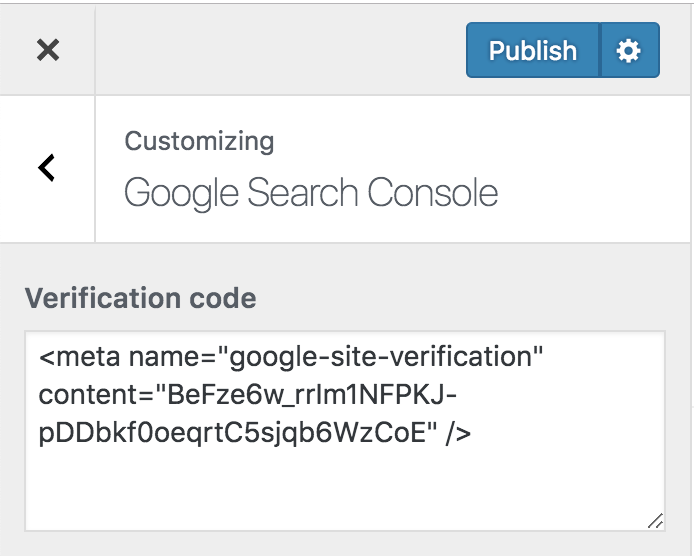
Installatie
- Upload
smntcs-google-webmaster-toolsto the/wp-content/plugins/directory - Activeer de plugin via het Plugins menu in WordPress
- Go to https://search.google.com/search-console/welcome
- Provide your URL in the section
URL prefix, e.g. https://example.com, and click onContinue - Now, open the section
HTML tagwithin the sectionOther verification methods - Copy the meta tag, e.g.
<meta name="google-site-verification" content="BeFze6w_rrIm1NFPKJ-pDDbkf0oeqrtC5sjqb6WzCoE" /> - Go to Google Webmaster Tools and paste your verification code
FAQ
-
Why do I need Google Webmaster Tools in first place?
-
Google Webmaster Tools enables web masters to detect indexing issues, e.g. if the Google Bot cannot access the page or if missing pages occur in the search index.
-
How do I add Google Webmaster Tools to my page?
-
- Go to https://search.google.com/search-console/welcome
- Provide your URL in the section URL prefix, e.g. https://example.com, and click on Continue
- Now, open the section HTML tag within the section Other verification methods
- Copy the meta tag, e.g.
<meta name="google-site-verification" content="BeFze6w_rrIm1NFPKJ-pDDbkf0oeqrtC5sjqb6WzCoE" /> - Go to Google Webmaster Tools and paste your verification code
-
Why am I not able to save the verification code?
-
This issue might be caused by a security plugin. If you use a security plugin, e.g. Wordfence, then disable it to save your verification code and activate it once you’re done.
Beoordelingen


Bijdragers & ontwikkelaars
“SMNTCS Google Webmaster Tools” is open source software. De volgende personen hebben bijgedragen aan deze plugin.
Bijdragers
“SMNTCS Google Webmaster Tools” is vertaald in 6 localen. Dank voor de vertalers voor hun bijdragen.
Vertaal “SMNTCS Google Webmaster Tools” in je eigen taal.
Interesse in ontwikkeling?
Bekijk de code, haal de SVN repository op, of abonneer je op het ontwikkellog via RSS.
Changelog
3.8 (2026.09.27)
- Clarify the licence as GPL v2 or later
- Rewrite the plugin description
3.7 (2026.09.26)
- Test up to WordPress 7.1
- Update development dependencies and GitHub Actions
3.6 (2026.08.14)
- Test up to WordPress 7.0
3.5 (2025.04.02)
- Test up to WordPress 6.8
3.4 (2024.10.30)
- Test up to WordPress 6.7
3.3 (2024.10.22)
- Test up to WordPress 6.6
- Migrate Cypress to Playwright
3.2 (2023.10.02)
- Test up to WordPress 6.4
3.1 (2023.03.11)
- Test up to WordPress 6.2
3.0 (2022.12.03)
- Test up to WordPress 6.1
2.9 (2022.05.09)
- Test up to WordPress 6.0
2.8 (2021.12.19)
- Replace Travis CI with GitHub Actions
- Test up to WordPress 5.8
2.7 (2021.04.25)
- Test up to WordPress 5.7
2.6 (2020.10.09)
- Test up to WordPress 5.5
2.5 (2020.05.02)
- Add testing
- Test up to WordPress 5.4
2.4 (2019.11.22)
- Test up to WordPress 5.3
2.3 (2019.06.28)
- Update installation instructions
2.2 (2018.03.18)
- Add README.md
2.1 (2016.12.24)
- Add FAQ
2.0 (2016.09.11)
- Use Customizer instead of options page
1.6 (2016.07.20)
- Add donation link
1.5 (2016.07.20)
- Update textdomain
1.4 (2016.07.20)
- Add settings link
- Update Dutch translation
- Update German translation
1.3 (2016.07.20)
- Store translations outside plugin
1.2 (2016.07.20)
- Make plugin translation ready
- Add Dutch translation
- Add German translation
1.1 (2016.07.20)
- Fix broken file path
- Add FAQs
1.0 (2016.07.20)
- Eerste release