
Beschrijving
Magni Image Flip adds a flip effect on your woocommerce product thumbnail images. It takes the first image from the gallery and uses it as a second image for the product.
The plugin allows you to have different types of animations for image hover effect. It will allow you to customize the plugin to as per your needs.
Just make sure add a second image to your WooCommerce Gallery and it will automatically display the image on your site.
Check plugin in action
Schermafdrukken
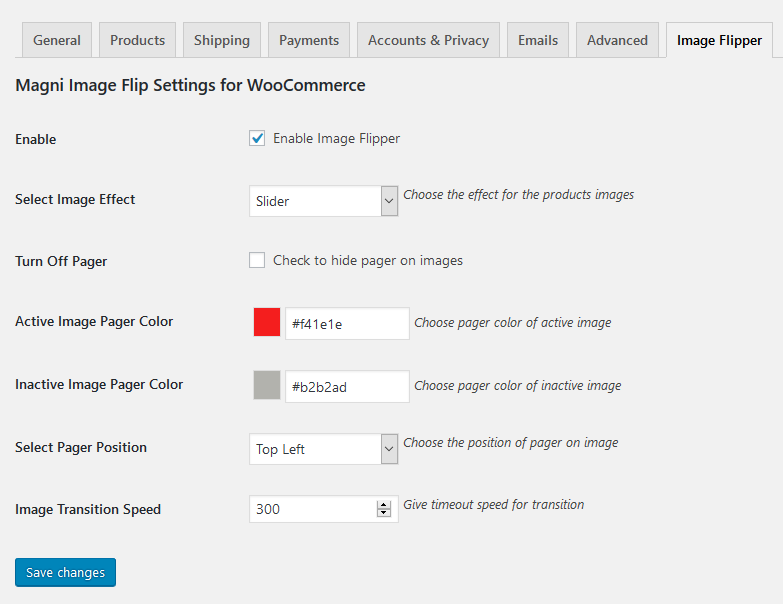
Admin settings. 
Frontend View.
Installatie
- Upload “magni-image-flip.zip” file to your “/wp-content/plugins/” directory.
- Once uploaded go to your WordPress admin and navigate to plugins.
- Once you are on plugins screen then you can see Magni Image Flip For WooCommerce listed there.
- Just activate and start playing with the plugin configurations.
FAQ
-
Why should I use this plugin?
-
This plugin would help you to engage more customers by creating nice looking image flip effect.
Beoordelingen


Bijdragers & ontwikkelaars
“Magni Image Flip For WooCommerce” is open source software. De volgende personen hebben bijgedragen aan deze plugin.
Bijdragers


Vertaal “Magni Image Flip For WooCommerce” naar jouw taal.
Interesse in ontwikkeling?
Bekijk de code, haal de SVN repository op, of abonneer je op het ontwikkellog via RSS.
Changelog
1.2
- Fixed: Deprecated issue resolved on 1.1 version.
1.1
- Added: bottom left and bottom right Pager position.
- Added: Correct .pot file added.
1.0
- Initial release.