

Beschrijving
Instinctor is a page builder that runs the business behind the page. You build the site, and the same plugin answers your visitors, books them into an open time, takes the deposit and gets the pages found. It replaces the page builder, the booking plugin, the chat widget, the SEO plugin and WooCommerce with one install.
Every question gets an answer
Live chat on every page. Each conversation is kept as a lead and sent to your email. With Pro, the chat answers on its own and texts you the lead.
Customers book themselves
They pick a service and an open time on your site, any hour of the day. No calls back and forth to find a slot.
Paid when they book
Each service can take a deposit through Stripe at the moment of booking, so a no-show still leaves you paid.
Found on Google
Titles, descriptions, sitemaps and redirects for every page, with a preview of how it looks in search.
Pages that look like nobody else’s
Headlines that move, sections that reveal as visitors scroll and, with Pro, 3D depth on your own photos. Desktop, tablet and phone are each set on their own.
Products too, when you sell them
A full store is built in: products, gift cards, discount codes and checkout through Stripe, PayPal or Authorize.net. Subscriptions and memberships with Pro. No WooCommerce needed.
Try it on one page
Instinctor renders only the pages you build with it and leaves your theme and existing pages alone, so you can start with one page without rebuilding the rest of your site. Free, with no page limit.
Wat het doet
Boekingen en afspraken. Klanten kiezen een dienst en een tijd op je site. Elke dienst kan een eigen aanbetaling hebben, via Stripe geïnd bij het boeken, zodat je bij een no-show toch betaald bent.
A real store. Unlimited physical and digital products with variants, discount codes, quantity discounts, stock control, tax rules, gift cards and loyalty points. Checkout through Stripe, PayPal or Authorize.net. Returns, refunds, packing slips, order tracking and editable order emails are included. No WooCommerce required.
Live chat. Visitors message you from any page. You answer from the dashboard, and every conversation is kept as a lead with an email alert.
SEO. Per-page titles and descriptions, canonical URLs, noindex control, a search preview and a page health score, XML sitemaps and redirects.
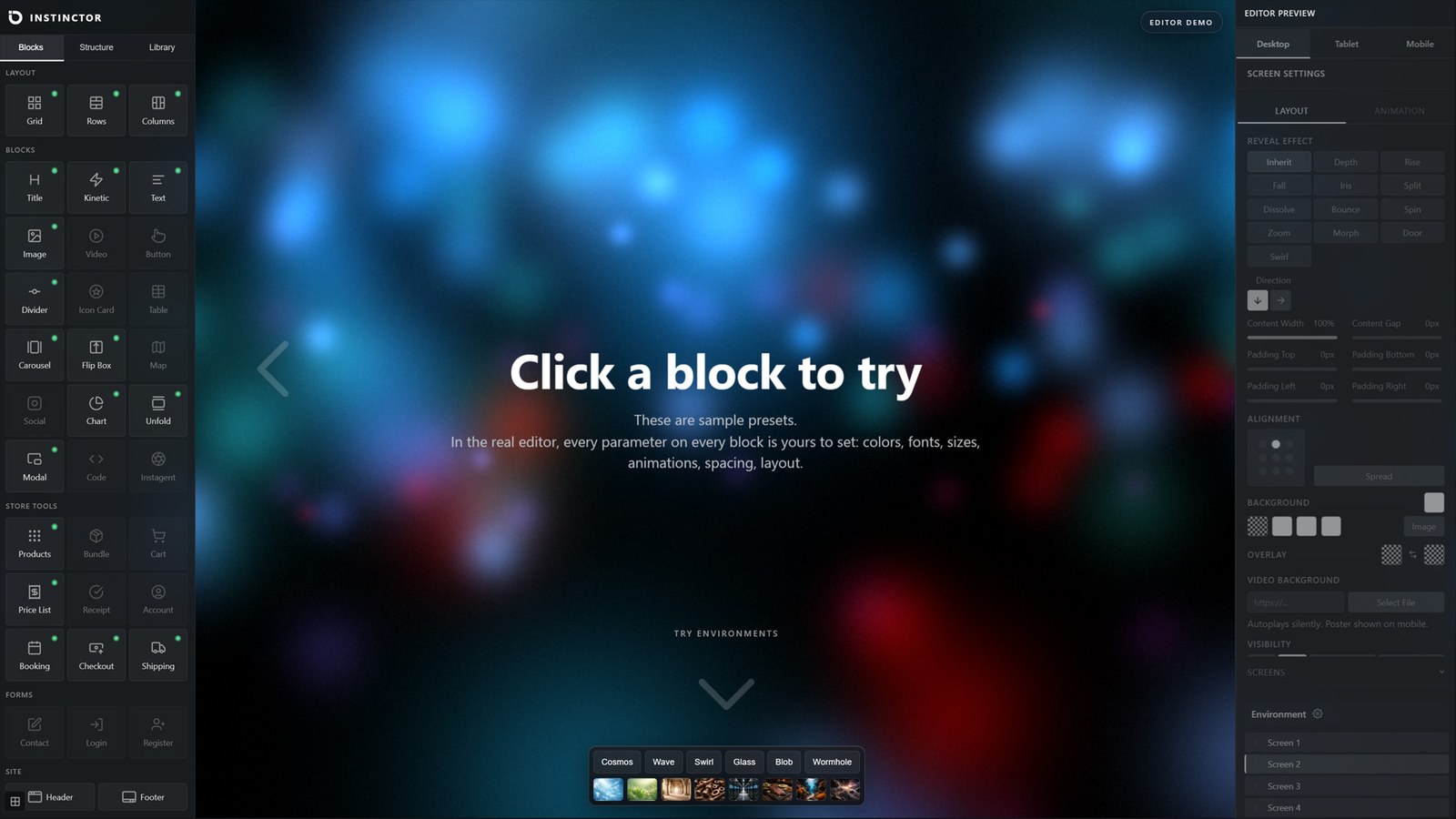
One editor for the whole site. Sections, Grid, Rows and Columns layouts, and every content block: text, images, video, maps, forms, navigation, header, footer, posts, tables, reviews, price lists, team, flip boxes, charts, plans and ecommerce blocks. Desktop, tablet and mobile are controlled separately.
Classic- of Cinematic-pagina’s. Classic-pagina’s scrollen normaal. Cinematic-pagina’s gaan scherm voor scherm, met overgangen per scherm en optioneel herhalen.
The animation engine. A kinetic text engine with 34 compositions and 62 motions, twenty section reveal effects, animated headlines, text reveals, animated dividers, gradient borders, animated gradient backgrounds, WebGL environments, 3D depth, Motion Walls and 3D carousels. Reveals, headlines, dividers, borders and gradient backgrounds publish on the free version, and so does 3D depth on images that already carry a depth map; processing your own photos into 3D depth, and the rest, run in the editor free and publish with Pro.
Gratis en Pro
Instinctor is gratis te installeren en om mee te bouwen, zonder paginalimiet. Instinctor Pro is een aparte plugin van instinctor.com, die naast deze wordt geïnstalleerd. Pro voegt toe:
- WebGL environments, kinetic headings, Motion Walls and section effects on published pages, and 3D depth for your own photos
- Automatic smart chat replies, and SMS and WhatsApp alerts
- Open Graph, Twitter kaart en gestructureerde gegevensuitvoer
- Product bundles
- Een op maat ontworpen afrekenen
- Branchespecifieke bedrijfstypen (restaurant, salon, instructeur, thuisdiensten, automotive, offertes voor 3D-printen)
Broncode
De plugin wordt als broncode geleverd. De .js-bestanden in assets/js/ zijn de canonieke, met de hand geschreven broncode: er is geen transpiler, bundler of buildstap. Enkele engine-bestanden (impulse-3d-effects.js, impulse-motion-lava.js, impulse-fx-engine.js, impulse-wave.js, impulse-animations.js) zijn voor de prestaties compact op enkele regels geschreven, maar elke instructie is normaal leesbaar JavaScript. PHP is niet versleuteld. Bibliotheken van derden in assets/js/vendor/ worden in hun oorspronkelijke geminificeerde vorm geleverd; zie assets/js/vendor/README.txt voor versies, licenties en bron-URL’s. Neem voor een kopie van de ontwikkelrepository contact op via instinctor@instinctor.com.
Externe diensten
This plugin connects to the following external services. Each connection is described below including what data is sent and when.
Stripe
Used for payment processing when Stripe is enabled in Settings Payments. Customer payment data is submitted directly to Stripe and is not stored on your server.
- Dienst: https://stripe.com
- Voorwaarden: https://stripe.com/legal
- Privacy: https://stripe.com/privacy
PayPal
Used for payment processing when PayPal is enabled in Settings Payments. When a customer chooses PayPal at checkout, the order amount and currency are sent to PayPal’s REST API at api-m.paypal.com (or api-m.sandbox.paypal.com in test mode) to create and capture the order. No data is sent unless PayPal is enabled and selected at checkout.
- Dienst: https://paypal.com
- Voorwaarden: https://www.paypal.com/us/legalhub/useragreement-full
- Privacy: https://www.paypal.com/us/legalhub/privacy-full
Authorize.Net
Used for payment processing when the Authorize.Net gateway is enabled in Settings Payments. When a customer pays, the checkout page loads Authorize.Net’s Accept.js library from js.authorize.net (or jstest.authorize.net in test mode) to tokenize the card in the browser, and the resulting payment token plus the order amount and billing details are sent to Authorize.Net’s API at api.authorize.net (or apitest.authorize.net in test mode) to process the transaction. No card data touches your server, and no data is sent unless the Authorize.Net gateway is enabled and selected at checkout.
- Dienst: https://www.authorize.net/
- Voorwaarden: https://www.authorize.net/about-us/terms.html
- Privacy: https://www.visa.com/en-us/legal/privacy-policy
AI-functies (via de relay van het Instinctor Platform)
Used by Instagent (smart live chat) and the SEO workspace features. When these features are used, page content, product data, and chat messages are sent to the Instinctor Platform relay at platform.instinctor.com, which forwards them to an AI provider on the plugin’s behalf. No AI provider API key is entered or stored on your site. These features are opt-in via the platform consent notice (see the Instinctor Platform section below).
- Dienst: https://platform.instinctor.com
- Voorwaarden: https://instinctor.com/terms
- Privacy: https://instinctor.com/privacy
SMS meldingen (via Instinctor Platform relay)
Used for SMS notifications (Instinctor Pro feature). Notification content and recipient phone numbers are sent to the Instinctor Platform relay at platform.instinctor.com, which delivers the message through its downstream SMS carrier (Telnyx). The plugin does not contact the carrier directly and no carrier credentials are entered on your site.
- Dienst: https://platform.instinctor.com
- Voorwaarden: https://instinctor.com/terms
- Privacy: https://instinctor.com/privacy
Transactionele e-mail (via de relay van het Instinctor Platform)
Used for transactional email delivery when the relay mailer is selected in Settings Email. Email content and recipient addresses are sent to the Instinctor Platform relay at platform.instinctor.com, which delivers the message through its downstream email provider. The plugin does not contact the email provider directly and no email-provider credentials are entered on your site.
- Dienst: https://platform.instinctor.com
- Voorwaarden: https://instinctor.com/terms
- Privacy: https://instinctor.com/privacy
ExchangeRate-API
Used by the multi-currency feature to fetch exchange rates when an API key is configured in Settings Currency. The base currency code is sent to the API. Off by default; only used when an API key is configured.
- Dienst: https://www.exchangerate-api.com/
- Voorwaarden: https://www.exchangerate-api.com/terms
- Privacy: https://www.exchangerate-api.com/privacy
USPS Shipping API
Optional. Used by the order-tracking feature to fetch tracking events for shipments routed via USPS. Requests are sent to the USPS Web Tools API at secure.shippingapis.com with the tracking number. Off by default; only used when USPS credentials are configured in Settings Shipping.
- Dienst: https://www.usps.com/business/web-tools-apis/
- Voorwaarden: https://www.usps.com/business/web-tools-apis/general-api-developer-guide.htm
- Privacy: https://www.usps.com/privacy-policy/
AfterShip
Optional. Used by the order-tracking feature to fetch tracking events across multiple carriers. Tracking number + carrier slug are sent. Off by default; only used when an AfterShip API key is configured in Settings Shipping.
- Dienst: https://www.aftership.com/
- Voorwaarden: https://www.aftership.com/legal/terms-of-service
- Privacy: https://www.aftership.com/legal/privacy
Google PageSpeed Insights
Used only when you click Measure in SEO a page Page Speed. The page’s public URL is sent to Google, which loads that URL and returns its performance score. No personal or visitor data is sent, and nothing is sent automatically: the call happens only on that click, and the result is cached for 24 hours.
- Dienst: https://developers.google.com/speed/docs/insights/v5/get-started
- Voorwaarden: https://developers.google.com/terms
- Privacy: https://policies.google.com/privacy
IndexNow (zoekmachine index melding)
Optional. Used by the SEO tools to tell participating search engines (via the IndexNow protocol, used by Bing and Yandex) when your pages are published or updated, so they recrawl sooner. When an IndexNow key is configured in Settings, the changed page URLs, your site host, and that key are sent to api.indexnow.org. Off by default; nothing is sent unless an IndexNow key is set.
- Dienst: https://www.indexnow.org/
- Voorwaarden: https://www.indexnow.org/faq
- Privacy: https://privacy.microsoft.com/privacystatement
Google Maps
Wanneer een pagina een kaartblok bevat, sluit de front-end een Google kaart in via een iframe van maps.google.com zodat bezoekers de locatie zien. Dit laadt alleen op pagina’s met een kaartblok, alleen wanneer een bezoeker die pagina bekijkt, en vereist geen API-sleutel. In de editor laadt het live voorbeeld van een kaartblok optioneel de Google Maps JavaScript API van maps.googleapis.com wanneer er een Maps API-sleutel is ingesteld in Settings (alleen aan de beheerkant). De plugin gebruikt geen Google Places of automatisch aanvullen van adressen.
- Dienst: https://developers.google.com/maps
- Voorwaarden: https://cloud.google.com/maps-platform/terms
- Privacy: https://policies.google.com/privacy
YouTube en Vimeo (ingesloten video’s)
Wanneer een pagina-auteur een videoblok met een YouTube- of Vimeo-URL toevoegt, sluit de front-end die video in via een iframe van www.youtube.com of player.vimeo.com. De insluiting laadt alleen op pagina’s met een videoblok, en alleen wanneer een bezoeker die pagina bekijkt.
- YouTube: https://www.youtube.com/t/terms, https://policies.google.com/privacy
- Vimeo: https://vimeo.com/terms, https://vimeo.com/privacy
Outbound links (carrier tracking and social sharing)
De functie voor het volgen van bestellingen maakt gewone uitgaande links naar de trackingpagina’s van vervoerders (UPS, FedEx, DHL, USPS, Amazon, Royal Mail, Canada Post en andere), en de profiel- en deelknoppen voor designers maken links naar sociale netwerken (X/Twitter, LinkedIn, WhatsApp). Dit zijn gewone links waarop de bezoeker kan klikken. De plugin verstuurt uit zichzelf geen gegevens naar die bestemmingen.
Instinctor Platform (platform.instinctor.com en instinctor.com)
De plugin kan verbinding maken met twee Instinctor-hosts: platform.instinctor.com voor AI-relays, transactionele e-mail en SMS, de sectie- en vormbibliotheken, plugin-updates en de designermarktplaats; en instinctor.com voor licentievalidatie, bereikt via instinctor.com/wp-json/instinctor/v1/license. Alle verbindingen staan standaard UIT. Bij de eerste login vraagt een beheerbanner “Connect Instinctor to platform.instinctor.com?” met de knoppen Connect / No thanks; de plugin neemt pas contact op met het platform nadat de site-eigenaar op Connect klikt, of nadat die een expliciete opt-in-actie uitvoert (een licentiesleutel invoeren, op Subscribe klikken, het registratie-e-mailadres verzenden). De toestemming kan altijd worden ingetrokken in Instinctor Settings Privacy.
Elk endpoint hieronder verstuurt de site-URL en, waar vermeld, aanvullende gegevens. Er wordt geen aanroep gedaan tenzij de gebruiker toestemming heeft gegeven of de bijbehorende expliciete actie heeft uitgevoerd.
GET instinctor.com/wp-json/instinctor/v1/license: Licentievalidatie bij de host instinctor.com. Verstuurt: licentiesleutel + site-URL. Wordt uitgevoerd wanneer de plugin een geactiveerde licentiesleutel valideert.POST platform.instinctor.com/api/validate: Activering van de licentiesleutel. Verstuurt: licentiesleutel + site-URL. Wordt uitgevoerd wanneer de beheerder een licentiesleutel invoert en activeert.POST /api/checkout: Aanmaken van een Stripe-checkoutsessie. Verstuurt: e-mailadres van de beheerder + abonnement + factuurinterval + site-URL. Wordt uitgevoerd wanneer de beheerder op Subscribe / Upgrade klikt.POST /api/register: Registratie van een gratis licentie. Verstuurt: e-mailadres + site-URL + pluginversie. Wordt uitgevoerd wanneer de beheerder het registratie-e-mailadres verzendt in de beheerbanner.GET /api/version: Plugin update check. Sends: nothing beyond the request. Fires when WordPress checks for plugin updates (only after consent).POST /api/relay/email: Transactional email relay. Sends: recipient + subject + body. Fires when the store sends a transactional email (order confirmation, etc.) AND the relay mailer is selected. Optional.POST /api/relay/sms: Relay voor transactionele SMS. Verstuurt: telefoonnummer van de ontvanger + bericht. Wordt uitgevoerd wanneer SMS-meldingen zijn ingesteld om de relay te gebruiken. Optioneel.POST /api/relay/ai-help: AI-vraag van Instagent in hulpmodus. Verstuurt: vraag van de gebruiker + editorcontext + licentiesleutel. Wordt uitgevoerd wanneer de editorgebruiker een vraag stelt in het Help-paneel.POST /api/relay/ai-help-chunk: Kennisbankartikel ophalen. Verstuurt: slug van het artikel + licentiesleutel. Wordt uitgevoerd wanneer de editorgebruiker op een onderwerp in het Help-paneel klikt.POST /api/relay/<task>: AI-relay voor content/SEO/chat. Verstuurt: taakparameters + licentiesleutel. Wordt uitgevoerd wanneer de gebruiker een AI-functie aanroept (AI-schrijven, SEO-suggesties, AI-chatantwoord).GET /api/graphics/sandbox-3d: Index van de samengestelde 3D-afbeeldingenbibliotheek voor de hero-sandbox. Verstuurt: niets. Wordt uitgevoerd wanneer een editorgebruiker de 3D-kiezer van de hero-sandbox opent.POST /api/admin/library/sections/create: Upload naar de sectiebibliotheek van het platform, alleen voor beheerders. Verstuurt: elementboom + HTML-voorbeeld + platformtoken. Wordt alleen uitgevoerd wanneer een beheerder op “Push to library” klikt.GET /api/sections,GET /api/shapes: Index van de template- en vormbibliotheek lezen. Verstuurt: niets. Wordt uitgevoerd wanneer de gebruiker de bijbehorende kiezer opent.POST /api/report: Migration / support ticket relay (marketing site only). Sends: email + site URL + message. Fires when a visitor submits the migration form.POST /api/public/subscribe-solo: Zelfstandige aanmelding. Verstuurt: e-mailadres + gekozen slug + verwijzingscode. Wordt uitgevoerd wanneer een bezoeker het aanmeldformulier op de marketingsite verzendt.GET /api/public/designer/<slug>: Designerprofiel lezen. Verstuurt: niets. Wordt uitgevoerd wanneer de openbare profielpagina van een designer wordt bekeken.POST /api/referral/apply,GET /api/referral/stats: Aanmelding voor affiliates + statistieken. Verstuurt: formulierwaarden / verwijzingscode. Wordt alleen uitgevoerd wanneer de beheerder van het partnerprogramma die schermen gebruikt.-
POST /analytics_ping: Anonieme dagelijkse gebruiksping. Verstuurt: PHP-versie + WP-versie + pluginversie (geen gebruikersgegevens). Wordt één keer per dag uitgevoerd, alleen als de beheerder apart heeft gekozen voor “Help improve Instinctor” in Settings Privacy EN de bovenstaande platformtoestemming is gegeven. -
Site: https://instinctor.com
- Privacybeleid: https://instinctor.com/privacy
- Dienstvoorwaarden: https://instinctor.com/terms
Schermafbeeldingen




Installatie
Vanuit het WordPress-beheer:
- Ga naar Plugins Nieuwe toevoegen.
- Zoek naar “Instinctor”
- Klik op Nu installeren en daarna op Activeren
- Open Instinctor vanuit de beheerzijbalk
- Je site in Instinctor configureren Je site instellen
- Maak je eerste pagina in Instinctor Impulse
Handmatige installatie:
- Download het zip-bestand van de plugin van WordPress.org
- Ga naar Plugins Nieuwe toevoegen Plugin uploaden
- Upload het zip-bestand en activeer
- Open Instinctor vanuit de beheerzijbalk
FAQ
-
Wat is gratis en wat is Pro?
-
Everything listed in the description above is free, with no page limit and no time limit. Pro is a separate plugin from instinctor.com that adds published WebGL environments and motion effects, automatic smart chat replies, SMS and WhatsApp alerts, Open Graph and structured data output, bundles, a custom checkout and the industry business types.
-
Why does an effect move in the editor but not on my published page?
-
Some motion effects are part of Pro. The editor shows them in full so you can see what they do, and labels each one on the block with “Pro preview”. On a free published page that effect is left out and the content stays: an animated heading publishes as static text, a 3D carousel as a plain one. Nothing is broken, and nothing is shown to your visitors about Pro.
-
Hoe neem ik boekingen aan?
-
Stel het bedrijfstype in op Diensten in Instinctor Setup your site, voeg je diensten toe met duur en optionele aanbetalingen, en plaats dan een boekingsformulier op een willekeurige pagina. Aanbetalingen worden via Stripe geïnd zodra je Stripe sleutels zijn ingevoerd in Instellingen Betalingen.
-
Wat gebeurt er met mijn gegevens als ik de plugin deactiveer?
-
Products, orders, customers, bookings and chats live in the plugin’s own database tables, separate from WordPress posts. Deactivating stops the pages built with Instinctor from rendering, and leaves all of that data in place. Reactivating restores everything as it was. Payments made through Stripe or PayPal remain in your own account with those providers.
-
Is WooCommerce hiervoor nodig?
-
Nee. Instinctor heeft een eigen e-commercesysteem: producten, winkelwagen, afrekenen, bestellingen en betalingen. Het is niet afhankelijk van WooCommerce.
-
Conflicteert het met mijn huidige paginabouwer?
-
Impulse-pagina’s worden onafhankelijk beheerd. Pagina’s die met andere bouwers of met het thema zijn gemaakt, worden niet beïnvloed. Beide kunnen op dezelfde WordPress installatie worden gebruikt.
-
Hoe werkt het samen met mijn thema?
-
Op Impulse pagina’s geeft de plugin een eigen template weer in plaats van de header, footer of stylesheet van het thema te laden. Het thema blijft actief en ongewijzigd op pagina’s die geen Impulse pagina zijn.
-
Welke betaalmethoden worden ondersteund?
-
Stripe (creditcards/debetkaarten, Apple Pay, Google Pay, Link), PayPal en Authorize.net. Voor alle is het nodig dat gegevens zijn ingesteld in Settings Payments.
-
Heb ik een AI-sleutel nodig voor de chat?
-
Nee. De gratis versie is livechat die je zelf beantwoordt. Automatische slimme antwoorden maken deel uit van Instinctor Pro en lopen via de relay van het Instinctor Platform (platform.instinctor.com). Er wordt nooit een API-sleutel van OpenAI of een andere AI op je site ingevoerd.
-
Kan ik SMS of WhatsApp meldingen ontvangen?
-
SMS en WhatsApp meldingen zijn beschikbaar in Instinctor Pro op instinctor.com, bezorgd via de relay van het Instinctor Platform (platform.instinctor.com). De versie op WordPress.org bevat alleen e-mailmeldingen.
-
Waar kan ik hulp krijgen?
-
Use the support panel inside the plugin, visit instinctor.com/docs, or email helpdesk@instinctor.com.
-
Waarom wordt Three.js lokaal meegeleverd in plaats van via een CDN geladen?
-
The plugin serves Three.js (r185, MIT) from its own assets directory rather than a CDN so the site stays self-contained, works behind a Content Security Policy, and never leaks visitor data to a third party. Three.js now ships as ES modules only, but the 3D effects engine loads it as a classic-script global, so the official r185 module distribution is bundled into an equivalent global build with esbuild (no library source is modified; the MIT license banner is preserved). See assets/js/vendor/README.txt for the exact build command. Three.js is a client-side rendering library with no network, storage, or server-side surface, and r185 has no known security advisories.
-
Impulse is a visual page builder. The styling for every block is computed from user-chosen settings (gradients, layered animation parameters, per-device overrides, custom fonts) and is unique to each rendered page, so the CSS cannot be pre-shipped as a static file. The same applies to a small number of runtime initializers that need the page’s element_tree as configuration. All emitted CSS and JS is escaped through esc_attr / esc_html / wp_json_encode where it embeds user-supplied values, and the JavaScript bundles themselves are enqueued via wp_enqueue_script.
Beoordelingen

Bijdragers & ontwikkelaars
“Instinctor – Page Builder with Booking, Online Store & AI Chat” is open source software. De volgende personen hebben bijgedragen aan deze plugin.
Bijdragers
Vertaal “Instinctor – Page Builder with Booking, Online Store & AI Chat” in je eigen taal.
Interesse in ontwikkeling?
Bekijk de code, haal de SVN repository op, of abonneer je op het ontwikkellog via RSS.
Changelog
2.1.09
- Published pages: an animated heading that publishes as still type keeps its design, with the same lines, font, sizes, weights, alignment per device and solid colour or gradient. It no longer falls back to plain body text.
- Published pages: a page designed on a WebGL environment keeps that environment’s background colour when the environment itself is not published, so light text stays readable.
- Published pages: the 3D orbit shows the Instinctor mark again on the free version. It was hidden, leaving an empty screen.
- Editor: effects that publish with Pro now carry a compact “Pro preview” label that no longer covers the block on narrow screens. Hover it for the details.
2.1.08
- Bookings are free: the Booking block works and publishes without Pro.
- Editor: a block whose effect previews in the editor but is left out of a free published page now says so on the block itself, with the effect named, so a still published page is never mistaken for a fault.
- Editor: animated headings render exactly as they publish with Pro, in every composition and per-line mode.
- A free published page keeps every word of an animated heading as static text.
- Fixed a fatal error on pages of a WordPress site installed in a subfolder.
2.1.07
- Een gepubliceerde pagina gebruikt nu precies de omgevingskleuren die in de editor zijn ingesteld. Een pagina kon met een ander palet worden gepubliceerd dan het palet dat tijdens het ontwerpen op het scherm stond.
- De Cosmos-omgeving vult een telefoonscherm in plaats van bijna zwart te worden weergegeven. De wolken waren verdeeld voor een breed scherm en de meeste vielen buiten een smal scherm.
- Some motion effects are part of the Pro build. They render in the editor so you can see what they do, and a published page renders without them: 3D Title outline and depth modes, the carousel’s 3D modes, marquee drift, image cutout and halftone, the script-driven image hover effects, and custom 3D models. Text, layout, colours and links are unchanged.
2.1.06
- Settings: fields render at their intended size on WordPress 7.0, which had raised its own minimum for form controls.
- Instellingen: de middelste kolom verdeelt de panelen gelijkmatig in plaats van een gat onder het laatste te laten.
- Editor: een gewijzigde instelling springt niet meer terug wanneer een eerdere bewerking nog wordt opgeslagen.
- Tabellen: onzichtbare witruimte die uit een tekstverwerker is geplakt, duwt een cel niet meer uit de lijn met de rij.
- Scheidingen: de elektrische stijl wordt niet langer boven en onder afgesneden wanneer hoeken vervagen is ingeschakeld.
- Beveiliging: een geüpload bestand krijgt nu een naam naar het type dat het werkelijk is, nooit naar de extensie die het meekreeg.
2.1.05
- Editor: the screen strip on the canvas edge gains a + to add a screen after the one you are on, a hover menu to rename, duplicate or delete a screen, and drag to reorder.
- Editor: de strip markeert nu welk scherm op het canvas staat en behoudt zijn formaat in plaats van mee te krimpen met het canvas.
- Accessibility: the mobile menu button announces itself, reports open or closed, and moves focus into the menu and back out again.
- Accessibility: an animated headline now exposes one clean copy of its text instead of every animated fragment.
- Opgelost: een pagina kon hetzelfde id op meerdere style-tags uitgeven.
- Instellingen zijn nu ingericht als bedrijf in plaats van als winkel, zodat het eerste scherm niet aanneemt dat je iets verkoopt.
2.1.04
- Nieuw: positioneer een achtergrond of afbeelding door de afbeelding zelf te slepen. Kies precies wat in beeld blijft, in plaats van uit vaste voorinstellingen te kiezen.
- Nieuw: afbeeldingsformaat per apparaat. Houd een afbeelding groot op desktop en stel een kleiner formaat in voor telefoons.
- Nieuw: uitlijning en vastzetten boven / onder worden per apparaat ingesteld. Een blok kan op desktop onderaan staan en op een telefoon gecentreerd.
- Nieuw: sectie gradiënten krijgen een plaatsing bediening. De vier kleuren over de hele sectie, de randen, de hoeken of alleen de boven of onderrand verspreiden.
- Paginabibliotheek: pagina’s worden in mappen gegroepeerd, en je kunt ze in de gewenste volgorde slepen.
- Editor: een blok dat op een apparaat verborgen is, ziet er nu verborgen uit terwijl je op dat apparaat werkt, sectienummers staan aan de rand van het canvas, en de geselecteerde sectie wordt gemarkeerd met een lichte lijn in plaats van een zware omtrek.
- Contactformulieren kunnen bezoekers na een geslaagde verzending naar een pagina naar keuze sturen.
- Header: het verbergen van de sitenaam werkt nu, en de sitenaam kan de wordmark-stijl krijgen.
- Accessibility: animated headlines expose one clean copy of the text to screen readers instead of every animated fragment.
- Fixed: per-device edits are saved against the device tab you are working on, so a change made on the Mobile tab no longer lands on Desktop.
- De lay-out van secties verfijnd wanneer een blok onderaan het scherm is vastgezet.
2.1.03
- Media-uploads en afbeeldingsverwerking verbeterd op WordPress installaties.
- Editor: verwijderen met één klik in het Structure-paneel, uitlijning per cel geldt nu voor elk bloktype, en rastercellen nemen de contentafstand van de sectie over.
- Motion: kinetic headlines with Loop off now settle and stay still; flip boxes hold their padding while being edited.
2.1
- Onderhoudsrelease.
2.0
Eerste openbare release.