Holiday Mode for WooCommerce

Beschrijving

WooCommerce® Holiday Mode allows you to temporarily pause your online store during holidays, vacations, maintenance periods, or other planned breaks.

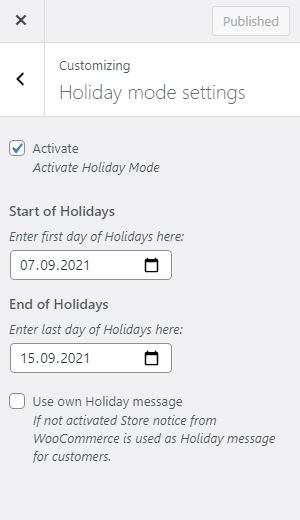
Define a start and end date for your closed period and automatically enable or disable holiday mode. During this time, you can display a prominently visible custom absence message to inform your customers about your temporary closure, return date, or other important information.

Features:

  • Disable new orders by removing the add-to-cart button and displaying a custom message
  • Disable the shopping cart (existing cart items will be removed when holiday mode is activated)
  • Disable checkout during the holiday period
  • Display a prominent custom absence message to inform customers about your temporary closure
  • Optionally show the absence message on every page, not just the shop, product, cart and checkout pages
  • Schedule holiday mode with a specific start and end date
  • Optional advance-notice period – show a heads-up message a configurable number of days before the shop closes, so customers can still place orders before purchasing is disabled
  • Automatically deactivate holiday mode when the vacation period ends
  • Works with headless/decoupled storefronts and the Cart & Checkout blocks, via the WooCommerce Store API
  • Admin notice reminding you that Holiday Mode is currently active, shown throughout wp-admin
  • Plays nicely with caching plugins – automatically flushes your page cache when you save your settings, and marks pages as non-cacheable while Holiday Mode is active, so visitors never see a stale, out-of-date version of your shop

WooCommerce® is a registered trademark of Automattic Inc.

Privacy Disclosure

This plugin does not collect, process, or store any personal data.

Schermafbeeldingen

Installatie

Follow these steps to install and configure the plugin:

Upload the plugin folder to the /wp-content/plugins/ directory Activate the plugin through the “Plugins” menu in WordPress Go to WooCommerce -> Settings -> Holiday Mode to configure your settings

FAQ

Will items already in a customer’s cart be removed when Holiday Mode starts?

Yes, if the “Disable purchasing” setting is enabled. As soon as Holiday Mode becomes active, existing cart contents are removed automatically so nobody can check out with items added before your break started.

Does Holiday Mode reactivate my shop automatically once the end date passes?

Yes. Once today’s date is past your configured end date, Holiday Mode stops being active on the next page load – you don’t need to log back in and switch it off manually. You can also turn it off early at any time from the settings page.

Can I warn customers before the shop actually closes?

Yes. Set “Advance notice” (under WooCommerce -> Settings -> Holiday Mode) to the number of days before your start date you’d like to give customers a heads-up. During that window, a separate, distinctly styled notice is shown – purchasing stays fully enabled until Holiday Mode itself becomes active on the configured start date.

Will Holiday Mode hide my shop from Google or affect my SEO?

No. Holiday Mode only disables purchasing and displays your absence message – it doesn’t hide pages, add noindex tags, or otherwise change how your site is treated by search engines.

Does this work with caching plugins like WP Rocket, W3 Total Cache, or LiteSpeed Cache?

Yes. Saving your Holiday Mode settings automatically flushes the page cache of all major caching plugins (W3 Total Cache, WP Super Cache, WP Rocket, LiteSpeed Cache, WP Fastest Cache, Cache Enabler, Breeze, WP-Optimize, Hummingbird, SiteGround Optimizer, Swift Performance), and pages are marked as non-cacheable for as long as Holiday Mode is active, so visitors always see its current status.

Does this work with a headless/decoupled storefront (e.g. a custom app built on the WooCommerce Store API)?

Yes. New orders are blocked the same way for headless storefronts as for a regular WordPress theme: products become non-purchasable and adding to cart or checking out is rejected while Holiday Mode is active. Your frontend can also ask the WooCommerce Store API directly whether Holiday Mode is active and what your absence message is, so it can be displayed even though it never renders any WordPress page. No setup is required for this – it is available as soon as the plugin is active, using your existing Holiday Mode settings.

(For developers) What does the Store API extension data look like?

Holiday Mode is included automatically in the Cart and Checkout endpoint responses (/wc/store/v1/cart and /wc/store/v1/checkout), under extensions.holiday-mode-woocommerce:

{
  "active": true,
  "purchasing_disabled": true,
  "message": "We are on vacation, back on 1 September.",
  "notice_type": "error"
}

Beoordelingen

18 juli 2026
I’ve been using this plugin for quite some time, and it’s great to see that it’s still actively maintained. Thanks to the developer for continuing to improve it and keep it up to date. It does exactly what I need: I can pause orders while I’m away without having to take my whole store offline. The setup is quick, the settings are easy to understand, and the option to display a custom message for customers is a nice touch. After all this time, it’s still the solution I keep coming back to whenever I need a reliable holiday mode for WooCommerce.
14 maart 2023
I've tested with version 6.1.1. The banner does not appear, it only removes the add to basket and google and/or apple pay button. It would be useful if the settings were more fruitful and it would allow you to just show the message rather than stop orders all together.
9 maart 2023
Great! Simple and useful plugin. Everything works flawlessly. This plugin enables everything that I could not achieve with code snippets. Amazingly good.
17 augustus 2022
Easy to configure, it does what it should and if after the vacation everything works again (the cache) I am very happy. The alternative message is not displayed although configured. But for the functionality and because the plugin is free 4 stars anyway.
16 december 2021
I was tasked with shutting down a client's WooCommerce store for the Xmas holidays so being lazy and in a hurry I looked to see if there was a well worn plugin for that simple task. Some were far too elaborate, others expensive for what little I needed, but this one with zero reviews yet turned out to be just right. Closed for the Holidays, that's it. I'm going to make myself a rum and eggnog now. I'd like to buy Heinrich Franz a drink. Maybe I'd prefer the controls somewhere under Woocomerce than under Appearance – Customize – but hey, whatever.
Lees alle 5 beoordelingen

Bijdragers & ontwikkelaars

“Holiday Mode for WooCommerce” is open source software. De volgende personen hebben bijgedragen aan deze plugin.

Bijdragers

“Holiday Mode for WooCommerce” is vertaald in 7 localen. Dank voor de vertalers voor hun bijdragen.

Vertaal “Holiday Mode for WooCommerce” in je eigen taal.

Interesse in ontwikkeling?

Bekijk de code, haal de SVN repository op, of abonneer je op het ontwikkellog via RSS.

Changelog

3.1.0

  • Fixed: The review-request notice’s “active for two weeks” timer was never started for existing installations updating from an older version, so it would never appear for them. It now also starts on the first admin page load after updating, not just on a fresh activation.

3.0.0

  • New: “Advance notice” setting shows a heads-up message a configurable number of days before the shop closes, so customers can still place orders before purchasing is disabled.
  • New: The vacation message and advance notice message both support {start_date}/{end_date} placeholders, replaced with your configured dates.
  • New: A dismissible admin notice asks for a review once the plugin has been active for two weeks.

2.9.0

  • New: Added a “Support” and a star-rating link to the plugin’s row on the Plugins list page.

2.8.0

  • New: “Show on all pages” setting displays the holiday notice on every page of your site, not just the shop, product, cart and checkout pages.
  • Fixed: Corrected the plugin’s text domain to match its wordpress.org slug, so translations load correctly.

2.7.0

  • New: Admin notice reminding you that Holiday Mode is currently active, shown throughout wp-admin so it’s harder to forget your shop is closed.
  • Tested up to WordPress 7.2.

2.6.0

  • New: Holiday Mode status and your absence message are now exposed through the WooCommerce Store API, so headless/decoupled storefronts and the Cart & Checkout blocks can display them.

2.5.0

  • Lower the minimum required PHP version to 8.0 to support websites still running PHP 8.0–8.3.
  • New: Added the option to select the color and icon for the absence message.

2.4.0

  • New: Settings are now validated on save – Holiday Mode can no longer be activated with a missing/invalid date range or an empty vacation message.
  • New: “Disable purchasing” setting lets you choose whether Holiday Mode blocks purchases (removes add-to-cart) or only shows the holiday notice. Enabled by default.

2.3.0

  • Lower minimum required PHP version to 8.3 to allow installation on WordPress 6.7 and higher.

2.2.0

  • Fixed: Holiday notice could appear below the archive title/result count instead of at the very top of the page on block themes (e.g. Twenty Twenty-Five) using WooCommerce’s default block-based Shop template.

2.1.0

  • Fixed: Holiday mode now also removes the “Add to cart” / “Buy product” button for external/affiliate and grouped products.

2.0.0

  • Enhanced: Holiday mode now explicitly removes the “Add to cart” button for variable products.

1.9.3

  • Fixed: Plugin was incorrectly deactivated after upgrading from a previous active version.

1.9.2

  • Security: Added improved escaping for holiday notice messages to strengthen protection against XSS vulnerabilities.
  • Maintenance: Refactored internal code and cleaned up various areas of the plugin.

1.9.1

  • Fixed: Holiday notice was not displayed on single product pages in some classic themes.
  • Fixed: Holiday notice was missing on shop, archive, cart, and checkout pages in some block theme setups. The notice is now displayed correctly in these cases.

1.9.0

  • Improved compatibility with caching plugins.
  • Replaced the start and end date text fields with date pickers to improve usability.

1.8.3

Minor translations update

1.8.2

Update plugins meta data

1.8.1

Update README.txt

1.8.0

  • Settings migrated from the Customizer to a dedicated page under WooCommerce -> Settings -> Holiday Mode
  • Existing Customizer settings are migrated automatically on first admin page load
  • WooCommerce HPOS (custom order tables) and Cart/Checkout Blocks compatibility declared
  • Security and reliability hardening (escaping, sanitization, timezone handling)

1.7.1

  • Compatibility for WordPress 5.9

1.7

  • Add additional message on product page to increase theme compatibility (if woocommerce_before_main_content is not used by active theme)
  • Settings are only visible if WooCommerce is activated within WordPress
  • HTML is now possible for customer message
  • Only provide vacation feature if WooCommerce is available
  • Lowest PHP version is now 7.3, because lower versions reached EOL

1.6

  • Fixed warning: Timezone is used correctly now

1.5

  • Add further translation

1.4

  • Fixed default translation language

1.3

  • Add german language

1.2

  • Fixed defined version, to allow updates

1.1

  • Fixed settings: names are now more unique

1.0

  • Initial version