

Beschrijving
The WooCommerce table rate shipping plugin is an add-on to your WooCommerce store and an easy-to-use extension. Table rate shipping for Woocommerce, unlike other plugins, offers an ideal and easily understood settings panel that lets users calculate the shipping costs effortlessly.
Table rate shipping WooCommerce lets the customers experience advanced and flexible shipping features in the Cart and Product check-out pages. Set up various shipping rates based on the criteria such as weight, price, location, item count, or shipping class.
Probeer de demo | Documentatie | Pro-versie
How to manage the settings in the Woocommerce table rate shipping plugin?
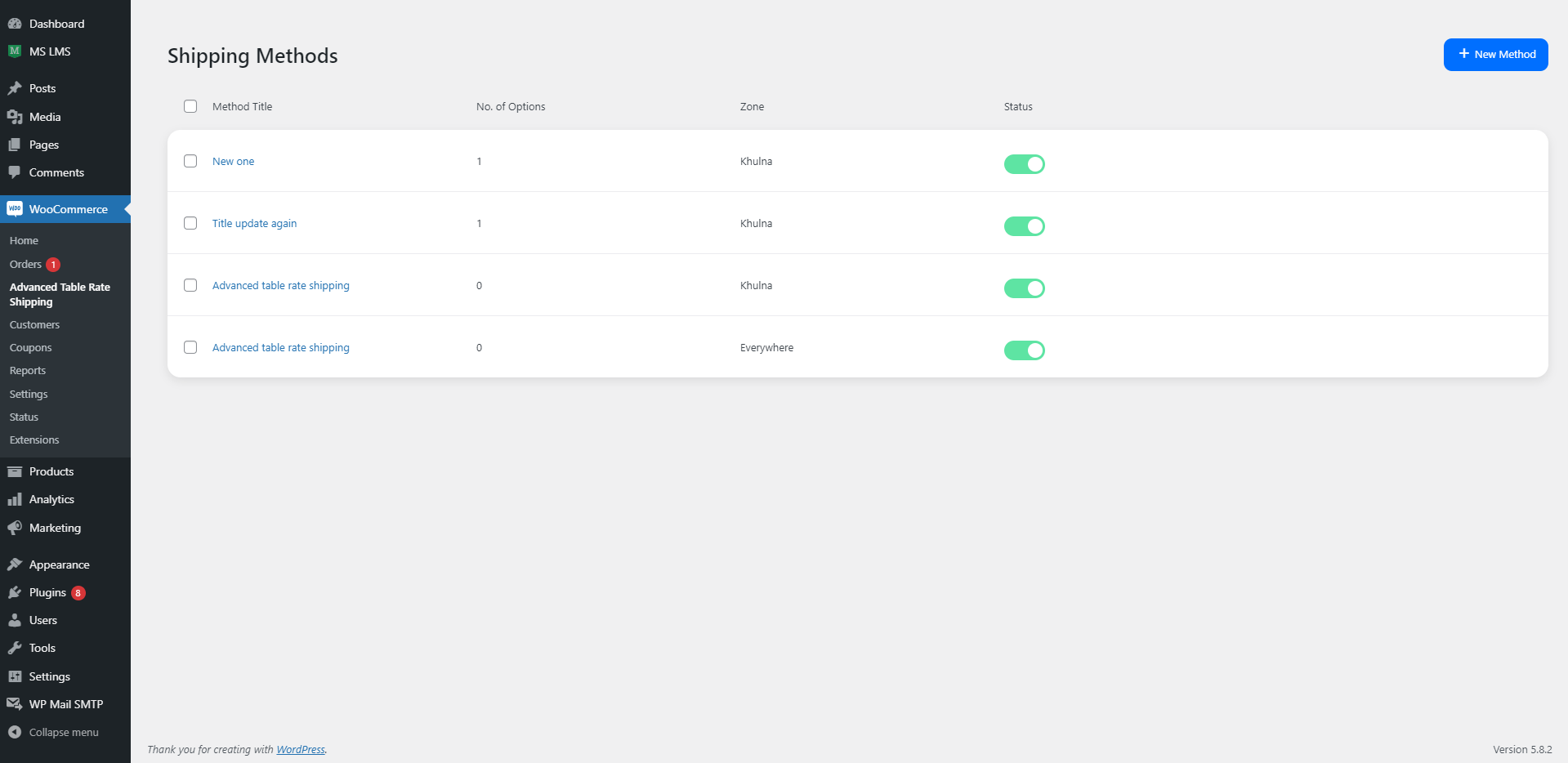
To control the options and settings, the admin can navigate to WooCommerce > Advance Table Rate Shipping sub-menu, then add New Method Here, the admin can add new shipping zone or select shipping zone from pre listed shipping zone. Once done, the user can opt for the preferred shipping method based on multiple conditions like days, holidays, delivery, etc.
BEKIJK ONZE VIDEODEMO OVER HOE DIT WERKT:
“WooCommerce Table Rate Shipping” basisfuncties
👉 Available up to 2 shipping methods
👉 Shipping rate calculation based on total price in the cart, total volume, total weight, length, Number of items, Number of items by class, cart item, etc.
👉 Desired Base condition selection
👉 Feature to set the default method
👉 Apply shipping cost concerning the multiplication with cost, weight, length, surface area, item quantity, etc.
👉 Apply shipping cost for each unit of cost.
👉 Option to Disable other methods
👉 Option to set city-based shipping methods
👉 Option to evaluate the volume
👉 Feature to set methods using multiple conditions
👉 Option to choose both minimum and maximum shipping cost
👉 Free shipping or discount on special occasions
👉 Feature to set height or lowest cost shipping class
👉 Import & Export shipping rates table in CSV format
👉 Import & Export shipping settings in JSON format
👉 Setting to hide method in case of free shipping availability
👉 Option to set fee handling
👉 Shipping option display for specific user role or excluding specific user role
👉 Include or exclude Tax
👉 Translation ready
👉 Compatibility with WPML
DEMO – BEKIJK HET IN DE PRAKTIJK
Check how Woocommerce shipping rates plugin custom options are created!
🔗 Front end Demo (See how the plugin works on the front-end)
🔗 Back end Demo (Be sure to turn around and watch how the plugin works in the back-end)
“WooCommerce Table Rate Shipping” Premium functies
The WooCommerce Table Rate Shipping plugin is a fully customizable conditional shipping extension for WooCommerce. This woocommerce table rate shipping plugin can provide your e-commerce site with the table rate shipping addons or conditional shipping features.
Dit zijn de pro-functies die de plugin WooCommerce Table Rate Shipping biedt:
👉 Option to set up Unlimited shipping services like Express shipping, standard shipping
👉 Shipping options based on country, state, or Postal Code
👉 Option to create shipping method based on taxonomy like color, size and any custom created taxonomy
👉 Option to create shipping method based particular date range or time range
👉 Use the built-in shipping classes to implement complex rules
👉 Options to set base shipping based on the number of items available in the cart
👉 Option to calculate the shipping as per the weight, width, height, length, product type of the products
👉 Add a handling fee along with the shipping costs for every order
👉 Option to set the shipping rates for any particular WooCommerce class
👉 Add fixed cost, percentage of subtotal, multiplied by wight, height, length, volume, quantity, products or for every number of cost.
👉 Ability to hide other methods if a particular method is activated.
👉 Provide special discount or free shipping on selected particular day
👉 Add the estimated delivery date option
👉 Offers premium support
PRO-VERSIE – BEKIJK HET
Check how the Woocommerce table rate shipping premium version options are created!
🔗 Front end Demo (See how the plugin works on the front-end)
🔗 Back end Demo (Be sure to turn around and watch how the plugin works in the back-end)
Waarom Acowebs?
At Acowebs, we fuel your e-commerce stores with stunning WooCommerce plugins and Shopify apps. Our expert WordPress developers build amazing WordPress plugins and themes to provide comprehensive solutions that give the best User experience to the customers and visitors. Being a globally renowned and award-winning software firm, we guarantee the best WooCommerce plugin support from a dedicated team of specialists.
Bekijk onze andere WordPress plugins hier.
Wat onze klanten zeggen:
“Aansprekende gebruikersinterface! Klantenservice en ondersteuning zijn met geen woorden te beschrijven. Bedankt voor deze geweldige plugin
“Table rate shipping plugin did wonders with our Woocommerce stores. The plugin made shipping calculations and customizations super-easy. My choice to go for Premium support was the best”.
ANDERE HANDIGE LINKS
Alle PRO-functies bekijken
Documentatie
Ontdek onze andere plugins
Supportticket
Facebook
Twitter
LinkedIn
YouTube
Schermafbeeldingen


Installatie
Installation of “WooCommerce Table Rate Shipping” can be done either by searching for “WooCommerce Table Rate Shipping” via the “Plugins > Add New” screen in your WordPress dashboard, or by using the following steps:
- Download de plugin via WordPress.org
- Upload the ZIP file through the ‘Plugins > Add New > Upload’ screen in your WordPress dashboard
- Activeer de plugin via het menu ‘Plugins’ in WordPress
FAQ
-
Biedt WooCommerce Table Rate Shipping compatibiliteit met WPML?
-
Of course, the table rate plugin for WooCommerce offers due compatibility with the WPML plugin. Since the plugin is tested, it can be used to build multilingual sites without issues.
-
Is it possible to disable all the shipping methods in the Woocommerce cart page with your Table Rate shipping extension?
-
Yes, you can use the WooCommerce shipping table plugin, to disable the shipping methods. Set the ‘Disable other methods’ option to disable the Woocommerce shipping options on the cart page.
-
Wat is het terugbetalingsbeleid?
-
Met onze WordPress plugins geniet je van een volledige geld-terug-garantie van 30 dagen. Neem contact op met ons team om je terugbetaling binnen de eerste 30 dagen na aankoop van de plugin aan te vragen.
Beoordelingen


Bijdragers & ontwikkelaars
“Table rate shipping for WooCommerce” is open source software. De volgende personen hebben bijgedragen aan deze plugin.
Bijdragers

“Table rate shipping for WooCommerce” is vertaald in 8 localen. Dank voor de vertalers voor hun bijdragen.
Vertaal “Table rate shipping for WooCommerce” in je eigen taal.
Interesse in ontwikkeling?
Bekijk de code, haal de SVN repository op, of abonneer je op het ontwikkellog via RSS.
Changelog
2.2.0
- Fixed – Add Delivery Days option in the table of rates.
- Fixed – Delivery date now uses the matching shipping row.
- Fixed – Minor bugs and enhanced stability.
2.1.9
- Fixed – Issue when logging into the dashboard.
- Fixed – Minor bugs and enhanced stability.
2.1.8
- Added – Compatibility with the latest WooCommerce version 11.x.
- Fixed – Minor bugs and enhanced stability.
2.1.7
- Added – Tested up to WordPress 7.0
- Fixed – Minor bugs and enhanced stability.
2.1.6
- Improved – Overall plugin performance and optimized database queries.
- Fixed – Minor bugs and enhanced stability.
2.1.5
- Improved – Overall plugin performance and optimized database queries.
- Added – Compatibility with the latest WooCommerce version 9.x.
- Fixed – Minor bugs and enhanced stability.
2.1.4
- Fixed – Conflict with another method data while editing the shipping method.
- Fixed – Characters (@, <, #, %, etc.) were not allowed in the method title.
- Fixed – “Per line item” option not working.
- Fixed – Default selection in the table of rates not working.
- Fixed – “Hide other option” not working in the table of rates.
- Fixed – “Hide other shipping option when free shipping is available” not working.
- Fixed – Weekend days exclusion condition not working.
- Fixed – Product visibility includes/excludes not working correctly for shipping methods.
- Fixed – Shipping charges calculated incorrectly for included and excluded product categories.
- Fixed – Issue where the second shipping method was shown only when identical conditions were used in multiple shipping methods.
- Fixed – Incorrect shipping costs when multiple conditions were applied to the same shipping method.
- Added – Allowed numeric data in city settings.
- Fixed – Table of rates not working as per conditions when more than one shipping method was added.
- Fixed – Base table rules not working.
- Opgelost – “Bezorgdatum automatisch instellen” werkte niet in de winkelwagen.
2.1.3
- Compatibel met WooCommerce versie 8.4
- Bugfix
2.1.2
- Fixed Woocommerce settings save button issue.
2.1.1
- Fixed WPML dynamic title translation issue.
2.1.0
- Fixed ReferenceError on table rate shipping listing page.
- Conflictprobleem met onjuiste gegevens in de verzendeditor opgelost
2.0.6
- Fix delivery date error issue in backend.
2.0.5
- Probleem met het toevoegen van een verzendmethode aan een specifieke rol opgelost.
- Probleem met belastbare / niet-belastbare afhandelingskosten opgelost.
- Andere bestandsformaten uitgeschakeld bij importeren uit CSV.
- Solved clicking issue on title in method listing page.
- Gecombineerde beschrijving bij meerdere opties in één methode opgelost.
- Character limit on description and number field.
- Invoer van negatieve waarden in numerieke velden is uitgeschakeld.
- Passende subtitel / pop-up beschrijving toegevoegd bij elke optie.
- Added proper placeholder in all field.
- Verwijderknop toegevoegd bij een lege optie.
- Invoer van speciale tekens in tekstvelden zoals optietitel & methodetitel is uitgeschakeld.
- Opslaan van een verzendoptie zonder geldige naam is uitgeschakeld
- Opgelost: als een voorwaarde niet overeenkomt of opties leeg zijn, wordt het vaste tarief getoond.
2.0.4
- PHP-fout op de winkelwagenpagina opgelost bij het toevoegen van een product aan de winkelwagen.
- Probleem opgelost met het verbergen van andere methoden wanneer dit in de plaatsinstellingen voor een specifieke plaats is ingesteld
- Disable add to Nagetive number on weight, delivery day, Flat rate etc.
- Add option to hide / show delivery date
2.0.3
- Fout in de belastingberekening opgelost.
- Fix Admin page conflict while try to edit.
- Updateprobleem met specifiek verzendmethode-ID opgelost
- Fix shipping zone error in general tab
- Probleem met lege waarde opgelost
2.0.2
- Probleem met lege gegevens bij het bewerken van bestaande methoden opgelost
2.0.1
- Update reactjs dependency based on node version 7.19.1
- Update react router dom latest version 6.0.2
- Belastingfout bij verzending opgelost
2.0.0
- Ontwerp geüpgraded
- Toegang via WooCommerce > Instellingen uitgeschakeld
- Add settings page to woocommerce > new custom page
- Lijst van alle tabeltariefverzendingen als landingspagina gemaakt
- UI change in table rates tab
- Enable / Disable toggle buttion in list page
- Aantal opties per methode op de overzichtspagina
- Delete option from list page
- Change shipping zone from inside general tab
- Gebruiksvriendelijker en nog veel meer…..
1.0.3
- Fix error issue’s, generated by wpml class
1.0.2
- Fix error issue for multiple method creation in “table of rate” tab
1.0.1
- compatibel met WooCommerce versie 5.1.0
1.0.0
- Initiële release